
A Python testing tool that combines fuzzing and traditional unit tests.

Project description
PyVeritas
Robust, user-friendly unit testing and fuzzing support for your Python application. Designed to be simple (easy to code your tests) and accessible (all of your testing in the one place).
🚀 Overview
PyVeritas is your easy-to-use software testing framework. PyVeritas combines unit testing, and the randomness of fuzzing to help you ensure the reliability and quality of your Python code.
🌟 Features
Fuzzing: Create meaningful fuzzing inputs tailored to your specific code logic.
Unit Testing: Write and run lean and relevant tests for your existing Python code.
🛠️ Installation
PyVeritas is easy to install via pip:
pip install pyveritas
✨ Quick Start
Example, testing a calculator function. Let's say you had a Python file called my_code.py where you had implemented a calculate_discount() function.
If you add the run_unit_tests() and run_fuzz_tests(), as shown below, you can ensure the robustness of your code:
import argparse
from pyveritas.unit import VeritasUnitTester
from pyveritas.fuzz import VeritasFuzzer

def convert_celsius_to_fahrenheit(celsius):
    """Convert temperature from Celsius to Fahrenheit."""
    return (celsius * 9/5) + 32

def calculate_distance(lat1, lon1, lat2, lon2):
    """Calculate the distance between two points on earth in kilometers."""
    from math import radians, sin, cos, sqrt, atan2
    R = 6371  # Earth radius in kilometers

    lat1, lon1, lat2, lon2 = map(radians, [lat1, lon1, lat2, lon2])
    dlat = lat2 - lat1
    dlon = lon2 - lon1

    a = sin(dlat / 2)**2 + cos(lat1) * cos(lat2) * sin(dlon / 2)**2
    c = 2 * atan2(sqrt(a), sqrt(1 - a))

    return R * c

def validate_ip_address(ip):
    """Validate if the given string is a valid IP address."""
    import re
    pattern = re.compile(r'^(?:(?:25[0-5]|2[0-4][0-9]|[01]?[0-9][0-9]?)\.){3}(?:25[0-5]|2[0-4][0-9]|[01]?[0-9][0-9]?)$')
    return bool(pattern.match(ip))

def validate_email(email):
    """Validate if the given string is a valid email address."""
    import re
    pattern = re.compile(r"(^[a-zA-Z0-9_.+-]+@[a-zA-Z0-9-]+\.[a-zA-Z0-9-.]+$)")
    return bool(pattern.match(email))

def original_script_logic():
    """Demonstrates the functionality of each function with example parameters."""
    print(f"Convert 25°C to Fahrenheit: {convert_celsius_to_fahrenheit(25)}°F")
    print(f"Distance between Berlin and London: {calculate_distance(52.5200, 13.4050, 51.5074, -0.1278):.2f} km")
    print(f"IP Address '192.168.0.1' valid: {validate_ip_address('192.168.0.1')}")
    print(f"IP Address '256.1.2.3' valid: {validate_ip_address('256.1.2.3')}")
    print(f"Email 'test@example.com' valid: {validate_email('test@example.com')}")
    print(f"Email 'invalid.email@' valid: {validate_email('invalid.email@')}")

def run_unit_tests():
    """Runs unit tests for the IoT functions."""
    unit_tester = VeritasUnitTester("IoT Unit Tests")

    # Unit Tests
    unit_tester.add(
        "Convert 0°C to 32°F",
        convert_celsius_to_fahrenheit,
        [{"input": [{"name": "celsius", "value": 0}], "output": [{"name": "result", "value": 32, "type": "float"}]}]
    )

    unit_tester.add(
        "Calculate distance between two points",
        calculate_distance,
        [
            {
                "input": [
                    {"name": "lat1", "value": 52.5200, "type": "float"},
                    {"name": "lon1", "value": 13.4050, "type": "float"},
                    {"name": "lat2", "value": 51.5074, "type": "float"},
                    {"name": "lon2", "value": -0.1278, "type": "float"}
                ],
                "output": [{"name": "distance", "value": 925.8, "type": "float"}]  # Approximate distance in km
            }
        ]
    )

    unit_tester.add(
        "Validate IP Address",
        validate_ip_address,
        [
            {"input": [{"name": "ip", "value": "192.168.0.1"}], "output": [{"name": "is_valid", "value": True}]},
            {"input": [{"name": "ip", "value": "256.1.2.3"}], "output": [{"name": "is_valid", "value": False}]}
        ]
    )

    unit_tester.add(
        "Validate Email Address",
        validate_email,
        [
            {"input": [{"name": "email", "value": "test@example.com"}], "output": [{"name": "is_valid", "value": True}]},
            {"input": [{"name": "email", "value": "invalid.email@"}], "output": [{"name": "is_valid", "value": False}]}
        ]
    )

    unit_tester.run()
    unit_tester.summary()

def run_fuzz_tests():
    """Runs fuzz tests for the IoT functions."""
    fuzz_tester = VeritasFuzzer("IoT Fuzz Tests")

    # Fuzz Tests
    fuzz_tester.add(
        "Fuzz temperature conversion",
        convert_celsius_to_fahrenheit,
        [
            {
                "input": [
                    {"name": "celsius", "type": "float", "range": {"min": -100, "max": 100}}
                ],
                "output": [],
                "iterations": 100
            }
        ]
    )

    fuzz_tester.add(
        "Fuzz IP validation",
        validate_ip_address,
        [
            {
                "input": [
                    {"name": "ip", "type": "str", "regular_expression": r"\b(?:\d{1,3}\.){3}\d{1,3}\b"}
                ],
                "output": [],
                "iterations": 1000
            }
        ]
    )

    fuzz_tester.add(
        "Fuzz Email validation",
        validate_email,
        [
            {
                "input": [
                    {"name": "email", "type": "str", "regular_expression": r"[a-zA-Z0-9_.+-]+@[a-zA-Z0-9-]+\.[a-zA-Z0-9-.]+"}
                ],
                "output": [],
                "iterations": 1000
            }
        ]
    )

    fuzz_tester.run()
    fuzz_tester.summary()

if __name__ == "__main__":
    parser = argparse.ArgumentParser(description="Run IoT functions or perform tests")
    parser.add_argument("--unit", action="store_true", help="Run unit and fuzz tests")
    parser.add_argument("--fuzz", action="store_true", help="Run unit and fuzz tests")
    args = parser.parse_args()

    if args.unit:
        run_unit_tests()
    elif args.fuzz:
        run_fuzz_tests()
    else:
        original_script_logic()
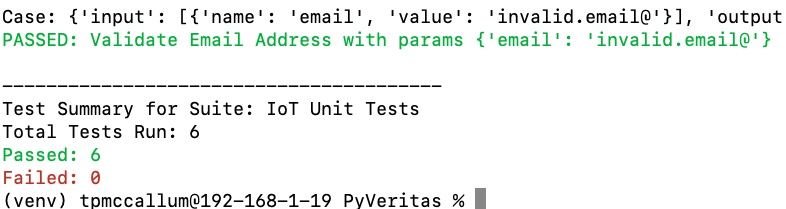
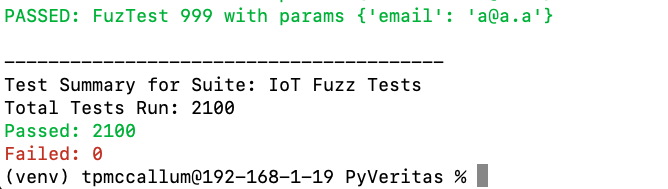
When calling the test and fuzz as arguments, your code (example as shown above) will return something similar to the following:
python3 tests/my_code.py --unit
python3 tests/my_code.py --fuzz
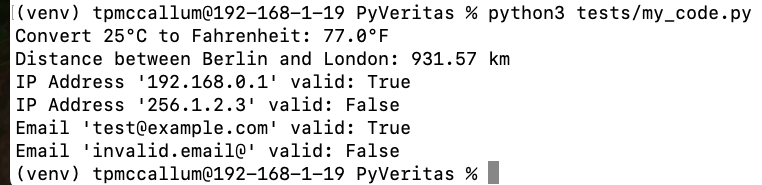
The code of the file will also run alone (meaning that your Python file can maintain functionality in your environment and only ever execute the tests when you specify the --unit or --fuzz arguments):
python3 tests/my_code.py --fuzz
PyVeritas aims to simplify advanced testing scenarios without requiring users to write extensive boilerplate code or understand complex concepts.
JSON Test Structure
{
    "enabled": 1,
    "description": "Test for generating sales report summary",
    "input": [
        {
            "name": "sales_data",
            "value": "[{\"product\": \"Gadget\", \"units\": 100}, {\"product\": \"Widget\", \"units\": 50}]",
            "type": "str",
            "regular_expression": "[{\"product\": \"[A-Za-z]+\", \"units\": \"\\d+\"}(,{\"product\": \"[A-Za-z]+\", \"units\": \"\\d+\"})*]"
        },
        {
            "name": "report_type",
            "value": "Summary",
            "type": "str",
            "regular_expression": "^(Summary|Detailed)$"
        },
        {
            "name": "customer_id",
            "value": 12345,
            "type": "int",
            "regular_expression": "[A-Za-z0-9]{5,10}"
        },
        {
            "name": "price",
            "value": 100,
            "type": "float",
            "range": {
                "min": 50,
                "max": 100
            }
        }
    ],
    "output": [
        {
            "name": "total_units",
            "value": 150,
            "type": "int"
        },
        {
            "name": "company_id",
            "value": 12345,
            "type": "int",
            "regular_expression": "[A-Za-z0-9]{5,10}"
        },
        {
            "name": "price",
            "value": 100,
            "type": "float",
            "range": {
                "min": 50,
                "max": 100
            }
        }
    ],
    "exception": "ValueError",
    "exception_message": "Invalid sales data format or report type",
    "iterations": 1000
}
Test Enablement
Whether the test is enabled or not.
Description
A brief explanation of what the test is for.
Input Array
Name
Name of the parameter
Example value
Value of the parameter
Type
Type of the parameter
Regular Expression
Regular expression used to generate value when fuzz testing
Range
A min and max value used to generate value when fuzz testing
Output Array
An array specifying expected outputs
Name
Name of the output
Example value
Value of the output
Type
Type of the parameter
Exception
The expected exception to be returned. This is for testing that a function will actually throw a specific exception under certain circumstances.
Exception Message
The message returned when an exception is returned.
Iterations
The amount of fuzz tests to generate
Some of the above fields are optional and some take precedence. The following paragraph explains optional/mandatory and precedence behaviour.

Input:
The input array can be empty or contain multiple items. Each item must have:
A name and a type.
One of the following for value specification:
Explicit value: If present, this value is used directly for unit testing; no fuzzing occurs.
Regular expression (regular_expression): Used for fuzzing; PyVeritas generates values according to this expression.
Range (range): Also for fuzzing; values are generated within the specified min and max.
Precedence and Behavior:
value has the highest precedence, used for unit testing.
In the absence of value, regular_expression or range is used for fuzzing.
If both regular_expression and range are specified, values are generated using the regular expression but then filtered by the range. If the range cannot filter the generated value or if min is not less than max, testing stops with an error.
Error Handling: If neither value, regular_expression, nor a properly set range is present for an input item, testing stops with an error.

Output:
If specified, exception and exception_message are checked against the actual exceptions thrown during testing.

Iterations:
iterations only applies to fuzzing tests.
Fuzzing occurs when any input uses regular_expression or range.
Tests with only explicit values run once.
Release history Release notifications | RSS feed


Download files
Download the file for your platform. If you're not sure which to choose, learn more about installing packages.
Source Distribution
Built Distribution
Filter files by name, interpreter, ABI, and platform.
If you're not sure about the file name format, learn more about wheel file names.
Copy a direct link to the current filters
File details
Details for the file pyveritas-0.1.5.tar.gz.
File metadata
- Download URL: pyveritas-0.1.5.tar.gz
- Upload date:
- Size: 7.7 MB
- Tags: Source
- Uploaded using Trusted Publishing? No
- Uploaded via: python-requests/2.32.3
File hashes
| Algorithm | Hash digest | |
|---|---|---|
| SHA256 |
d25f6ab6ab14da184e143bb07b9ad63efdfdf26ac56b09f8732c1d074e0abff9
|
|
| MD5 |
1e6340faefec262632c1c866c1c5ebce
|
|
| BLAKE2b-256 |
1163c974d3e4689b81b24155827668f13734b0ffb8b02946fc9519a97f3078fb
|
File details
Details for the file pyveritas-0.1.5-py2.py3-none-any.whl.
File metadata
- Download URL: pyveritas-0.1.5-py2.py3-none-any.whl
- Upload date:
- Size: 12.6 kB
- Tags: Python 2, Python 3
- Uploaded using Trusted Publishing? No
- Uploaded via: python-requests/2.32.3
File hashes
| Algorithm | Hash digest | |
|---|---|---|
| SHA256 |
d406c955b5d3dfac5b20296886021ea05463cbb6c59cd683888347127e1cec89
|
|
| MD5 |
b56c5668528123e0e503a1a32af53011
|
|
| BLAKE2b-256 |
a2a113e7753de7cdc64ef51e2c578d093cb331fdb75999433f2d4eca87a6eb73
|






