
Python Turtle









An educational environment for learning Python, suitable for beginners and children. Inspired by LOGO.
Homepage: http://pythonturtle.org
An Appealing Environment to Learn Python
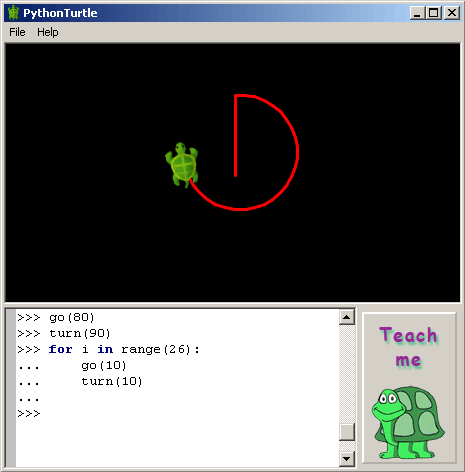
PythonTurtle strives to provide the lowest-threshold way to learn Python. Students command an interactive Python shell (similar to the IDLE development environment) and use Python functions to move a turtle displayed on the screen.
An illustrated help screen introduces the student to the basics of Python programming while demonstrating how to move the turtle. Simplicity and a colorful visual appearance makes the learning environment more appealing to students.
Installation
Installers for Microsoft Windows and macOS are available from pythonturtle.org and GitHub.
Ubuntu Linux:
sudo apt-get install -y python3-wxgtk4.0
Fedora:
python3 -m pip install wxpython
On any GNU/Linux distribution: (after installing prerequisites from above)
python3 -m pip install --user PythonTurtle
PythonTurtle
If you're into automation:
Ansible tasks for setting up PythonTurtle including a desktop shortcut for GNOME.
Troubleshooting
ImportError: libpng12.so.0: cannot open shared object file: No such file or directory
See https://askubuntu.com/a/978338/14650
Compatibility
Tested with Python version 3.6 and wxPython version 4.0.1. Reported to run on Windows, macOS, Ubuntu Linux, and Fedora.
Development
git clone https://github.com/PythonTurtle/PythonTurtle.git
cd PythonTurtle
python3 -m pythonturtle
Build application bundles like this:
python3 setup.py clean bundle
Please open a pull request for contributions or bug fixes. If you can, please also add tests.
About
This project is licensed under the MIT license.
PythonTurtle was created by Ram Rachum as a side-project in 2009. I also provide freelance Django/Python development services. I give Python workshops to teach people Python and related topics. (Hebrew website.)


Release files for PythonTurtle 0.3.2
For a detailed explanation of source distributions (sdists) and built distributions (wheels), please see the package formats documentation.
Source distribution (sdist)
| File | Size | Uploaded | |
|---|---|---|---|
| PythonTurtle-0.3.2.tar.gz | 513.9 kB | Details |
Built distribution (wheel)
| File | Interpreter | ABI | Platform | Reset |
|---|---|---|---|---|
| PythonTurtle-0.3.2-py3-none-any.whl | Python 3 | none | any | Details |
Total release size: 1.0 MB
Release files / PythonTurtle-0.3.2.tar.gz
| Download URL | PythonTurtle-0.3.2.tar.gz |
|---|---|
| Size | 513.9 kB |
| Tags | Source |
|
SHA-256 checksum How to use checksums |
bd5628ab23a73189ec1cb9effbddf2f9fb43613ee9c971cf0954700b202d8534
|
|
BLAKE2b-256 checksum How to use checksums |
32b12267c041fd484f864c575d69ebac593bb511d2f91d14dfaea24e63203025
|
| Upload date | |
|
Uploaded using Trusted Publishing? What is trusted publishing? |
No |
| Uploaded via |
twine/3.2.0 pkginfo/1.5.0.1 requests/2.24.0 setuptools/50.3.0 requests-toolbelt/0.9.1 tqdm/4.49.0 CPython/3.6.10
|
Release files / PythonTurtle-0.3.2-py3-none-any.whl
| Download URL | PythonTurtle-0.3.2-py3-none-any.whl |
|---|---|
| Size | 518.4 kB |
| Tags | Python 3 |
|
SHA-256 checksum How to use checksums |
255d1912c79e34c47e93684e915ea74c584d38bc94637c16a161212ce332b6b5
|
|
BLAKE2b-256 checksum How to use checksums |
5edfb83ffcf5626d59af2247d257cb252996df0559f2e07bec3de1bad9a619f0
|
| Upload date | |
|
Uploaded using Trusted Publishing? What is trusted publishing? |
No |
| Uploaded via |
twine/3.2.0 pkginfo/1.5.0.1 requests/2.24.0 setuptools/50.3.0 requests-toolbelt/0.9.1 tqdm/4.49.0 CPython/3.6.10
|














