
QAxRDP
QAxRDP embeds the Microsoft Remote Desktop client (the MsTscAx ActiveX control used by mstsc.exe) in Qt
applications, with a pure Qt API: signals, slots and properties. It is written on top of
ManyQt, so the same code runs with PyQt5, PyQt6, PySide2, PySide6 (and the
Qt4 bindings).
The goal is to let a Python/Qt application open RDP sessions inside its own windows, configure every option of the Microsoft client (credentials, display, redirections, RD Gateway, RemoteApp...) and react to the session life cycle with ordinary Qt signals, without touching COM.
Version 2.0 is a complete rewrite of QAxRDP 1.x. See Migrating from QAxRDP 1.x.
Contents:
| Category | Name | Package | Description |
|---|---|---|---|
| Remote desktop | RemoteDesktopWidget |
remotedesktop |
The RDP client control as a Qt widget. |
| Settings interfaces | RdpControlSettings, RdpAdvancedSettings (1 to 8), RdpSecuredSettings (1, 2), RdpClientShell, RdpRemoteProgram (1 to 3), RdpTransportSettings (1 to 4) |
remotedesktop |
The 19 setting groups of the control as QObjects (152 properties), reached from the widget (rdp.advancedSettings...). |
| Connection UI | ConnectionBar |
connectionbar |
Address / logon name / password fields, Connect / Disconnect buttons and status. |
| Connection UI | StatusDot |
connectionbar |
Painted status indicator that pulses while connecting. |
| Helpers | parseAddress, parseUserName |
connectionbar |
'host:port', '[ipv6]:port' and 'DOMAIN\user' parsers. |
| Helpers | disconnectReasonText, isNormalDisconnect, isActiveXAvailable, controlProgId |
remotedesktop |
Disconnect reasons, platform and control detection. |
| Application | RemoteConnector, main() |
root | Ready-to-use RDP client window (qaxrdp command, python -m QAxRDP). |
| Qt Designer | qaxrdpplugin.py, registerqaxrdp.py, launchDesigner() |
designer |
Designer plugins for PyQt and PySide6, qaxrdp-designer launcher and plugin preview. |
Every package is self-contained (one folder to copy) and runnable: python QAxRDP/remotedesktop/main.py,
python QAxRDP/connectionbar/main.py.
Key features:
- Every ActiveX event is a typed Qt signal:
connected,disconnected(int),logonError(int),loginComplete,fatalError(int),autoReconnecting2(int, bool, int, int)... and any signal can also be passed to the constructor as a callable:RemoteDesktopWidget(connected=self.onConnected). - Every option is a Qt property: a keyword argument, a getter, a
@pyqtSlotsetter and apyqtProperty(rdp.server,rdp.setServer(),rdp.setProperty('server', ...)), so options can be bound to any Qt signal. - Complete settings coverage: all the
IMsRdpClientAdvancedSettings*, secured, transport (RD Gateway), RemoteApp and shell settings exposed by the control, documented indocs/API.md. - Validated and cached values: ranges are clamped (ports, timeouts, color depths...); values can be set before connecting, survive a control version switch and stay readable when the control does not exist.
- Safe with secrets: passwords are written to the control but never returned by getters nor emitted by signals.
- Graceful degradation: without ActiveX (Linux, macOS, CI) the widget paints an explanatory placeholder and every API keeps working, so applications and tests run everywhere.
- Control version fallback:
MsTscAx.MsTscAx.11by default, older registered versions are tried automatically. - One API for every binding through ManyQt; the test suite passes on PyQt5 and PySide6.
- Qt Designer plugins: drag the widgets from a "QAxRDP" widget box section, edit their properties, and load
the forms with
pyuic5,pyside6-uicorloadUi.
Requirements:
- Python 2.7 or 3.x.
- ManyQt.
- A Qt binding. The remote desktop itself needs Windows and a binding providing the
QAxContainer/QtAxContainermodule: PyQt5's Windows wheels include it; for another binding check thatfrom ManyQt.QAxContainer import QAxWidgetworks. - The Microsoft Remote Desktop client, present on every Windows desktop and server.
Installation:
From PyPI:
pip install "QAxRDP[pyqt5]"    # with PyQt5 (recommended on Windows)
pip install "QAxRDP[pyside6]"  # or pyqt6 / pyside2 / pyside6 / designer
From a source checkout:
pip install .            # QAxRDP + ManyQt, using the Qt binding already installed
pip install .[pyqt5]     # with PyQt5 (recommended on Windows)
pip install .[pyside6]   # or pyqt6 / pyside2 / pyside6
pip install .[designer]  # adds PySide6, whose pyside6-designer loads the QAxRDP Designer plugins
ManyQt picks PyQt5 when several bindings are installed. To force one, set QT_API before any Qt import:
set QT_API=pyside6 # Windows (cmd); export QT_API=pyside6 elsewhere
Quick start:
Run the bundled client:
qaxrdp                   # installed command
python -m QAxRDP         # same thing from a source tree
Embed the widget:
from ManyQt.QtWidgets import QApplication, QMainWindow
from QAxRDP import RemoteDesktopWidget, isNormalDisconnect
from sys import argv, exit


class Window(QMainWindow):
    def __init__(self):
        super(Window, self).__init__()
        self.rdp = RemoteDesktopWidget(server='10.0.0.5', port=3389, domain='CONTOSO', userName='bob',
                                       password='********', smartSizing=True,
                                       settings={'redirectClipboard': True, 'enableCredSspSupport': True},
                                       connected=self.onConnected, disconnected=self.onDisconnected)
        self.setCentralWidget(self.rdp)
        self.rdp.connectToServer()

    def onConnected(self):
        self.statusBar().showMessage('Connected')

    def onDisconnected(self, reason):
        if not isNormalDisconnect(reason):
            self.statusBar().showMessage(self.rdp.getErrorDescription(reason))


app = QApplication(argv)
w = Window()
w.resize(1280, 800)
w.show()
exit(app.exec_())
Usage:
Connecting
rdp.connectTo('server.contoso.com', 3390, userName='bob', password=pwd, domain='CONTOSO')
# or step by step
rdp.server = 'server.contoso.com'
rdp.setPort(3390)
rdp.connectToServer()          # returns False (and emits controlException) without control or server
rdp.disconnectFromServer()
rdp.isConnected()              # connectionState: 0 disconnected, 1 connected, 2 connecting
connectionState has a notify signal, connectionStateChanged(int).
Signals
| ActiveX event | Signal |
|---|---|
OnConnecting / OnConnected / OnLoginComplete |
connecting() / connected() / loginComplete() |
OnDisconnected |
disconnected(int reason) |
OnLogonError / OnFatalError / OnWarning |
logonError(int) / fatalError(int) / warning(int) |
OnAutoReconnecting / OnAutoReconnecting2 / OnAutoReconnected |
autoReconnecting(int, int) / autoReconnecting2(int, bool, int, int) / autoReconnected() |
OnEnterFullScreenMode / OnLeaveFullScreenMode |
enterFullScreenMode() / leaveFullScreenMode() |
OnRequestGoFullScreen / OnRequestLeaveFullScreen / OnRequestContainerMinimize |
requestGoFullScreen() / requestLeaveFullScreen() / requestContainerMinimize() |
OnConfirmClose / OnIdleTimeoutNotification |
confirmClose() / idleTimeoutNotification() |
OnChannelReceivedData |
channelReceivedData(str channel, str data) |
OnReceivedTSPublicKey / OnUserNameAcquired / OnServiceMessageReceived |
receivedTSPublicKey(str) / userNameAcquired(str) / serviceMessageReceived(str) |
OnRemoteDesktopSizeChange / OnNetworkStatusChanged |
remoteDesktopSizeChange(int, int) / networkStatusChanged(int, int, int) |
OnMouseInputModeChanged / OnFocusReleased |
mouseInputModeChanged(bool) / focusReleased(int) |
OnRemoteProgramDisplayed / OnRemoteProgramResult / OnRemoteWindowDisplayed |
remoteProgramDisplayed(bool, int) / remoteProgramResult(str, int, bool) / remoteWindowDisplayed(bool, object, int) |
OnAuthenticationWarningDisplayed / OnAuthenticationWarningDismissed |
authenticationWarningDisplayed() / authenticationWarningDismissed() |
OnConnectionBarPullDown / OnDevicesButtonPressed |
connectionBarPullDown() / devicesButtonPressed() |
exception / propertyChanged (QAxBase) |
controlException(int, str, str, str) / controlPropertyChanged(str) |
The widget also emits controlChanged(str progId) and connectionStateChanged(int). If the binding cannot forward
an event, it is listed by rdp.getUnconnectedEvents().
Settings
The most common options are properties of the widget: server, port, domain, userName, password
(write-only), colorDepth, desktopWidth, desktopHeight, smartSizing, fullScreenMode, connectingText,
connectedStatusText, disconnectedText, fullScreenTitle, and read-only version, cipherStrength,
connectionState, extendedDisconnectReason, securedSettingsEnabled.
Everything else lives in the settings interfaces, with the same three access styles:
rdp.advancedSettings.setRedirectDrives(True)               # setter (a slot)
rdp.advancedSettings2.maxReconnectAttempts = 5             # property
rdp.securedSettings.setProperty('startProgram', 'notepad.exe')
slider.valueChanged.connect(rdp.advancedSettings.setMinutesToIdleTimeout)
Or many at once with applySettings(), which accepts python names, ActiveX names and interface.property keys,
case-insensitively, and returns the keys it could not apply:
rejected = rdp.applySettings({
    'colorDepth': 24,
    'RedirectClipboard': True,                        # ActiveX name
    'advancedSettings.rdpPort': 3390,
    'TransportSettings.GatewayHostname': 'gw.contoso.com',
})
The full list (types, access, ranges, ActiveX names) is in docs/API.md. Enumerations are nested in
the classes, e.g. RdpAdvancedSettings4.AuthenticationWarn, RdpSecuredSettings.ApplyRemotely,
RdpTransportSettings.Direct.
RD Gateway
ts = rdp.transportSettings
ts.setGatewayHostname('gw.contoso.com')
ts.setGatewayUsageMethod(ts.Direct)
ts.setGatewayCredsSource(ts.UserPassword)
rdp.transportSettings2.setGatewayUsername('bob')
rdp.transportSettings2.setGatewayPassword(pwd)
RemoteApp
rdp.remoteProgram.setRemoteProgramMode(True)
rdp.connected.connect(lambda: rdp.remoteProgram.serverStartProgram('||calc', '', '%SYSTEMDRIVE%', True, '', False))
rdp.connectToServer()
Virtual channels
rdp.createVirtualChannels(['MYCHAN'])      # before connecting
rdp.channelReceivedData.connect(lambda channel, data: print(channel, data))
rdp.sendOnVirtualChannel('MYCHAN', 'hello')
Errors, screenshots, display
rdp.getErrorDescription(reason)            # text from the control, built-in table as fallback
rdp.saveScreenshot('session.png')          # grabs the native window, ActiveX content included
rdp.updateSessionDisplaySettings(1920, 1080)
rdp.setControlVersion(10)                  # recreates the control, settings are reapplied
rdp.getAxWidget()                          # the underlying QAxWidget for direct QAxBase calls
rdp.releaseControl()                       # release the control now (automatic when the application quits)
Qt Designer:
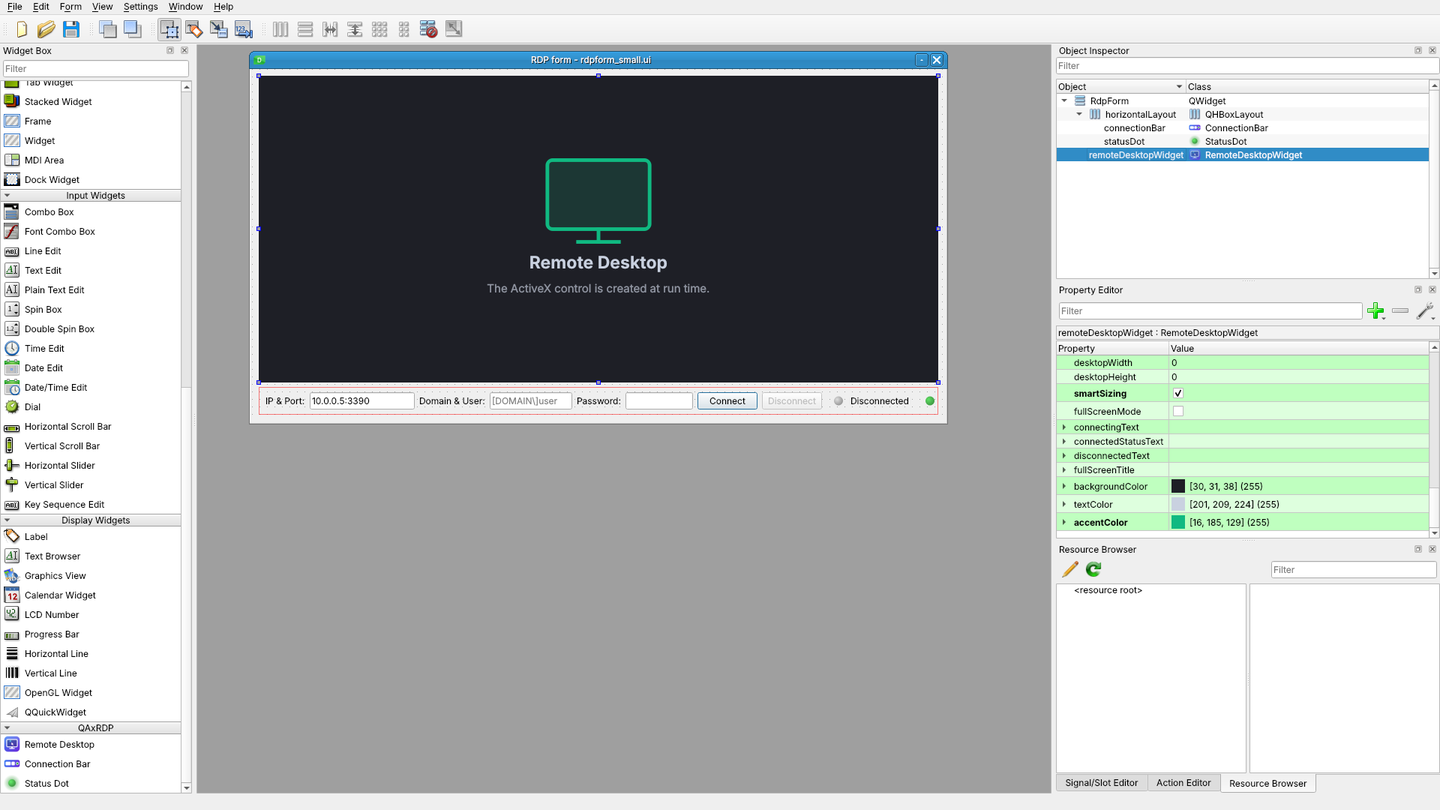
RemoteDesktopWidget, ConnectionBar and StatusDot appear in a QAxRDP section of Designer's widget box.
Start Designer with the plugins registered:
qaxrdp-designer                      # finds a Qt Designer for your binding and opens it
qaxrdp-designer --api pyside6 form.ui
qaxrdp-designer --preview            # what each plugin gives Designer, without Designer
qaxrdp-designer --print-env          # the variables to set to use another Designer / Qt Creator
| Binding | Plugin file | Registered through | Designer used by qaxrdp-designer |
|---|---|---|---|
| PySide6 | QAxRDP/designer/registerqaxrdp.py |
PYSIDE_DESIGNER_PLUGINS |
pyside6-designer (installed with PySide6) |
| PyQt5 / PyQt6 / PyQt4 | QAxRDP/designer/qaxrdpplugin.py |
PYQTDESIGNERPATH |
pyqt5-tools designer, pyqt6-tools designer or a designer on PATH; it must have PyQt's Designer plugin loader |
PySide2's Designer cannot load Python plugins. The plugin directory works from an installed package or straight from a source checkout.
Forms reference the widgets with the header QAxRDP, so generated code imports them from the package:
pyuic5 form.ui -o ui_form.py           # -> from QAxRDP import ConnectionBar, RemoteDesktopWidget, StatusDot
pyside6-uic form.ui -o ui_form.py
from PyQt5 import uic
form = uic.loadUi('form.ui')          # PyQt
form.remoteDesktopWidget.setPassword(password)
form.remoteDesktopWidget.connectToServer()
With PySide6's QUiLoader, register the classes first: loader.registerCustomWidget(RemoteDesktopWidget).
In Designer the RDP control is not started (autoCreateControl is off there): the widget shows a placeholder, and
the real control is created when the form runs. Only meaningful options are editable (server, port, domain,
userName, colorDepth, desktop size, smartSizing, texts, colours, control version). The password, the advanced
settings objects and the runtime state are hidden so that they never end up in .ui files: set them in code.
Migrating from QAxRDP 1.x:
| QAxRDP 1.x | QAxRDP 2.x |
|---|---|
from QAxRDP import QAxRemoteDesktop |
from QAxRDP import RemoteDesktopWidget |
from PyQt5... |
from ManyQt... |
rdp.Server('host') / rdp.Server() |
rdp.setServer('host') / rdp.getServer() / rdp.server |
rdp.UserName(u), rdp.Domain(d), rdp.DesktopWidth(w)... |
setUserName(u), setDomain(d), setDesktopWidth(w)... |
rdp.AdvancedSettings.RDPPort(3390) |
rdp.setPort(3390) or rdp.advancedSettings.setRdpPort(3390) |
rdp.AdvancedSettings.ClearTextPassword(p) |
rdp.setPassword(p) |
rdp.AdvancedSettings.SmartSizing(True) |
rdp.setSmartSizing(True) |
rdp.AdvancedSettings5.RedirectClipboard(True) |
rdp.advancedSettings5.setRedirectClipboard(True) |
rdp.MsRdpClientShell.RdpFileContents(s) |
rdp.clientShell.setRdpFileContents(s) |
rdp.Connect() / rdp.Disconnect() |
rdp.connectToServer() / rdp.disconnectFromServer() |
rdp.Connected() |
rdp.isConnected() / rdp.connectionState |
rdp.onConnected = fn + rdp.connectAllSignals() |
rdp.connected.connect(fn) or RemoteDesktopWidget(connected=fn) |
overriding onDisconnected(self, reason) |
disconnected(int) signal |
Exception(...) / PropertyChanged(name) |
controlException(...) / controlPropertyChanged(str) signals |
rdp.parseArguments({...}) |
rdp.applySettings({...}) |
rdp.version(8) |
rdp.setControlVersion(8) or RemoteDesktopWidget(controlVersion=8) |
rdp.Screenshot() / rdp.SaveScreenshot(path) |
rdp.grabScreenshot() / rdp.saveScreenshot(path) |
CreateVirtualChannels(s) / SendOnVirtualChannel(c, d) |
createVirtualChannels(names) / sendOnVirtualChannel(c, d) |
AttachInterfaces(), CreateSink(), DetachSink() |
removed: .NET AxHost methods, not part of the control |
RemoteConnector in main.py |
RemoteConnector in mainwindow.py, run with qaxrdp |
Names follow Qt conventions: getX() / isX() getters, setX() setters, camelCase properties whose names come
from the ActiveX names (RDPPort -> rdpPort, PCB -> pcb, KeyBoardLayoutStr -> keyBoardLayoutStr). See
CHANGELOG.md for the bugs fixed by the rewrite.
Project layout:
QAxRDP/
├── setup.py, pyproject.toml, requirements.txt, MANIFEST.in
├── .github/
│   ├── workflows/release.yml # tests, build, PyPI and GitHub release v<version>
│   ├── scripts/release.py    # release checks used by the workflow (version, notes, distributions)
│   └── FUNDING.yml
├── README.md, CHANGELOG.md, LICENSE
├── QAxRDP/
│   ├── __init__.py          # exports every public name
│   ├── __main__.py          # python -m QAxRDP
│   ├── main.py              # main(): the qaxrdp command
│   ├── mainwindow.py        # RemoteConnector, createAppIcon()
│   ├── version.py           # __version__ (read by setup.py)
│   ├── images/logo.png      # application icon
│   ├── remotedesktop/
│   │   ├── remotedesktop.py # RemoteDesktopWidget, events table, helpers
│   │   ├── rdpsettings.py   # settings interfaces (generated by tools/rdpsettings)
│   │   ├── mainwindow.py    # demo: server field, event log
│   │   └── main.py
│   ├── connectionbar/
│   │   ├── connectionbar.py # ConnectionBar, StatusDot, parseAddress, parseUserName
│   │   ├── mainwindow.py    # demo: simulated connection
│   │   └── main.py
│   └── designer/
│       ├── qaxrdpplugin.py  # Designer plugin for PyQt
│       ├── registerqaxrdp.py# Designer plugin for PySide6
│       ├── widgetinfo.py    # widget descriptions shared by both plugins
│       ├── designer.py      # launcher and environment helpers (no Qt import)
│       ├── mainwindow.py    # plugin preview
│       ├── main.py          # qaxrdp-designer
│       └── images/          # widget box icons
├── docs/
│   ├── images/              # logo, banner (PNG + SVG), Designer screenshot
│   ├── API.md               # settings reference (generated)
│   ├── MsTscAx-control-reference.html  # QAxWidget.generateDocumentation() of MsTscAx.MsTscAx.11
│   └── links.md             # Microsoft documentation and related projects
├── tests/                   # python -m unittest discover -s tests -v
└── tools/
    ├── rdpsettings/         # generator of rdpsettings.py and docs/API.md (spec.py = property tables)
    └── branding/            # generator of the logo, banner and icons
Development:
python -m unittest discover -s tests -v       # ActiveX tests run on Windows only, the others everywhere
python tools/rdpsettings/generate.py          # after editing tools/rdpsettings/spec.py
python tools/branding/makebranding.py         # after changing the logo or banner drawing
QT_API=pyside6 python -m unittest discover -s tests   # same suite on another binding
rdpsettings.py and docs/API.md are generated: change tools/rdpsettings/spec.py (properties, types, ranges,
descriptions) or header.py.tpl, then regenerate instead of editing them by hand.
Releasing:
Releases are made by .github/workflows/release.yml. It runs when QAxRDP/version.py changes on main / master,
or by hand: Actions > Release > Run workflow (or gh workflow run release.yml).
- Set
__version__inQAxRDP/version.pyand add a## <version> - <date>section toCHANGELOG.md: it becomes the release notes, and the workflow refuses to release without it. - Push. The workflow checks the version and the changelog, runs the tests (PyQt5 on Python 3.10, 3.12 and 3.13,
PySide6 on 3.12, and Windows with the real ActiveX control), builds the sdist and the wheel, checks
them with
twine check --strictand installs the wheel in a clean environment. - Only then it publishes on PyPI and creates the GitHub release v with the distributions attached. The
release and its tag are forced: an existing
v<version>is deleted and recreated on the current commit.
PyPI never accepts the same version twice: if it is already published, the PyPI step is skipped with a warning (the GitHub release is still made). Bump the version to publish again.
One-time setup of the PyPI authentication, either:
- Trusted publishing (recommended, no secret): on PyPI, Your account > Publishing > Add a new pending
publisher (or the project's Publishing page once it exists) with PyPI project
QAxRDP, your GitHub owner and repository, workflowrelease.ymland environmentpypi. - API token: create a token on PyPI and save it as the repository secret
PYPI_API_TOKEN.
The package description on PyPI is this README; when built by the workflow, its relative links and images are made absolute (pinned to the released commit), so the repository must be public for the images to show there.
Notes and limitations:
- The control only exists on Windows. Elsewhere
isActiveXAvailable()isFalse,controlAvailableisFalse,errorStringexplains why and connecting emitscontrolException. - Event forwarding uses the dynamic signals that the binding creates for the control. PyQt5 supports them; with
other bindings, check
getUnconnectedEvents(). - Write-only ActiveX properties (
ClearTextPassword,FullScreenTitle,RemoteApplicationName...) cannot be read back from the control: their getters return the last value set through QAxRDP (passwords return''). - Some properties are documented by Microsoft as unsupported by recent clients; they are kept for completeness and
marked as such in
docs/API.md. - Settings are sent to the control when set. Most of them only take effect at the next connection.
License:
GPLv3, see LICENSE. Copyright 2022-2026 Aininou Usama (ininou.oussematn@gmail.com).
References:
See docs/links.md: Microsoft Remote Desktop Services documentation, rdpappcontainerclient.h,
Devolutions MsRdpEx and ManyQt.
1 maintainer

Metadata
1 maintainer
Release files for QAxRDP 2.1.0
For a detailed explanation of source distributions (sdists) and built distributions (wheels), please see the package formats documentation.
Source distribution (sdist)
| File | Size | Uploaded | Provenance | Actions |
|---|---|---|---|---|
| qaxrdp-2.1.0.tar.gz | 613.1 kB | With provenance | Details for qaxrdp-2.1.0.tar.gz |
Built distribution (wheel)
| File | Interpreter | ABI | Platform | Actions Reset |
|---|---|---|---|---|
| qaxrdp-2.1.0-py3-none-any.whl | Python 3 | none | any | Details for qaxrdp-2.1.0-py3-none-any.whl |
Total release size: 718.8 kB
Release files / qaxrdp-2.1.0.tar.gz
| Download URL | qaxrdp-2.1.0.tar.gz |
|---|---|
| Size | 613.1 kB |
| Tags | Source |
|
SHA-256 checksum How to use checksums |
9f3901f0c04802fa4e7a964f35ff375efec4581801782b4de75d59244e5eaebd
|
|
BLAKE2b-256 checksum How to use checksums |
c54996deafaa5e98a0c6c99073492253420cf1d18839141d4ef61a02313e51b0
|
| Upload date | |
|
Uploaded using Trusted Publishing? What is trusted publishing? |
Yes |
| Uploaded via |
twine/7.0.0 CPython/3.13.16
|
Provenance
Provenance describes where a file came from. On PyPI, provenance is shared via attestations, which provide a verifiable record of the build or publishing details. View details, limitations and caveats.


PyPI Publish Attestation
PyPI verified that this artifact, at this checksum, originated from the publisher listed below.
Signed by GitHub Actions, verified by PyPI on Nov 12, 2026.
Transparency logRelease files / qaxrdp-2.1.0-py3-none-any.whl
| Download URL | qaxrdp-2.1.0-py3-none-any.whl |
|---|---|
| Size | 105.7 kB |
| Tags | Python 3 |
|
SHA-256 checksum How to use checksums |
3a19a8a160cc0f145acacf8d069cbe6bd3c3adf0d9783b7c8c341701f1dcc282
|
|
BLAKE2b-256 checksum How to use checksums |
806fce8517a5841fdaa5ea20907ccd14ec390a46f656a4d447601aa7735a225a
|
| Upload date | |
|
Uploaded using Trusted Publishing? What is trusted publishing? |
Yes |
| Uploaded via |
twine/7.0.0 CPython/3.13.16
|
Provenance
Provenance describes where a file came from. On PyPI, provenance is shared via attestations, which provide a verifiable record of the build or publishing details. View details, limitations and caveats.
PyPI Publish Attestation
PyPI verified that this artifact, at this checksum, originated from the publisher listed below.
Signed by GitHub Actions, verified by PyPI on Nov 12, 2026.
Transparency logSecurity for QAxRDP 2.1.0
Provenance
Provenance describes where a file came from. On PyPI, provenance is shared via attestations, which provide a verifiable record of the build or publishing details. View details, limitations and caveats.
Full provenance
Both files in this release have been uploaded with provenance metadata.
Attestation for qaxrdp-2.1.0.tar.gz
PyPI Publish Attestation
PyPI verified that this artifact, at this checksum, originated from the publisher listed below.
Signed by GitHub Actions, verified by PyPI on Nov 12, 2026.
Transparency logA note on package security
PyPI is a repository for distributing packages, not a service for auditing them. While third-party security researchers and our staff do their best to detect and remove malicious packages, PyPI cannot guarantee the quality, security or suitability of any given package.
To learn more about protecting yourself from malicious actors, visit our package security documentation.













