
QInstrument





A Qt-based framework for controlling scientific instruments over serial ports.
Instruments are represented as Qt objects with a uniform property system,
automatic UI binding, and JSON-based configuration persistence.
Any Qt binding (PyQt5, PyQt6, PySide2, PySide6) is supported via qtpy.
Instruments
IPG Photonics
- YLR Series: Ytterbium fiber laser
Laser Quantum
- Opus: Continuous-wave laser
PiezoDrive
- PDUS210: Piezo transducer driver
Prior Scientific
- Proscan II/III: Motorized microscope stage controller
Stanford Research Systems
- DS345: 30 MHz Synthesized Function Generator
- SR830: 100 kHz Digital Lock-in Amplifier
- SR844: 200 MHz RF Lock-in Amplifier
Tektronix
- TDS1000: Digital oscilloscope
Installation
pip install QInstrument
pip install PyQt6          # or PyQt5, PySide2, PySide6
Installing from PyPI also places a qinstrument command on your PATH.
To install from source:
git clone https://github.com/davidgrier/QInstrument
cd QInstrument
python -m venv .qi
source .qi/bin/activate
pip install -e ".[dev]"
Quick start
Rack application
Launch the rack to control multiple instruments at once:
qinstrument DS345 SR830
On subsequent runs, qinstrument with no arguments restores the
last-used instrument list automatically. Use the Add instrument…
button to add instruments at runtime, or right-click any instrument
to remove it.
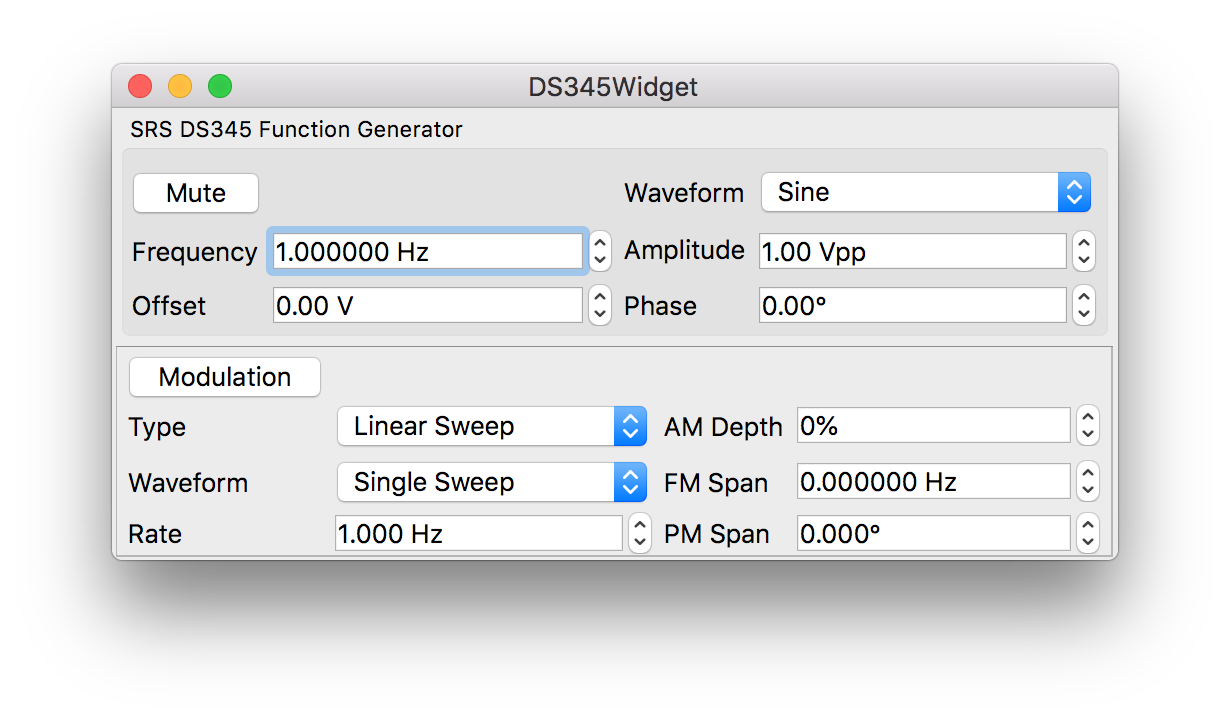
Single instrument widget
Each instrument widget also has a built-in example() entry point:
python -m QInstrument.instruments.DS345.widget
This finds a connected DS345 and opens its control panel. If no instrument is detected it falls back automatically to a simulated (fake) device so the UI is always usable.
Embedding a widget in your application
from qtpy.QtWidgets import QApplication
from QInstrument.instruments import QDS345Widget

app = QApplication([])
widget = QDS345Widget()
widget.show()
app.exec()
Using a simulated instrument
When hardware is not available, pass a fake device directly:
from QInstrument.instruments import QDS345Widget, QFakeDS345

app = QApplication([])
widget = QDS345Widget(device=QFakeDS345())
widget.show()
app.exec()
Architecture
QtCore.QObject
└── QAbstractInstrument      # property/method registry, thread-safe get/set
    └── QSerialInstrument    # holds QSerialInterface; adds open/find/identify
        └── QXxxInstrument   # concrete instrument

QtSerialPort.QSerialPort
└── QSerialInterface         # raw serial I/O (owned by QSerialInstrument)

QWidget
├── QInstrumentWidget        # loads .ui file; auto-binds widgets to properties;
│                            # saves/restores device state via Configure
└── QInstrumentRack          # holds multiple QInstrumentWidgets; runtime
                             # add/remove; saves/restores instrument list
Each instrument lives in instruments/<Name>/ with three files:
| File | Purpose |
|---|---|
instrument.py |
Serial communication and property registration |
fake.py |
Simulated instrument for UI development without hardware |
widget.py |
Qt widget, .ui file binding, example() entry point |
Development
Run the test suite:
source .qi/bin/activate
pytest tests/
Tests run automatically before every git push via a pre-push hook.
To install the hook in a fresh clone:
cp hooks/pre-push .git/hooks/pre-push   # if tracked, else set up manually
chmod +x .git/hooks/pre-push
Acknowledgements
Work on this project at New York University is supported by the National Science Foundation of the United States under award number DMR-2438983.
1 maintainer

Metadata
1 maintainer
Release files for QInstrument 3.0.2
For a detailed explanation of source distributions (sdists) and built distributions (wheels), please see the package formats documentation.
Source distribution (sdist)
| File | Size | Uploaded | |
|---|---|---|---|
| qinstrument-3.0.2.tar.gz | 111.4 kB | Details |
Built distribution (wheel)
| File | Interpreter | ABI | Platform | Reset |
|---|---|---|---|---|
| qinstrument-3.0.2-py3-none-any.whl | Python 3 | none | any | Details |
Total release size: 234.0 kB
Release files / qinstrument-3.0.2.tar.gz
| Download URL | qinstrument-3.0.2.tar.gz |
|---|---|
| Size | 111.4 kB |
| Tags | Source |
|
SHA-256 checksum How to use checksums |
66039e30bb295dc8daa3cf0e73492838bb4b187d2012918e4ceae2f983ed0983
|
|
BLAKE2b-256 checksum How to use checksums |
67ca237f3aacc2bf3f934e6f8e2b397bcf26bed2fb6cf893133759018a7c8974
|
| Upload date | |
|
Uploaded using Trusted Publishing? What is trusted publishing? |
Yes |
| Uploaded via |
twine/6.1.0 CPython/3.13.12
|
Provenance
Provenance describes where a file came from. On PyPI, provenance is shared via attestations, which provide a verifiable record of the build or publishing details. View details, limitations and caveats.


PyPI Publish Attestation
PyPI verified that this artifact, at this checksum, originated from the publisher listed below.
Signed by GitHub Actions, verified by PyPI on Apr 29, 2026.
Transparency logRelease files / qinstrument-3.0.2-py3-none-any.whl
| Download URL | qinstrument-3.0.2-py3-none-any.whl |
|---|---|
| Size | 122.6 kB |
| Tags | Python 3 |
|
SHA-256 checksum How to use checksums |
fbb784c96842c0b6a4e3ccd2c19944173dab20726128852d30889d1c5e1b097f
|
|
BLAKE2b-256 checksum How to use checksums |
27f6226a7498a3cbea81bc5d8e842eabdc3240b05cae29b308599cb72be420d0
|
| Upload date | |
|
Uploaded using Trusted Publishing? What is trusted publishing? |
Yes |
| Uploaded via |
twine/6.1.0 CPython/3.13.12
|
Provenance
Provenance describes where a file came from. On PyPI, provenance is shared via attestations, which provide a verifiable record of the build or publishing details. View details, limitations and caveats.
PyPI Publish Attestation
PyPI verified that this artifact, at this checksum, originated from the publisher listed below.
Signed by GitHub Actions, verified by PyPI on Apr 29, 2026.
Transparency log













