
QVideo: Qt framework for video cameras






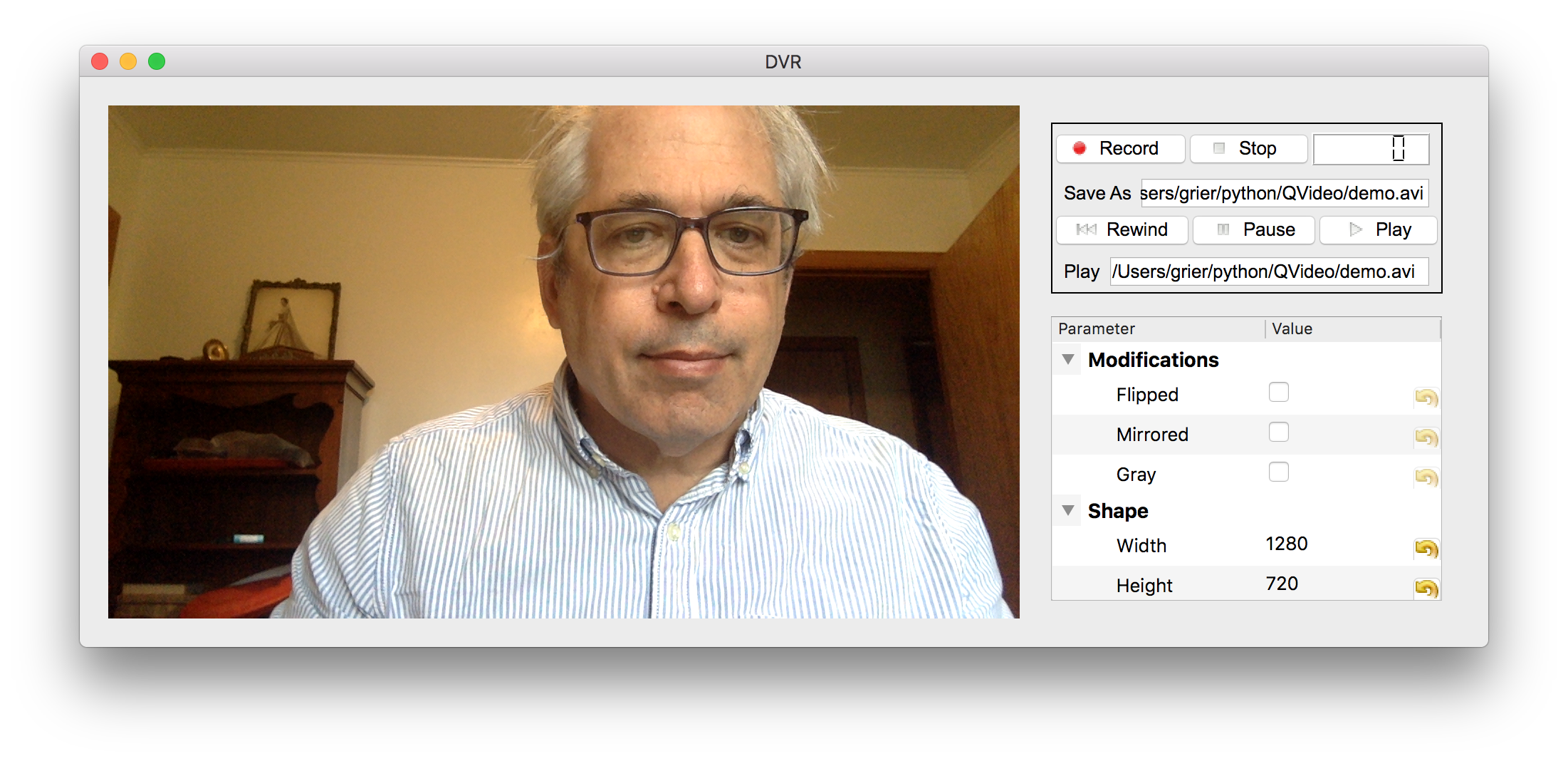
QVideo is a framework for integrating video cameras into Qt projects (PyQt6 or PyQt5; PySide6 is experimental) for scientific research. It provides a unified, registration-based property system so that every camera backend — USB webcams, GenICam devices, FLIR cameras, Raspberry Pi cameras — is controlled through the same API. Property trees, display widgets, and a digital video recorder are built on top of that abstraction and require no camera-specific code.
Features
- Unified camera API —
QCamerasubclasses expose adjustable parameters viaregisterProperty/registerMethod; UI and recording layers consume them without knowing the underlying hardware. - Auto-built property trees —
QCameraTreereads the registered property map and builds apyqtgraphparameter tree widget automatically. - Threaded video source —
QVideoSourcewraps any camera in aQThreadand emitsnewFrame(ndarray, FrameInfo)at acquisition rate. - Composable filter pipeline —
VideoFilterobjects run in aQFilterStackon a worker thread between source and consumers (display, recorder); filters include blur, edge detection, RGB channel selection, sample-and-hold, binary threshold, and blob coloring. - Graphical overlays —
QTrackpyWidgetfor live particle tracking andQYoloWidgetfor real-time object detection render markers directly onQVideoScreen; composite mode lets the DVR record the annotated scene. - Digital video recorder — lossless HDF5 (with timestamps) and OpenCV
video formats;
QDVRWidgetis the composite UI widget. - Live display —
QVideoScreensupports mouse-aware graphical overlays for annotations, regions of interest, and user interaction.
Installation
pip install "QVideo[pyqt6]"
Qt binding
QVideo needs a Qt binding: PyQt6 (recommended) or PyQt5. The binding is an optional extra so that QVideo can use one you already have, such as the system packages on a Raspberry Pi, instead of installing a second copy:
pip install "QVideo[pyqt6]"   # PyQt6 (recommended)
pip install "QVideo[pyqt5]"   # PyQt5
pip install QVideo            # use a binding that is already installed
PySide6 is experimental (pip install "QVideo[pyside6]"): it runs in
continuous integration, but not all of QVideo's tests have been adapted to it.
Raspberry Pi
PyPI has no prebuilt ARM wheels for PyQt5 or PyQt6, so the system-provided
packages must be used instead. Create the virtual environment with
--system-site-packages so pip can see them:
sudo apt install python3-pyqt6 python3-pyqt6.qtsvg
python3 -m venv --system-site-packages .venv
source .venv/bin/activate
pip install QVideo
Replace python3-pyqt6 with python3-pyqt5 if you prefer PyQt5.
Optional hardware backends
| Backend | Extra | Notes |
|---|---|---|
| GenICam cameras (Vimba, etc.) | pip install QVideo[genicam] |
Requires a vendor-supplied .cti producer file |
| Raspberry Pi camera | pip install QVideo[picamera] |
Requires picamera2 |
Quick start
import pyqtgraph as pg
from QVideo.cameras.Noise import QNoiseSource
from QVideo.lib import QVideoScreen

pg.mkQApp()

source = QNoiseSource()          # synthetic noise — no hardware needed
screen = QVideoScreen()
source.newFrame.connect(screen.setImage)

screen.show()
source.start()
pg.exec()
Replace QNoiseSource with QOpenCVSource, QGenicamSource, etc. to switch
hardware — the rest of the code is identical.
Camera backends
| Backend | Class | Hardware |
|---|---|---|
cameras/Noise |
QNoiseCamera |
Synthetic — no hardware required |
cameras/OpenCV |
QOpenCVCamera |
USB webcams via OpenCV |
cameras/Genicam |
QGenicamCamera |
Abstract base for all GenICam/GigE Vision cameras |
cameras/Flir |
QFlirCamera |
FLIR cameras via GenICam (Spinnaker GenTL producer) |
cameras/Basler |
QBaslerCamera |
Basler cameras via GenICam (pylon GenTL producer) |
cameras/IDS |
QIDSCamera |
IDS Imaging cameras via GenICam |
cameras/MV |
QMVCamera |
Any GenICam camera via MATRIX VISION mvGenTLProducer |
cameras/Vimbax |
QVimbaXCamera |
Allied Vision cameras via VimbaX GenTL producer |
cameras/Picamera |
QPicamera |
Raspberry Pi camera module |
Compatibility
Verified on real hardware (the unit tests mock all hardware):
| Backend | macOS | Ubuntu | Raspberry Pi OS | Windows |
|---|---|---|---|---|
| OpenCV | 14 – 26 | 24.04 | tested | not tested |
| FLIR (GenICam) | 14 – 26 | 24.04 | — | not tested |
On macOS 26.7.1 (Tahoe), the OpenCV backend was tested with OpenCV 5.0.0_11 and the FLIR backend with Spinnaker SDK 4.4.0.246. Other combinations are expected to work but have not been checked. See the documentation for details.
QVideo itself is pure Python and is tested on Python 3.11 – 3.14. The newest Python release may lag: Python 3.15 is run in CI as an allowed-failure job because some dependencies (e.g. scipy) do not yet publish wheels for it.
Writing a new camera backend
Subclass QCamera and implement three methods:
from QVideo.lib import QCamera

class MyCamera(QCamera):

    def _initialize(self) -> bool:
        self.device = open_my_hardware()
        if not self.device:
            return False
        self.registerProperty('exposure',
                              getter=lambda: self.device.get_exposure(),
                              setter=lambda v: self.device.set_exposure(v),
                              ptype=float)
        return True

    def _deinitialize(self) -> None:
        self.device.close()

    def read(self):
        ok, frame = self.device.read_frame()
        return ok, frame
QCameraTree and QVideoSource work with MyCamera immediately — no
additional code needed.
Filters
| Filter | Class | Description |
|---|---|---|
| Gaussian blur | QBlurFilter |
Smoothing with adjustable kernel radius |
| Canny edge detection | QEdgeFilter |
Edge map with configurable thresholds |
| RGB channel selection | QRGBFilter |
Pass one or more color channels |
| Sample and hold | QSampleHold |
Background normalization via a sampled median estimate |
| Binary threshold | QThresholdFilter |
Convert to binary mask at a configurable level |
| Blob coloring | QBlobFilter |
Color connected foreground regions with distinct hues |
| YOLO annotation | QYOLOFilter |
Annotate frames with YOLO bounding boxes (requires ultralytics) |
Overlays
Overlays render analysis results directly on the live QVideoScreen. Each
needs its own optional packages: pip install QVideo[trackpy] for the trackpy
overlay, pip install QVideo[yolo] for the YOLO overlay (which pulls in
PyTorch), or pip install QVideo[overlays] for both.
| Overlay | Class | Description |
|---|---|---|
| Particle tracking | QTrackpyWidget |
Live particle detection and tracking using trackpy |
| Object detection | QYoloWidget |
Real-time bounding-box detection using YOLO (ultralytics) |
Acknowledgements
Work on this project at New York University is supported by the National Science Foundation of the United States under award number DMR-2428983 and by an award from the TAC Program of New York University.
1 maintainer

Metadata
1 maintainer
Release files for QVideo 4.3.0
For a detailed explanation of source distributions (sdists) and built distributions (wheels), please see the package formats documentation.
Source distribution (sdist)
| File | Size | Uploaded | Provenance | |
|---|---|---|---|---|
| qvideo-4.3.0.tar.gz | 277.6 kB | With provenance | Details |
Built distribution (wheel)
| File | Interpreter | ABI | Platform | Reset |
|---|---|---|---|---|
| qvideo-4.3.0-py3-none-any.whl | Python 3 | none | any | Details |
Total release size: 494.7 kB
Release files / qvideo-4.3.0.tar.gz
| Download URL | qvideo-4.3.0.tar.gz |
|---|---|
| Size | 277.6 kB |
| Tags | Source |
|
SHA-256 checksum How to use checksums |
ee0cb184c8ee86e32fa74d916537791c15c5b9a9a0a7059cc075606813872ee2
|
|
BLAKE2b-256 checksum How to use checksums |
b5aad63f158c20f670e8cab16f8f54b4cf22b296d2a147bc0004204b08983b85
|
| Upload date | |
|
Uploaded using Trusted Publishing? What is trusted publishing? |
Yes |
| Uploaded via |
twine/7.0.0 CPython/3.13.16
|
Provenance
Provenance describes where a file came from. On PyPI, provenance is shared via attestations, which provide a verifiable record of the build or publishing details. View details, limitations and caveats.


PyPI Publish Attestation
PyPI verified that this artifact, at this checksum, originated from the publisher listed below.
Signed by GitHub Actions, verified by PyPI on Oct 25, 2026.
Transparency logRelease files / qvideo-4.3.0-py3-none-any.whl
| Download URL | qvideo-4.3.0-py3-none-any.whl |
|---|---|
| Size | 217.2 kB |
| Tags | Python 3 |
|
SHA-256 checksum How to use checksums |
2a8783f4ba15e0bc2d47a177f902fa25009f7442a831a1e8c291c7f1f5195827
|
|
BLAKE2b-256 checksum How to use checksums |
051942d17ef8617c63863477405cf8ca33bd199326faeac85dc93d4b555cd3f3
|
| Upload date | |
|
Uploaded using Trusted Publishing? What is trusted publishing? |
Yes |
| Uploaded via |
twine/7.0.0 CPython/3.13.16
|
Provenance
Provenance describes where a file came from. On PyPI, provenance is shared via attestations, which provide a verifiable record of the build or publishing details. View details, limitations and caveats.
PyPI Publish Attestation
PyPI verified that this artifact, at this checksum, originated from the publisher listed below.
Signed by GitHub Actions, verified by PyPI on Oct 25, 2026.
Transparency logSecurity for QVideo 4.3.0
Provenance
Provenance describes where a file came from. On PyPI, provenance is shared via attestations, which provide a verifiable record of the build or publishing details. View details, limitations and caveats.
Full provenance
All 2 files in this release have been uploaded with provenance metadata.
Attestation for qvideo-4.3.0.tar.gz
PyPI Publish Attestation
PyPI verified that this artifact, at this checksum, originated from the publisher listed below.
Signed by GitHub Actions, verified by PyPI on Oct 25, 2026.
Transparency logA note on package security
PyPI is a repository for distributing packages, not a service for auditing them. While third-party security researchers and our staff do their best to detect and remove malicious packages, PyPI cannot guarantee the quality, security or suitability of any given package.
To learn more about protecting yourself from malicious actors, visit our package security documentation.














