






QuantStats: Portfolio analytics for quants
QuantStats Python library that performs portfolio profiling, allowing quants and portfolio managers to understand their performance better by providing them with in-depth analytics and risk metrics.
QuantStats is comprised of 3 main modules:
quantstats.stats- for calculating various performance metrics, like Sharpe ratio, Win rate, Volatility, etc.quantstats.plots- for visualizing performance, drawdowns, rolling statistics, monthly returns, etc.quantstats.reports- for generating metrics reports, batch plotting, and creating tear sheets that can be saved as an HTML file.
NEW! Monte Carlo Simulations
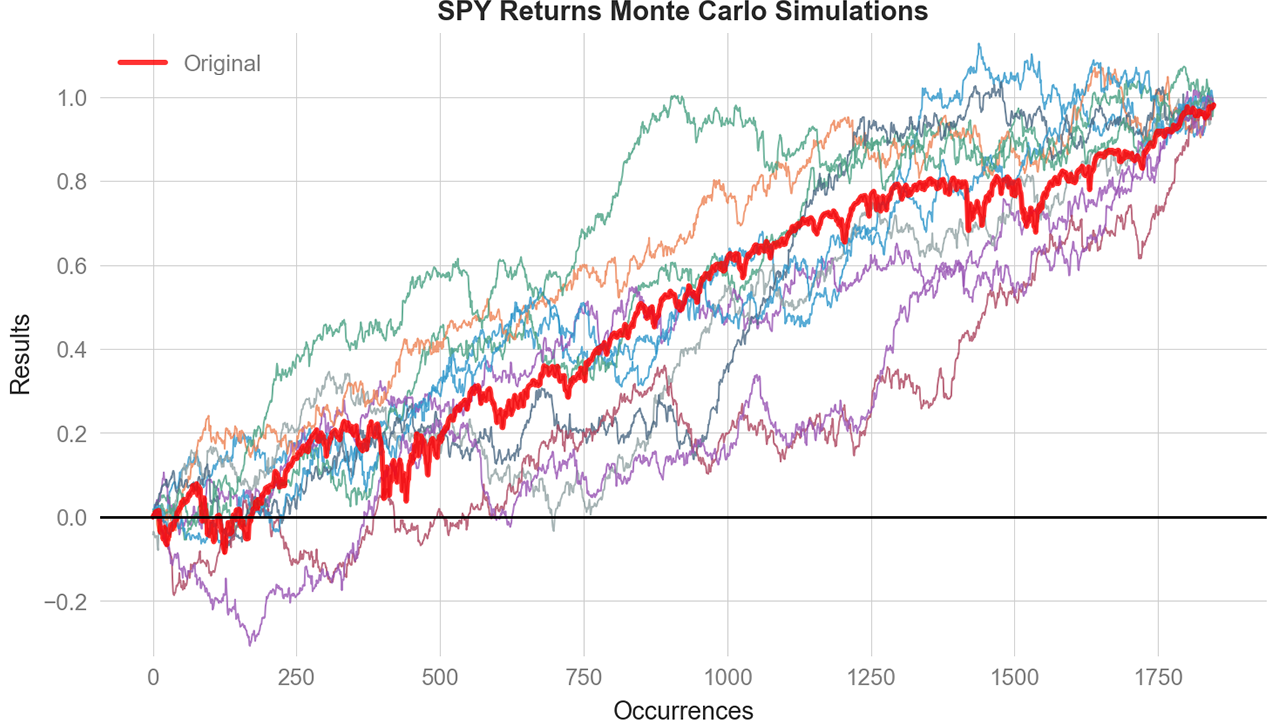
Run probabilistic risk analysis with built-in Monte Carlo simulations:
mc = qs.stats.montecarlo(returns, sims=1000, bust=-0.20, goal=0.50)
print(f"Bust probability: {mc.bust_probability:.1%}")
print(f"Goal probability: {mc.goal_probability:.1%}")
mc.plot()
Full Monte Carlo documentation »
Quick Start
%matplotlib inline
import quantstats as qs

# extend pandas functionality with metrics, etc.
qs.extend_pandas()

# fetch the daily returns for a stock
stock = qs.utils.download_returns('META')

# show sharpe ratio
qs.stats.sharpe(stock)

# or using extend_pandas() :)
stock.sharpe()
Output:
0.7604779884378278
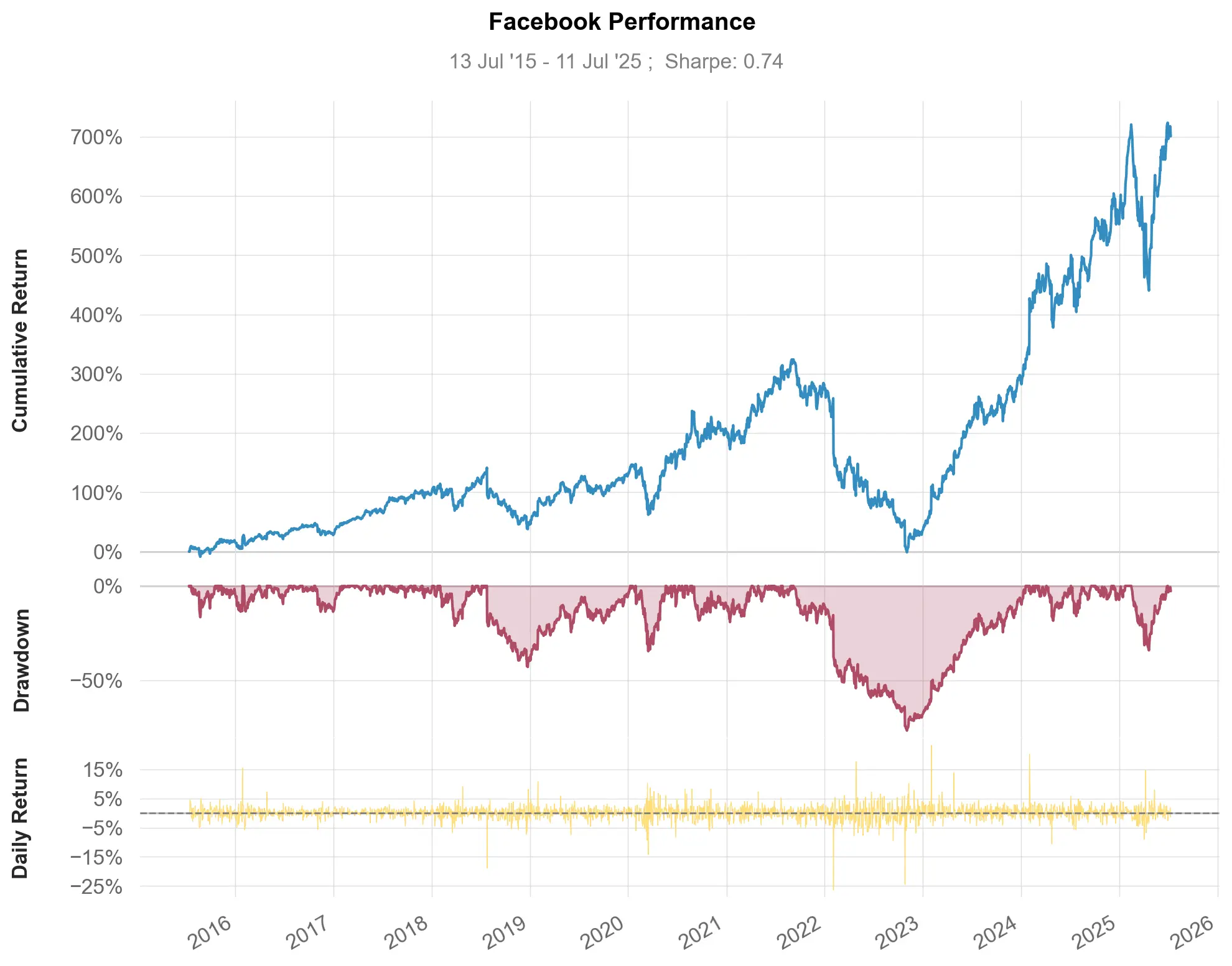
Visualize stock performance
qs.plots.snapshot(stock, title='Facebook Performance', show=True)

# can also be called via:
# stock.plot_snapshot(title='Facebook Performance', show=True)
Output:
Creating a report
You can create 7 different report tearsheets:
qs.reports.metrics(mode='basic|full", ...)- shows basic/full metricsqs.reports.plots(mode='basic|full", ...)- shows basic/full plotsqs.reports.basic(...)- shows basic metrics and plotsqs.reports.full(...)- shows full metrics and plotsqs.reports.html(...)- generates a complete report as html
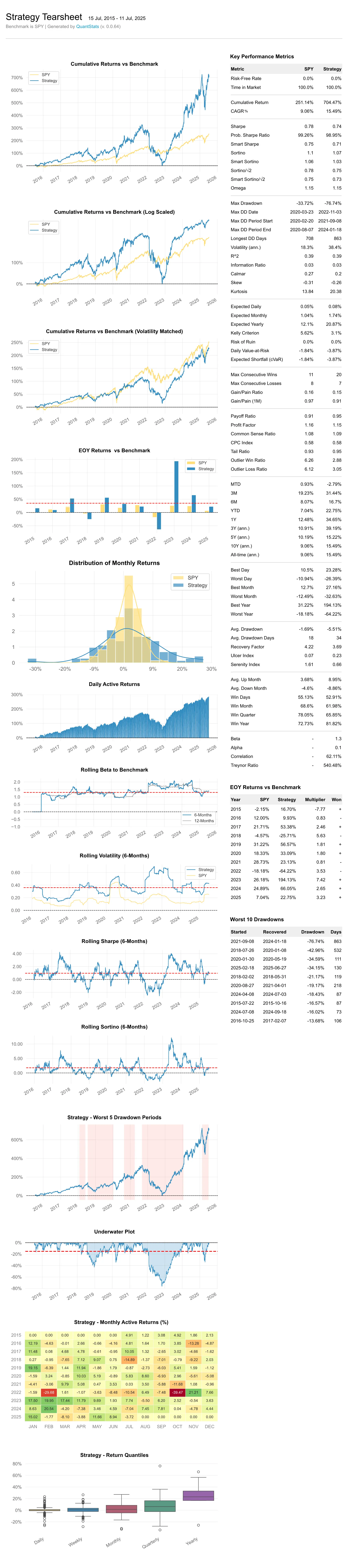
Let's create an html tearsheet:
# benchmark can be a pandas Series or ticker
qs.reports.html(stock, "SPY")
Output will generate something like this:
Available methods
To view a complete list of available methods, run:
[f for f in dir(qs.stats) if f[0] != '_']
['avg_loss',
 'avg_return',
 'avg_win',
 'best',
 'cagr',
 'calmar',
 'common_sense_ratio',
 'comp',
 'compare',
 'compsum',
 'conditional_value_at_risk',
 'consecutive_losses',
 'consecutive_wins',
 'cpc_index',
 'cvar',
 'drawdown_details',
 'expected_return',
 'expected_shortfall',
 'exposure',
 'gain_to_pain_ratio',
 'geometric_mean',
 'ghpr',
 'greeks',
 'implied_volatility',
 'information_ratio',
 'kelly_criterion',
 'kurtosis',
 'max_drawdown',
 'monthly_returns',
 'montecarlo',
 'montecarlo_cagr',
 'montecarlo_drawdown',
 'montecarlo_sharpe',
 'outlier_loss_ratio',
 'outlier_win_ratio',
 'outliers',
 'payoff_ratio',
 'profit_factor',
 'profit_ratio',
 'r2',
 'r_squared',
 'rar',
 'recovery_factor',
 'remove_outliers',
 'risk_of_ruin',
 'risk_return_ratio',
 'rolling_greeks',
 'ror',
 'sharpe',
 'skew',
 'sortino',
 'adjusted_sortino',
 'tail_ratio',
 'to_drawdown_series',
 'ulcer_index',
 'ulcer_performance_index',
 'upi',
 'value_at_risk',
 'var',
 'volatility',
 'win_loss_ratio',
 'win_rate',
 'worst']
[f for f in dir(qs.plots) if f[0] != '_']
['daily_returns',
 'distribution',
 'drawdown',
 'drawdowns_periods',
 'earnings',
 'histogram',
 'log_returns',
 'monthly_heatmap',
 'montecarlo',
 'montecarlo_distribution',
 'returns',
 'rolling_beta',
 'rolling_sharpe',
 'rolling_sortino',
 'rolling_volatility',
 'snapshot',
 'yearly_returns']
*** Full documentation coming soon ***
Important: Period-Based vs Trade-Based Metrics
QuantStats analyzes return series (daily, weekly, monthly returns), not discrete trade data. This means:
- Win Rate = percentage of periods with positive returns
- Consecutive Wins/Losses = consecutive positive/negative return periods
- Payoff Ratio = average winning period return / average losing period return
- Profit Factor = sum of positive returns / sum of negative returns
These metrics are valid and useful for:
- Systematic/algorithmic strategies with regular rebalancing
- Analyzing return-series behavior over time
- Comparing strategies on a period-by-period basis
For discretionary traders with multi-day trades, these period-based metrics may differ from trade-level statistics. A single 5-day trade might span 3 positive days and 2 negative days - QuantStats would count these as 3 "wins" and 2 "losses" at the daily level.
This is consistent with how all return-based analytics work (Sharpe ratio, Sortino ratio, drawdown analysis, etc.) - they operate on return periods, not discrete trade entries/exits.
In the meantime, you can get insights as to optional parameters for each method, by using Python's help method:
help(qs.stats.conditional_value_at_risk)
Help on function conditional_value_at_risk in module quantstats.stats:

conditional_value_at_risk(returns, sigma=1, confidence=0.95, prepare_returns=True, method='parametric')
    Calculate the Conditional Value at Risk (CVaR), also known as Expected Shortfall.

    CVaR measures the expected loss given that a loss exceeds the VaR threshold.
    It quantifies the amount of tail risk an investment faces, providing a more
    comprehensive risk measure than VaR alone.
Installation
Install using pip:
$ pip install quantstats --upgrade --no-cache-dir
Install using conda:
$ conda install -c ranaroussi quantstats
Requirements
- Python >= 3.10
- pandas >= 1.5.0
- numpy >= 1.24.0
- scipy >= 1.11.0
- matplotlib >= 3.7.0
- seaborn >= 0.13.0
- tabulate >= 0.9.0
- yfinance >= 0.2.40
- plotly >= 5.0.0 (optional, for using
plots.to_plotly())
Questions?
This is a new library... If you find a bug, please open an issue.
If you'd like to contribute, a great place to look is the issues marked with help-wanted.
Known Issues
For some reason, I couldn't find a way to tell seaborn not to return the
monthly returns heatmap when instructed to save - so even if you save the plot (by passing savefig={...}) it will still show the plot.
Legal Stuff
QuantStats is distributed under the Apache Software License. See the LICENSE.txt file in the release for details.
P.S.
Please drop me a note with any feedback you have.
Ran Aroussi
1 maintainer

Metadata
1 maintainer
Release files for quantstats 0.0.86
For a detailed explanation of source distributions (sdists) and built distributions (wheels), please see the package formats documentation.
Source distribution (sdist)
| File | Size | Uploaded | Provenance | |
|---|---|---|---|---|
| quantstats-0.0.86.tar.gz | 99.1 kB | Without provenance | Details |
Built distribution (wheel)
| File | Interpreter | ABI | Platform | Reset |
|---|---|---|---|---|
| quantstats-0.0.86-py3-none-any.whl | Python 3 | none | any | Details |
Total release size: 195.9 kB
Release files / quantstats-0.0.86.tar.gz
| Download URL | quantstats-0.0.86.tar.gz |
|---|---|
| Size | 99.1 kB |
| Tags | Source |
|
SHA-256 checksum How to use checksums |
eb348e342410f0abb9b7a457f524df703dc337ed075303b842eaba220a11c7e1
|
|
BLAKE2b-256 checksum How to use checksums |
3c5aa859727babc25df8e42e5d2d0d928de5652be7bf1d20a768ecc58add2d3c
|
| Upload date | |
|
Uploaded using Trusted Publishing? What is trusted publishing? |
No |
| Uploaded via |
twine/7.0.0 CPython/3.12.14
|
Release files / quantstats-0.0.86-py3-none-any.whl
| Download URL | quantstats-0.0.86-py3-none-any.whl |
|---|---|
| Size | 96.8 kB |
| Tags | Python 3 |
|
SHA-256 checksum How to use checksums |
4cfb157c8228cbb47681d6a81767d465fbc2bdf529643dd7e836479d2165efd6
|
|
BLAKE2b-256 checksum How to use checksums |
d8463d9304b888c5e67e00e3ad814e06ab08b21c0386e14ba5d08daceaab9b31
|
| Upload date | |
|
Uploaded using Trusted Publishing? What is trusted publishing? |
No |
| Uploaded via |
twine/7.0.0 CPython/3.12.14
|
Security for quantstats 0.0.86
Provenance
Provenance describes where a file came from. On PyPI, provenance is shared via attestations, which provide a verifiable record of the build or publishing details. View details, limitations and caveats.
No provenance found
None of the files in this release were uploaded with provenance metadata.
A note on package security
PyPI is a repository for distributing packages, not a service for auditing them. While third-party security researchers and our staff do their best to detect and remove malicious packages, PyPI cannot guarantee the quality, security or suitability of any given package.
To learn more about protecting yourself from malicious actors, visit our package security documentation.














