





QuantStats: Portfolio analytics for quants
QuantStats Python library that performs portfolio profiling, allowing quants and portfolio managers to understand their performance better by providing them with in-depth analytics and risk metrics.
QuantStats is comprised of 3 main modules:
quantstats.stats - for calculating various performance metrics, like Sharpe ratio, Win rate, Volatility, etc.
quantstats.plots - for visualizing performance, drawdowns, rolling statistics, monthly returns, etc.
quantstats.reports - for generating metrics reports, batch plotting, and creating tear sheets that can be saved as an HTML file.
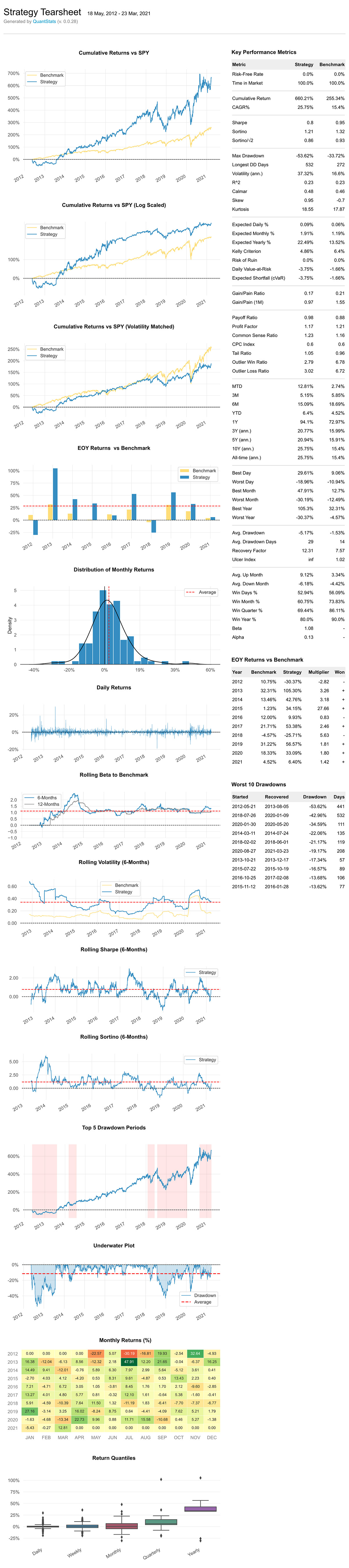
Here’s an example of a simple tear sheet analyzing a strategy:
Quick Start
%matplotlib inline
import quantstats as qs

# extend pandas functionality with metrics, etc.
qs.extend_pandas()

# fetch the daily returns for a stock
stock = qs.utils.download_returns('META')

# show sharpe ratio
qs.stats.sharpe(stock)

# or using extend_pandas() :)
stock.sharpe()
Output:
0.8135304438803402Visualize stock performance
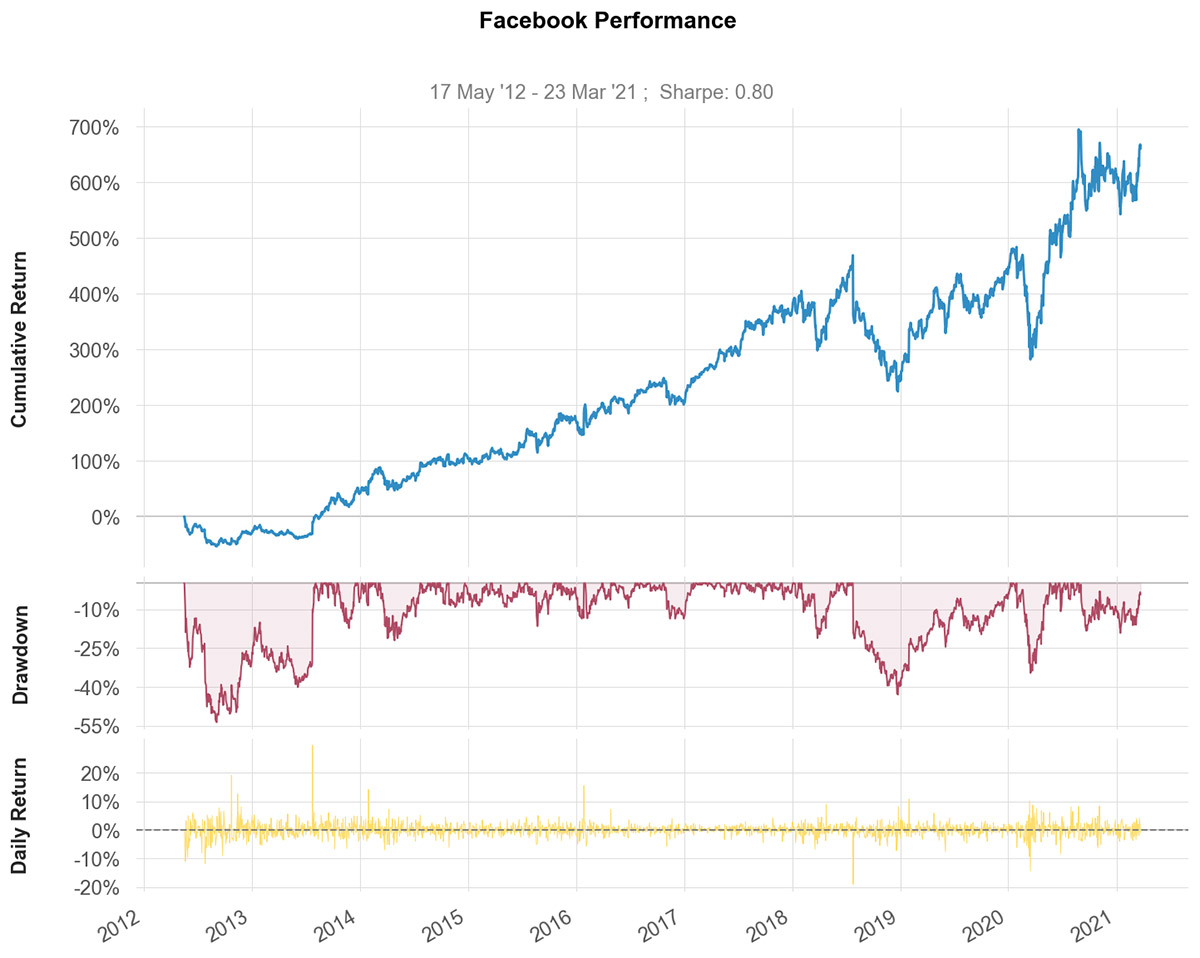
qs.plots.snapshot(stock, title='Facebook Performance', show=True)

# can also be called via:
# stock.plot_snapshot(title='Facebook Performance', show=True)
Output:
Creating a report
You can create 7 different report tearsheets:
qs.reports.metrics(mode='basic|full", ...) - shows basic/full metrics
qs.reports.plots(mode='basic|full", ...) - shows basic/full plots
qs.reports.basic(...) - shows basic metrics and plots
qs.reports.full(...) - shows full metrics and plots
qs.reports.html(...) - generates a complete report as html
Let’ create an html tearsheet
(benchmark can be a pandas Series or ticker)
qs.reports.html(stock, "SPY")
Output will generate something like this:
To view a complete list of available methods, run
[f for f in dir(qs.stats) if f[0] != '_']['avg_loss',
'avg_return',
'avg_win',
'best',
'cagr',
'calmar',
'common_sense_ratio',
'comp',
'compare',
'compsum',
'conditional_value_at_risk',
'consecutive_losses',
'consecutive_wins',
'cpc_index',
'cvar',
'drawdown_details',
'expected_return',
'expected_shortfall',
'exposure',
'gain_to_pain_ratio',
'geometric_mean',
'ghpr',
'greeks',
'implied_volatility',
'information_ratio',
'kelly_criterion',
'kurtosis',
'max_drawdown',
'monthly_returns',
'outlier_loss_ratio',
'outlier_win_ratio',
'outliers',
'payoff_ratio',
'profit_factor',
'profit_ratio',
'r2',
'r_squared',
'rar',
'recovery_factor',
'remove_outliers',
'risk_of_ruin',
'risk_return_ratio',
'rolling_greeks',
'ror',
'sharpe',
'skew',
'sortino',
'adjusted_sortino',
'tail_ratio',
'to_drawdown_series',
'ulcer_index',
'ulcer_performance_index',
'upi',
'utils',
'value_at_risk',
'var',
'volatility',
'win_loss_ratio',
'win_rate',
'worst'][f for f in dir(qs.plots) if f[0] != '_']['daily_returns',
'distribution',
'drawdown',
'drawdowns_periods',
'earnings',
'histogram',
'log_returns',
'monthly_heatmap',
'returns',
'rolling_beta',
'rolling_sharpe',
'rolling_sortino',
'rolling_volatility',
'snapshot',
'yearly_returns']*** Full documenttion coming soon ***
In the meantime, you can get insights as to optional parameters for each method, by using Python’s help method:
help(qs.stats.conditional_value_at_risk)Help on function conditional_value_at_risk in module quantstats.stats:
conditional_value_at_risk(returns, sigma=1, confidence=0.99)
calculats the conditional daily value-at-risk (aka expected shortfall)
quantifies the amount of tail risk an investmentInstallation
Install using pip:
$ pip install quantstats --upgrade --no-cache-dirInstall using conda:
$ conda install -c ranaroussi quantstatsRequirements
Questions?
This is a new library… If you find a bug, please open an issue in this repository.
If you’d like to contribute, a great place to look is the issues marked with help-wanted.
Known Issues
For some reason, I couldn’t find a way to tell seaborn not to return the monthly returns heatmap when instructed to save - so even if you save the plot (by passing savefig={...}) it will still show the plot.
Legal Stuff
QuantStats is distributed under the Apache Software License. See the LICENSE.txt file in the release for details.
P.S.
Please drop me a note with any feedback you have.
Ran Aroussi
1 maintainer

Metadata
1 maintainer
Release files for QuantStatsQd 0.0.63
For a detailed explanation of source distributions (sdists) and built distributions (wheels), please see the package formats documentation.
Source distribution (sdist)
| File | Size | Uploaded | |
|---|---|---|---|
| quantstatsqd-0.0.63.tar.gz | 41.4 kB | Details |
Built distribution (wheel)
| File | Interpreter | ABI | Platform | Reset |
|---|---|---|---|---|
| quantstatsqd-0.0.63-py2.py3-none-any.whl | Python 2, Python 3 | none | any | Details |
Total release size: 87.4 kB
Release files / quantstatsqd-0.0.63.tar.gz
| Download URL | quantstatsqd-0.0.63.tar.gz |
|---|---|
| Size | 41.4 kB |
| Tags | Source |
|
SHA-256 checksum How to use checksums |
07e973a4ae3c7dd08dd5b9a2f519bf2268602dbf0032e224c9b50adbe5bff3e8
|
|
BLAKE2b-256 checksum How to use checksums |
a53fa367d2111bd30f33c10a977578a4912794e73344f06c6528279e91982d46
|
| Upload date | |
|
Uploaded using Trusted Publishing? What is trusted publishing? |
No |
| Uploaded via |
twine/6.1.0 CPython/3.13.2
|
Release files / quantstatsqd-0.0.63-py2.py3-none-any.whl
| Download URL | quantstatsqd-0.0.63-py2.py3-none-any.whl |
|---|---|
| Size | 46.0 kB |
| Tags | Python 2 Python 3 |
|
SHA-256 checksum How to use checksums |
0eb7c88ac8b4dbb129b75c0b047a25590939eb5e8e11111fe994e365002ee0d4
|
|
BLAKE2b-256 checksum How to use checksums |
e9c1adb910b714aa6aa08eecfda9a6401625b346d66face6bb5e6c1f8973117e
|
| Upload date | |
|
Uploaded using Trusted Publishing? What is trusted publishing? |
No |
| Uploaded via |
twine/6.1.0 CPython/3.13.2
|













