
python package to retreive youtube comments and translate them

Project description
Queue Analyzer
This standalone app is the Graphical user interface version of the python program written to generate a distribution for arrival and analyse the results from the Dosimis software. The app is written in python version 3.11 and GUI is enabled with GTK 3.0 with Glide software.
Table of Contents
Installation
The App can be run/installed in following ways.
Install
Prerequisites are following
-
matplotlib==3.7.2
-
numpy==1.25.1
-
pycairo==1.24.0
-
PyGObject==3.44.1
-
pandas==2.0.1
Prerequistic for PyGObject
On Ubuntu or debian based OS :
sudo apt-get install libgirepository1.0-devOn Fedora, you can use the "dnf" package manager:
sudo dnf install gobject-introspection-develOn Arch Linux, you can use the "pacman" package manager:
sudo pacman -S gobject-introspectionOn macOS, you can use Homebrew:
brew install gobject-introspection
Install using pip
From GitHub
pip install git+https://github.com/dipson94/Queue-Analyzer.git@main#subdirectory=singlepyfile
From pypi
pip install Queue-Analyzer
Running the App
Enter the following command in Terminal to run program
queueanalyzer
Standalone running (without install)
-
Download .exe windows executable file.Download Link.
-
Build the .exe file using pyinstaller.run 'pyinstaller -w --onefile Queue_Analyzer.py' in terminal. find executable in dist folder. Or use auto-py-to-exe for GUI experience. pip install auto-py-to-exe and then run auto-py-to-exe in terminal.
-
Run python script file. make sure the following dependencies are met before running Queue_Analyzer.py file.
- Python 3.10 or newer
- Gtk version 3.0 (libraries include pycairo,pygobject,gtk,gi)
- numpy
- matplotlib
- pandas
- datetime
- Base64
Usage
The App has Two functions, one is to generate arrival distribution for the Dosimis model and second is to analyse the results from the simulation of Dosimis model.
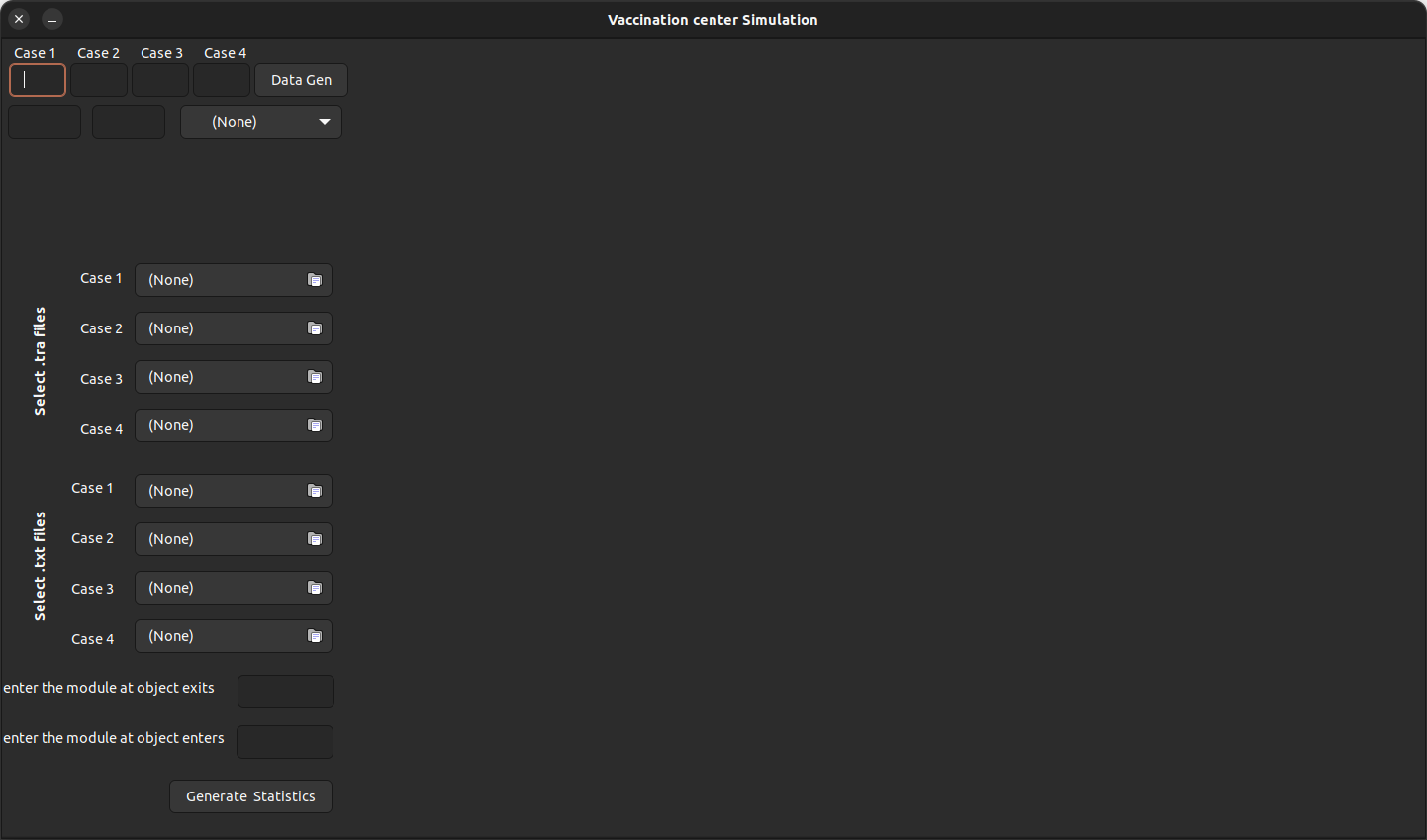
- Statistical data of total time spend and queue length (the time) at entrance for four cases.
- Graph plotted between time spend vs number of peoples for four cases.
- Second graph plotted between max time spend across each module and corresponding modules for four cases.
Subsequently a local directory is created and filled with data used for the results including the .png files of graphs.
How it works
The program has two segments. First segment perform the task of arrival data generater and second segment consists of Queue analyzing part.
Data Generater
A raw string is created with template of input data for Dosimis.
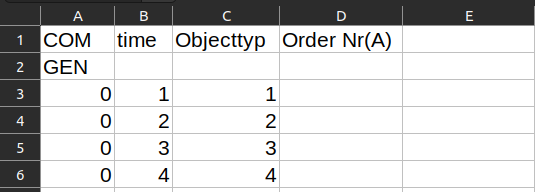
First two rows are the part of templete and later rows with columns 1, 2, and 3 represents time, object type and order number respectively.
The arrival data is generated with regular interval and added to the raw string. Later that string saved as .txt format.
Queue Analyzer
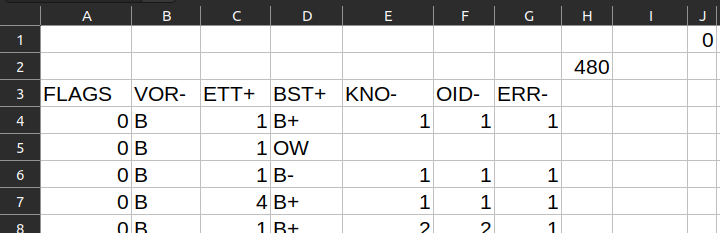
The above illustration is the data from .tra file when space is used as the delimiter. It is then sliced and saved as .csv format. Refer the Dosimis user Manual for more details about .tra file (Dosimis-3 User manual 2017, page number : 414) .
The below illustraion is the result of the above change.
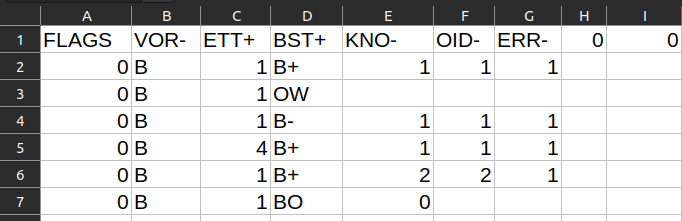
-
First column indicates the time starting from the beginning of the simulation.
-
Third column indicates identifying number of module.
-
Fourth column indicates the keys to identifiy the current event corresponding to the time.
- B+ indicates the entering time of object into the module.
- B- indicates the exit time of object from module.
-
Sixth column indicates the object number.
The idendified data is extracted into a dataframe. And that dataframe is used to form the data such as queue tine,dwell tiem etc.
Base64 Encoding
In order to have the ability of standalone -independant nature, all the dependent data are encapsulated into python file.
The icon file encoded into base64 and stored as string values. it is then to decoded and directly used as icon.
Simlarly the glade file, which in xml format, is loaded as raw string and later loaded as GUI of the program.
Contributing
Optimizing the project with size and run speed.
Making C version of the same App.
License
GNU General Public License v3.0
Author
Dipson


Download files
Download the file for your platform. If you're not sure which to choose, learn more about installing packages.
Source Distribution
Built Distribution
Filter files by name, interpreter, ABI, and platform.
If you're not sure about the file name format, learn more about wheel file names.
Copy a direct link to the current filters
File details
Details for the file Queue_Analyzer-0.9.1.tar.gz.
File metadata
- Download URL: Queue_Analyzer-0.9.1.tar.gz
- Upload date:
- Size: 29.0 kB
- Tags: Source
- Uploaded using Trusted Publishing? No
- Uploaded via: twine/4.0.2 CPython/3.11.3
File hashes
| Algorithm | Hash digest | |
|---|---|---|
| SHA256 |
ad1ab40ba567f84c5533cfa2364c22f3a49980bf3091d178314924b904f2b9cf
|
|
| MD5 |
7bf02c0c7795e89978b3309255d4920f
|
|
| BLAKE2b-256 |
21a8401b8188d362b5a566b801d465b7f6007fb260fd901f4eef09c003918953
|
File details
Details for the file Queue_Analyzer-0.9.1-py3-none-any.whl.
File metadata
- Download URL: Queue_Analyzer-0.9.1-py3-none-any.whl
- Upload date:
- Size: 25.8 kB
- Tags: Python 3
- Uploaded using Trusted Publishing? No
- Uploaded via: twine/4.0.2 CPython/3.11.3
File hashes
| Algorithm | Hash digest | |
|---|---|---|
| SHA256 |
4dbb068c35a59ce24bd77f9f1e292f517af7dd04bca73fab019351293188200c
|
|
| MD5 |
838623d21c6b91cae8fef3b57f485cab
|
|
| BLAKE2b-256 |
a2010c7356728daf7e0e031a5eb2250b682b1d23b16f015277d4548945140bc7
|






