
A PyMOL plugin that makes enzyme redesign tasks easier to all.

Project description
REvoDesign

Platforms supported










CI Status



Docker images

Code checkings





Introduction
Welcome to REvoDesign - a PyMOL plugin that makes enzyme redesign tasks easier for everyone. REvoDesign aims at facilitating enzyme redesign using a combination of structural and phylogenetic information, serving as a co-pilot for protein designers and leveraging the wealth of human knowledge in enzyme design.
About the Plugin
Enzyme redesign is a complex task that requires a deep understanding of protein structures, substrate binding sites, and evolutionary relationships. REvoDesign Toolkit is designed to streamline this process by offering a range of tools and functionalities to assist protein designers in their endeavors.
Basic Architecture Design
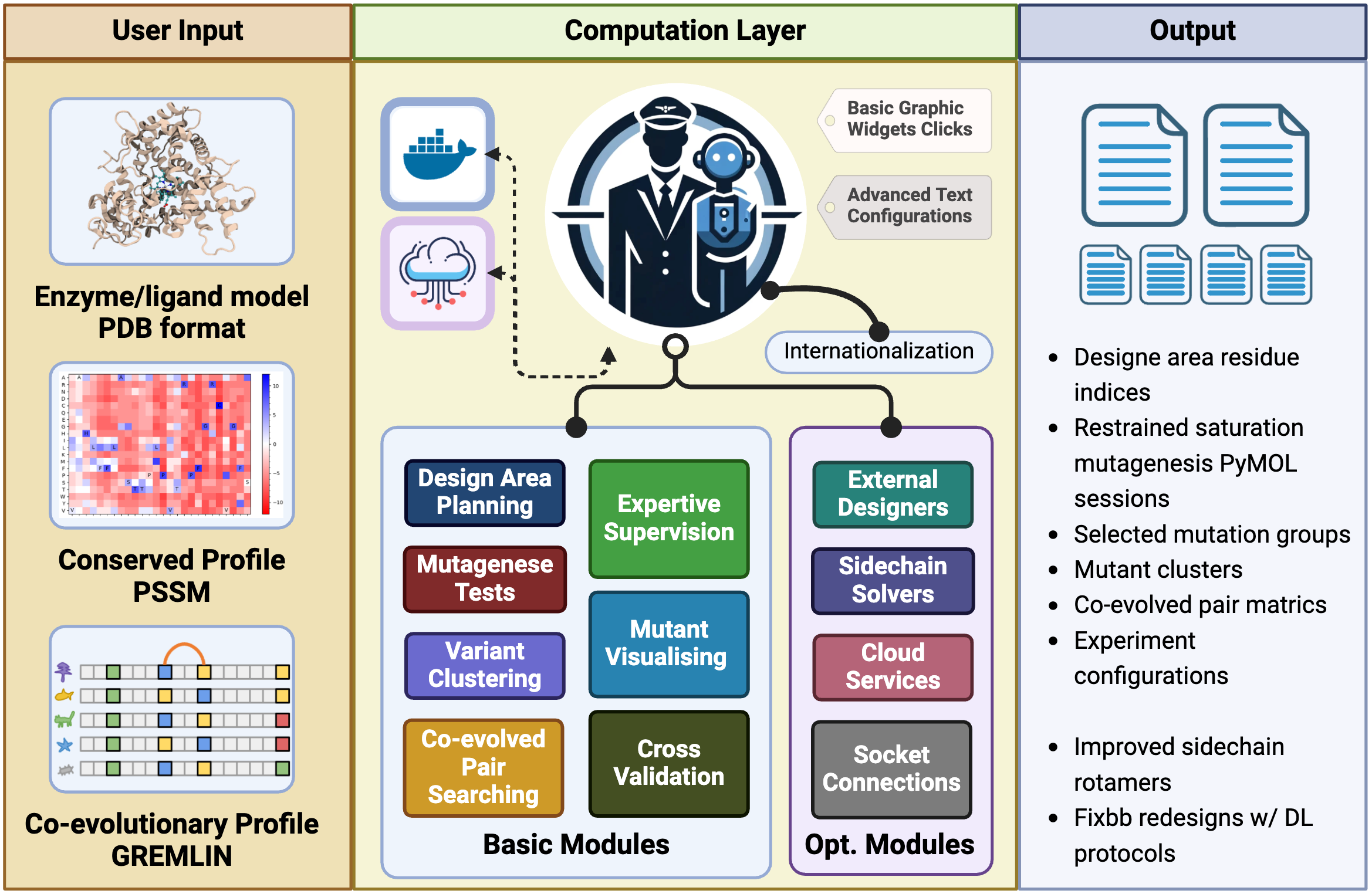
Key Features
In brief, the REvoDesign PyMOL plugin provides a set of essential tools to help protein designers with the following tasks:
-
Surface Residue Analysis: Identify surface residues exposed as solvent-accessible surface area (SASA) and design pocket identification based on substrates and/or cofactors, with customizable cutoffs.
-
Mutant Loading: Load available designable mutants through a PSSM-like table in CSV format, allowing for customizable rejections and preferences.
-
Human Knowledge Supervision: Perform human knowledge-supervised mutant selection within the PyMOL interface, utilizing structural views.
-
Scale Reduction: Reduce the scale of your design, making it suitable for low-throughput wet-lab validation by leveraging sequence clustering.
-
Visualization: Visualize mutant tables in PyMOL, whether they have been scored or not.
-
Co-Evolution Analysis: Search for possible inter-residue co-evolved residue pairs for effective mutants using the GREMLIN Markov random field profile.
REvoDesign is your indispensable companion in the intricate journey of enzyme redesign. Whether you are a seasoned protein designer or just beginning your exploration, REvoDesign Toolkit is here to simplify your workflow and enhance your enzyme engineering endeavors.
Please refer to the documentation(WIP) for detailed instructions on how to use the toolkit and make the most of its features.
Dependencies wait list
[!NOTE] These are the dependencies that are not yet implemented but will be added in the toolkit.
Designers
Sidechain Solvers
Installation
REvoDesign offers a user-friendly installation process using a graphical user interface (GUI).
Step 1: Install the REvoDesign Package Manager
Before installing the main program, you need to install the REvoDesign Package Manager as a PyMOL plugin.
-
Open PyMOL.
-
Navigate to Plugin > Plugin Manager and select Install New Plugin.
-
Choose Install from PyMOLWiki or any URL.
-
Paste the following URL:
https://gist.githubusercontent.com/YaoYinYing/c1e8bfe0fc0b9c60bf49ea04a550a044/raw/REvoDesign_PyMOL.py
-
Click Fetch.
-
Confirm the installation when prompted.
-
Set the installation location (use the default if unsure) and click OK.
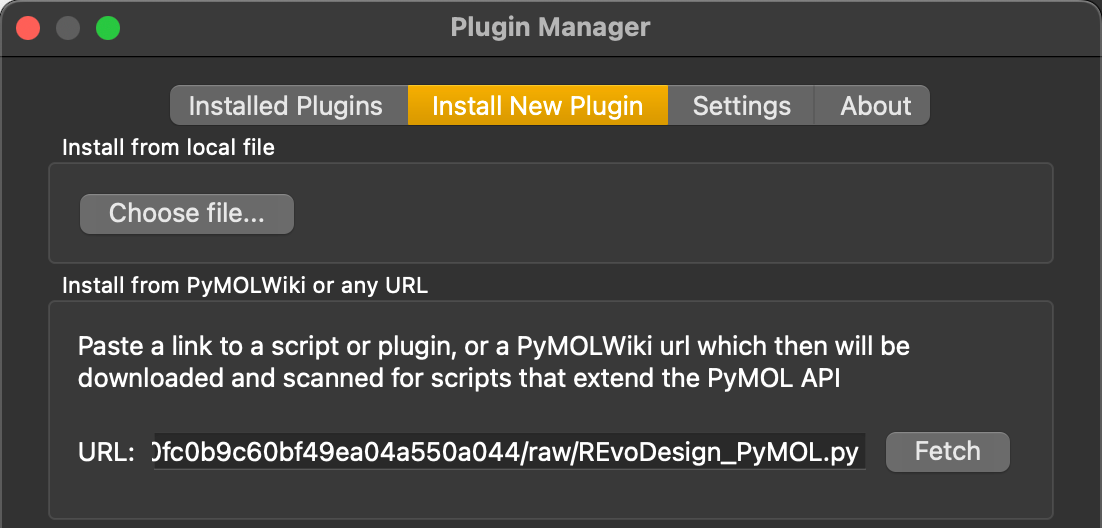
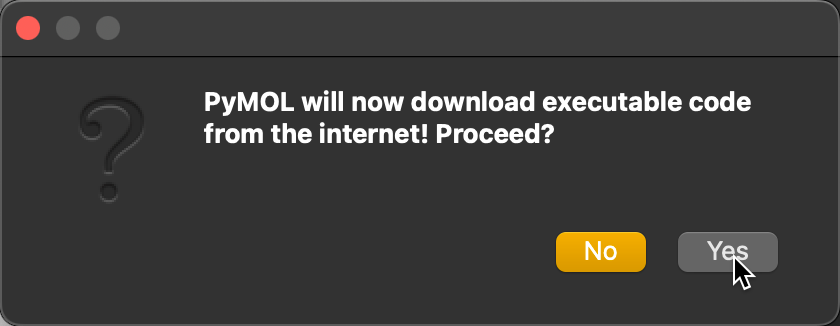
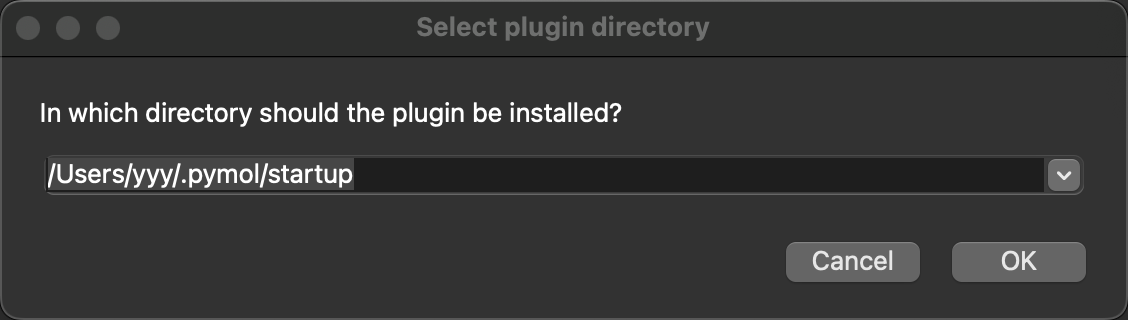
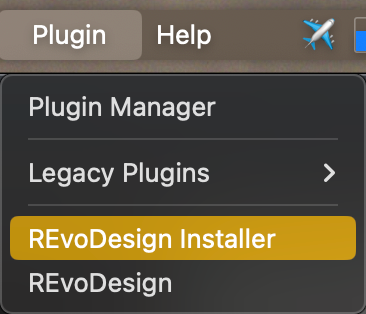
Once installed, the REvoDesign Package Manager will appear in the PyMOL menu.
Step 2: Install the Main Program
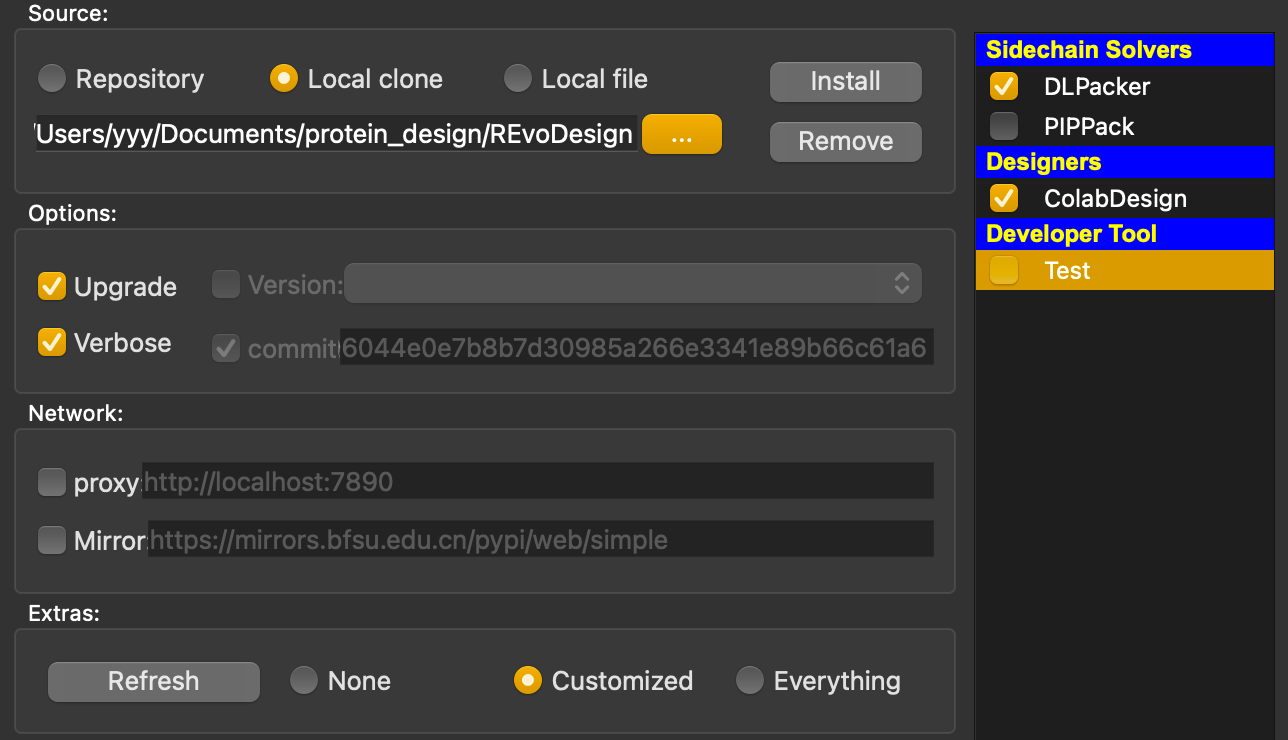
The REvoDesign Package Manager simplifies the installation of the core REvoDesign program. It supports various installation methods and configurations:
Features:
- Installation Sources:
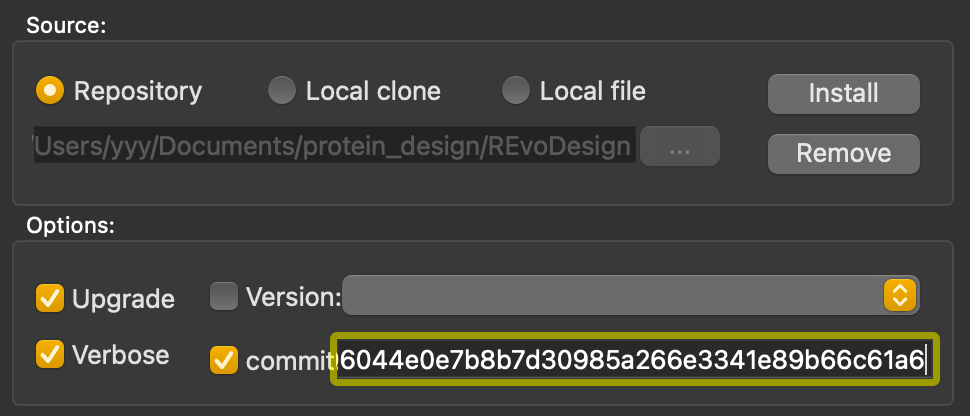
- Repository: Install directly from the remote repository.
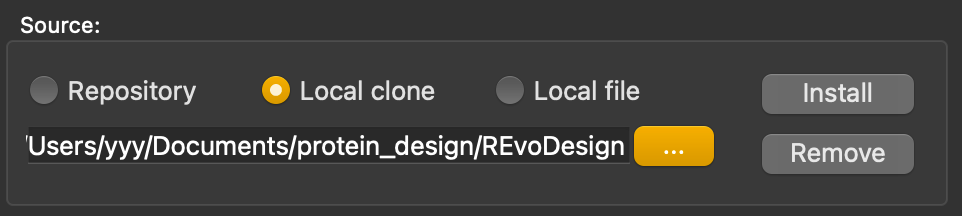
- Local clone/directory: Install from a local source code or cloned repository.
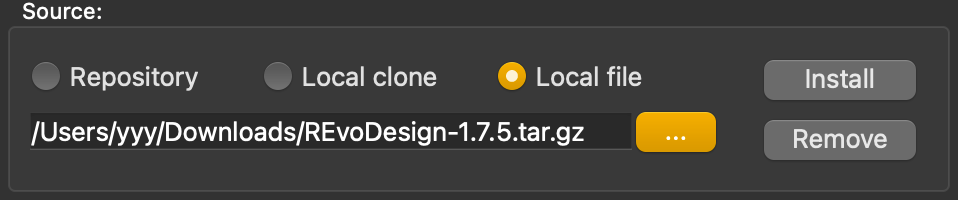
- Local file: Install from a
.zipor.tar.gzarchive.
- Options:
- Upgrade: Update to the latest release version.
- Verbose: Show detailed installation logs.
- Version/Commit: Install a specific version or commit from the repository.
- Network Control:
- Proxy Support: Configure HTTP, HTTPS, SOCKS5, or SOCKS5h proxies.
- Mirror: Use a PyPI mirror for installations.
- Extras:
- Basic: Default installation.
- Customized: Select additional features.
- Everything: Install all extras (excluding test packages).
- Cache: Choose a custom cache directory or use the default.
- Self-Upgrades: Upgrade the package manager and UI directly.
Installation Methods
-
Remote Repository: Select Repository and click Install.
-
Local Clone: Use Local clone to install from a local repository or unzipped source code.
-
Local File: Select Local file to install from a
.zipor.tar.gzfile. -
Specific Version/Commit: Check Version or Commit to install a specific release.
-
Customized/Extras: Use Customized to select specific features or Everything for a full installation.
Uninstallation
Use the Remove button in the manager to uninstall. You can also remove selected extras.
Network Settings
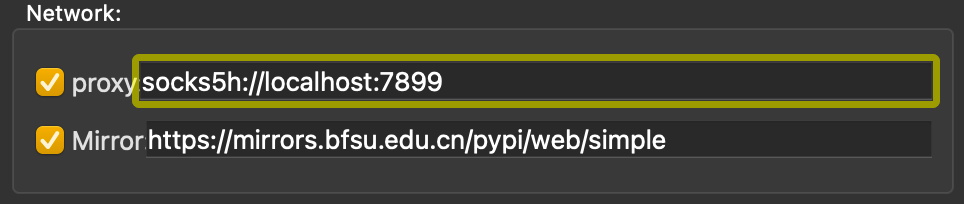
Set up proxies and mirrors to bypass network restrictions. For example, create a SOCKS5 proxy using SSH:
ssh -D 7899 -C root@<your.vps.ip> -p<ssh-port>
Configure the proxy in the manager:
Self-Upgrades
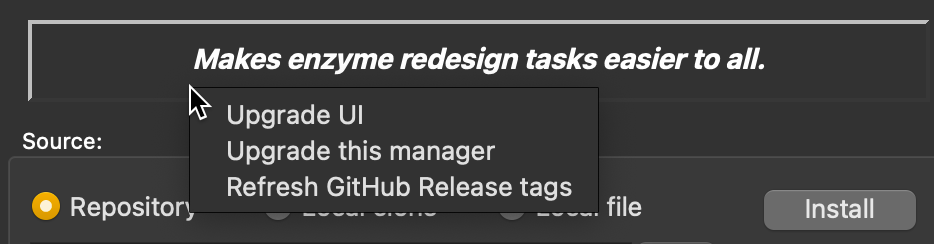
Right-click any non-editing area of the manager and select Upgrade this manager to fetch the latest version.
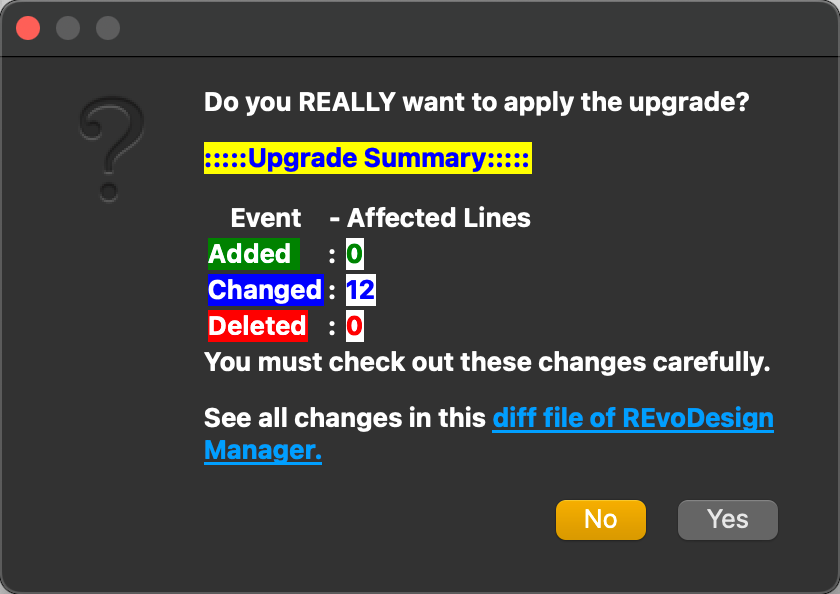
After confirming, the script will replace the existing manager with the updated version.
You are now ready to use REvoDesign for your enzyme redesign projects!
Extras table
| extras tag and packages | references | explanations |
|---|---|---|
ColabDesign |
https://github.com/sokrypton/ColabDesign.git@v1.1.1 | with JAX |
DLPacker |
https://github.com/YaoYinYing/DLPacker@pip-installable | with TensorFlow |
PIPPack |
https://github.com/YaoYinYing/PIPPack@pip-installable | with PyTorch |
[!WARNING] ColabDesign uses Jax, which requires Python >= 3.9
[!IMPORTANT] Please make sure that modern PyMOL version is fetched from pymol-open-source channel, instead of obsolete PyMOL bundle (* < v2.5.7*, shipped with Python 3.7) from offical website or schrodinger's conda channel.
[!IMPORTANT] ALSO, for MacOS users work with Apple Silicon and PyMOL bundle >2.5.7,
jaxlibbuilded withAVXwill not work underRosetta-2. Please consider using native build ofpymol-open-sourceor buildingjaxlibfrom source.
Doc: Building jaxlib from source
Issue: CPU Support / Necessary AVX Instructions
- Getting started:
- In order to get started, you need to load/fetch a structure(
fetch 1SUO, for example) into your PyMOL session. - Click
Menu->REvoDesign->Import PyMOL Sessionto let REvoDesign find a designable molecule. Here is a keyboard shortcut:Ctrl+N. - Have fun!
- In order to get started, you need to load/fetch a structure(
Happy enzyme redesigning with REvoDesign! If you encounter any issues during installation or usage, please consult the documentation or seek assistance from REvoDesign toolkit's support resources.

Release history Release notifications | RSS feed

Download files
Download the file for your platform. If you're not sure which to choose, learn more about installing packages.
Source Distribution
Built Distribution
Filter files by name, interpreter, ABI, and platform.
If you're not sure about the file name format, learn more about wheel file names.
Copy a direct link to the current filters
File details
Details for the file revodesign-0.0.0rc23.post1.tar.gz.
File metadata
- Download URL: revodesign-0.0.0rc23.post1.tar.gz
- Upload date:
- Size: 30.0 kB
- Tags: Source
- Uploaded using Trusted Publishing? No
- Uploaded via: python-requests/2.32.3
File hashes
| Algorithm | Hash digest | |
|---|---|---|
| SHA256 |
6ba6e85d758f3f21e34340eef2a864b113a54061caddf10c99cc1473d5135078
|
|
| MD5 |
a6b0ab9fcbf5f81fa4d2ecd58b04d592
|
|
| BLAKE2b-256 |
e68f34bacbda950bbb32b2aff51e2b8ce1e0d890d427ffe1672cb17410a150fd
|
File details
Details for the file revodesign-0.0.0rc23.post1-py3-none-any.whl.
File metadata
- Download URL: revodesign-0.0.0rc23.post1-py3-none-any.whl
- Upload date:
- Size: 8.3 kB
- Tags: Python 3
- Uploaded using Trusted Publishing? No
- Uploaded via: python-requests/2.32.3
File hashes
| Algorithm | Hash digest | |
|---|---|---|
| SHA256 |
bf94d1802315e18a0358e92002dc1abb5e25b0dc0d8fea02b0ab5b52a65ec1c1
|
|
| MD5 |
18ef4a14bc8eb3c2d07fae0501ccea15
|
|
| BLAKE2b-256 |
02657daeae6de62612dd7532938cf96c7e84e59e8f98bfbf9fa2ea2f51bf920d
|






