


RM-Tools
RM-synthesis, RM-clean and QU-fitting on polarised radio spectra
Python scripts to perform RM-synthesis, RM-clean and QU-fitting on polarised radio spectra.
Initial version by Cormac R. Purcell Currently hosted by CIRADA and maintained by Cameron Van Eck
Installation / Usage
Installation, usage instructions and detailed algorithm information can be found in the wiki.
Structure:
- RMtools_1D ... Toolkit to produce Faraday spectra of single pixels.
- RMtools_3D ... Toolkit to produce Faraday depth cubes.
- RMutils ... Utilities for interacting with polarized data and Faraday depth
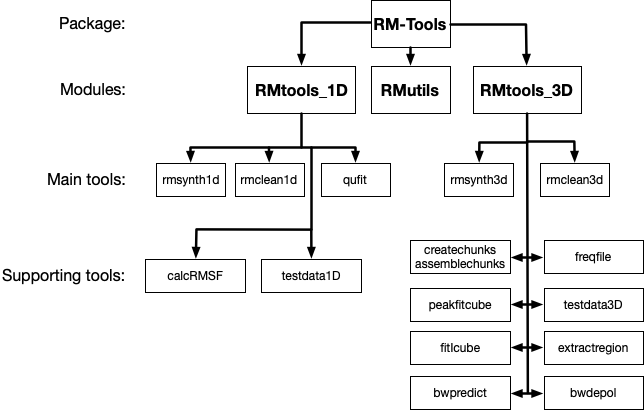
Five terminal commands are added to invoke the main tools:
rmsynth1drmclean1drmsynth3drmclean3dqufit
Use these commands with a -h flag to get information on the usage of each. Full documentation is on the wiki.
The following terminal commands are available to access the additional tools:
rmtools_freqfilermtools_calcRMSFrmtools_testdata1Drmtools_createchunksrmtools_assemblechunksrmtools_fitIcubermtools_peakfitcubermtools_testdata3Drmtools_extractregion
Citing
If you use this package in a publication, please cite the RM-Tools paper, and optionally the Zenodo DOI for the specific version (version DOIs can be found here).
More information on the Canadian Initiative for Radio Astronomy Data Analysis (CIRADA) can be found at cirada.ca.
RM-Tools is open source under an MIT License.
Contributing
Contributions are welcome. Questions, bug reports, and feature requests can be posted to the GitHub issues page or sent to Cameron Van Eck, cameron.vaneck (at) anu.edu.au.
The development dependencies can be installed via pip from PyPI:
pip install "RM-Tools[dev]"
or for a local clone:
cd RM-Tools
pip install ".[dev]"
Code formatting and style is handled by black and isort, with tests run by pytest. A pre-commit hook is available to handle the autoformatting. After installing the dev dependencies, you can install the hooks by running:
cd RM-Tools
pre-commit install
1 maintainer

Metadata
1 maintainer
Release files for RM-Tools 1.4.11
For a detailed explanation of source distributions (sdists) and built distributions (wheels), please see the package formats documentation.
Source distribution (sdist)
| File | Size | Uploaded | |
|---|---|---|---|
| rm_tools-1.4.11.tar.gz | 174.7 kB | Details |
Built distribution (wheel)
| File | Interpreter | ABI | Platform | Reset |
|---|---|---|---|---|
| rm_tools-1.4.11-py3-none-any.whl | Python 3 | none | any | Details |
Total release size: 380.7 kB
Release files / rm_tools-1.4.11.tar.gz
| Download URL | rm_tools-1.4.11.tar.gz |
|---|---|
| Size | 174.7 kB |
| Tags | Source |
|
SHA-256 checksum How to use checksums |
f91c59a93cc7ecefcbb33b57e39b54a50a8ea3de9be594daabb73c38331c6ab1
|
|
BLAKE2b-256 checksum How to use checksums |
a7394cc6e4d7b2a7f3b80026c98f9ee664f2bec37e1a9d980bc3dfcf0f46a456
|
| Upload date | |
|
Uploaded using Trusted Publishing? What is trusted publishing? |
No |
| Uploaded via |
twine/6.2.0 CPython/3.9.25
|
Release files / rm_tools-1.4.11-py3-none-any.whl
| Download URL | rm_tools-1.4.11-py3-none-any.whl |
|---|---|
| Size | 206.0 kB |
| Tags | Python 3 |
|
SHA-256 checksum How to use checksums |
a5a7658f8961e3d44f8f713bee9bd7e6aa4a8d0c987ff950440e553e26226563
|
|
BLAKE2b-256 checksum How to use checksums |
3023ef95a1070a5dcefac211d3083a90be503fed51b3cad6b279f89626e60987
|
| Upload date | |
|
Uploaded using Trusted Publishing? What is trusted publishing? |
No |
| Uploaded via |
twine/6.2.0 CPython/3.9.25
|














