
Rapid registration-free tractogram parcellation using global context

Project description
RapidParc




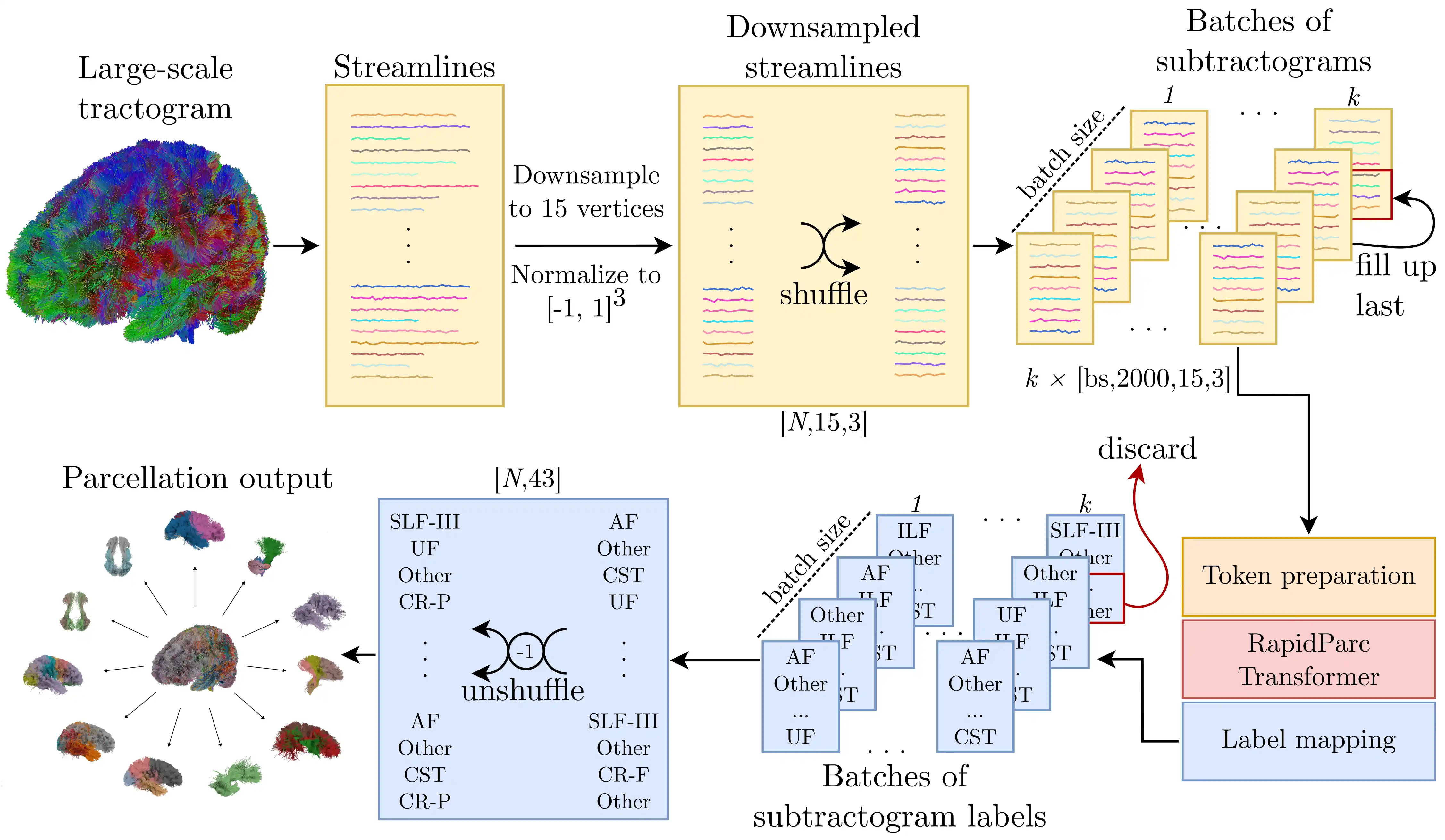
RapidParc is a fast, accurate, and lesion-robust transformer-based algorithm for registration-free parcellation of streamlines from diffusion MRI tractography. It assigns one label to each streamline in a tractogram and is designed for efficient large-scale inference.
If you use this repository, please cite:
Justus Bisten, Valentin von Bornhaupt, Johannes Grün, Tobias Bauer, Theodor Rüber, Thomas Schultz.
RapidParc: A Global-Context Transformer for Parallel, Accurate, and Lesion-Robust Tractogram Parcellation.
Imaging Neuroscience (2026).
DOI: 10.1162/IMAG.a.1168
Table of Contents
Problem description
Tractogram parcellation assigns anatomical labels to streamlines obtained from diffusion MRI tractography. RapidParc performs this task without anatomical registration and uses a transformer architecture to incorporate global context across streamlines.
Method
At inference time, streamlines are shuffled and processed in groups of size eval_context_size. This makes it possible to scale to large tractograms while retaining contextual information beyond the individual streamline. The method is registration-free, which is especially useful when anatomical deformation, lesions, or post-surgical alterations reduce the reliability of registration-based pipelines.
Key Features:
- Registration-free inference
- Fast, parallelized tractogram processing
- Strong benchmark performance on the TractCloud test split
- Improved robustness in anatomically altered or lesioned brains
- Simple usage from both Python and command line
RapidParc predicts one of 43 classes per streamline, including an outlier class, Other.
Pretrained models:
| Model | Intended use |
|---|---|
rapidparc |
Default general-purpose model for standard inference. |
hemiaug |
When your data may contain strong unilateral anatomical changes, lesions, or post-surgical alterations. |
rapidparc_v8 |
When you want to study the effect of using 8 instead of 15 resampled vertices. |
Installation
This project was developed with PyTorch 2.4 on Python 3.12.3 and CUDA 12.4.
1. (optional, recommended) Create and activate a virtual environment
python3 -m venv .venv
source .venv/bin/activate
pip install -U pip
2. Install PyTorch
Install PyTorch using pip by following the official instructions: https://pytorch.org/get-started/locally/
3. Install RapidParc
pip install RapidParc
Quick start
Python Interface
To parcellate a tractogram in Python:
from RapidParc import RapidParc

predictions = RapidParc(...)
The RapidParc function accepts multiple input-formats like list, torch.Tensor and numpy.ndarray. Input streamlines do not need to have the same number of supporting points. RapidParc resamples them automatically.
Example:
from RapidParc import RapidParc
import torch

# Your tractogram goes here
inputTractogram = torch.rand([5000, 15, 3])

predictions = RapidParc(
    model_name_or_path = "rapidparc",
    inputTractogram = inputTractogram,
    eval_batch_size = 128,
    eval_context_size = 2000,
    device = torch.device("cpu"),
    print_time = True,
    print_class_distribution = False
)

print(f"Output shape: {predictions.shape}")
print(f"Output: {predictions}")
classes, counts = torch.unique(predictions, return_counts=True)
print(f"Output summary: {[f'{pred}: {num}' for pred, num in zip(classes, counts)]}")
Time to load model: 0.05s
Time to shuffle data: 0.00s
5000 Streamlines are loaded and preprocessed.
100%|█████████████████████████████████████| 1/1 [00:00<00:00,  5.28it/s]
Prediction is done in 0.20s
Total time: 0.27s

Output shape: torch.Size([5000])
Output: tensor([42, 42, 42,  ..., 42, 42, 42])
Output summary: ['33: 1', '42: 4999']
In this example, randomly generated streamlines are mostly classified as outliers, which is expected.
Command-line usage (.tck tractograms)
If your tractogram is stored as a .tck file, you can run parcellation directly from the terminal. Each assigned tract results in a new .tck output file inside the specified directory.
Example:
rapidparc --tck_path tractogram.tck \
 --out_path parcellated_tractogram \
 --model_name_or_path rapidparc \
 --eval_batch_size 64 \
 --eval_context_size 2000 \
 --device cpu \
 --print_time \
 --print_class_distribution
Time to load tck file with 926641 streamlines: 1.50s
Time to shorten streamlines: 5.54s
Time to load model: 0.07s
Time to shuffle data: 0.08s
926641 Streamlines are loaded and preprocessed.
100%|█████████████████████████████████████| 8/8 [00:12<00:00,  1.60s/it]
Prediction is done in 12.83s
Class distribution
      Class       | Count
 0 AF                (6254) ▇▇▇▇▇▇
 1 CB               (14252) ▇▇▇▇▇▇▇▇▇▇▇▇▇
 2 EC                (3795) ▇▇▇▇
 3 EmC               (5990) ▇▇▇▇▇▇
 4 ILF              (17420) ▇▇▇▇▇▇▇▇▇▇▇▇▇▇▇▇
 5 IOFF             (19687) ▇▇▇▇▇▇▇▇▇▇▇▇▇▇▇▇▇▇
 6 MdLF             (10216) ▇▇▇▇▇▇▇▇▇▇
 7 SLF-I            (10937) ▇▇▇▇▇▇▇▇▇▇
 8 SLF-II           (28028) ▇▇▇▇▇▇▇▇▇▇▇▇▇▇▇▇▇▇▇▇▇▇▇▇▇
 9 SLF-III           (5348) ▇▇▇▇▇
10 UF                (4185) ▇▇▇▇
11 CST              (24662) ▇▇▇▇▇▇▇▇▇▇▇▇▇▇▇▇▇▇▇▇▇▇
12 CR-F             (14493) ▇▇▇▇▇▇▇▇▇▇▇▇▇
13 CR-P              (2089) ▇▇
14 SF               (23246) ▇▇▇▇▇▇▇▇▇▇▇▇▇▇▇▇▇▇▇▇▇
15 SO                (5810) ▇▇▇▇▇▇
16 SP                (5294) ▇▇▇▇▇
17 TF               (40690) ▇▇▇▇▇▇▇▇▇▇▇▇▇▇▇▇▇▇▇▇▇▇▇▇▇▇▇▇▇▇▇▇▇▇▇▇
18 TO                (4753) ▇▇▇▇▇
19 TT                (8700) ▇▇▇▇▇▇▇▇
20 TP                (9958) ▇▇▇▇▇▇▇▇▇
21 PLIC              (4345) ▇▇▇▇
22 CC1               (1477) ▇▇
23 CC2              (18125) ▇▇▇▇▇▇▇▇▇▇▇▇▇▇▇▇
24 CC3               (7703) ▇▇▇▇▇▇▇
25 CC4               (9848) ▇▇▇▇▇▇▇▇▇
26 CC5               (7267) ▇▇▇▇▇▇▇
27 CC6              (18489) ▇▇▇▇▇▇▇▇▇▇▇▇▇▇▇▇▇
28 CC7               (8638) ▇▇▇▇▇▇▇▇
29 CPC                (875) ▇
30 ICP                (866) ▇
31 Intra-CBLM-I-P    (6059) ▇▇▇▇▇▇
32 Intra-CBLM-PaT   (10004) ▇▇▇▇▇▇▇▇▇
33 MCP                (929) ▇
34 Sup-F            (56703) ▇▇▇▇▇▇▇▇▇▇▇▇▇▇▇▇▇▇▇▇▇▇▇▇▇▇▇▇▇▇▇▇▇▇▇▇▇▇▇▇▇▇▇▇▇▇▇▇▇▇
35 Sup-FP            (5456) ▇▇▇▇▇
36 Sup-O             (7084) ▇▇▇▇▇▇▇
37 Sup-OT            (6879) ▇▇▇▇▇▇▇
38 Sup-P            (23330) ▇▇▇▇▇▇▇▇▇▇▇▇▇▇▇▇▇▇▇▇▇
39 Sup-PO            (6748) ▇▇▇▇▇▇
40 Sup-PT           (19768) ▇▇▇▇▇▇▇▇▇▇▇▇▇▇▇▇▇▇
41 Sup-T            (11187) ▇▇▇▇▇▇▇▇▇▇
42 Outlier 'Other' (429054) ###################################################
Total time: 13.28s
Files saved in parcellated_tractogram/
The same function is also available from Python:
from RapidParc import RapidParcTckEval

RapidParcTckEval(...)
Reproducing results
To benchmark RapidParc on the TractCloud test split, use RapidParc.test. The RapidParc.test function automatically fetches the TractCloud dataset during evaluation.
Example:
import RapidParc
import torch

acc_43, f1_43 = RapidParc.test(
    model_name_or_path = "rapidparc_v8",
    applyTestSetAugmentations = False,
    eval_batch_size = 128,
    eval_context_size = 2000,
    device = torch.device("cpu"),
    print_classification_report = True
)
print(f"Accuracy: {100 * acc_43:.2f} %, Macro F1 Score: {100 * f1_43:.2f} %")
This prints out a classification report and creates a confusion matrix plot in rapidParc_v8/plots. You can also execute this via the CLI using rapidparc-test.
Retrain RapidParc on the TractCloud train split
To retrain RapidParc on the TractCloud training split, a minimal run can be started using:
rapidparc-train
A list of all configurable attributes can be obtained from cli_train.py. The parameters we used for each model can be found in the .yaml files attached to the GitHub releases.
Known issues
- Orientation Errors: If evaluation results are unexpectedly poor, your tractogram may have an axis flip or coordinate-system mismatch.
- Outlier Class Ratio: The
Otherclass may contain a large fraction of streamlines, especially in whole-brain tractograms. This is often expected and wanted.
Release history Release notifications | RSS feed


Download files
Download the file for your platform. If you're not sure which to choose, learn more about installing packages.
Source Distribution
Built Distribution
Filter files by name, interpreter, ABI, and platform.
If you're not sure about the file name format, learn more about wheel file names.
Copy a direct link to the current filters
File details
Details for the file rapidparc-1.0.2.tar.gz.
File metadata
- Download URL: rapidparc-1.0.2.tar.gz
- Upload date:
- Size: 326.4 kB
- Tags: Source
- Uploaded using Trusted Publishing? No
- Uploaded via: twine/6.2.0 CPython/3.13.3
File hashes
| Algorithm | Hash digest | |
|---|---|---|
| SHA256 |
aa494decb5ed2da84b99cc726f0b4ec14d365902aab271a519ae1b3a029c15ea
|
|
| MD5 |
57d22da54dcea4c88bcf626820b68bad
|
|
| BLAKE2b-256 |
703f85ff4fdf934c9bd79537b4d3c37252fc3a747e243a45475dae080ae70f92
|
File details
Details for the file rapidparc-1.0.2-py3-none-any.whl.
File metadata
- Download URL: rapidparc-1.0.2-py3-none-any.whl
- Upload date:
- Size: 44.9 kB
- Tags: Python 3
- Uploaded using Trusted Publishing? No
- Uploaded via: twine/6.2.0 CPython/3.13.3
File hashes
| Algorithm | Hash digest | |
|---|---|---|
| SHA256 |
48310d54d393a485035fd8f59b78d6104acc64dd3dc39c59f6c4a27876a0d384
|
|
| MD5 |
31392b988520191a9e62d16e70b10d19
|
|
| BLAKE2b-256 |
9568341b334be9032701105263728a073beb395c55e9424898fadd7e44aa1a4c
|






