
Reticulum-Telemetry-Hub (RTH) manages a complete TCP node across a Reticulum-based network, enabling communication and data sharing between clients like Sideband or Meshchat.


Project description
Reticulum-Telemetry-Hub (RTH)
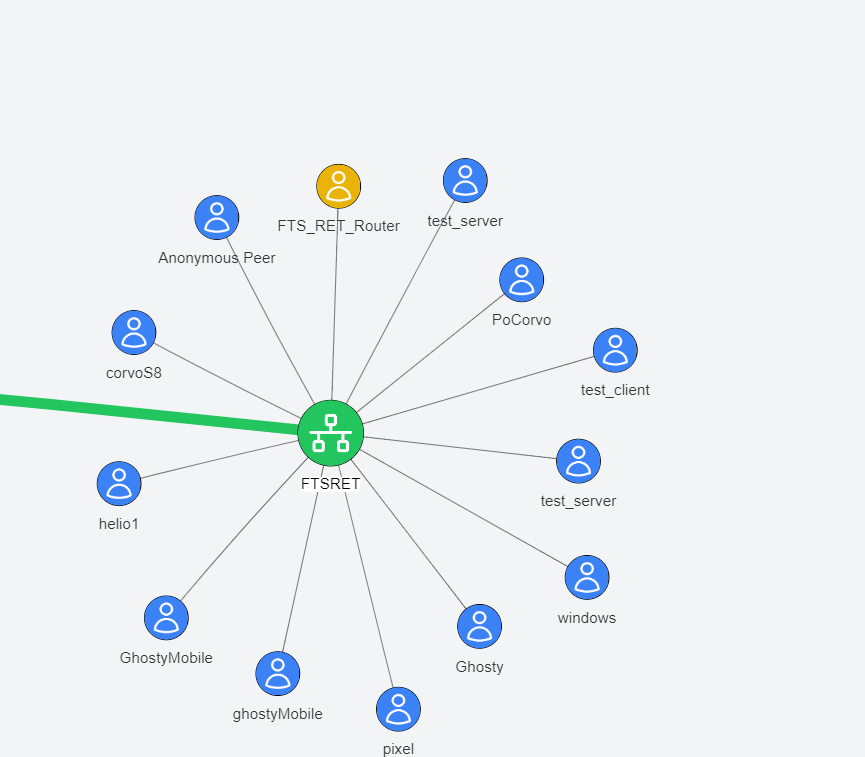
Reticulum-Telemetry-Hub (RTH) is an independent component within the Reticulum / lXMF ecosystem, designed to manage a complete TCP node across a Reticulum-based network. RTH enables communication and data sharing between clients like Sideband or Meshchat, enhancing situational awareness and operational efficiency in distributed networks.
Core Functionalities
The Reticulum-Telemetry-Hub can perform the following key functions:
- One to Many & Topic-Targeted Messages: RTH supports broadcasting messages to all connected clients or filtering the fan-out by topic tags maintained in the hub's subscriber registry.
- By sending a message to the hub, it will be distributed to all clients connected to the network or, when the payload includes a
TopicID, only to the peers subscribed to that topic. (Initial implementation - Experimental) - Telemetry Collector: RTH acts as a telemetry data repository, collecting data from all connected clients. Currently, this functionality is focused on Sideband clients that have enabled their Reticulum identity. By rewriting the code we hope to see a wider implementation of telemetry in other applications.
- Lightweight Topic Managemnt : Ability to create topics and to distribute messages to users subscribed to the topic
- Replication Node: RTH uses the LXMF router to ensure message delivery even when the target client is offline. If a message's destination is not available at the time of sending, RTH will save the message and deliver it once the client comes online.
- Reticulum Transport: RTH uses Reticulum as a transport node, routing traffic to other peers, passing network announcements, and fulfilling path requests.
- File and Image Attachments: RTH stores inbound files/images sent over LXMF, catalogs them by ID, and serves them back on demand. Clients can list stored items (
ListFiles,ListImages) and retrieve them (RetrieveFile,RetrieveImage) with the binary payload delivered in LXMF fields so Sideband, Meshchat, and similar tools can save them directly. - TAK Server Integration: if configured, RTH sends chat and telemetry to a TAK server.
Documentation
- Command payload formats and examples:
docs/supportedCommands.md - User Manual
- TAK / Cursor-on-Target integration:
docs/tak.md - File and image workflows: see the "Exchanging attachments over LXMF" section below.
Quickstart
Follow these steps to bring up a local hub using the bundled defaults:
- Clone the repository and enter it.
git clone https://github.com/FreeTAKTeam/Reticulum-Telemetry-Hub.git
cd Reticulum-Telemetry-Hub
- Create and activate a virtual environment.
python3 -m venv .venv
source .venv/bin/activate
You should see(.venv)in your shell prompt after activation. - Install dependencies in editable mode (or use Poetry if you prefer).
pip install --upgrade pip
pip install -e .
The editable install pulls every dependency declared inpyproject.toml(including runtime services, the optionalgpsdclientGPS integration, and the bundled tests). Core dependencies now includepython-dotenvfor environment loading,qrcodefor QR payload rendering, andPyNaClfor stamp generation. If you prefer Poetry, runpip install poetryonce and then usepoetry installto create and manage the virtual environment instead. - Prepare a storage directory and unified config (the defaults live under
RTH_Store).- Copy
config.iniintoRTH_Storeor point the--storage_dirflag at another directory. - See the Configuration section below for the available options and defaults.
- Copy
- Run the lightweight smoke checks to confirm the entry point and daemon wiring.
python -m reticulum_telemetry_hub.reticulum_server --help
pytest tests/test_reticulum_server_daemon.py -q
- Start the hub.
python -m reticulum_telemetry_hub.reticulum_server \
    --storage_dir ./RTH_Store \
    --display_name "RTH"
Installation
Install RTH from PyPI inside a virtual environment:
- Create the virtual environment.
python -m venv .venv
- Activate it.
# Linux/macOS
source .venv/bin/activate

# Windows (PowerShell)
.venv\Scripts\Activate.ps1
- Install from PyPI.
python -m pip install --upgrade pip
python -m pip install ReticulumTelemetryHub
If you want the full installation steps outside the quickstart (for example, installing from source), follow the commands above. Optional extras: No extras are currently defined, so the commands above install the complete feature set out of the box.
Verify the setup
After installation, run a quick smoke test to confirm the environment is wired correctly:
# Show the available runtime flags and ensure the entry point loads
python -m reticulum_telemetry_hub.reticulum_server --help

# Run the lightweight daemon test (optional, but verifies command handling)
pytest tests/test_reticulum_server_daemon.py -q
Configuration
RTH now uses a unified runtime configuration file alongside the Reticulum/LXMF configs. Defaults live under RTH_Store, but you can point at another storage directory with --storage_dir (the hub will look for config.ini there).
Unified runtime config (config.ini)
Create RTH_Store/config.ini (or place it in your chosen storage directory). CLI flags always override the file, and the file overrides built-in defaults.
If you do not set explicit locations, RTH creates files/ and images/ folders inside the storage directory for general file storage and decoded imagery. Override them in the [files] or [images] sections if you want to place them elsewhere.
[hub]
display_name = RTH
announce_interval = 60           # seconds
hub_telemetry_interval = 600     # seconds
service_telemetry_interval = 900 # seconds
log_level = debug
embedded_lxmd = false            # set true to run the embedded router
services = tak_cot, gpsd         # comma-separated default services
reticulum_config_path = ~/.reticulum/config
lxmf_router_config_path = ~/.lxmd/config
telemetry_filename = telemetry.ini

[reticulum]
enable_transport = true
share_instance = true

[interfaces]
type = TCPServerInterface
interface_enabled = true
listen_ip = 0.0.0.0
listen_port = 4242

[propagation]
enable_node = yes
announce_interval = 10           # minutes
propagation_transfer_max_accepted_size = 1024

[lxmf]
display_name = RTH_router

[gpsd]
host = 127.0.0.1
port = 2947

[files]
# path = /var/lib/rth/files     # defaults to <storage_dir>/files

[images]
# directory = /var/lib/rth/img  # defaults to <storage_dir>/images

[TAK]
cot_url = tcp://127.0.0.1:8087
callsign = RTH
poll_interval_seconds = 30
# tls_client_cert = /path/to/cert.pem
# tls_client_key  = /path/to/key.pem
# tls_ca          = /path/to/ca.pem
# tls_insecure    = true
How the unified config is used:
HubConfigurationManagerloadsconfig.iniinto a single runtime view (HubRuntimeConfigstored onHubAppConfig).- Reticulum and LXMF settings can be supplied directly in
config.ini, or you can point to existing config files via[hub].reticulum_config_path/[hub].lxmf_router_config_path. - File and image storage directories default to
<storage_dir>/filesand<storage_dir>/images, but can be overridden via the[files]and[images]sections. - TAK, GPSD, announce/telemetry intervals, default services, log level, and embedded/external LXMF choices are all centralized here.
- GPSD integration relies on the
gpsdclientdependency (bundled in the install) and an accessible gpsd instance at the configured host/port. - CLI flags (
--storage_dir,--config,--display-name,--announce-interval,--embedded,--service, etc.) override any values loaded from the file.
File and image metadata API
The Python API exposes helpers to track stored files and images alongside their metadata (paths, MIME types, categories, sizes, and timestamps). Use these calls after you place files under the configured storage directories:
ReticulumTelemetryHubAPI.store_file(path, name=None, media_type=None)records a file in the defaultfiles/directory.ReticulumTelemetryHubAPI.store_image(path, name=None, media_type=None)records an image in theimages/directory.list_files()/list_images()return stored metadata filtered by category.retrieve_file(id)/retrieve_image(id)return a single record by ID, raisingKeyErrorwhen the category does not match.
File and image directories still default to <storage_dir>/files and <storage_dir>/images, but you can point them elsewhere via the [files] and [images] sections as shown above.
Exchanging attachments over LXMF
- LXMF clients can discover stored artifacts with
ListFilesandListImagescommands and fetch them withRetrieveFile/RetrieveImage. Retrieval replies include metadata in the message body and ship the binary payloads in the LXMF-standard fields (FIELD_FILE_ATTACHMENTSfor files,FIELD_IMAGEfor images) so Sideband, Meshchat, and similar tools can save them without extra parsing. - Attachment payloads are sent in list form for client compatibility:
["filename.ext", <bytes>, "mime/type"]. Images includeFIELD_IMAGEand are also mirrored inFIELD_FILE_ATTACHMENTS. - Incoming LXMF messages that already include
FIELD_FILE_ATTACHMENTSorFIELD_IMAGEfields are persisted automatically to the configured storage directories. The hub replies with the assigned index so you can reference the attachment in subsequent retrievals.
Service
In order to start the RTH automatically on startup, we will need to install a /etc/systemd/system/RTH.service file:
[Unit]
Description=Reticulum Telemetry Hub
After=network-online.target
Wants=network-online.target

[Service]
ExecStart=/usr/local/bin/RTH
Restart=on-failure
User=root  # Change this if you run RTH as a non-root user
WorkingDirectory=/usr/local/bin  # Adjust to where RTH is located
ExecReload=/bin/kill -HUP $MAINPID

[Install]
WantedBy=multi-user.target
Usage
Enable and start the service: Once the service file is created, run the following commands to enable and start the service:
Copy code
sudo systemctl daemon-reload
sudo systemctl enable RTH.service
sudo systemctl start RTH.service
Ensure your Reticulum network is operational and configure for the full functionality of RTH. Once installed and configured, you can start the Reticulum-Telemetry-Hub directly from the package entry point:
# from the repository root
python -m reticulum_telemetry_hub.reticulum_server \
    --storage_dir ./RTH_Store \
    --display_name "RTH" \
    [--daemon --service gpsd]
Sending commands with parameters
RTH consumes LXMF commands from the Commands field (numeric field ID 9). Each command is a JSON object inside that array and may include either the string key Command or the numeric key 0 (PLUGIN_COMMAND) for the command name. The server now accepts the following shapes:
- A plain JSON object:
[{"Command": "join"}] - A JSON string that parses to an object:
[ "{\"Command\": \"join\"}" ] - Sideband-style numeric wrapper that RTH unwraps automatically:
[{"0": "{\"Command\":\"join\"}"}] - An escape-prefixed message body when you cannot populate the
Commandsfield:- Plain text:
\\\join(RTH wraps this as[{"Command":"join"}]) - JSON:
\\\{"Command":"CreateTopic","TopicName":"Weather","TopicPath":"environment/weather"}
- Plain text:
Unregistered LXMF senders automatically receive a getAppInfo reply containing
the app name, version, and description from the [app] section of
config.ini so they can identify the hub before joining.
Parameters are provided alongside the command name in the same object. RTH tolerates common casing differences (TopicID, topic_id, topic_id, etc.) and will prompt for anything still missing.
Typical commands with parameters
[{"Command": "CreateTopic", "TopicName": "Weather", "TopicPath": "environment/weather"}]
[{"Command": "SubscribeTopic", "TopicID": "<TopicID>", "RejectTests": true, "Metadata": {"role": "field-station"}}]
[{"Command": "PatchTopic", "TopicID": "<TopicID>", "TopicDescription": "New description"}]
You can stack multiple commands by adding more objects to the array. If a required field is missing, the hub will ask for it and keep the partially supplied values. Reply with another command object that includes the missing fields--RTH merges it with your earlier attempt:
- Send a partial command:
[{"Command": "CreateTopic", "TopicName": "Weather"}] - The hub replies asking for
TopicPathand shows an example. - Reply with the missing field only (or the full payload):
[{"Command": "CreateTopic", "TopicPath": "environment/weather"}]
The full list of supported command names (with examples) is in docs/supportedCommands.md; the in-code reference lives in reticulum_telemetry_hub/reticulum_server/command_text.py.
Topic-targeted broadcasts
RTH keeps a lightweight topic registry via its API, letting operators create topics, add subscribers and limit message delivery to interested peers. Use the CreateTopic/ListTopic commands to define topic IDs and describe them. Connected clients can then issue the SubscribeTopic command so the hub records their LXMF destination hashes under the appropriate topic.
To create a topic, send a CreateTopic command payload. For example, Sideband operators commonly issue:
{"Command": "CreateTopic","TopicName": "Weather", "TopicPath": "environment/weather"}
This is the exact payload the hub expects (reticulum_telemetry_hub/reticulum_server/command_manager.py:424-431), so any LXMF client can reuse it when spawning new operational channels.
RTH also tolerates Sideband's positional fallback that shows up in logs like Fields: {9: {0: "CreateTopic", 1: "Weather", 2: "environment/weather"}}. The hub maps the numeric positions into the expected fields for known commands, so the payload above is treated the same as the JSON example earlier.
Any message sent to the hub that includes a TopicID (in the LXMF fields or a command payload) will only be forwarded to the subscribers registered for that topic. The hub automatically refreshes the registry from the API, so new subscriptions take effect without restarting the process.
Telemetry requests
Send TelemetryRequest (numeric key 1) to fetch recent telemetry snapshots. The hub replies with:
- A
FIELD_TELEMETRY_STREAMfield containing msgpack-encoded snapshots (Sideband-compatible). - A message body containing JSON with a human-readable
telemetryarray (peer hash, timestamp, decoded sensors).
See docs/example_telemetry.json for a sample response body.
Unified configuration (config.ini)
RTH reads defaults from a single config.ini file located in the storage directory (or an alternate path supplied via --config). Command-line flags still win at runtime, but the file keeps every parameter—telemetry cadence, TAK settings, telemetry synthesis and service options—in one place.
Example configuration:
[app]
name = Reticulum Telemetry Hub
version = 0.63.0
description = Public-facing hub for the mesh network

[hub]
display_name = RTH
announce_interval = 60
hub_telemetry_interval = 600
service_telemetry_interval = 900
log_level = debug
embedded_lxmd = false
services = gpsd, tak_cot
telemetry_filename = telemetry.ini

[TAK]
cot_url = tcp://127.0.0.1:8087
callsign = RTH
poll_interval_seconds = 30
tls_client_cert =
tls_client_key =
tls_ca =
tls_insecure = false
tak_proto = 0
fts_compat = 1

[gpsd]
host = 127.0.0.1
port = 2947

[telemetry]
synthesize_location = true
location_latitude = 44.0
location_longitude = -63.0
location_altitude = 10.0
location_accuracy = 5.0
static_information = Callsign RTH
enable_battery = yes

[files]
path = /var/lib/rth/files

[images]
directory = /var/lib/rth/images
TAK servers typically expect TCP unicast connections. Keep cot_url in the
tcp://host:port format and use tak_proto = 0 (TAK XML) with
fts_compat = 1 to match PyTAK's compatibility guidance.
Values omitted from the file fall back to the built-in defaults listed below. The telemetry section mirrors the prior telemetry.ini format so existing files remain compatible.
Command-line options
| Flag | Description |
|---|---|
--config |
Path to config.ini (defaults to <storage_dir>/config.ini). |
--storage_dir |
Directory that holds LXMF storage and the hub identity (defaults to ./RTH_Store). |
--display_name |
Human-readable label announced with your LXMF destination (defaults to [hub].display_name). |
--announce-interval |
Seconds between LXMF identity announcements (defaults to [hub].announce_interval). |
--hub-telemetry-interval |
Seconds between local telemetry snapshots (defaults to [hub].hub_telemetry_interval). |
--service-telemetry-interval |
Seconds between service collector polls (defaults to [hub].service_telemetry_interval). |
--embedded/--no-embedded |
Run the LXMF daemon in-process (defaults to [hub].embedded_lxmd). |
--daemon |
Enable daemon mode so the hub samples telemetry autonomously. |
--service NAME |
Enable optional daemon services such as gpsd (repeat the flag for multiple services). Defaults to [hub].services. |
Embedded vs. external lxmd
RTH can rely on an external lxmd process (the default) or it can host the
delivery/propagation threads internally via the --embedded/--embedded-lxmd
flag. Choose the mode that best matches your deployment:
- External daemon (default) - ideal for production installs that already run
Reticulum infrastructure. Keep your Reticulum/LXMF daemons configured with
their normal files (
~/.reticulum/configand~/.lxmd/config) and mirror those values intoconfig.iniso the hub reflects the same settings. Use your init system (for examplesystemd) to keeplxmdalive. The hub connects to that router and benefits from the daemon's storage limits and lifecycle management. - Embedded
lxmd- useful for development, CI or constrained hosts where running a companion service is impractical. Launch the server withpython -m reticulum_telemetry_hub.reticulum_server --embedded(combine it with--storage_dirto point at a temporary workspace). The embedded daemon reads its values fromconfig.inivia theHubConfigurationManagerand automatically persists telemetry snapshots emitted by the LXMF router. Tweak the[propagation]settings in the file (announce interval, enable_node, etc.) to control in-process behaviour.
Daemon mode & services
Passing --daemon tells the hub to spin up the TelemetrySampler along with any
services requested via --service. The sampler periodically snapshots the local
TelemeterManager, persists the payload and republishes it to every connected
client without manual intervention. Additional services (for example gpsd)
run in their own threads and update specialized sensors when the host hardware
is present. Each service self-identifies whether it can start so the daemon can
gracefully run on hardware that lacks certain peripherals.
These background workers honor the normal shutdown() lifecycle hooks, making
it safe to run the hub under systemd, supervisord or similar process
managers. pytest tests/test_reticulum_server_daemon.py -q exercises the daemon
mode in CI and verifies that it collects telemetry automatically.
TAK/CoT connector
Use the tak_cot service to push location updates to a TAK endpoint over
Cursor-on-Target. The hub polls the latest location sensor snapshot and
transmits it via PyTAK with the configured callsign and TLS settings. Enable the
service with the CLI flag and customize its behavior through the [TAK] section
in config.ini.
Signed chat messages delivered over LXMF are also mirrored into CoT chat events when they include non-telemetry content. Remarks carry the chat body and topic identifier to maintain topic-aware routing inside TAK tools.
PyTAK connections reuse a single persistent CLI session with shared queues so
chat and telemetry dispatches do not restart sockets on every send. The
connector also schedules both takPong and hello/ping keepalives using the
keepalive_interval_seconds option (or --keepalive flag) to keep TAK
endpoints responsive.
Example: python -m reticulum_telemetry_hub.reticulum_server --daemon --service tak_cot.
Configuring the TAK integration
- Ensure PyTAK is installed in the same environment as RTH (
pip install pytakis already declared as a dependency). - Populate the
[TAK]section inconfig.iniwith your endpoint details (see the example above). Flags override file values if you need a one-off change. - Start the hub with the TAK service enabled (combine with
--embeddedif you are not running an externallxmd):python -m reticulum_telemetry_hub.reticulum_server --daemon --service tak_cot - Provide a location feed so the connector has something to send. The hub will use the latest
locationsensor reading (for example from thegpsdservice:--service gpsd), or any location telemetry already present in the database. - Watch the logs for successful CoT dispatches; failures will be logged with the TAK connector error message.
Project Roadmap
- Transition to Command-Based Server Joining: Shift the "joining the server" functionality from an announce-based method to a command-based approach for improved control and scalability.
- Configuration Wizard Development: Introduce a user-friendly wizard to simplify the configuration process.
- Integration with TAK_LXMF Bridge: Incorporate RTH into the TAK_LXMF bridge to strengthen the link between TAK devices and Reticulum networks.
- Foundation for FTS "Flock of Parrot": Use RTH as the base for implementing the FreeTAKServer "Flock of Parrot" concept, aiming for scalable, interconnected FTS instances.
Contributing
We welcome and encourage contributions from the community! To contribute, please fork the repository and submit a pull request. Make sure that your contributions adhere to the project's coding standards and include appropriate tests.
Linting
RTH uses Ruff for linting with a 120-character line length and ignores E203 to align with Black-style slicing.
- With Poetry (installs dev dependencies, including Ruff):
poetry install --with dev
poetry run ruff check .
- With a plain virtual environment:
python -m pip install ruff
ruff check .
License
<<<<<<< HEAD
This project is licensed under the Eclipse Public License (EPL). For more details, refer to the LICENSE file in the repository.
This project is licensed under the Eclipse Public License, refer to the LICENSE file in the repository.
3562022f1971d6a19e82853bab5f7d3d8c72896b
Support
For any issues or support, feel free to open an issue on this GitHub repository or join the FreeTAKServer community on [Discord](The FTS Discord Server).
Support Reticulum
You can help support the continued development of open, free and private communications systems by donating via one of the following channels to the original Reticulm author:
- Monero: 84FpY1QbxHcgdseePYNmhTHcrgMX4nFfBYtz2GKYToqHVVhJp8Eaw1Z1EedRnKD19b3B8NiLCGVxzKV17UMmmeEsCrPyA5w
- Ethereum: 0xFDabC71AC4c0C78C95aDDDe3B4FA19d6273c5E73
- Bitcoin: 35G9uWVzrpJJibzUwpNUQGQNFzLirhrYAH
- Ko-Fi: https://ko-fi.com/markqvist
Release history Release notifications | RSS feed


Download files
Download the file for your platform. If you're not sure which to choose, learn more about installing packages.
Source Distribution
Built Distribution
Filter files by name, interpreter, ABI, and platform.
If you're not sure about the file name format, learn more about wheel file names.
Copy a direct link to the current filters
File details
Details for the file reticulumtelemetryhub-0.95.0.tar.gz.
File metadata
- Download URL: reticulumtelemetryhub-0.95.0.tar.gz
- Upload date:
- Size: 164.8 kB
- Tags: Source
- Uploaded using Trusted Publishing? Yes
- Uploaded via: twine/6.1.0 CPython/3.13.7
File hashes
| Algorithm | Hash digest | |
|---|---|---|
| SHA256 |
05a87ed22aa00cf64652611572b58f38a4e9ca341e554f6b5ff54fa6cc4f389d
|
|
| MD5 |
5c88c73d597710fda7d377d3eb69c1d4
|
|
| BLAKE2b-256 |
a24eac5b6354c1cc3b42db7bd7e9686f407489e21e7a8fb90b71c6bcdbab8027
|
Provenance
The following attestation bundles were made for reticulumtelemetryhub-0.95.0.tar.gz:
Publisher:
python-publish.yml on FreeTAKTeam/Reticulum-Telemetry-Hub
-
Statement:
-
Statement type:
https://in-toto.io/Statement/v1 -
Predicate type:
https://docs.pypi.org/attestations/publish/v1 -
Subject name:
reticulumtelemetryhub-0.95.0.tar.gz -
Subject digest:
05a87ed22aa00cf64652611572b58f38a4e9ca341e554f6b5ff54fa6cc4f389d - Sigstore transparency entry: 803191535
- Sigstore integration time:
-
Permalink:
FreeTAKTeam/Reticulum-Telemetry-Hub@df2f13f63c90b20b7bd93928b6622914e0618337 -
Branch / Tag:
refs/tags/V.0.94-beta - Owner: https://github.com/FreeTAKTeam
-
Access:
public
-
Token Issuer:
https://token.actions.githubusercontent.com -
Runner Environment:
github-hosted -
Publication workflow:
python-publish.yml@df2f13f63c90b20b7bd93928b6622914e0618337 -
Trigger Event:
release
-
Statement type:
File details
Details for the file reticulumtelemetryhub-0.95.0-py3-none-any.whl.
File metadata
- Download URL: reticulumtelemetryhub-0.95.0-py3-none-any.whl
- Upload date:
- Size: 191.8 kB
- Tags: Python 3
- Uploaded using Trusted Publishing? Yes
- Uploaded via: twine/6.1.0 CPython/3.13.7
File hashes
| Algorithm | Hash digest | |
|---|---|---|
| SHA256 |
4a3306b412323a0fdfc0684ed5b922e9165d000fbb8a430b716490d5aa5d6dd3
|
|
| MD5 |
8d1bdede931cbd5d4f831d5c5e145370
|
|
| BLAKE2b-256 |
4f105757b4260c1e646ee5cec36805982994e012aa48c5b3bc613c57e75fb5b7
|
Provenance
The following attestation bundles were made for reticulumtelemetryhub-0.95.0-py3-none-any.whl:
Publisher:
python-publish.yml on FreeTAKTeam/Reticulum-Telemetry-Hub
-
Statement:
-
Statement type:
https://in-toto.io/Statement/v1 -
Predicate type:
https://docs.pypi.org/attestations/publish/v1 -
Subject name:
reticulumtelemetryhub-0.95.0-py3-none-any.whl -
Subject digest:
4a3306b412323a0fdfc0684ed5b922e9165d000fbb8a430b716490d5aa5d6dd3 - Sigstore transparency entry: 803191544
- Sigstore integration time:
-
Permalink:
FreeTAKTeam/Reticulum-Telemetry-Hub@df2f13f63c90b20b7bd93928b6622914e0618337 -
Branch / Tag:
refs/tags/V.0.94-beta - Owner: https://github.com/FreeTAKTeam
-
Access:
public
-
Token Issuer:
https://token.actions.githubusercontent.com -
Runner Environment:
github-hosted -
Publication workflow:
python-publish.yml@df2f13f63c90b20b7bd93928b6622914e0618337 -
Trigger Event:
release
-
Statement type:






