
Riskfolio-XL
Riskfolio-Lib add-in for Microsoft Excel
Description
Riskfolio-XL is a Microsoft Excel add-in based on PyXLL library, that allows users use the same features of Riskfolio-Lib in Excel through Riskfolio-XL spreadsheet functions. Its objective is to help non-programming users to build investment portfolios based on mathematically complex models with low effort and to support the maintenance and further development of Riskfolio-Lib.
Installation
Riskfolio-XL is only available on Windows and it requires a valid installation of PyXLL package and PyXLL add-in. To install PyXLL and PyXLL add-in, you can find the PyXLL installation instructions in the following link.
After installing the PyXLL package and PyXLL add-in, the latest stable release of Riskfolio-XL (and older versions) can be installed from PyPI:
pip install riskfolio-xl
After installing the Riskfolio-XL package you will have access to the TRIAL COPY of Riskfolio-XL, this version is limited to work only with portfolios of 7 assets and risk factor models of 3 risk factors.
To access the PURCHASED COPY of Riskfolio-XL, you need a valid license. To get a Riskfolio-XL license you have to purchase it paying a monthly or annual subscription:
| Monthly License | Annual License |
|---|---|
|
|
After paying, you need to send us an email to orenji.eirl@gmail.com and you will receive your Riskfolio-XL license (within 24 hours) and a discount code to purchase the PyXLL package.
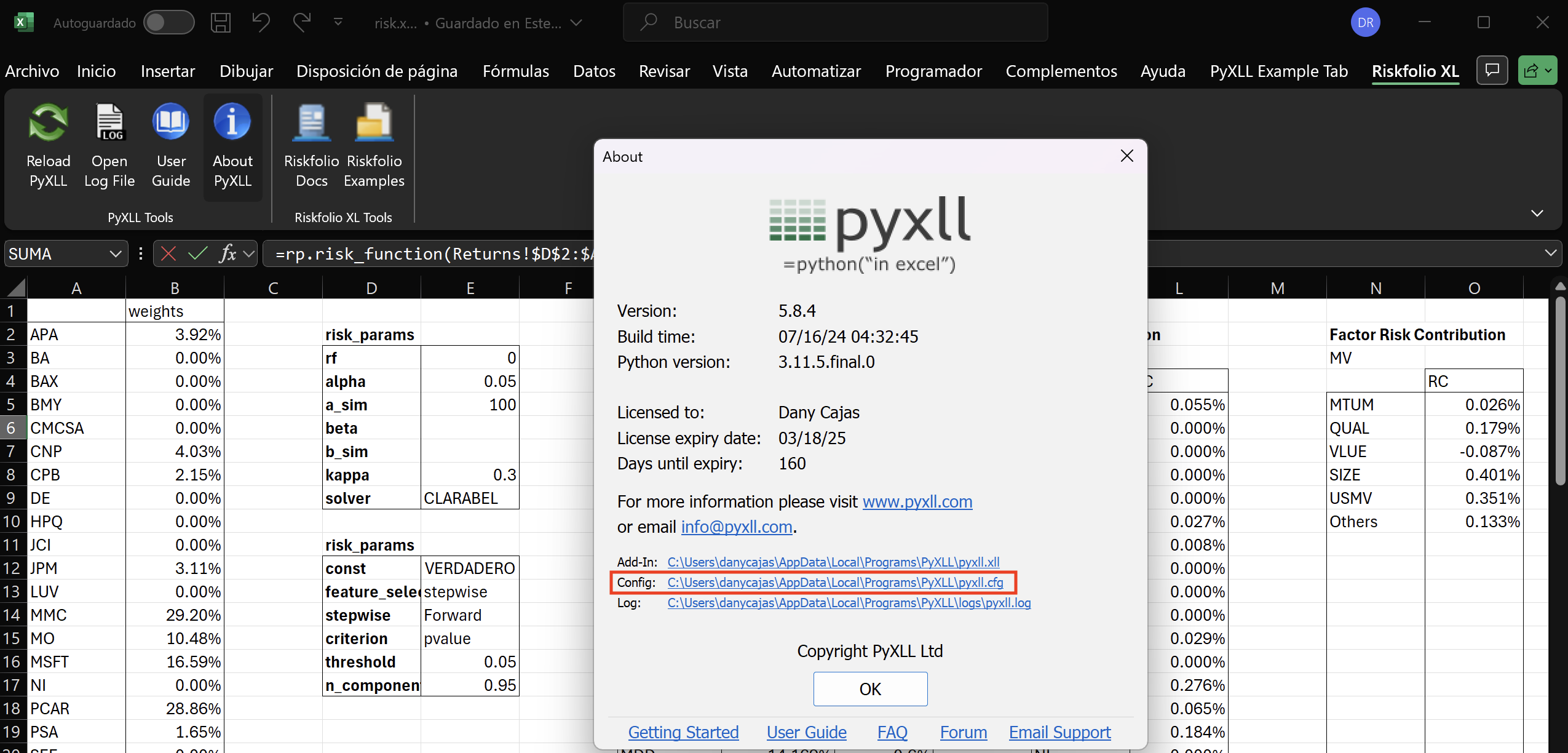
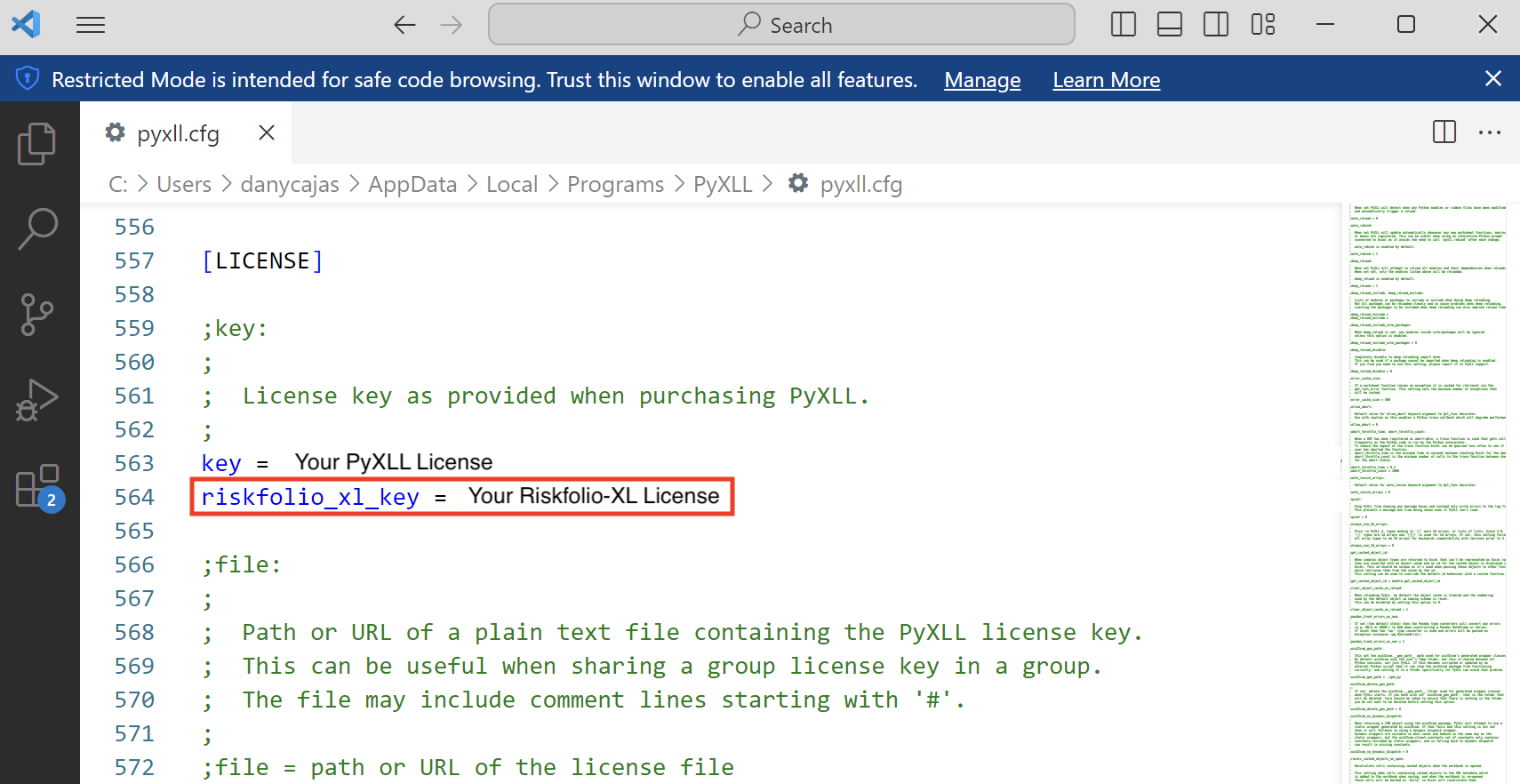
Then, you have to add your Riskfolio-XL license to the pyxll.cfg file:
- First, click on About PyXLL button of Riskfolio-XL add-in as shown in the image below:

- Then, click on the config file link as shown in the image below:
- Finally, write your Riskfolio-XL license in the riskfolio_xl_key parameter as shown in the image below:
Citing
If you use Riskfolio-Lib for published work, please use the following BibTeX entry:
@misc{riskfolioxl,
      author = {Dany Cajas},
      title = {Riskfolio-XL (0.1.1)},
      year  = {2024},
      url   = {https://riskfolio-lib.readthedocs.io/en/latest/excel.html},
      }
1 maintainer

Metadata
1 maintainer
Release files for Riskfolio-XL 0.1.1
For a detailed explanation of source distributions (sdists) and built distributions (wheels), please see the package formats documentation.
Built distributions (wheels)
| File | Actions Reset | |||
|---|---|---|---|---|
| Riskfolio_XL-0.1.1-cp312-cp312-win_amd64.whl | CPython 3.12 | CPython 3.12 | Windows x86-64 | Details for Riskfolio_XL-0.1.1-cp312-cp312-win_amd64.whl |
| Riskfolio_XL-0.1.1-cp311-cp311-win_amd64.whl | CPython 3.11 | CPython 3.11 | Windows x86-64 | Details for Riskfolio_XL-0.1.1-cp311-cp311-win_amd64.whl |
| Riskfolio_XL-0.1.1-cp310-cp310-win_amd64.whl | CPython 3.10 | CPython 3.10 | Windows x86-64 | Details for Riskfolio_XL-0.1.1-cp310-cp310-win_amd64.whl |
| Riskfolio_XL-0.1.1-cp39-cp39-win_amd64.whl | CPython 3.9 | CPython 3.9 | Windows x86-64 | Details for Riskfolio_XL-0.1.1-cp39-cp39-win_amd64.whl |
Total release size: 37.7 MB
Release files / Riskfolio_XL-0.1.1-cp312-cp312-win_amd64.whl
| Download URL | Riskfolio_XL-0.1.1-cp312-cp312-win_amd64.whl |
|---|---|
| Size | 9.4 MB |
| Tags | CPython 3.12 Windows x86-64 |
|
SHA-256 checksum How to use checksums |
7682e47f2d51c8004086beabd9c3381dd4f0ae0d4b81055547968381ea4c52bf
|
|
BLAKE2b-256 checksum How to use checksums |
df093251c923ed6c802543fc1aacb29df493f4e2f55d1262ad8ef9e4967cb4ee
|
| Upload date | |
|
Uploaded using Trusted Publishing? What is trusted publishing? |
No |
| Uploaded via |
twine/5.1.1 CPython/3.11.7
|
Release files / Riskfolio_XL-0.1.1-cp311-cp311-win_amd64.whl
| Download URL | Riskfolio_XL-0.1.1-cp311-cp311-win_amd64.whl |
|---|---|
| Size | 9.5 MB |
| Tags | CPython 3.11 Windows x86-64 |
|
SHA-256 checksum How to use checksums |
e7815206b5af1095b4698338e67f974142eec3a6bb67eb5f2141e61700aef3d3
|
|
BLAKE2b-256 checksum How to use checksums |
963b7ec14e605af198404adaca8f958e2ca30993a242e5c757859afc0c929bc4
|
| Upload date | |
|
Uploaded using Trusted Publishing? What is trusted publishing? |
No |
| Uploaded via |
twine/5.1.1 CPython/3.11.7
|
Release files / Riskfolio_XL-0.1.1-cp310-cp310-win_amd64.whl
| Download URL | Riskfolio_XL-0.1.1-cp310-cp310-win_amd64.whl |
|---|---|
| Size | 9.4 MB |
| Tags | CPython 3.10 Windows x86-64 |
|
SHA-256 checksum How to use checksums |
e884de6de48f4fd79db4c83fe73ae00446ec9f43810d5253ed7a820c052cd3a3
|
|
BLAKE2b-256 checksum How to use checksums |
e5eb6f541a94bf07fd25f3d31c693a240f516dd653a06f1d5f3e2795e32c1672
|
| Upload date | |
|
Uploaded using Trusted Publishing? What is trusted publishing? |
No |
| Uploaded via |
twine/5.1.1 CPython/3.11.7
|
Release files / Riskfolio_XL-0.1.1-cp39-cp39-win_amd64.whl
| Download URL | Riskfolio_XL-0.1.1-cp39-cp39-win_amd64.whl |
|---|---|
| Size | 9.4 MB |
| Tags | CPython 3.9 Windows x86-64 |
|
SHA-256 checksum How to use checksums |
dd60570e4116024dcb742e083742f6197744037d4d2d8ccb518d83e7a84b0b03
|
|
BLAKE2b-256 checksum How to use checksums |
a1a195304cd71619c786cdf104ef6920456a03450fa5085dbcbba6635727825b
|
| Upload date | |
|
Uploaded using Trusted Publishing? What is trusted publishing? |
No |
| Uploaded via |
twine/5.1.1 CPython/3.11.7
|
Security for Riskfolio-XL 0.1.1
Provenance
Provenance describes where a file came from. On PyPI, provenance is shared via attestations, which provide a verifiable record of the build or publishing details. View details, limitations and caveats.
No provenance found
None of the files in this release were uploaded with provenance metadata.
A note on package security
PyPI is a repository for distributing packages, not a service for auditing them. While third-party security researchers and our staff do their best to detect and remove malicious packages, PyPI cannot guarantee the quality, security or suitability of any given package.
To learn more about protecting yourself from malicious actors, visit our package security documentation.














