
GUI to track rod-like particles on multiple cameras

Project description
RodTracker
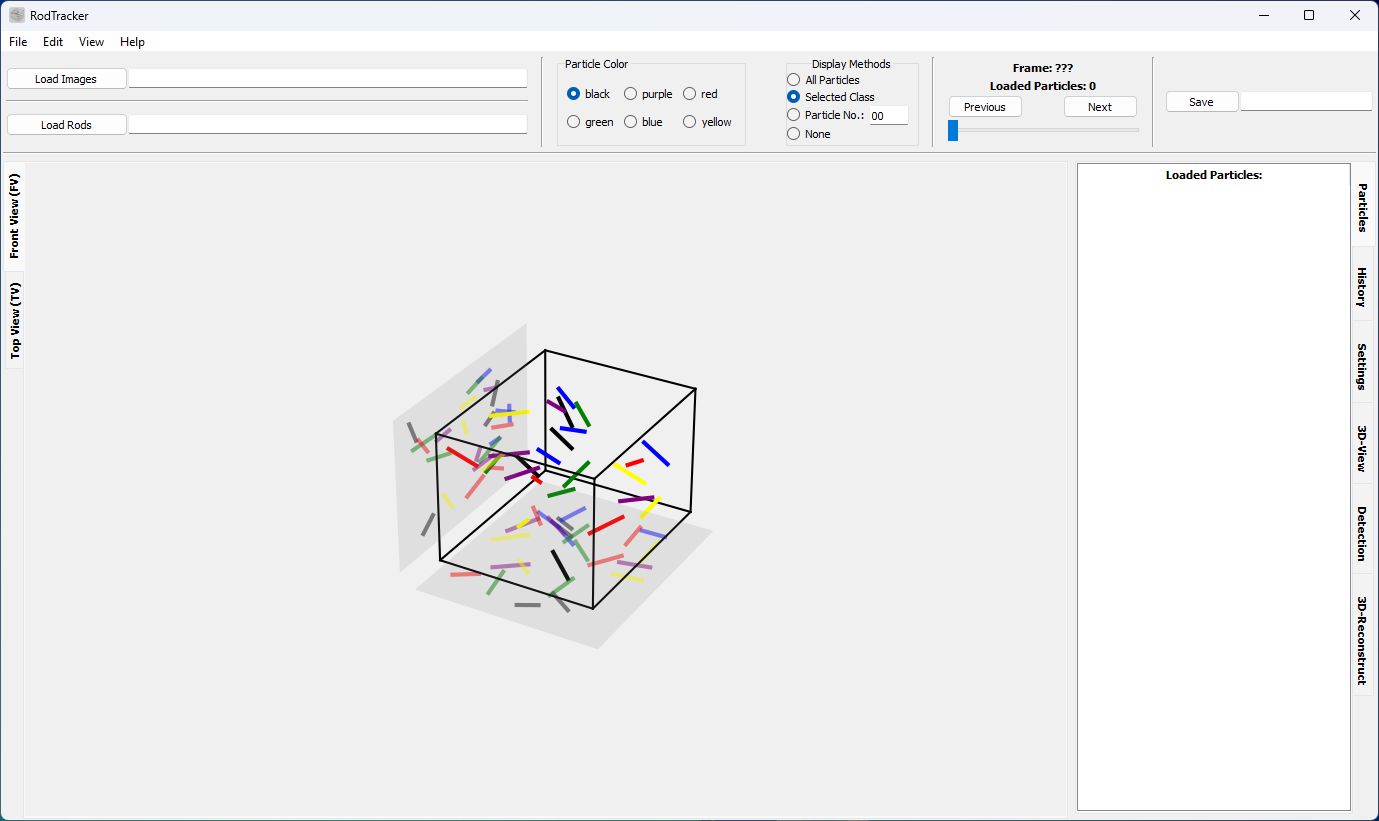
This package provides a GUI encapsulating the most used functionality of the ParticleDetection package. It enables users to carry out the aforementioned tasks, except for training a model. Additionally, it provides the means to manually correct placement and assignment mistakes of the automated processes.
Please refer to the documentation for more detailed information.
Installation
Refer to the documentation for more details on the installation process.
Installation as a standalone program
Use the provided executable installer for your operating system provided in the repository releases:
RodTracker-Setup.exe- WindowsRodTracker-Setup.deb- LinuxRodTracker-Setup.dmg- macOS
Note: There might not always be a version provided for macOS.
Installation as a python package
Requirements:
- Python
>=3.8 - pip
Install the default version using pip:
pip install RodTracker
Or use one of the options described in the documentation.
pip install RodTracker[OPTION]
Install it from source by:
- Cloning the repository containing the RodTracker. Do NOT just copy the
RodTrackerfolder. This will lead to a missing dependency during the installation. - Install it using
pip.YOUR/REPO/PATH/RodTracker$ pip install .
It is also possible to install it directly from GitHub (requires Git to be installed):
pip install 'git+https://github.com/ANP-Granular/ParticleTracking.git#egg=rodtracker&subdirectory=RodTracker'
pip install 'rodtracker[DOCS] @ git+https://github.com/ANP-Granular/ParticleTracking.git#egg=RodTracker&s
ubdirectory=RodTracker'
Running the RodTracker
Run the RodTracker GUI using one of the possibilities:
- (Standalone Program) Run the executable installed by the installer.
- (Python Package) Run
main.pymanually:YOUR/REPO/PATH/RodTracker/src/RodTracker$ python main.py
- (Python Package) Use the registered command:
ARBITRARY/PATH$ RodTracker
Keyboard shortcuts
| Feature | Shortcut |
|---|---|
| Open images | Ctrl + O |
| Save rod position data | Ctrl + S |
| Switch to next/previous view | Ctrl+Tab |
| Zoom in/out | +/- Ctrl+Wheel |
| Fit image to available space | F |
| Show in original size | Ctrl + R |
| Next/previous image | Right/Left |
| Undo | Ctrl + Z |
| Lengthen/Shorten a rod | A/S |
| Lengthen/Shorten all rods in current view | R/T |
| Delete a selected rod | Del |
| Toggle automatic rod selection mode | G |
Release history Release notifications | RSS feed


Download files
Download the file for your platform. If you're not sure which to choose, learn more about installing packages.
Source Distribution
Built Distribution
Filter files by name, interpreter, ABI, and platform.
If you're not sure about the file name format, learn more about wheel file names.
Copy a direct link to the current filters
File details
Details for the file rodtracker-0.6.4.dev29.tar.gz.
File metadata
- Download URL: rodtracker-0.6.4.dev29.tar.gz
- Upload date:
- Size: 12.9 MB
- Tags: Source
- Uploaded using Trusted Publishing? No
- Uploaded via: poetry/1.8.3 CPython/3.12.6 Linux/6.8.0-1014-azure
File hashes
| Algorithm | Hash digest | |
|---|---|---|
| SHA256 |
9c284d1ea2365ddc603646b87c2b74d3f1f909e0c7ed5ed49873fb171955485c
|
|
| MD5 |
1a4b9df7aee21e81eaae54fcdcb727e2
|
|
| BLAKE2b-256 |
00c21d2e4647ac6c80aca89e09aab4a1dd34103e99c2a2b2a2d145f4cc9831f5
|
File details
Details for the file rodtracker-0.6.4.dev29-py3-none-any.whl.
File metadata
- Download URL: rodtracker-0.6.4.dev29-py3-none-any.whl
- Upload date:
- Size: 12.9 MB
- Tags: Python 3
- Uploaded using Trusted Publishing? No
- Uploaded via: poetry/1.8.3 CPython/3.12.6 Linux/6.8.0-1014-azure
File hashes
| Algorithm | Hash digest | |
|---|---|---|
| SHA256 |
ce0d45fb64674a213d540c7b822101577e6011309ad612e3be53151b5a19f38f
|
|
| MD5 |
c6d06c21785e98a134bf2ecf9c2b46b5
|
|
| BLAKE2b-256 |
d52f39cf3bc9d4b9a45b93b889b5e8a5d66efd2cd3e8f02679cc16c6c92edc92
|






