
SLM controller
SLM controller is a python based GUI software for controlling the phase pattern of an SLM (Spatial Light Modulator).
The software takes care of rendering the hologram on top of any graphical interface of the operative system used. For now it has been tested on windows 10/11, ubuntu 22.04(previous release version) and MacOS.
The software offers various types of static holograms that are normally used in the field of optical tweezers.
From the main window it is possible to add new optical elements and toggle the rendering of the hologram.
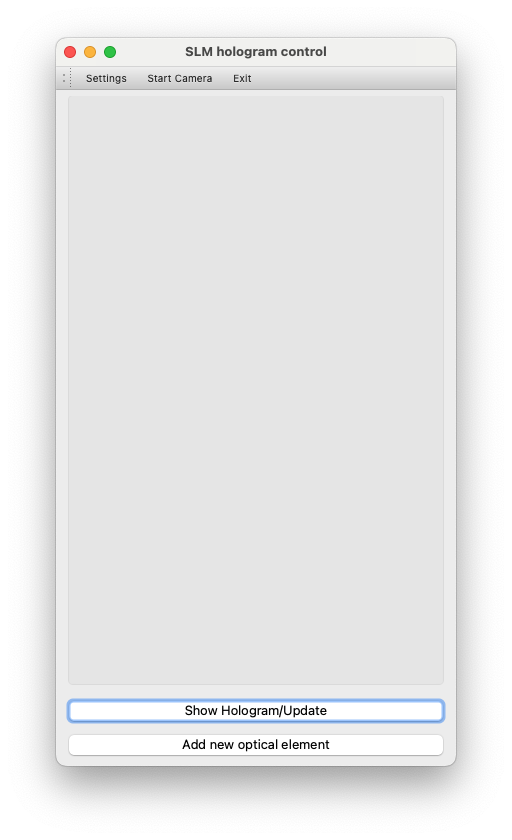
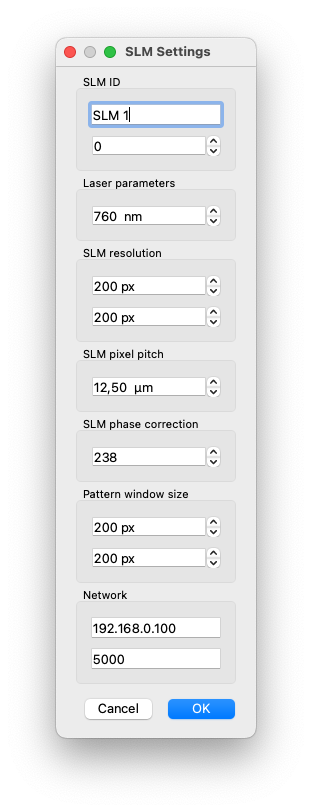
Before doing that however the user should set-up the parameters of his SLM and system. In the settings windows it is possible to set the following parameters :
-
SLM ID : This is an identifier for that particular SLM. In future I plan to provide support for multiple SLMs. Under it the user can select on which monitor the SLM pattern should be rendered. 0 = main monitor. Here the typical selection should be 1 (first external monitor, SLM)
-
Laser parameters : The wavelength of the laser used, this is used for calculating the correct lens pattern.
-
SLM resolution : This is the resolution (number of pixels) of the SLM. Beware that it can be different than the screen resolution seen by the operative system. Many SLMs use standard resolution values (eg. Full-HD) even if their effective number of pixels is different than (1920x1080).
-
SLM pixel pitch : The pixel size of the SLM
-
SLM phase correction : This is the correction value for a 2π phase modulation. The value is nomally provided by the manufacturing company. Typically 2π --> 255 but at different wavelengths this value can vary
-
Pattern window size : This should be the screen resolution used for the SLM (eg. Full-HD) not the number of pixels of the SLM (although the two might match). The unused (SLM resolution - window size) pixels will be rendered as black.
-
Network : IP and port used for remote control of the optimisation algorithm. The algorithm is based on the following work. Remote control is handled using Flask. The interface misuses the RESTful approach in order to simplify the code and improve usability (e.g. set methods are based on HTTP GET). The following endpoints are available:
- /optimiser/start : starts the algorithm (if already running, triggers a next step)
- /optimiser/nextStep : triggers the next step of the algorithm (once scaned till the end of the phase pattern, this will return phase = null)
- /optimiser/refzone : returns the current reference zone
- /optimiser/refzone/ : sets the reference zone to
- /optimiser/probzone : returns the current probe zone
- /optimiser/probzone/ : sets the probe zone to
- /optimiser/phase : returns the current phase
- /optimiser/phase/ : sets the phase to
- /optimiser/phaseStep/ : sets the phase step to
- /optimiser/IDsList : returns the list of IDs of the active optical elements
- /optimiser/phasePattern : returns the optimiser phase pattern (as image)
- /optimiser/phasePatternData : returns the optimiser phase pattern (as list)
-
Other endpoints are available globally
- /phasePattern : returns the phase pattern (as image) currently being rendered on the SLM
At the center of the optical element tab it is possible to see a small preview of the pattern associated to that element.
Some optical elements have a "live update" feature. The live update permits to change the parameters of the optical element and automatically re-render the whole SLM pattern each time a value is changed. Beware that this works fine on good PCs but can require quite some time on old PCs or when many optical elements are active at once.
Fresnel lens pattern
It is possible to add a virtual lens on the SLM by generating a fresnel lens pattern (fresnel zone plate). This can be done by adding a new "lens" optical element.
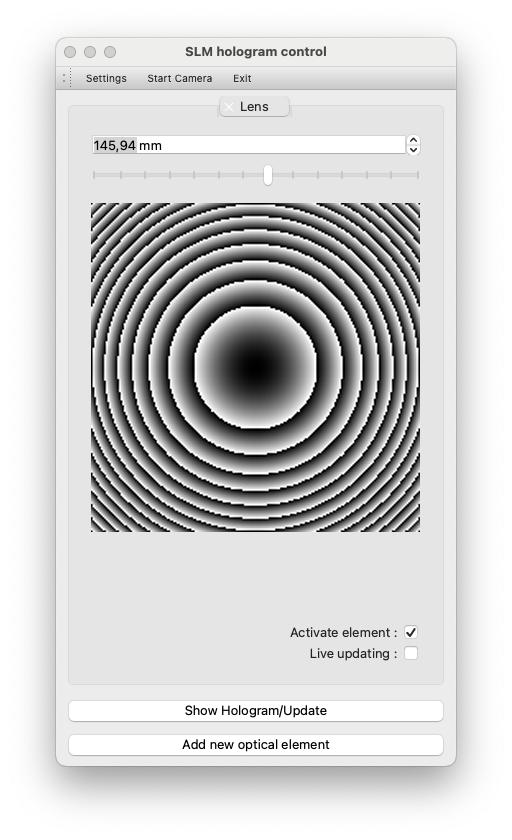
In the tab it is possible to control the focus of the lens and activate/deactivate it.
Grating
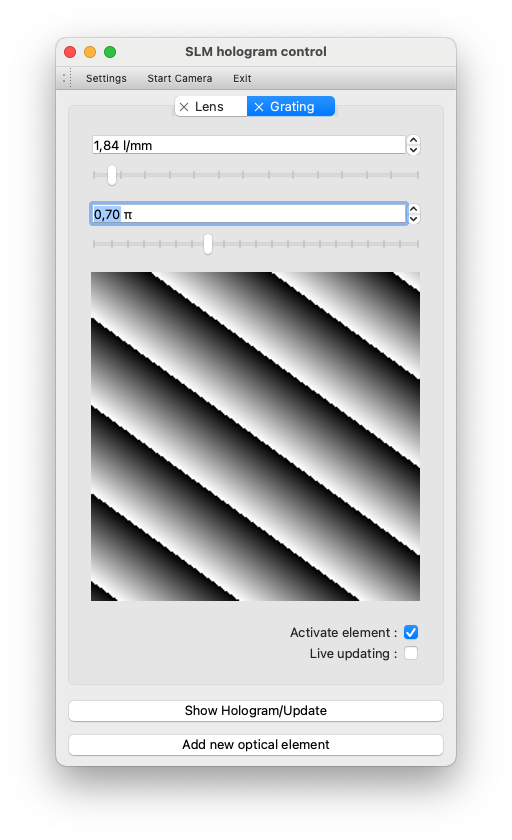
This adds a virtual diffractive grating. It is possible to control the lines/mm of the grating and its orientation. The number of lines per pixel will depend on the size of each SLM pixel.
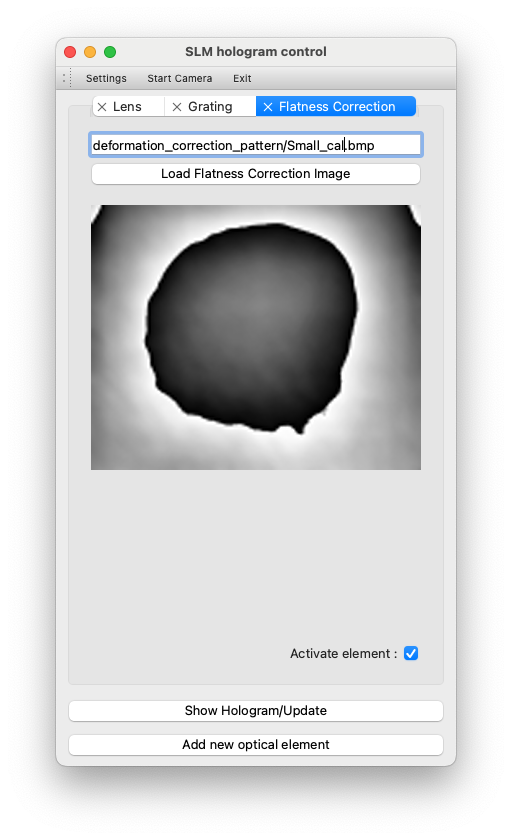
Flatness correction
This controls the flatness correction pattern typically used to correct for flatness imperfections of the SLM. The SLM manufacturing company normally provides a file for each wavelength supported by the SLM. This can be added to the total pattern by selecting the proper flatness correction for the used wavelength. The flatness correction is normally an image and its size should match the SLM size.
Displayed pattern
This is a grayscale image [0,255] of the sum of all optical elements that have been activated. The rendered pattern is calculated as following:
Wrapped pattern = mod(Corrected pattern,256)
Displayed pattern = Wrapped pattern * SLM phase correction /255
1 maintainer

Metadata
1 maintainer
Release files for SLMcontroller 1.0.23
For a detailed explanation of source distributions (sdists) and built distributions (wheels), please see the package formats documentation.
Source distribution (sdist)
| File | Size | Uploaded | Provenance | |
|---|---|---|---|---|
| slmcontroller-1.0.23.tar.gz | 88.4 kB | Without provenance | Details |
Built distribution (wheel)
| File | Interpreter | ABI | Platform | Reset |
|---|---|---|---|---|
| SLMcontroller-1.0.23-py3-none-any.whl | Python 3 | none | any | Details |
Total release size: 168.1 kB
Release files / slmcontroller-1.0.23.tar.gz
| Download URL | slmcontroller-1.0.23.tar.gz |
|---|---|
| Size | 88.4 kB |
| Tags | Source |
|
SHA-256 checksum How to use checksums |
894a1f9b1ef966469df0728bb3fd5f1fff8ceb22917a1eae87f043cbc0fd71ed
|
|
BLAKE2b-256 checksum How to use checksums |
46a9f530b2ef0440c58e357b2b23ab1f32912e2a1be7b7d9dd53655f177a0349
|
| Upload date | |
|
Uploaded using Trusted Publishing? What is trusted publishing? |
No |
| Uploaded via |
twine/5.0.0 CPython/3.12.2
|
Release files / SLMcontroller-1.0.23-py3-none-any.whl
| Download URL | SLMcontroller-1.0.23-py3-none-any.whl |
|---|---|
| Size | 79.7 kB |
| Tags | Python 3 |
|
SHA-256 checksum How to use checksums |
993faf75dd82e245fdd2d3fd11a73c44a7573c4a23e39c61b17f9a80ebf2801f
|
|
BLAKE2b-256 checksum How to use checksums |
05b0ffd9fdd296cb6a6916520422313f180e26fc1f33c4a655837ce18e7955f3
|
| Upload date | |
|
Uploaded using Trusted Publishing? What is trusted publishing? |
No |
| Uploaded via |
twine/5.0.0 CPython/3.12.2
|
Security for SLMcontroller 1.0.23
Provenance
Provenance describes where a file came from. On PyPI, provenance is shared via attestations, which provide a verifiable record of the build or publishing details. View details, limitations and caveats.
No provenance found
None of the files in this release were uploaded with provenance metadata.
A note on package security
PyPI is a repository for distributing packages, not a service for auditing them. While third-party security researchers and our staff do their best to detect and remove malicious packages, PyPI cannot guarantee the quality, security or suitability of any given package.
To learn more about protecting yourself from malicious actors, visit our package security documentation.














