
A Python framework for making CLI tools prettier and customizable.

Project description
SaiunCLI ✨
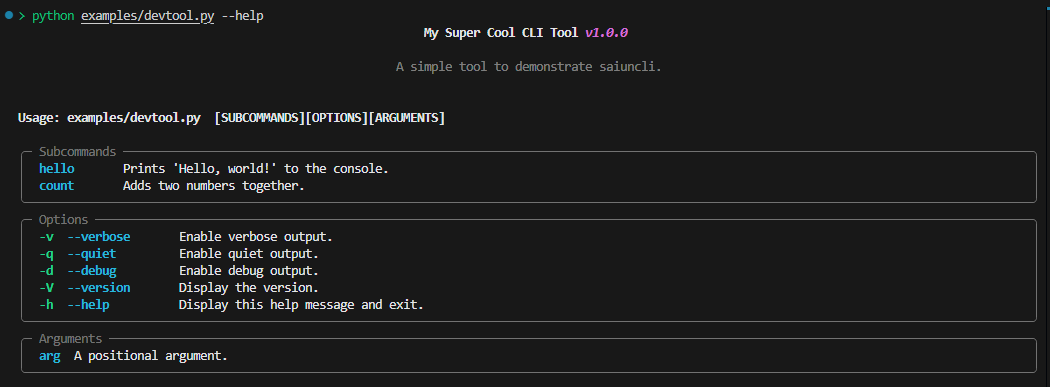
SaiunCLI is a Python framework for creating visually appealing, user-friendly, and highly customizable Command-Line Interface (CLI) tools. It leverages the power of rich for styling and formatting, making it easy to build modern CLI applications that are both functional and beautiful.
Project Status: 🚧 Under Construction 🚧
SaiunCLI is actively being developed. Some features may be incomplete or subject to change. Stay tuned for updates and improvements!
Features
- Customizable Themes: Easily style your CLI with themes and override defaults.
- Command and Subcommand Support: Define commands and nested subcommands with specific options and arguments.
- Inherited Options and Arguments: Configure options to be inherited across subcommands.
- Global Options: Define options that apply globally across all commands and subcommands.
- Modern Styling: Leverage rich to make CLI output visually appealing, including tables, progress bars, and spinners.
- User-Friendly Argument Parsing: Parse both positional arguments and flags in a structured and intuitive manner.
- Dynamic Command Registration: Add commands programmatically during runtime.
- Configurable Help and Usage: Auto-generate help messages for commands with customization options.
- Intuitive Developer Experience: Focus on functionality without worrying about low-level details.
Comparison with Other Tools
| Feature | SaiunCLI | Click | Argparse |
|---|---|---|---|
| Custom Styling | ✅ | ❌ | ❌ |
| Nested Commands | ✅ | ✅ | ❌ |
| Dynamic Commands | ✅ | ✅ | ❌ |
| Option Inheritance | ✅ | ❌ | ❌ |
| Global Options | ✅ | ❌ | ❌ |
| Easy Theming | ✅ | ❌ | ❌ |
Installation
You can install saiuncli with pip.
pip install saiuncli
Usage
from saiuncli.cli import CLI
from saiuncli.command import Command
from saiuncli.option import Option
from saiuncli.theme import Theme

# Custom CLI Theme
theme = Theme()


# Define your command handlers
def hello_handler(name: str, count: int):
    for i in range(count):
        print(f"Hello, {name}!")

def count_handler(a: int, b: int):
    print(f"{a} + {b} = {a + b}")


def base_handler(**args):
    print("Base command executed.")
    print(f"{args}")


if __name__ == "__main__":

    # Create CLI
    mycli = CLI(
        title="My Super Cool CLI Tool",
        description="A simple tool to demonstrate saiuncli.",
        version="1.0.0",
        handler=base_handler, # Command Handler
        help_flags=[],
        version_flags=[],
        options=[
            Option(
                flags=["-v", "--verbose"],
                description="Enable verbose output.",
                action="store_true",
            ),
            Option(
                flags=["-q", "--quiet"],
                description="Enable quiet output.",
                action="store_true",
            ),
            Option(
                flags=["-d", "--debug"],
                description="Enable debug output.",
                action="store_true",
            ),
        ],
    )

    # Define Subcommands
    hello_command = Command(
        name="hello",
        handler=hello_handler,
        description="Prints 'Hello, world!' to the console.",
        options=[
            Option(
                flags=["-n", "--name"],
                description="The name to print.",
                type=str,
                required=True,
            ),
            Option(
                flags=["-c", "--count"],
                description="The number of times to print the name.",
                type=int,
                default=1,
            ),
        ],
    )

    count_command = Command(
        name="count",
        handler=count_handler,
        description="Adds two numbers together.",
        options=[
            Option(
                flags=["-a"],
                description="The first number.",
                type=int,
                required=True,
            ),
            Option(
                flags=["-b"],
                description="The second number.",
                type=int,
                required=True,
            ),
        ],
    )


    # Append Subcommands
    mycli.add_subcommands([hello_command, count_command])

    # Run your CLI Tool!
    mycli.run()
Release history Release notifications | RSS feed


Download files
Download the file for your platform. If you're not sure which to choose, learn more about installing packages.
Source Distribution
Built Distribution
Filter files by name, interpreter, ABI, and platform.
If you're not sure about the file name format, learn more about wheel file names.
Copy a direct link to the current filters
File details
Details for the file saiuncli-0.1.2.tar.gz.
File metadata
- Download URL: saiuncli-0.1.2.tar.gz
- Upload date:
- Size: 11.9 kB
- Tags: Source
- Uploaded using Trusted Publishing? No
- Uploaded via: twine/6.1.0 CPython/3.10.15
File hashes
| Algorithm | Hash digest | |
|---|---|---|
| SHA256 |
d4506be456c49fc52885b74f367c16a0da9a734b1df4808fd91a8300379c09cc
|
|
| MD5 |
baa4fe8dfd5b892fce1895e800503e28
|
|
| BLAKE2b-256 |
4726be3e2928ffd23a387cfc8ab1be0c040935a8e6bf51f1fde705eb4227bd69
|
File details
Details for the file SaiunCLI-0.1.2-py3-none-any.whl.
File metadata
- Download URL: SaiunCLI-0.1.2-py3-none-any.whl
- Upload date:
- Size: 13.6 kB
- Tags: Python 3
- Uploaded using Trusted Publishing? No
- Uploaded via: twine/6.1.0 CPython/3.10.15
File hashes
| Algorithm | Hash digest | |
|---|---|---|
| SHA256 |
ab50f5919a7b6d700201e37c5d97d6df9850fdc104eac082bf1e44e7437b5602
|
|
| MD5 |
c32e3eb41c55ace40871380366775712
|
|
| BLAKE2b-256 |
ccf9ecf9bce1572ea5ca6ad28d82c8089eecbb6f11330465a39bbd356ee4f1dd
|






