
ScEqAn (Scientific Equation/Expression Analysis)
- Dynamic Expression Analysis for research on equations and algorithms.
- Used for providing boundary values to any equations to make sure how far the input dependencies have impact on outcomes
- Altering the x, y multiple times to check individual impact of x & y on f(x, y) is the ultimate goal of ScEqAn.
- Check out the example code in repo ( https://github.com/Palani-SN/ScEqAn ) for reference.
Note:
- Recommended for Educational & Research purposes only,
- Not Recommended for Verification & Validation (Testing)
Step 1 : Create ScEqAn input scripts in Input.txt
[P] = p{-10.0, 70.0} + r{-50.0, 50.0} * t{0.0, 0.20};
[Q] = q{-20.0, 20.0} + s{-50.0, 50.0} * t;
- save the above content to Input.txt and use that to create the Output.log
Rules to be followed in writing ScEqAn script
- All Input Variables of any equation should be provided with a range as specified below.
... = input_variable{lower_bound, upper_bound}
- And Output variables should be enclosed within square brackets.
[output_variable] = ...
- Otherwise you can write the equations the same way you would write in a python code.
Step 2 : Use the following example Code to get reports
Analysis
- Sample usage of the file is as given below (Refer Examples for more understanding)
from ScEqAn.Analysis import DynamicProgramAnalysis

OBJ = DynamicProgramAnalysis("InputFiles/Input.txt", "OutputFiles/Output.log");

# For printing the results to console, set Debug = True
OBJ.Run(Debug = True);

# For printing the results to console, set Debug = False
OBJ.Run(Debug = False);
CodeFlow
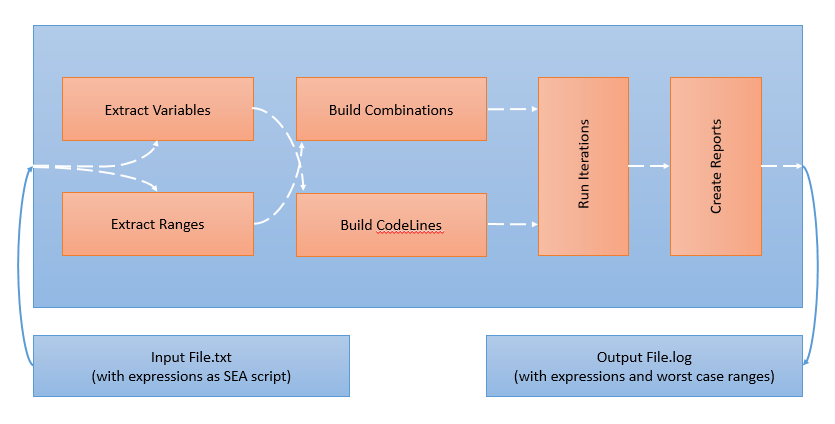
DynamicProgramAnalysis (class from Analysis.py)
- Initialising class helps to configure the Input txt file to be used and output report needs to be generated with the worst case values.
- Arguments
- Arg1 - FileName (name of the input file which has ScEqAn script)
- Arg2 - LogFileName (name of the output file for the reports)
- Sample usage of DynamicProgramAnalysis Initialisation is shown below.
from ScEqAn.Analysis import DynamicProgramAnalysis

OBJ = DynamicProgramAnalysis("Input.txt", "Output.log")
Run()
- Initiates the Dynamic Program Analysis with the already set Input and Output files as configuration.
- Additionally we can select Debug as True to print the current status of the run to console.
## Definition
def Run(self, Debug = False):
- Arguments
- Arg1 - Debug (If True prints the run info to console, If false doesnt print)
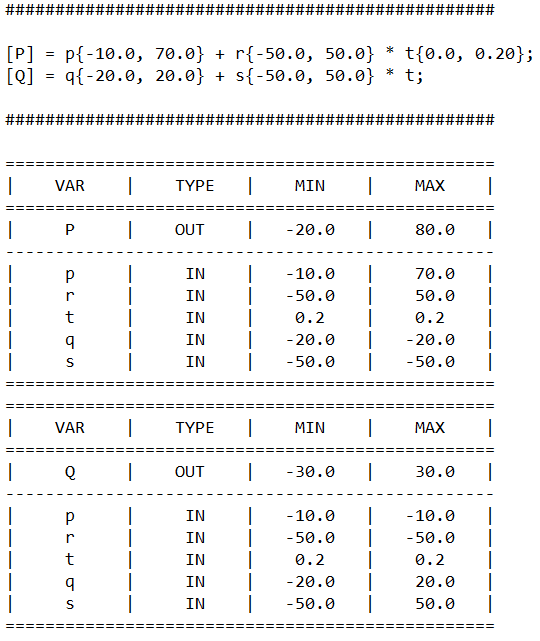
Step 3 : Check output reports in Output.log
- you will be getting the extreme values of input with respect to output extremes as shown below.
1 maintainer

Release files for ScEqAn 1.0.0
For a detailed explanation of source distributions (sdists) and built distributions (wheels), please see the package formats documentation.
Source distribution (sdist)
| File | Size | Uploaded | |
|---|---|---|---|
| ScEqAn-1.0.0.tar.gz | 53.8 kB | Details |
Built distribution (wheel)
| File | Interpreter | ABI | Platform | Reset |
|---|---|---|---|---|
| ScEqAn-1.0.0-py3-none-any.whl | Python 3 | none | any | Details |
Total release size: 71.6 kB
Release files / ScEqAn-1.0.0.tar.gz
| Download URL | ScEqAn-1.0.0.tar.gz |
|---|---|
| Size | 53.8 kB |
| Tags | Source |
|
SHA-256 checksum How to use checksums |
262c8b45209ec3036fa94e2193169db30a0ed44076daf0f9292f8fe2fcd59ddf
|
|
BLAKE2b-256 checksum How to use checksums |
fee5c67ced7cbd46f88b3ddf990d4e5c654c932153759233dcb2949a333c61e5
|
| Upload date | |
|
Uploaded using Trusted Publishing? What is trusted publishing? |
No |
| Uploaded via |
twine/3.4.2 importlib_metadata/4.8.1 pkginfo/1.7.1 requests/2.26.0 requests-toolbelt/0.9.1 tqdm/4.62.2 CPython/3.7.6
|
Release files / ScEqAn-1.0.0-py3-none-any.whl
| Download URL | ScEqAn-1.0.0-py3-none-any.whl |
|---|---|
| Size | 17.7 kB |
| Tags | Python 3 |
|
SHA-256 checksum How to use checksums |
e89fadbe6f75fa2d2b7fc07f279240371247fc0bdd5f2066b6a5f7af4a7fbbc3
|
|
BLAKE2b-256 checksum How to use checksums |
c0d75c3ecbade335b21d6fe2a1247064e46b09c13fc7328863574b12ff2047d1
|
| Upload date | |
|
Uploaded using Trusted Publishing? What is trusted publishing? |
No |
| Uploaded via |
twine/3.4.2 importlib_metadata/4.8.1 pkginfo/1.7.1 requests/2.26.0 requests-toolbelt/0.9.1 tqdm/4.62.2 CPython/3.7.6
|














