




SciQLopPlots
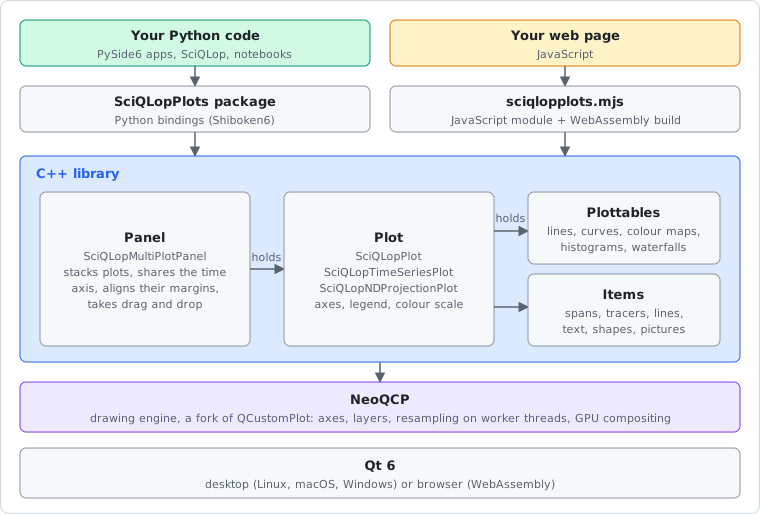
A high-performance scientific plotting library built on C++20/Qt6 with Python bindings via Shiboken6 (PySide6). Designed for the SciQLop data analysis platform but usable standalone.
Try it in your browser: the gallery runs the same library as WebAssembly, with examples you can edit and run. The JavaScript guide shows how to use it in your own pages.
Features
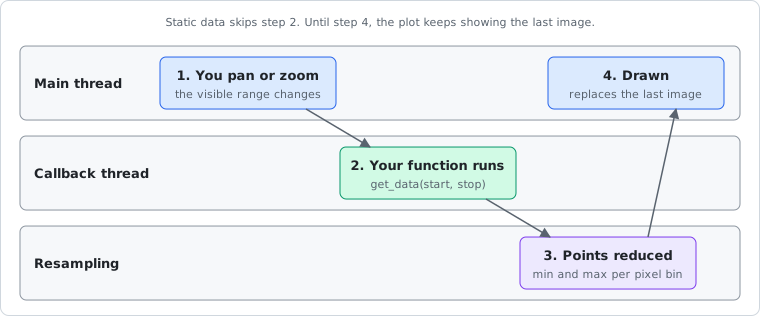
- Async resampling — render millions of points smoothly; data is downsampled in background threads via NeoQCP pipelines
- Multiple plot types — time series (line graphs), spectrograms (color maps), 2D histograms, parametric curves, N-D projection curves, waterfall plots
- Interactive — pan, zoom, data-driven callbacks, vertical/horizontal/rectangular spans, tracers, straight lines, text, shapes, pixmaps
- Multi-plot panels — synchronized axes, aligned margins, drag-and-drop from product trees
- Interval timelines — events and instrument modes as bars on named lanes, drawn like a logic analyzer's wave view; overlaps stacked by time or category, or forbidden; editable with the mouse
- Reactive pipelines — connect plot properties with
>>to build live data flows - Export — PDF (vector), PNG, JPG, BMP for both individual plots and panels
- Busy indicator — visual feedback when data is loading or being processed
- Runtime inspector — tree model/view for inspecting and editing plot properties
- Signal processing — gap-aware filters, FFT, spectrograms and rolling statistics on NumPy arrays (
SciQLopPlots.dsp) - In the browser — the same plots from JavaScript, compiled to WebAssembly (gallery, guide)
- Cross-platform — Linux, macOS and Windows, on x86-64 and ARM64
Architecture
Data flow
Quick start
The user guide walks through everything below and more: plot types, live data, time series, panels, overlays, pipelines and export. Every example in it is tested. The API reference lists every class and method.
pip install SciQLopPlots
Wheels exist for Python 3.11 to 3.14. They pin PySide6 to an exact version, so installing replaces any other PySide6 in the environment.
import numpy as np
from PySide6.QtWidgets import QApplication
from SciQLopPlots import SciQLopPlot

app = QApplication([])
plot = SciQLopPlot()

# Static data and a data function, both on the same plot
x = np.arange(0, 1000, dtype=np.float64)
y = np.sin(x / 100) * np.cos(x / 10)
plot.plot(x, y, labels=["signal"])

# Data callback (called on pan/zoom with visible range)
def get_data(start, stop):
    x = np.arange(start, stop, dtype=np.float64)
    y = np.column_stack([np.sin(x / 100), np.cos(x / 100)])
    return x, y

plot.plot(get_data, labels=["sin", "cos"])

plot.show()
app.exec()
Reactive pipelines
Connect plot properties with the >> operator, optionally through a function:
import numpy as np
from PySide6.QtGui import QColor
from SciQLopPlots import SciQLopPlot, SciQLopVerticalSpan, SciQLopPlotRange

plot = SciQLopPlot()
x = np.linspace(0, 10, 1000)
plot.plot(x, np.sin(x), labels=["sin"])
span = SciQLopVerticalSpan(plot, SciQLopPlotRange(2.0, 4.0), QColor(100, 200, 100, 80),
                           read_only=False, visible=True, tool_tip="")

def describe(event):
    return f"{event.value.start():.2f} .. {event.value.stop():.2f}"

span.on.range >> describe >> span.on.tooltip   # the tooltip follows the span

zoomed = SciQLopPlot()
zoomed.plot(x, np.sin(x), labels=["zoom"])
span.on.range >> zoomed.x_axis().on.range      # a second plot shows the span's interval
The function gets an event whose .value is the new value. The user guide lists the properties you can connect.
To see every feature, try the browser gallery, or run the desktop gallery from a source checkout:
python tests/manual-tests/gallery.py
Runtime tracing
SciQLopPlots ships with a built-in tracer that emits Chrome trace JSON, viewable in
Perfetto, Speedscope, or
chrome://tracing. Always compiled in, runtime-toggled, ~1 ns when off.
Enable for a session, then open the file in Perfetto:
from SciQLopPlots import tracing

with tracing.session("/tmp/sciqlop.json"):
    do_the_slow_thing()         # your code here
Annotate your own Python work so it shows next to the C++ zones (plot.replot,
setdata.colormap, resample.async_2d, …). speasy and q below stand for your own code:
with tracing.zone("speasy.fetch", cat="data", product="amda/mms_fgm"):
    data = speasy.get_data(...)

@tracing.traced("layer.eval", cat="layer")
def render_layer(layer): ...

tracing.counter("queue_depth", q.size(), cat="fetch")
You can also auto-enable at process start with the SCIQLOP_TRACE env var:
SCIQLOP_TRACE=/tmp/sciqlop.json python my_script.py
When tracy_enable=true is also passed at build time, the same PROFILE_HERE_N
sites feed both the Chrome JSON tracer and the Tracy live-streaming view.
Building from source
You need Qt 6.11, a C++20 compiler, libclang (for Shiboken) and, in a virtual environment, the exact PySide6 version the package pins:
pip install pyside6==6.11.2 shiboken6==6.11.2 shiboken6-generator==6.11.2 \
    numpy meson meson-python ninja

# Qt's tools must be on PATH
export PATH=/path/to/Qt/6.11.2/gcc_64/bin:$PATH
export PKG_CONFIG_PATH=/path/to/Qt/6.11.2/gcc_64/lib/pkgconfig:$PKG_CONFIG_PATH

# debugoptimized, not debug: without optimisations the resampling is slow
meson setup build --buildtype=debugoptimized
meson compile -C build

# or build and install it as a Python package
pip install . --no-build-isolation
The browser build is described in the JavaScript guide.
Build options
| Option | Type | Default | Description |
|---|---|---|---|
trace_refcount |
bool | false | Enable reference count tracing |
tracy_enable |
bool | false | Enable Tracy profiling |
with_opengl |
bool | true | Enable OpenGL support |
Contributing
Fork the repository, make your changes and submit a pull request. Bug reports and feature requests are welcome.
Credits
Development is supported by CDPP. We acknowledge support from Plas@Par.
Thanks
- PySide6 — Qt bindings and Shiboken6 binding generator
- NeoQCP — fork of QCustomPlot with async pipelines, multi-dtype support, and QRhi rendering
1 maintainer

Metadata
1 maintainer
Release files for SciQLopPlots 0.52.0
For a detailed explanation of source distributions (sdists) and built distributions (wheels), please see the package formats documentation.
Source distribution (sdist)
| File | Size | Uploaded | |
|---|---|---|---|
| sciqlopplots-0.52.0.tar.gz | 4.8 MB | Details |
Built distributions (wheels)
| File | Reset | |||
|---|---|---|---|---|
| sciqlopplots-0.52.0-cp311-abi3-win_arm64.whl | CPython 3.11 | abi3 | Windows ARM64 | Details |
| sciqlopplots-0.52.0-cp311-abi3-win_amd64.whl | CPython 3.11 | abi3 | Windows x86-64 | Details |
| sciqlopplots-0.52.0-cp311-abi3-manylinux_2_39_aarch64.whl | CPython 3.11 | abi3 | Linux glibc 2.39+ ARM64 | Details |
| sciqlopplots-0.52.0-cp311-abi3-manylinux_2_34_x86_64.whl | CPython 3.11 | abi3 | Linux glibc 2.34+ x86-64 | Details |
| sciqlopplots-0.52.0-cp311-abi3-macosx_13_0_x86_64.whl | CPython 3.11 | abi3 | macOS 13.0+ x86-64 | Details |
| sciqlopplots-0.52.0-cp311-abi3-macosx_13_0_arm64.whl | CPython 3.11 | abi3 | macOS 13.0+ ARM64 | Details |
Total release size: 39.3 MB
Release files / sciqlopplots-0.52.0.tar.gz
| Download URL | sciqlopplots-0.52.0.tar.gz |
|---|---|
| Size | 4.8 MB |
| Tags | Source |
|
SHA-256 checksum How to use checksums |
7eca9248cdcff2ead67042013241b29daf466cc7e034824b1bdedb7218f5ff14
|
|
BLAKE2b-256 checksum How to use checksums |
2dc16d0287cdf471bfeae249421646c0255df2617653f03df9c1d3e96c76c19e
|
| Upload date | |
|
Uploaded using Trusted Publishing? What is trusted publishing? |
No |
| Uploaded via |
twine/7.0.0 CPython/3.13.14
|
Release files / sciqlopplots-0.52.0-cp311-abi3-win_arm64.whl
| Download URL | sciqlopplots-0.52.0-cp311-abi3-win_arm64.whl |
|---|---|
| Size | 4.8 MB |
| Tags | CPython 3.11 Windows ARM64 abi3 |
|
SHA-256 checksum How to use checksums |
8ec8f7c776f9af6074a1aabc30de571f8da10f1e14f52e83f7961dd870f1b588
|
|
BLAKE2b-256 checksum How to use checksums |
f319afe1b54d175e71d3692aefa49f4017e70a10675330bc428d303a30ee97b6
|
| Upload date | |
|
Uploaded using Trusted Publishing? What is trusted publishing? |
No |
| Uploaded via |
twine/7.0.0 CPython/3.13.14
|
Release files / sciqlopplots-0.52.0-cp311-abi3-win_amd64.whl
| Download URL | sciqlopplots-0.52.0-cp311-abi3-win_amd64.whl |
|---|---|
| Size | 4.5 MB |
| Tags | CPython 3.11 Windows x86-64 abi3 |
|
SHA-256 checksum How to use checksums |
a2ef40ef4aab3c46d681897429cfef871b837cb0a9e49e8fb538fc3bf5ba2138
|
|
BLAKE2b-256 checksum How to use checksums |
c644aed4321445cffcd0192e61b7c5c103006a1791ca05320755f540fdd73dcc
|
| Upload date | |
|
Uploaded using Trusted Publishing? What is trusted publishing? |
No |
| Uploaded via |
twine/7.0.0 CPython/3.13.14
|
Release files / sciqlopplots-0.52.0-cp311-abi3-manylinux_2_39_aarch64.whl
| Download URL | sciqlopplots-0.52.0-cp311-abi3-manylinux_2_39_aarch64.whl |
|---|---|
| Size | 6.7 MB |
| Tags | CPython 3.11 Linux glibc 2.39+ ARM64 abi3 |
|
SHA-256 checksum How to use checksums |
6af9990a708bfc63bdf4c270d2dd358097f010607c1799d0b6b18d9f5a017667
|
|
BLAKE2b-256 checksum How to use checksums |
dc678d91e70f795d56299ae3e859ffb790a2ad9e80768eedf1abc4c60edf0164
|
| Upload date | |
|
Uploaded using Trusted Publishing? What is trusted publishing? |
No |
| Uploaded via |
twine/7.0.0 CPython/3.13.14
|
Release files / sciqlopplots-0.52.0-cp311-abi3-manylinux_2_34_x86_64.whl
| Download URL | sciqlopplots-0.52.0-cp311-abi3-manylinux_2_34_x86_64.whl |
|---|---|
| Size | 7.2 MB |
| Tags | CPython 3.11 Linux glibc 2.34+ x86-64 abi3 |
|
SHA-256 checksum How to use checksums |
ac015cf8c195a5caa3f9a347da8703e0cddf53cabaa095e9af90e8ee5f1dbee2
|
|
BLAKE2b-256 checksum How to use checksums |
4934141d10478b42dcea2b689e22f8280003af9bee22f8937c3acb61ff1dce0b
|
| Upload date | |
|
Uploaded using Trusted Publishing? What is trusted publishing? |
No |
| Uploaded via |
twine/7.0.0 CPython/3.13.14
|
Release files / sciqlopplots-0.52.0-cp311-abi3-macosx_13_0_x86_64.whl
| Download URL | sciqlopplots-0.52.0-cp311-abi3-macosx_13_0_x86_64.whl |
|---|---|
| Size | 5.8 MB |
| Tags | CPython 3.11 abi3 macOS 13.0+ x86-64 |
|
SHA-256 checksum How to use checksums |
132fe634696b01c8c623e42ce10799243dc21ec4a6f8125d28acbeb11aafed7d
|
|
BLAKE2b-256 checksum How to use checksums |
be7fbe8caf01a2f55aa1a897f065c5c4220f6b9a42d936bb5c1ad251b88acd0c
|
| Upload date | |
|
Uploaded using Trusted Publishing? What is trusted publishing? |
No |
| Uploaded via |
twine/7.0.0 CPython/3.13.14
|
Release files / sciqlopplots-0.52.0-cp311-abi3-macosx_13_0_arm64.whl
| Download URL | sciqlopplots-0.52.0-cp311-abi3-macosx_13_0_arm64.whl |
|---|---|
| Size | 5.4 MB |
| Tags | CPython 3.11 abi3 macOS 13.0+ ARM64 |
|
SHA-256 checksum How to use checksums |
096f76ec8b661d2447e74fbbd76dc5b3d5961f5e963fea0fd455dc6f4f585ffe
|
|
BLAKE2b-256 checksum How to use checksums |
cc52a23bfb7ff2bf3ec3ef41d9371d9c84b98f9ad17223d898bf79dddb41957c
|
| Upload date | |
|
Uploaded using Trusted Publishing? What is trusted publishing? |
No |
| Uploaded via |
twine/7.0.0 CPython/3.13.14
|














