
Scrollable containers for Tkinter, wxPython, PyQt5 and PyQt6

Project description
Scrollable containers which just work!
If you have developed GUI applications, you probably know the pain of designing a clean front-end only to find that your application window is too large for your client's screen. Making the content scrollable is not straightforward (at least in Tkinter). Especially not after you have already written a lot of code to draw the content.
You can use ScrollableContainers to reduce headaches.
It's available on PyPI!
pip install ScrollableContainers
Scrollable containers are currently available for the following GUI toolkits.
- Tkinter
- wxPython
- PyQt5
- PyQt6

No part of the code in this repository has been written by or in consultation with artificial intelligence chatbots. All of it is purely a product of natural intelligence (or stupidity, as the case may be).
This project is not sponsored or endorsed by, or connected with, any organisation or entity such as but not limited to: the Tcl Core Team, the Python Software Foundation, the wxWidgets Team, the wxPython Team, the Qt Company and Riverbank Computing.


Tkinter
ScrollableContainers.ScrollableFrameTk: a comprehensive implementation of a scrollable frame, and the flagship class
of this project. (I wrote the other classes just for completeness.)
Usage
Add widgets to the frame attribute of a ScrollableFrameTk object.
See examples.
Features
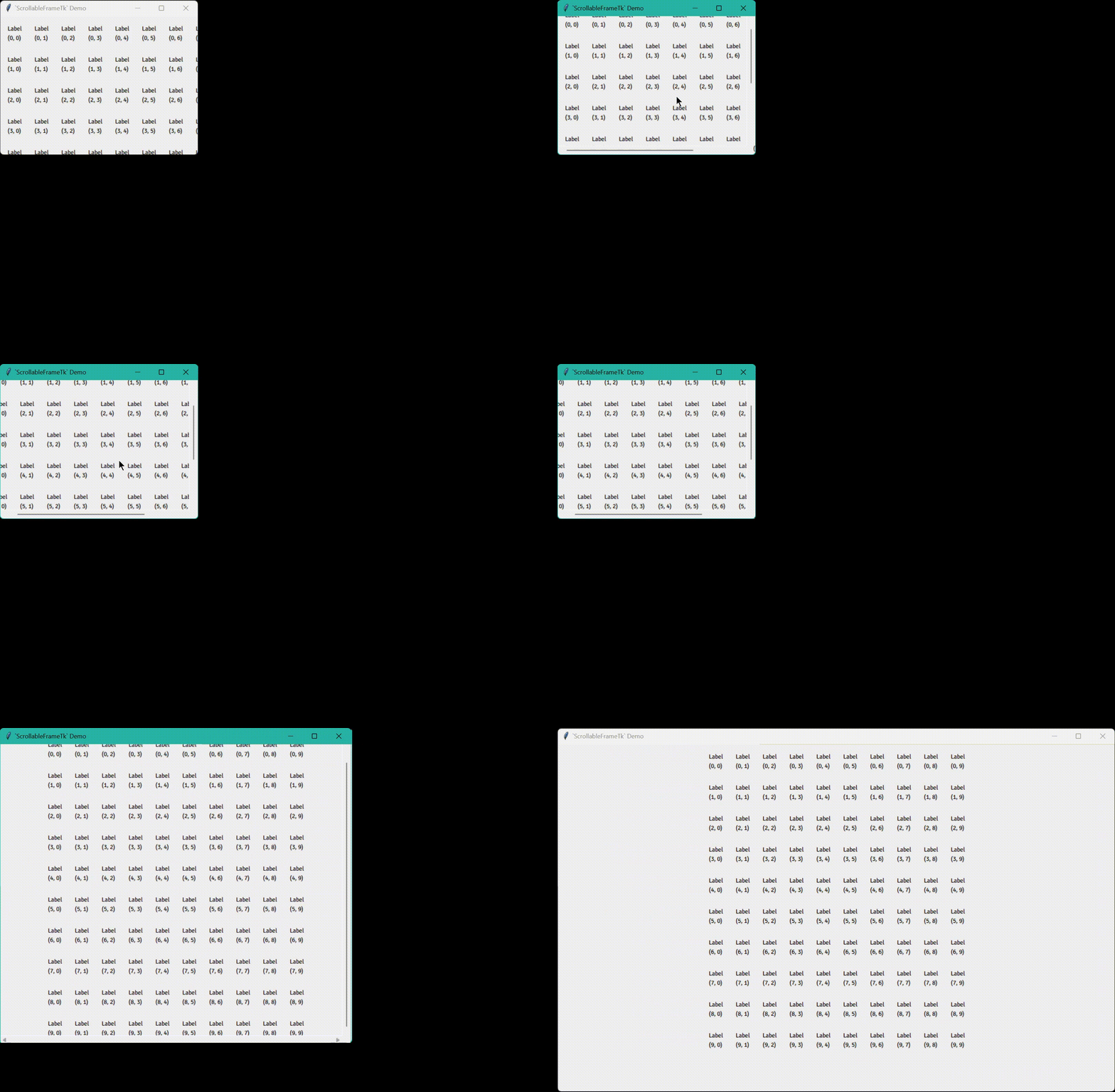
- Handles resize events correctly.
- Supports scrolling with the mouse wheel and touchpad.
- Scrolling the mouse wheel or swiping vertically with two fingers on the touchpad triggers a vertical scroll.
- Scrolling the mouse wheel while holding down Shift or swiping horizontally with two fingers on the touchpad triggers a horizontal scroll.
- Horizontally centres the contents if the window is wider.
- Reserves all space in the window for child widgets.
- The scrollbars do not take up any space. When scrolling or moving the cursor in the window, they are shown briefly, and then hidden.
Demo
Notes
"<Button-4>", "<Button-5>" and "<MouseWheel>" are bound to all widgets using bind_all to handle mouse wheel
scroll events. Do not unbind_all (or bind_all another function to) these three sequences!
wxPython
ScrollableContainers.ScrollablePanelWx: a thin wrapper around wx.lib.scrolledpanel.ScrolledPanel.
Usage
Add widgets to the panel attribute of a ScrollablePanelWx object.
See examples.
Features
- Does everything the wrapped class does.
- Horizontally centres the contents if the window is wider.
PyQt5/PyQt6
ScrollableContainers.ScrollableAreaQt5/ScrollableContainers.Qt6.ScrollableAreaQt6: a thin wrapper around
PyQt5.QtWidgets.QScrollArea/PyQt6.QtWidgets.QScrollArea.
Usage
Add widgets to the area attribute of a ScrollableAreaQt5/ScrollableAreaQt6 object.
See
examples.
Features
- Does everything the wrapped class does.
- Horizontally centres the contents if the window is wider.
In GTK, containers are widgets, so they can be aligned in other containers.
import itertools

import gi; gi.require_version("Gtk", "3.0")
from gi.repository import Gtk

window = Gtk.Window()
window.connect("destroy", Gtk.main_quit)
window.set_default_size(256, 128)

scrolled_window = Gtk.ScrolledWindow()
window.add(scrolled_window)

grid = Gtk.Grid()
grid.set_halign(Gtk.Align.CENTER)
grid.set_row_spacing(20)
grid.set_column_spacing(20)
scrolled_window.add(grid)

dim = 10
for i, j in itertools.product(range(dim), repeat=2):
    label = Gtk.Label()
    label.set_label(f"Label\n({i}, {j})")
    grid.attach(label, j, i, 1, 1)

window.show_all()
Gtk.main()
Since horizontally centring the contents of a scrollable container is the primary function of this package, and GTK has built-in functionality to achieve the same, no submodule for PyGObject is implemented here.
Release history Release notifications | RSS feed


Download files
Download the file for your platform. If you're not sure which to choose, learn more about installing packages.
Source Distribution
Built Distribution
Filter files by name, interpreter, ABI, and platform.
If you're not sure about the file name format, learn more about wheel file names.
Copy a direct link to the current filters
File details
Details for the file scrollablecontainers-2.2.5.tar.gz.
File metadata
- Download URL: scrollablecontainers-2.2.5.tar.gz
- Upload date:
- Size: 21.3 kB
- Tags: Source
- Uploaded using Trusted Publishing? No
- Uploaded via: twine/6.2.0 CPython/3.11.2
File hashes
| Algorithm | Hash digest | |
|---|---|---|
| SHA256 |
853245ae9f7ec4743634a14ddeb178049888776b62f90046f1db75268e5169c1
|
|
| MD5 |
641a584616424e250669f7e99bcc2a9f
|
|
| BLAKE2b-256 |
2dc9c45b1eeb5867e9b344f12bd707e1db4d3f9aaa6b65e51610ef6b8b2d5929
|
File details
Details for the file scrollablecontainers-2.2.5-py3-none-any.whl.
File metadata
- Download URL: scrollablecontainers-2.2.5-py3-none-any.whl
- Upload date:
- Size: 19.2 kB
- Tags: Python 3
- Uploaded using Trusted Publishing? No
- Uploaded via: twine/6.2.0 CPython/3.11.2
File hashes
| Algorithm | Hash digest | |
|---|---|---|
| SHA256 |
8db2c4dbd5dc9b9670677cc9ed33d03729f840add152457861a0a03e41b24938
|
|
| MD5 |
b599607a6336fa849349febae1ff9dbf
|
|
| BLAKE2b-256 |
a7cd81fa61e0e410534d5bae7ab77f37f50069b1f8eb77a01835579229ac9064
|






