
SearchMaster is a Python library that helps you search for files with a specified name across all available drives on your system. Whether you're looking for a specific document, image, or any other file type, SearchMaster can help you locate it quickly and efficiently.
Table of Contents
Features
- Cross-Drive Search: Searches across all mounted drives on your system, ensuring comprehensive file discovery.
- Efficient File Locating: Uses optimized search algorithms to quickly locate files, even in systems with vast amounts of data.
- User-Friendly Output: Provides clear and concise output, listing the full paths of the located files and the total number of matches found.
- Customizable Search Parameters: Allows you to specify the file name or pattern you are looking for, making it versatile for different search needs.
- Error Handling: Includes robust error handling to manage issues like inaccessible directories or read permissions.
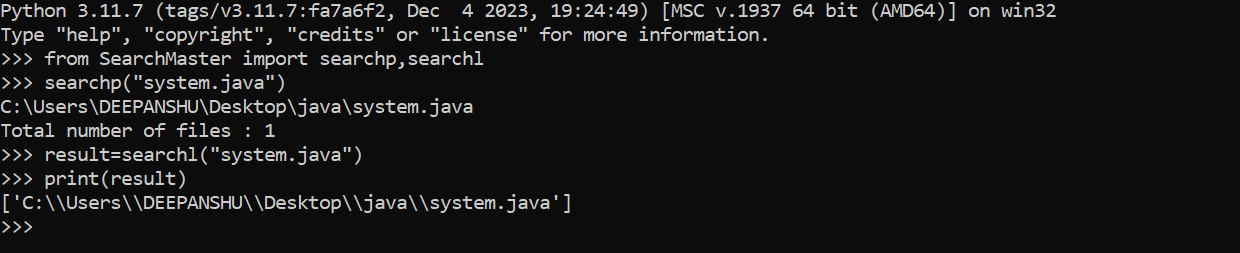
Demo
Badges

About Me 🚀
👋 Hi there! I'm Deepanshu, a passionate software developer with a broad range of skills in various programming languages and technologies. I thrive on solving complex problems, building efficient solutions, and continuously learning and growing in the tech world.
Requirements
- Python 3.x
psutillibrary
Installation
-
Clone the repository:
git clone https://github.com/deepanshu414/SearchMaster.git
-
You can install SearchMaster using pip:
pip install SearchMaster
Usage/Examples
Here's how to use the SearchMaster library to search for a file named example.txt:
# Importing search functions from the SearchMaster module
from SearchMaster import searchp, searchl

def main():
    # Perform a search using the `searchp` function and print each result one by one.
    # This function is useful for immediate feedback or incremental output.
    # Replace "example.txt" with the actual search query or file name.
    searchp("example.txt")

    # Perform a search using the `searchl` function and obtain the results as a list.
    # This function is useful for scenarios where results need to be processed or manipulated further.
    # Replace "example.txt" with the actual search query or file name.
    results = searchl("example.txt")

    # Print the list of results returned by `searchl`.
    # This allows you to see all results at once after the search is completed.
    print(results)

# Check if the script is being run directly (not imported as a module).
# If true, execute the `main()` function to start the program.
if __name__ == "__main__":
    main()
Here's how to use the SearchMaster library to search for a file named example.txt via command line:
python -m SearchMaster "example.txt"
License
This project is licensed under the MIT License - see the LICENSE file for details.
🔗 Links


Support
For support, email deepanshuantil4113@gmail.com
1 maintainer

Release files for SearchMaster 1.1.6
For a detailed explanation of source distributions (sdists) and built distributions (wheels), please see the package formats documentation.
Source distribution (sdist)
| File | Size | Uploaded | |
|---|---|---|---|
| SearchMaster-1.1.6.tar.gz | 4.5 kB | Details |
Built distribution (wheel)
| File | Interpreter | ABI | Platform | Reset |
|---|---|---|---|---|
| SearchMaster-1.1.6-py3-none-any.whl | Python 3 | none | any | Details |
Total release size: 9.2 kB
Release files / SearchMaster-1.1.6.tar.gz
| Download URL | SearchMaster-1.1.6.tar.gz |
|---|---|
| Size | 4.5 kB |
| Tags | Source |
|
SHA-256 checksum How to use checksums |
7533c24de79ed5588e71e25ad5a868ecc4d19807c6ec9cb5462a2a26aa5ff18a
|
|
BLAKE2b-256 checksum How to use checksums |
fafe3637c3f87f77cb90281556340301f1fd5ad463c90ff836d3098421f4b626
|
| Upload date | |
|
Uploaded using Trusted Publishing? What is trusted publishing? |
No |
| Uploaded via |
twine/5.1.1 CPython/3.12.6
|
Release files / SearchMaster-1.1.6-py3-none-any.whl
| Download URL | SearchMaster-1.1.6-py3-none-any.whl |
|---|---|
| Size | 4.7 kB |
| Tags | Python 3 |
|
SHA-256 checksum How to use checksums |
473c26bca859cda50f6bc39a53d20d3e7fc8ae9ebd4411b306db2a4ad66d2dae
|
|
BLAKE2b-256 checksum How to use checksums |
10e099a0798b561cad878f6a7b34f1a4a772f29a83242c524d78f5636a26a806
|
| Upload date | |
|
Uploaded using Trusted Publishing? What is trusted publishing? |
No |
| Uploaded via |
twine/5.1.1 CPython/3.12.6
|














