
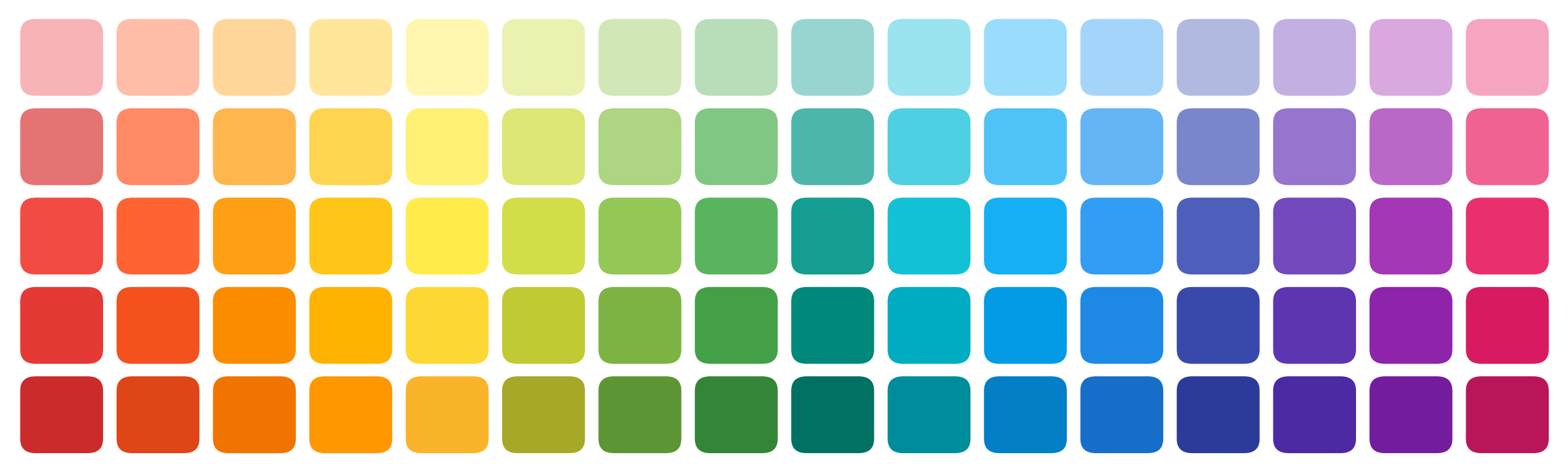
SecretColors
Beautiful, ready-to-use color palettes and colormaps for Python. IBM, Material, Adobe Spectrum, ColorBrewer, Tableau and colorblind-safe schemes - one simple API.
Documentation · GitHub · Changelog · Report a bug
Why SecretColors?
- Curated colors, not random hex codes - palettes from well known design systems, each with a full range of shades.
- Any shade you want -
p.blue(shade=37.5)works. Every color is a smooth gradient from white to its darkest tone. - Colormaps by name - register once and write
cmap="sc.greens"in matplotlib, pandas or seaborn. - Works everywhere - plain hex output for plotly, bokeh, altair or CSS.
- Colorblind friendly - pick colors optimized for normal vision, protanopia and deuteranopia, check your own, and use Okabe-Ito and Paul Tol schemes.
- Accessible - WCAG contrast ratio and readability checks.
- Smoother gradients - mix colors in perceptual L*a*b* or LCh space.
- Palettes from images - pull the dominant colors out of any photo.
- Color science included - CIE L*a*b*, LCh, Delta E (CIEDE2000) and 16 RGB colorspaces.
- Notebook friendly - colors show up as swatches in Jupyter.
- Zero dependencies - matplotlib is optional.
Installation
uv add SecretColors # or: pip install SecretColors
Optional extras
uv add "SecretColors[matplotlib]"   # matplotlib colormap objects
uv add "SecretColors[image]"        # palettes from images (Pillow)
uv add "SecretColors[all]"          # everything
Requires Python 3.11 or newer.
Quick start
from SecretColors import Palette

p = Palette()                   # IBM palette (default)
p.red()                         # '#fa4d56'
p.red(shade=20)                 # '#ffd7d9'  lighter
p.red(shade=80)                 # '#750e13'  darker
p.blue(n=5)                     # ['#edf5ff', '#9bc0ff', '#2a75fe', '#0032a9', '#001141']

Palette("material").red()       # '#f44336'
Every color is a plain str (or tuple), so you can pass it straight to any
plotting library.
Palettes
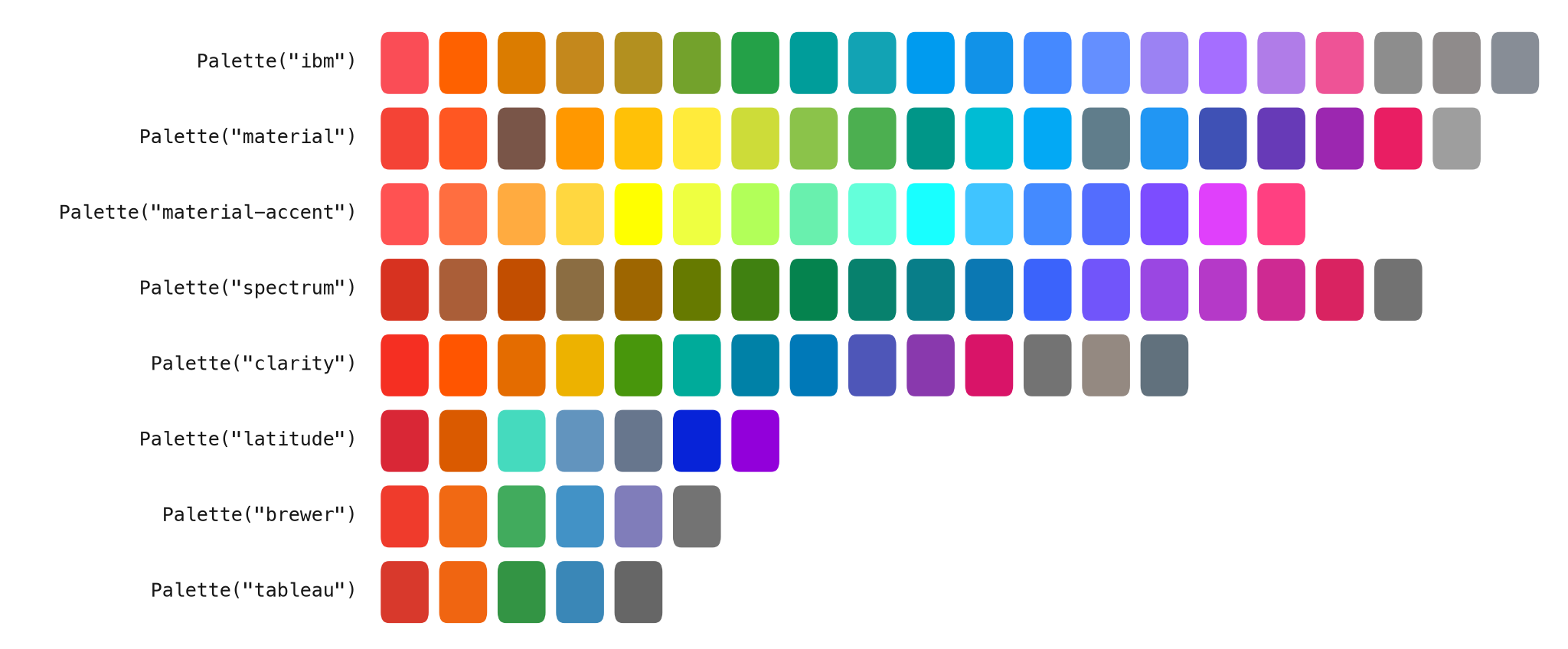
| Name | Palette |
|---|---|
ibm |
IBM Design Language (default) |
material |
Google Material Design |
material-accent |
Material Design accent colors |
spectrum |
Adobe Spectrum |
clarity |
VMware Clarity |
latitude |
Flexport Latitude |
brewer |
ColorBrewer |
tableau |
Tableau |
Need a color that is not in your palette? SecretColors looks for it in other palettes, then in the standard CSS / X11 color names.
p = Palette()                   # IBM has no 'amber'
p.get("amber")                  # '#ffc107'  borrowed from Material
p.get("aquamarine")             # '#7fffd4'  CSS color name
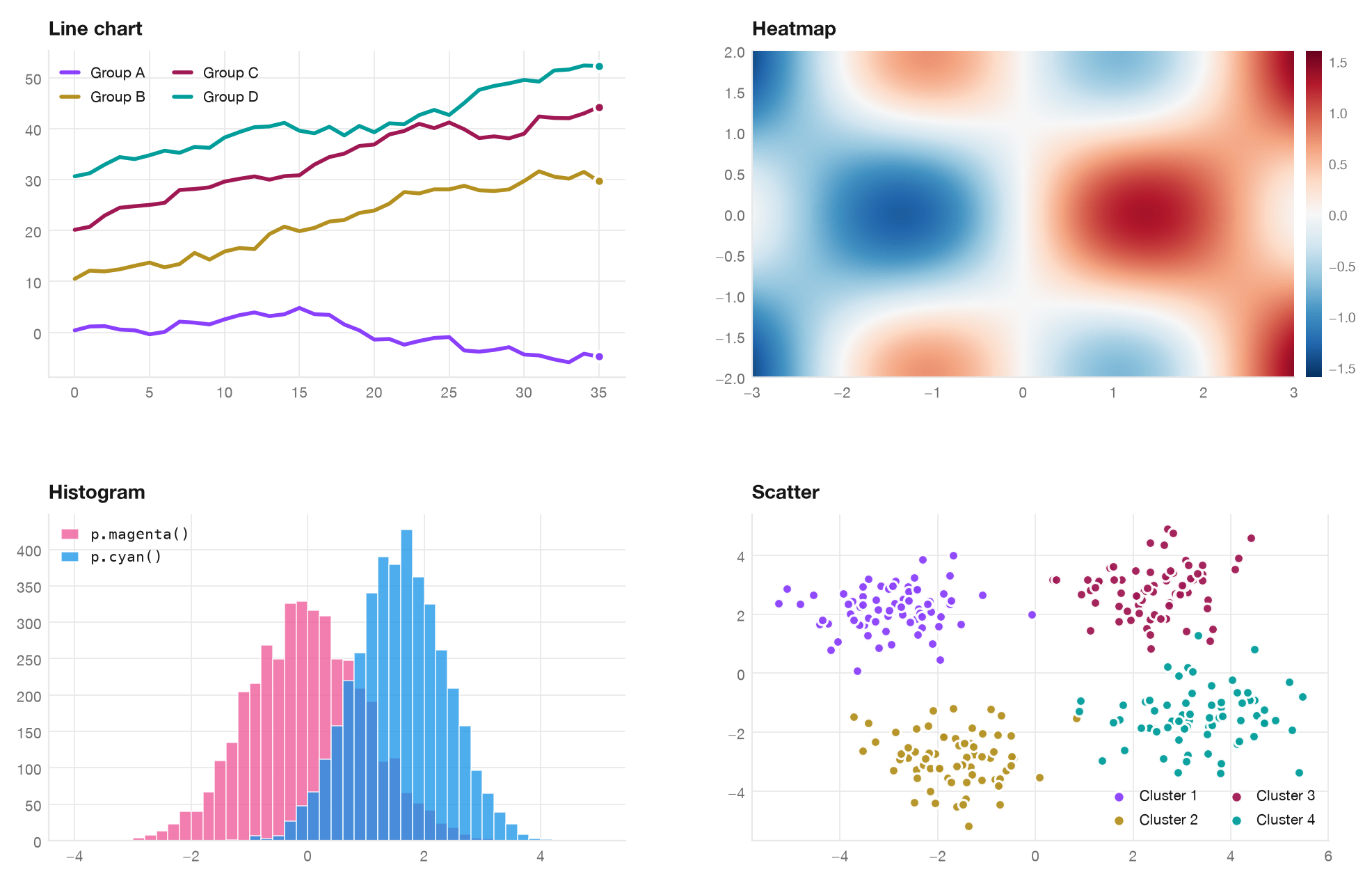
Use it in your plots
import matplotlib.pyplot as plt
from SecretColors import Palette, distinct_colors

plt.rcParams["axes.prop_cycle"] = plt.cycler(color=distinct_colors(5))

p = Palette()
plt.hist(a, color=p.magenta(), alpha=0.75)
plt.hist(b, color=p.cyan(), alpha=0.75)
Colormaps
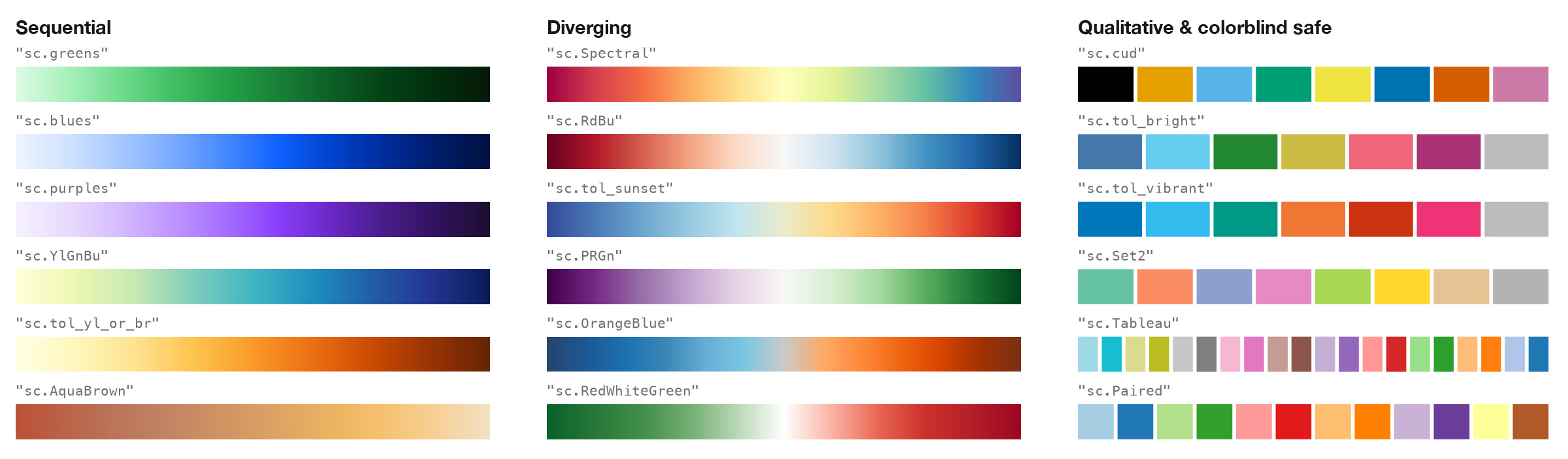
Register once and use any of the 83 colormaps by name - exactly like
matplotlib's own. Each one also has a reversed _r version.
from SecretColors import cmaps

cmaps.register()

plt.imshow(data, cmap="sc.greens")
plt.imshow(data, cmap="sc.Spectral_r")
sns.heatmap(data, cmap="sc.RdBu")                   # seaborn

cmaps.colors("Spectral", n=5)   # plain hex list, no matplotlib needed
Choosing distinguishable colors

distinct_colors() optimizes color separation for normal vision,
protanopia and deuteranopia, and have enough contrast with the background.
from SecretColors import distinct_colors, check_colors

distinct_colors(5)                          # ['#8a3ffc', '#b3901f', '#9f1853', '#009d9a', '#993a1d']
distinct_colors(5, background="#161616")   # for dark themes
print(check_colors(["#fa4d56", "#24a148", "#0f62fe"]))

from SecretColors.utils import contrast_ratio, is_readable
contrast_ratio("#0f62fe", "#ffffff")        # 5.0
is_readable("#8d8d8d", "#ffffff")           # False (needs 4.5)
Requests which miss min_delta_e=10 emit DistinctnessWarning. Use
distinct_colors(8, on_failure="raise") to enforce the threshold, or
on_failure="ignore" for deliberate best-effort selection. The supported
simulations are protanopia and deuteranopia; they do not cover every viewer.
Smoother gradients

from SecretColors.utils import mix, color_in_between

mix("#fa4d56", "#4589ff", space="lab")              # '#c670a9'
mix("#fa4d56", "#4589ff", space="lch")              # '#df57c0'
color_in_between("#f1c21b", "#0f62fe", 3, space="lab")
Palette from an image
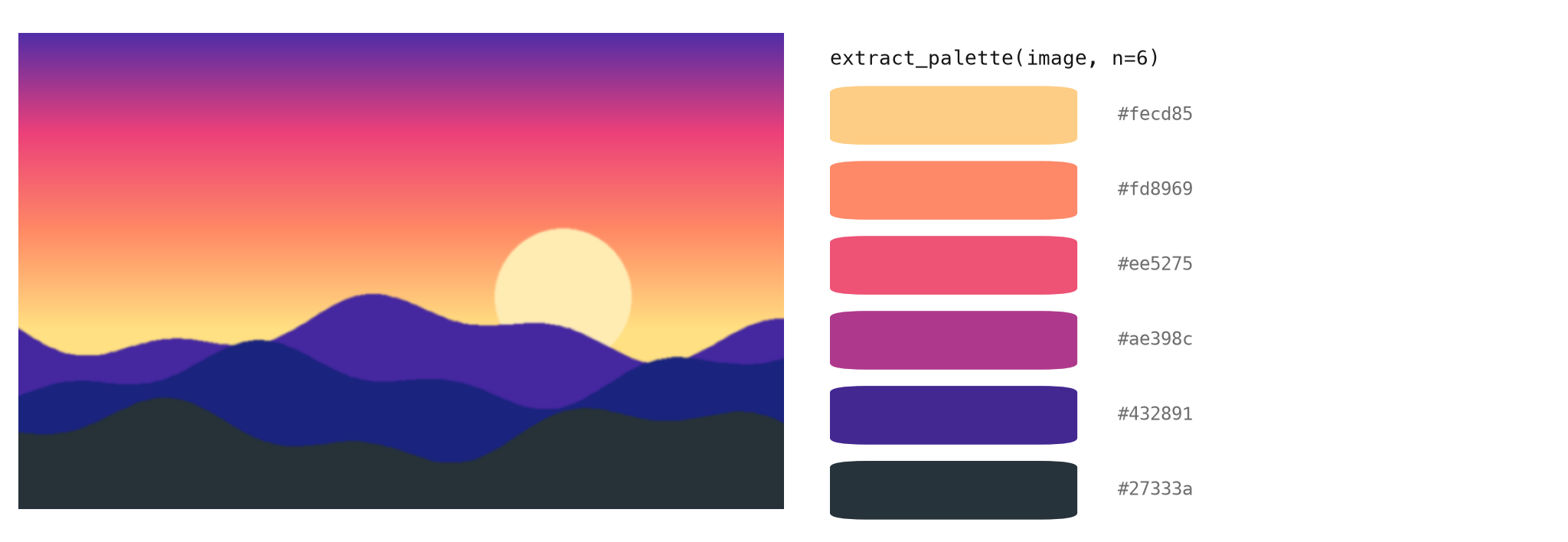
from SecretColors.image import extract_palette     # needs the "image" extra

extract_palette("sunset.jpg")                       # 5 dominant colors
extract_palette("sunset.jpg", n=6, sort="lightness")
Color harmonies
from SecretColors import ColorWheel

cw = ColorWheel("#3f51b5")
cw.complementary()          # ['#3f51b5', '#b5a33f']
cw.triadic()                # ['#3f51b5', '#b53f51', '#51b53f']
cw.text_color()             # '#ffffff'  readable text on this background
Upgrading from 1.x
Version 2.0 fixes many bugs and makes a few behaviour changes: unknown palette
names raise ValueError, ColorString + "text" is plain string concatenation
(use .blend()), hexa / ahex alpha uses the 0-255 scale, and
get_color_list / get_color_dict are now color_list / color_dict.
See the changelog
for the full list.
Documentation
Full guide and API reference: secretcolors.readthedocs.io. The story behind this library is on the WeirdData blog.
License
Released under the MIT License.
1 maintainer

Metadata
1 maintainer
Release files for SecretColors 2.2.0
For a detailed explanation of source distributions (sdists) and built distributions (wheels), please see the package formats documentation.
Source distribution (sdist)
| File | Size | Uploaded | Provenance | Actions |
|---|---|---|---|---|
| secretcolors-2.2.0.tar.gz | 108.5 kB | Without provenance | Details for secretcolors-2.2.0.tar.gz |
Built distribution (wheel)
| File | Interpreter | ABI | Platform | Actions Reset |
|---|---|---|---|---|
| secretcolors-2.2.0-py3-none-any.whl | Python 3 | none | any | Details for secretcolors-2.2.0-py3-none-any.whl |
Total release size: 205.4 kB
Release files / secretcolors-2.2.0.tar.gz
| Download URL | secretcolors-2.2.0.tar.gz |
|---|---|
| Size | 108.5 kB |
| Tags | Source |
|
SHA-256 checksum How to use checksums |
de74bc212693e2a2203e091fec7d27255b26881ea94064e12bf2116dc2a96ea4
|
|
BLAKE2b-256 checksum How to use checksums |
54544d5e1b638b7a1d1b6c83ccd4f00e6d319d2ee93c6874a5f5c143a0b0e01f
|
| Upload date | |
|
Uploaded using Trusted Publishing? What is trusted publishing? |
No |
| Uploaded via |
uv/0.13.4 {"installer":{"name":"uv","version":"0.13.4","subcommand":["publish"]},"python":null,"implementation":{"name":null,"version":null},"distro":{"name":"macOS","version":null,"id":null,"libc":null},"system":{"name":null,"release":null},"cpu":null,"openssl_version":null,"setuptools_version":null,"rustc_version":null,"ci":null}
|
Release files / secretcolors-2.2.0-py3-none-any.whl
| Download URL | secretcolors-2.2.0-py3-none-any.whl |
|---|---|
| Size | 96.9 kB |
| Tags | Python 3 |
|
SHA-256 checksum How to use checksums |
1b4b8a85c41e4afdf8b57e5e33ceb704d9e7bb8743ad602b82778abf7cabface
|
|
BLAKE2b-256 checksum How to use checksums |
1b7a445be1d1df8843217d71e8dea763ad721d4ffb954296713de3d8bb467a71
|
| Upload date | |
|
Uploaded using Trusted Publishing? What is trusted publishing? |
No |
| Uploaded via |
uv/0.13.4 {"installer":{"name":"uv","version":"0.13.4","subcommand":["publish"]},"python":null,"implementation":{"name":null,"version":null},"distro":{"name":"macOS","version":null,"id":null,"libc":null},"system":{"name":null,"release":null},"cpu":null,"openssl_version":null,"setuptools_version":null,"rustc_version":null,"ci":null}
|
Security for SecretColors 2.2.0
Provenance
Provenance describes where a file came from. On PyPI, provenance is shared via attestations, which provide a verifiable record of the build or publishing details. View details, limitations and caveats.
No provenance found
None of the files in this release were uploaded with provenance metadata.
A note on package security
PyPI is a repository for distributing packages, not a service for auditing them. While third-party security researchers and our staff do their best to detect and remove malicious packages, PyPI cannot guarantee the quality, security or suitability of any given package.
To learn more about protecting yourself from malicious actors, visit our package security documentation.














