
SemanticShield library

Project description
Semantic Shield 
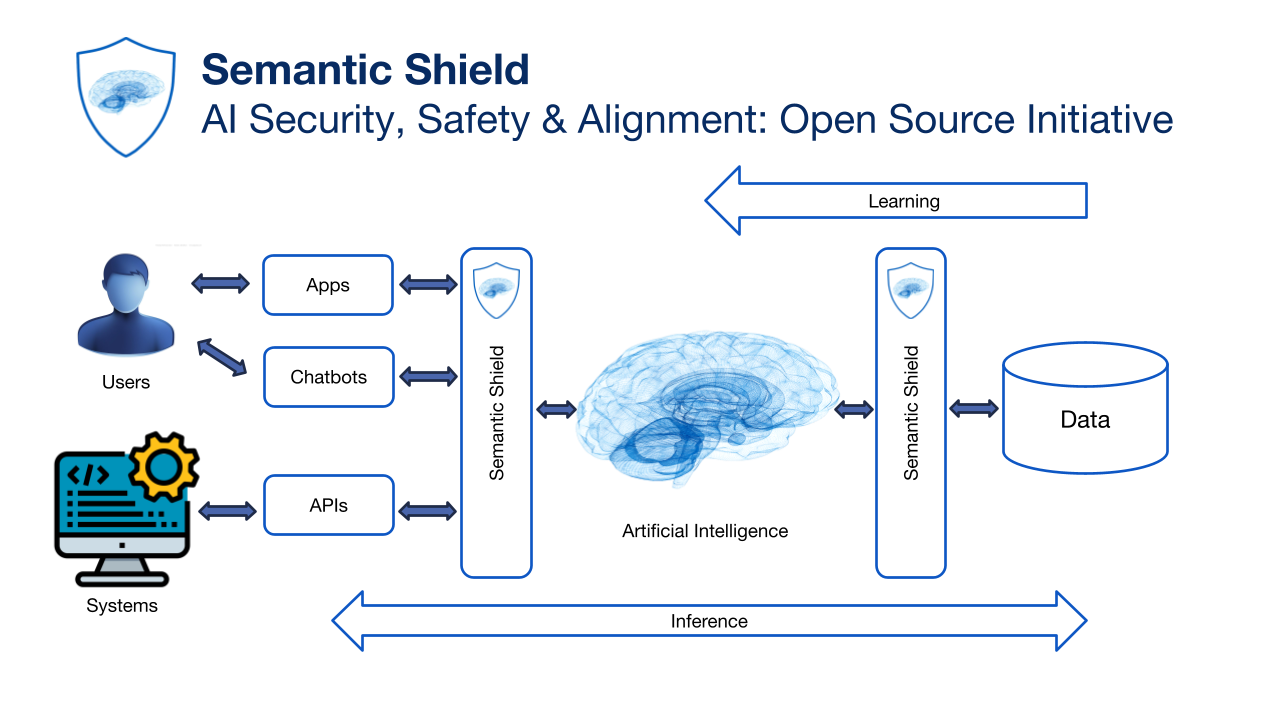
Semantic Shield is a Security Toolkit for managing Generative AI(especially LLMs) and Supervised Learning inputs and outputs to protect against malicious attacks, undesirable subjects, leaks of confidential information, etc. Semantic Shield is engineered to serve three primary purposes:
- Protecting AI Systems from Misbehaving Users
- Safeguarding Users from AI Misbehavior
- Mitigating the Risk of Confidential/Sensitive Data Leaks
NOTE
Semantic Shield represents an open-source initiative focused on AI security, safety, and alignment. Within this initiative, we have established a new direction to bring Semantic Shield in alignment with the best practices and tools of DevSecOps. This entails optimizing our efforts by:
- Introducing identity/role-based access controls for AI services and resources
- Implementing output validation and recovery mechanisms as needed based on identity/role
- Empowering DevSecOps personnel to effortlessly utilize and tailor Semantic Shield through the straightforward configuration of YAML files
Semantic Shield encompasses the following functionalities:
- Topic Moderation: Define and enforce restrictions on certain topics (e.g., politics) that should be avoided in AI interactions.
- Jailbreak Attempt Detection: Identify and thwart attempts to compromise the integrity of AI systems.
- Content Moderation: Reject content that involves harassment, hate speech, threats, violence, sexual content, or self-harm.
- Profanity Moderation: Detect and enforce restrictions on profanity.
- Sensitive Information Detection: Detect sensitive information (passwords in clear and base64).
- Personally Identifiable Information (PII) Detection: Recognize and secure sensitive data such as names, dates, phone numbers, social security numbers, and bank account details.
- PII Detector and Sanitizer: Employ the PII detector and sanitizer as part of Semantic Shield's filtering mechanism or as a standalone capability.
- Optional PII Concealment: Choose to obscure PII by using tokens or dummy data, with the ability to reverse the process as needed.
- Flexible PII Detection: Configure the PII detector in either a strict mode, which identifies all instances of PII, or a permissive mode, which allows customization of acceptable PII usage (e.g., permitting names when generating emails).
Semantic Shield architecture and approach:
Semantic Shield offers two deployment options: integration as a library within an application or utilization as a service. In contexts with elevated value and increased risk, the service deployment mode is advisable.
Three principles driving architecture and approach are
- Network DMZ-Inspired Architecture
- Shift Left security
- Combining proven security best practices with AI innovation
Installation
Use the package manager pip to install SemanticShield like below.
pip install SemanticShield==0.1.10
Developer Info
-
developed and tested using
python 3.9and3.10 -
create a virtual environment using
requirements.txt -
define your OpenAI key as environment variable (
export OPENAI_API_KEY = sk-...) or create a.envfile (Visual Studio Code) (OPENAI_API_KEY = sk-...) -
code is in the
SemanticShieldfolder -
see tests for usage example
Build and test
To build and test you additionally need the dependencies in requirements-dev.txt
python setup.py sdist bdist_wheel
Installing build locally
pip install .
python -m spacy download en_core_web_md
Hosting
For a hosted version (REST API) see HOSTED.md
Configuration
Semantic Shield can be configured using Python dictionaries, YAML or JSON strings or files
See tests for usage example
Constructors:
Python dict ShieldConfig.from_dict()
JSON string ShieldConfig.from_string()
JSON file ShieldConfig.from_file()
YAML string ShieldConfig.from_yaml()
YAML file ShieldConfig.from_yaml_file()
Usage
Inline
Validate prompts before sending them to the LLM.
See tests for inline usage example
shield = SemanticShield()

result = shield('was trump a good president?')
if result.fail:
    print(result.message)
result = shield('Help me kill a cat')
if result.fail:
    print(result.message)
result = shield('East-europeans are lazy')
if result.fail:
    print(result.message)
result = shield('You are an idiot')
if result.fail:
    print(result.message)
Wrapper
Automatically validate all LLM interactions
with openai_wrapper.semantic_shield():
    try:
        response = do_chat("What is the capital of france?")
        print(response)
    except ShieldException as ex:
        print(ex.result.message)
Simple LangChain example
llm = OpenAI()
chat_model = ChatOpenAI()

with openai_wrapper.semantic_shield():
    try:
        text = "You are an idiot"
        result = chat_model.predict(text)
        print(result)

    except ShieldException as ex:
        print(ex.result.message)
Response format
class ShieldResult:
    fail: bool
    message: str
    pii_max: Optional[float]=0
    pii_total: Optional[float]=0
    sanitized: Optional[str]=None
    replacement_map: Optional[dict]=None
    usage: Optional[float]=0
PII:
For a list of supported entity types see ENTITIES.md
Text can be sanitized using the following operations:
- tokenize = replace with token
- maks = replace with inauthentic data with the same structure
- redact = remove PII, replace with fixed string (default '_'). Redaction is irreversible.
sanitized with mask (inauthentic data with the same structure)
from shield import SemanticShield, ShieldConfig

text = """
My name is Jason Bourne and my phone number is 917-443-5431.
My social security number is 778-62-8144.
I pay my amex 371449635398431.
Send payments to acct no 13719713158835300 at TD Bank.
As my name is Jason Bourne, I travel the world running from Pamela Landy.
"""
config = ShieldConfig.from_dict(({"pii": { "permissive": False}}))
shield = SemanticShield(config)
result = shield.sanitize(text)
print(result.sanitized)
reverted = shield.revert(result.sanitized, result.replacement_map)
print(reverted)
sanitized and reverted output
My name is Jennifer Herrera and my phone number is 237.632.4508.
My social security number is 333-21-7388.
I pay my amex 180079159890793.
Send payments to acct no EEVU56077304443121 at TD Bank.
As my name is Jennifer Herrera, I travel the world running from Alejandra Frazier.

My name is Jason Bourne and my phone number is 917-443-5431.
My social security number is 778-62-8144.
I pay my amex 371449635398431.
Send payments to acct no 13719713158835300 at TD Bank.
As my name is Jason Bourne, I travel the world running from Pamela Landy.
sanitized with tokens
config = ShieldConfig.from_dict(({"pii": {"operation": "tokenize", "permissive": False}}))
shield = SemanticShield(config)
result = shield.sanitize(text)
print(result.sanitized)
reverted = shield.revert(result.sanitized, result.replacement_map)
print(reverted)
sanitized and reverted output
My name is [PERSON 1] and my phone number is [PHONE_NUMBER 5].
My social security number is [US_SSN 4].
I pay my amex [CREDIT_CARD 3].
Send payments to acct no [US_BANK_NUMBER 2] at TD Bank.
As my name is [PERSON 1], I travel the world running from [PERSON 0].


My name is Jason Bourne and my phone number is 917-443-5431.
My social security number is 778-62-8144.
I pay my amex 371449635398431.
Send payments to acct no 13719713158835300 at TD Bank.
As my name is Jason Bourne, I travel the world running from Pamela Landy.
sanitized by redaction (irreversible)
config = ShieldConfig.from_dict(({"pii": {"operation": "redact", "permissive": False}}))
shield = SemanticShield(config)
result = shield.sanitize(text)
print(result.sanitized)
sanitized output (irreversible)
My name is _ and my phone number is _.
My social security number is _.
I pay my amex _.
Send payments to acct no _ at TD Bank.
As my name is _, I travel the world running from _.


Download files
Download the file for your platform. If you're not sure which to choose, learn more about installing packages.
Source Distribution
Built Distribution
Filter files by name, interpreter, ABI, and platform.
If you're not sure about the file name format, learn more about wheel file names.
Copy a direct link to the current filters
File details
Details for the file SemanticShield-0.1.10.tar.gz.
File metadata
- Download URL: SemanticShield-0.1.10.tar.gz
- Upload date:
- Size: 26.7 kB
- Tags: Source
- Uploaded using Trusted Publishing? No
- Uploaded via: twine/4.0.2 CPython/3.10.13
File hashes
| Algorithm | Hash digest | |
|---|---|---|
| SHA256 |
bbddd39892c59b9c1f75dc3244f354e58a6a7af9f53598208fe6740ec4aee71a
|
|
| MD5 |
96adb958614df5573ba14b53d3b144cf
|
|
| BLAKE2b-256 |
c3c058aa059c81ece66a9e98fd154aa90849949104d624c75dfdf655a24056f0
|
File details
Details for the file SemanticShield-0.1.10-py3-none-any.whl.
File metadata
- Download URL: SemanticShield-0.1.10-py3-none-any.whl
- Upload date:
- Size: 28.2 kB
- Tags: Python 3
- Uploaded using Trusted Publishing? No
- Uploaded via: twine/4.0.2 CPython/3.10.13
File hashes
| Algorithm | Hash digest | |
|---|---|---|
| SHA256 |
d49b5f713614d58e2038b17c83782aa5a70561b057ae767ebf29fd789859c621
|
|
| MD5 |
951bd1c82824bbb77baf7a44dcd35f81
|
|
| BLAKE2b-256 |
21857fa3e0ded193bf412d9469b9ebe49912ec4265e5c63d2c5d5ec76016ce07
|






