
ShadowFinder



A lightweight tool and Google Colab notebook for estimating the points on the Earth's surface where a shadow of a particular length could occur, for geolocation purposes.
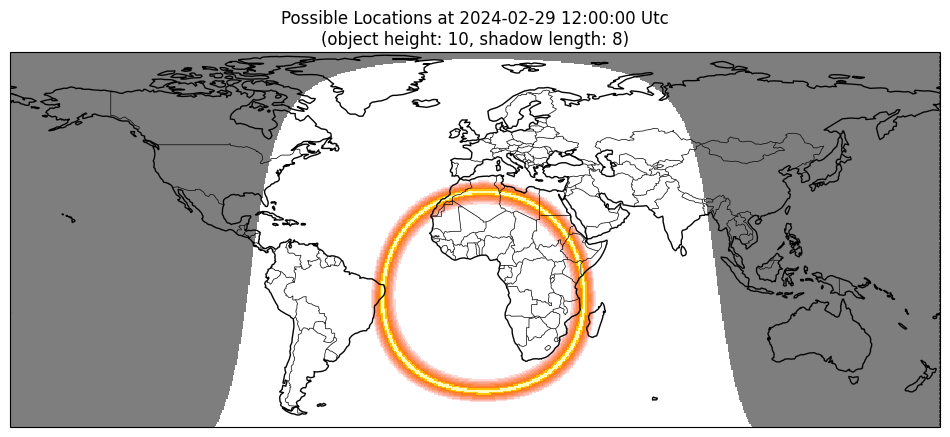
Using an object's height, the length of its shadow, the date and the time, ShadowFinder estimates the possible locations where that shadow could occur. These possible locations are shown as a bright band on a map of the Earth:
Usage - Google Colab Notebook 🚀
No installation necessary, just try it out using the Google Colab notebook here!
Installation 🪄

ShadowFinder is built with the interactive notebook in mind, which can be downloaded and used in a local Jupyter environment, the package also provides a Python API and a command-line interface.
ShadowFinder is published on PyPi so can be installed via pip with:
pip install shadowfinder
Usage - Python Library 🐍
If you want to use ShadowFinder directly from Python, the usage is as follows.
from shadowfinder import ShadowFinder

finder = ShadowFinder()

# Use a pre-generated timezone grid to save time
# Attempt to load a timezone grid and on a failure generate the grid and save to file
try:
    finder.load_timezone_grid()
except FileNotFoundError:
    finder.generate_timezone_grid()
    finder.save_timezone_grid() # timezone_grid.json

# Set up the scenario
# Provide either object_height and shadow_length OR sun_altitude_angle
finder.set_details(
    date_time=date_time, # datetime object with no timezone awareness
    object_height=object_height, # object height in arbitrary units
    shadow_length=shadow_length, # shadow length in arbitrary units
    time_format=time_type, # string, either 'local' or 'utc'
    sun_altitude_angle=sun_altitude_angle, # altitude angle of the sun, in degrees above the horizon
)

# Run the finder
finder.find_shadows()

# Access the resulting figure
fig = finder.plot_shadows()
Usage - Command Line Interface 🐌
[!IMPORTANT] Using the CLI is not the recommended way of using ShadowFinder as it is quite slow (there is currently not a caching strategy for the timezone_grid, so this is generated every run which is resource intesive)
shadowfinder find 10 5 2024-02-29 13:59:59 --time_format=utc
Where the arguments are OBJECT_HEIGHT, SHADOW_LENGTH, DATE, and TIME respectively.
You can also use the angle to the sun directly (above the horizon, in degrees):
shadowfinder find_sun 50 2024-02-29 13:59:59 --time_format=utc
Where the arguments are SUN_ALTITUDE_ANGLE, DATE, and TIME respectively.
More complete help information can be found by running:
shadowfinder find --help
shadowfinder find_sun --help
Development :octocat:
Expand to view information for developers
This section describes how to install the project to run it from source, for example if you want to build new features.
# Clone the repository
git clone https://github.com/bellingcat/ShadowFinder.git

# Change directory to the project folder
cd ShadowFinder
This project uses Poetry for dependency management and packaging.
# Install poetry if you haven't already
pip install poetry

# Install dependencies
poetry install

# Setup pre-commit hooks
poetry run pre-commit install

# Run the tool
poetry run shadowfinder --help

# Run tests against your current Python interpreter
poetry run pytest

# Or, run pytest against all shadowfinder supported Python versions
poetry run tox p  # p=run in parallel
1 maintainer

Metadata
1 maintainer
Release files for ShadowFinder 0.7.1
For a detailed explanation of source distributions (sdists) and built distributions (wheels), please see the package formats documentation.
Source distribution (sdist)
| File | Size | Uploaded | |
|---|---|---|---|
| shadowfinder-0.7.1.tar.gz | 8.4 kB | Details |
Built distribution (wheel)
| File | Interpreter | ABI | Platform | Reset |
|---|---|---|---|---|
| shadowfinder-0.7.1-py3-none-any.whl | Python 3 | none | any | Details |
Total release size: 18.2 kB
Release files / shadowfinder-0.7.1.tar.gz
| Download URL | shadowfinder-0.7.1.tar.gz |
|---|---|
| Size | 8.4 kB |
| Tags | Source |
|
SHA-256 checksum How to use checksums |
635939cbc379adfb8385c442e803c52af5bfd842fa1d139720be02e456d61ce2
|
|
BLAKE2b-256 checksum How to use checksums |
d5f8286a7d46416662c37a0faed18a15d3a6007008285a25c4dd2b3758b8d849
|
| Upload date | |
|
Uploaded using Trusted Publishing? What is trusted publishing? |
No |
| Uploaded via |
poetry/2.4.2 CPython/3.12.8 Linux/6.17.0-1022-azure
|
Release files / shadowfinder-0.7.1-py3-none-any.whl
| Download URL | shadowfinder-0.7.1-py3-none-any.whl |
|---|---|
| Size | 9.8 kB |
| Tags | Python 3 |
|
SHA-256 checksum How to use checksums |
d23c22dff49276bd493305e61e2edf8bd1ca0d2bfe8c0ce27e8cb0164b4cd79d
|
|
BLAKE2b-256 checksum How to use checksums |
85d400525184bb0ccc1bd0f18b98b85efa8cdf612d1f0c5ad84291591440f491
|
| Upload date | |
|
Uploaded using Trusted Publishing? What is trusted publishing? |
No |
| Uploaded via |
poetry/2.4.2 CPython/3.12.8 Linux/6.17.0-1022-azure
|














