
StoryForge
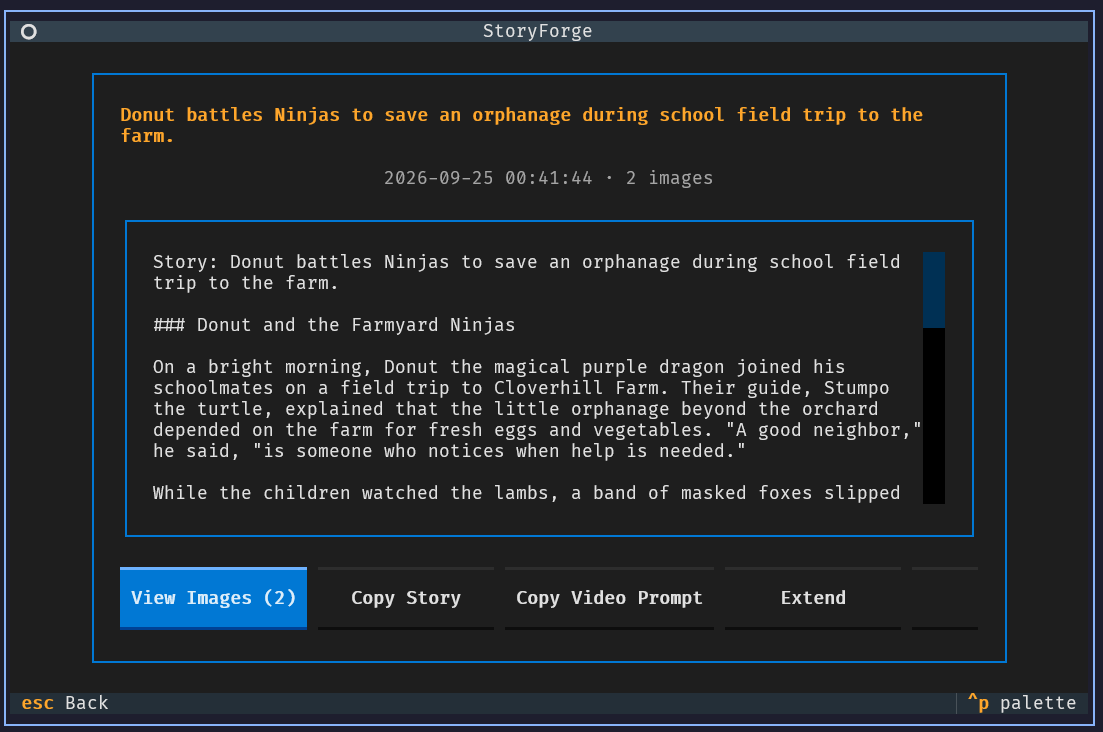
A full-screen TUI and MCP server that generate illustrated children's stories using AI. Provide a prompt, get a story and AI-generated images.
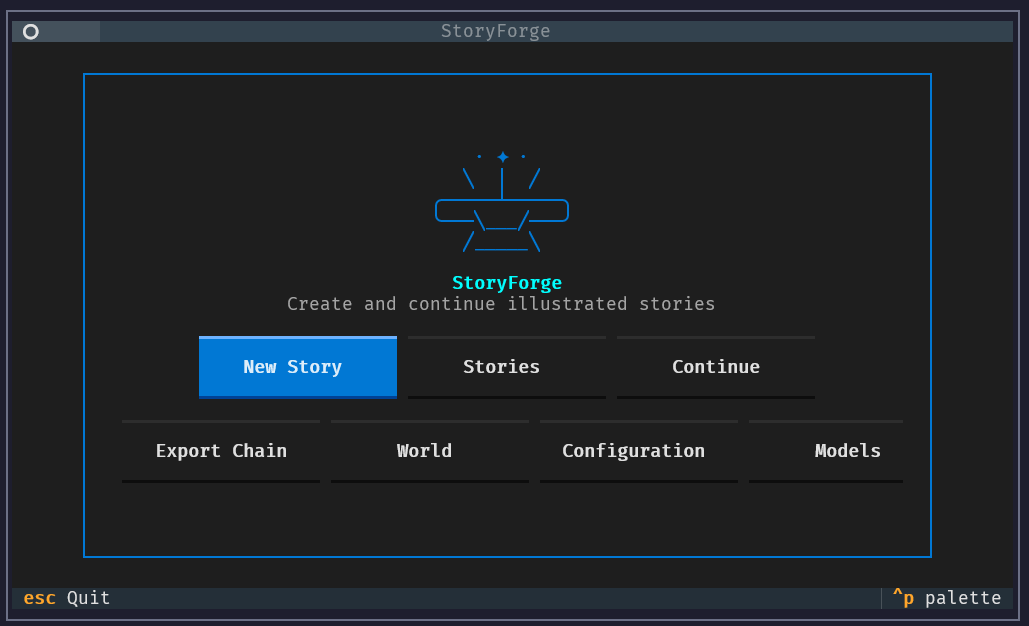
Features
- 📖 Story generation from simple prompts with customizable age range, length, tone, theme, and style
- 🎨 AI illustrations in multiple art styles (chibi, realistic, cartoon, watercolor, sketch)
- 🖼️ In-app image viewer — uses Sixel or Kitty graphics when the terminal supports them, with a portable Unicode fallback
- 🗣️ Voice archetypes — narrator styles (anapestic, sardonic, picaresque, gothic, lyrical, and more)
- 🌍 World definitions — persistent
world.mdfor characters, places, and lore across stories - 📚 Story extension — continue stories with an interactive TUI picker; chain tracking and export
- 👤 Character registry — tracks appearances and injects visual descriptions into image prompts
- ⏯️ Checkpoint system — resume interrupted sessions with
sf continue - 🔄 Context summarization with temporal sampling, sentence deduplication, and token budget management
- 🔁 Automatic retry with exponential backoff for transient API errors
- 🔌 Bundled MCP server — the TUI and classic CLI share one typed workflow API that can also be registered with other MCP hosts
- ⚙️ In-app configuration editor — edit and validate the active INI file without leaving the TUI
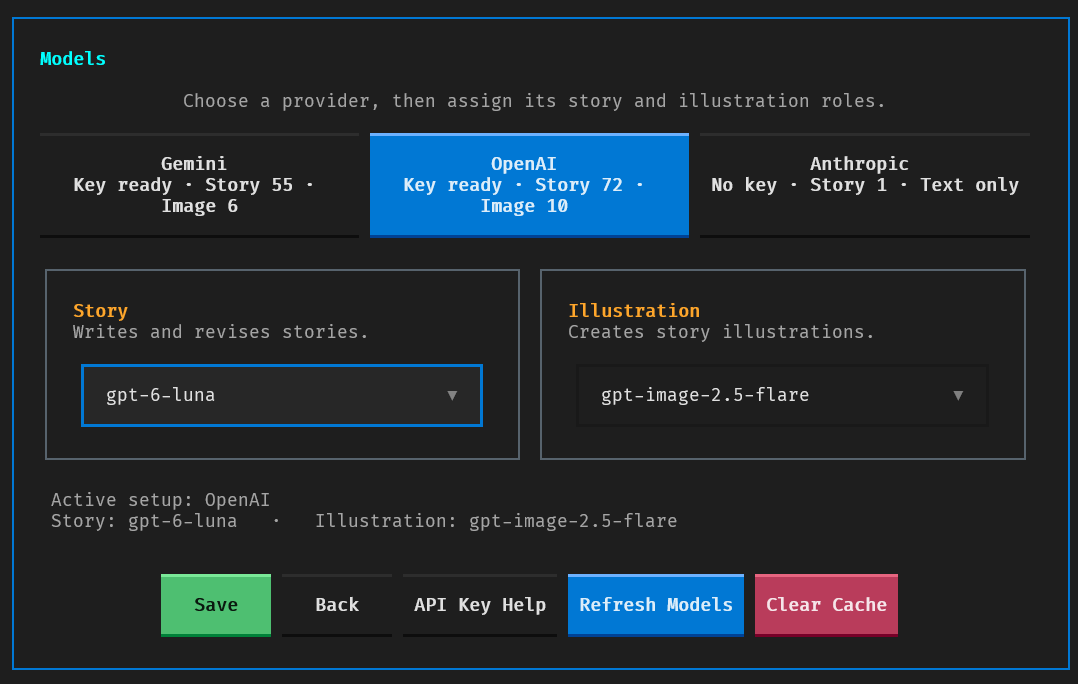
- 🤖 Provider model picker — refresh available models and persist separate story/image choices
Backends: Google Gemini ✅ | OpenAI ✅ | Anthropic (text only)
Installation
Requires Python 3.12+ and at least one API key from a supported backend.
# Install with uv (recommended)
uv tool install StoryForge

# Or with pipx
pipx install StoryForge
Set up at least one provider API key (add it to your shell profile to persist):
export GEMINI_API_KEY=your_gemini_key
# Or: export OPENAI_API_KEY=your_openai_key
# Or: export ANTHROPIC_API_KEY=your_anthropic_key
Only one key is required. StoryForge auto-detects the backend from available keys; override it with
LLM_BACKEND=gemini|openai|anthropic. Restart StoryForge after changing environment variables so its local server
inherits the new values.
Quick Start
# Open the StoryForge home screen
sf

# Generate a story (the bare-prompt shortcut)
sf "A brave mouse named Max finds a magic acorn"

# The explicit, script-friendly command is also available
sf generate "A brave mouse named Max finds a magic acorn"

# With options
sf "A dragon learns to fly" \
  --age-range preschool --length short --tone exciting \
  --voice anapestic --image-style watercolor \
  --setting "enchanted forest" --character "Luna the owl" -n 3

# Resume an interrupted session
sf continue

# Extend a previous story (interactive TUI picker)
sf extend

# Export a multi-part story chain to one file
sf export-chain
Both storyforge and the shorter sf entry point are installed; examples use sf. storyforge-mcp is the separate
stdio protocol server entry point.
StoryForge launches the full-screen interface when stdin and stdout are attached to a capable terminal. A bare management group such as sf config, sf world, or sf models opens its corresponding screen. Explicit actions such as sf world path, sf config init, and sf models refresh always execute directly so their arguments are never discarded. Use --no-tui for the Rich prompt interface, or set STORYFORGE_NO_TUI=1; redirected input/output selects that interface automatically. Both interfaces execute application workflows through the bundled local MCP server.
Story Options
| Option | Values |
|---|---|
--age-range |
toddler, preschool, early_reader, middle_grade |
--length |
flash, short, medium, bedtime |
--style |
adventure, comedy, fantasy, fairy_tale, friendship, random |
--tone |
gentle, exciting, silly, heartwarming, magical, random |
--voice |
anapestic, sardonic, picaresque, iambic, fable, gothic, nonsense, lyrical, epistolary, random |
--theme |
courage, kindness, teamwork, problem_solving, creativity, random |
--image-style |
chibi, realistic, cartoon, watercolor, sketch |
--setting |
Free text (e.g., "enchanted forest") |
--character |
Repeatable (e.g., --character "Max the mouse" --character "Luna the owl") |
-n |
Image count (1–5, default: 3) |
All Commands
sf ["prompt"] [options]         # Generate a new story (bare-prompt shortcut)
sf generate "prompt" [options]  # Explicit generation command
sf continue                     # Resume a previous session
sf extend                       # Extend a previous story
sf export-chain [-c NAME] [-o FILE]  # Export story chain
sf config                         # Open the in-app configuration screen
sf config show                    # Print resolved configuration
sf config init [--force]        # Generate default config file
sf world                          # Open the in-app world editor
sf world init                   # Create world.md template
sf world edit                   # Open world.md in $EDITOR
sf world show                   # Display world.md contents
sf world path                   # Show world.md location
sf models                         # Open the model picker
sf models list                    # List fresh cached provider models
sf models refresh                 # Query configured providers now
sf models clear                   # Delete cached provider model lists
sf --tui                        # Force the full-screen interface
sf --no-tui "prompt"           # Force the Rich MCP client
sf --help                       # Full help
MCP Server
StoryForge includes a local stdio MCP server with typed tools for story discovery, draft generation, refinement, finalization, extension, resume, export, world/config access, and model-cache management.
# Run the protocol server directly (it waits for an MCP client on stdio)
storyforge-mcp

# Development inspector
make mcp-dev
Register the installed command with an MCP host using its normal server configuration shape:
{
  "mcpServers": {
    "storyforge": {
      "command": "storyforge-mcp"
    }
  }
}
The server inherits the host environment, including provider API keys. It reserves stdout for MCP messages and sends diagnostics to stderr.
Configuration
StoryForge can be configured via CLI flags, a config file, or both (CLI flags take priority).
# Generate a default config file
sf config init
Config file location (first found wins): $STORYFORGE_CONFIG → ~/.config/storyforge/storyforge.ini → ~/.storyforge.ini → ./storyforge.ini
Run sf config to view the resolved configuration and edit the active file inside the TUI. Candidates are validated
before an atomic replacement; if validation or saving fails, the editor keeps the unsaved text so it can be corrected.
See docs/CONFIGURATION.md for the full reference of all options, defaults, and examples.
World Definitions
Define your story universe in a persistent world.md file — characters, places, lore, and tone notes. This content is injected into every story prompt, giving the LLM consistent world knowledge across all generations.
sf world init     # Create from template
sf world          # Open the in-app viewer/editor
sf world edit     # Open in $EDITOR in the classic interface
sf world show     # Display current contents
sf world path     # Show file location
The template includes sections for Characters, Places, Rules & Lore, Relationships, and Tone & Style Notes. You fill in what matters for your stories — keep it concise because the world text is included verbatim and consumes model context.
HTML comments (<!-- ... -->) are stripped before prompt injection, so you can leave yourself notes that won't reach the LLM:
## Characters

### Luna
A curious 7-year-old with curly red hair and bright green eyes.
Always wears purple rain boots, even on sunny days.
<!-- TODO: decide if she has a pet yet -->
File location: StoryForge reads an existing ./context/world.md first, then the platform user-data context/world.md (normally ~/.local/share/storyforge/context/world.md on Linux). An empty local context/ directory does not hide an existing user-data world file. sf world init creates a local file when ./context/ exists; otherwise it uses the user-data directory. An explicit --world-file takes precedence. World definitions are included even when saved-story context is disabled and when extending a story.
Models and cache
Run sf models to choose a provider and separate story/image models. The provider strip reports whether each API key
is present and offers setup help, but StoryForge never stores or displays the key itself. A Key ready badge means
the environment variable is present; refresh the model list to verify that the provider accepts it. Anthropic is
text-only, so its illustration role is unavailable. Automatic leaves the field empty and lets StoryForge discover
and rank a suitable model. Saving a choice updates the active configuration and applies to the next generation without
restarting.
Discovered provider lists are cached for seven days in the platform user-data directory (normally
~/.local/share/storyforge/model_cache/ on Linux). Refresh Models queries every provider whose API key is available
and preserves a valid previous cache if a provider fails. Clear Cache requires confirmation and removes only the
discovered lists; it does not erase configured model choices.
Story Chains
To make a story extendable, check Save as future story context in the TUI (or answer yes to the classic interface's context-save prompt) when finishing it. Do the same for each continuation you may want to extend again. The TUI shows a chain length and preview, while the classic picker shows saved-story previews; neither displays every part's full text during selection. Use sf export-chain to combine all saved parts into one file.
See docs/STORY_CHAIN_TRACKING.md for details.
Output
Stories are saved to timestamped directories containing story.txt and, if requested, illustration files in the format returned by the provider (such as PNG, JPEG, or WebP).
Tips
- Offline dev mode:
sf "any prompt" --debugloads the bundled test story without a provider key. Refinement, video prompts, and images initialize a provider only if requested. To finish without a key, choose zero illustrations and no video prompt on the media screen. - Verbose output:
sf "prompt" --verbosefor detailed generation logs
Development
See DEV.md for setup, testing, and contributing.
License
MIT — see LICENSE.
1 maintainer

Release files for StoryForge 0.1.1
For a detailed explanation of source distributions (sdists) and built distributions (wheels), please see the package formats documentation.
Source distribution (sdist)
| File | Size | Uploaded | |
|---|---|---|---|
| storyforge-0.1.1.tar.gz | 205.4 kB | Details |
Built distribution (wheel)
| File | Interpreter | ABI | Platform | Reset |
|---|---|---|---|---|
| storyforge-0.1.1-py3-none-any.whl | Python 3 | none | any | Details |
Total release size: 336.3 kB
Release files / storyforge-0.1.1.tar.gz
| Download URL | storyforge-0.1.1.tar.gz |
|---|---|
| Size | 205.4 kB |
| Tags | Source |
|
SHA-256 checksum How to use checksums |
6bfa4dce1f69b1ead5aeb1f03e23ef03e6fbae8d2da2bb682e392e9e8f2b98f8
|
|
BLAKE2b-256 checksum How to use checksums |
347b0a3e2e147e210bc6236345e21c17f96a0314f96c559590d5f8e1669c631f
|
| Upload date | |
|
Uploaded using Trusted Publishing? What is trusted publishing? |
No |
| Uploaded via |
uv/0.5.13
|
Release files / storyforge-0.1.1-py3-none-any.whl
| Download URL | storyforge-0.1.1-py3-none-any.whl |
|---|---|
| Size | 130.9 kB |
| Tags | Python 3 |
|
SHA-256 checksum How to use checksums |
d5dfc97aebfc27b8b8b419f43bc9f38c98f1e5fa55df89c83f28944cac6000a4
|
|
BLAKE2b-256 checksum How to use checksums |
eb65e34ca16cd3ab9cc533747663a2dab7d5cbc49e88c6b238f7a0ec6f3570ab
|
| Upload date | |
|
Uploaded using Trusted Publishing? What is trusted publishing? |
No |
| Uploaded via |
uv/0.5.13
|














