
SHARAD surface echo extraction model training package based on deep learning

Project description
U-Net: Semantic segmentation with PyTorch




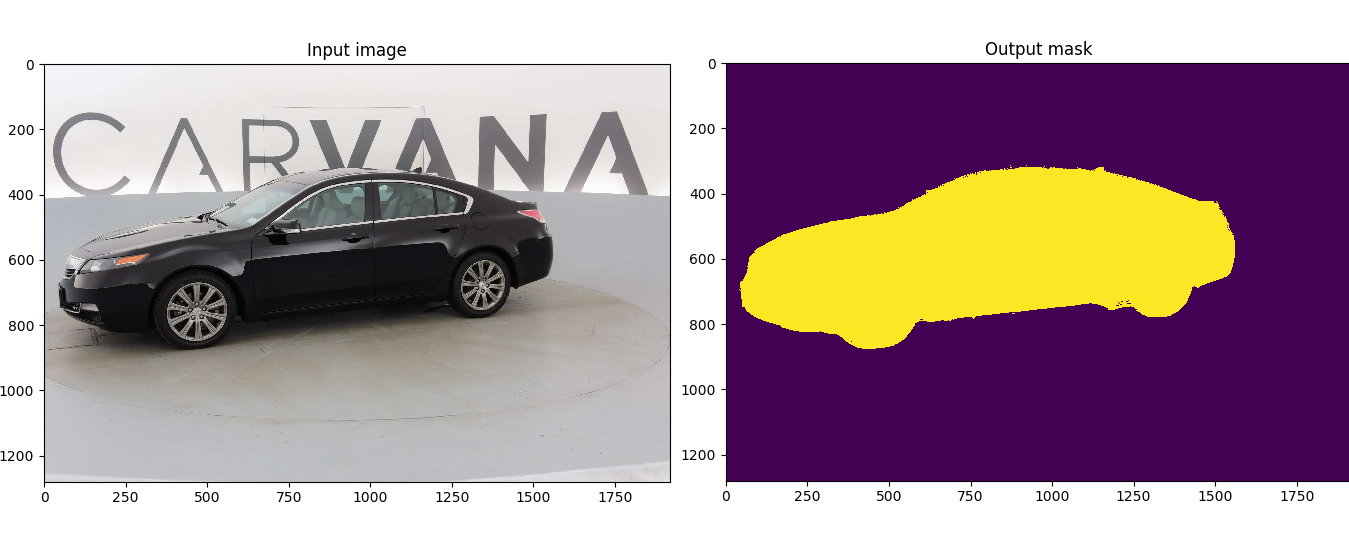
Customized implementation of the U-Net in PyTorch for Kaggle's Carvana Image Masking Challenge from high definition images.
Quick start
Without Docker
-
Install dependencies
pip install -r requirements.txt
- Download the data and run training:
bash scripts/download_data.sh
python train.py --amp
With Docker
curl https://get.docker.com | sh && sudo systemctl --now enable docker
distribution=$(. /etc/os-release;echo $ID$VERSION_ID) \
   && curl -s -L https://nvidia.github.io/nvidia-docker/gpgkey | sudo apt-key add - \
   && curl -s -L https://nvidia.github.io/nvidia-docker/$distribution/nvidia-docker.list | sudo tee /etc/apt/sources.list.d/nvidia-docker.list
sudo apt-get update
sudo apt-get install -y nvidia-docker2
sudo systemctl restart docker
sudo docker run --rm --shm-size=8g --ulimit memlock=-1 --gpus all -it milesial/unet
- Download the data and run training:
bash scripts/download_data.sh
python train.py --amp
Description
This model was trained from scratch with 5k images and scored a Dice coefficient of 0.988423 on over 100k test images.
It can be easily used for multiclass segmentation, portrait segmentation, medical segmentation, ...
Usage
Note : Use Python 3.6 or newer
Docker
A docker image containing the code and the dependencies is available on DockerHub. You can download and jump in the container with (docker >=19.03):
docker run -it --rm --shm-size=8g --ulimit memlock=-1 --gpus all milesial/unet
Training
> python train.py -h
usage: train.py [-h] [--epochs E] [--batch-size B] [--learning-rate LR]
                [--load LOAD] [--scale SCALE] [--validation VAL] [--amp]

Train the UNet on images and target masks

optional arguments:
  -h, --help            show this help message and exit
  --epochs E, -e E      Number of epochs
  --batch-size B, -b B  Batch size
  --learning-rate LR, -l LR
                        Learning rate
  --load LOAD, -f LOAD  Load model from a .pth file
  --scale SCALE, -s SCALE
                        Downscaling factor of the images
  --validation VAL, -v VAL
                        Percent of the data that is used as validation (0-100)
  --amp                 Use mixed precision
By default, the scale is 0.5, so if you wish to obtain better results (but use more memory), set it to 1.
Automatic mixed precision is also available with the --amp flag. Mixed precision allows the model to use less memory and to be faster on recent GPUs by using FP16 arithmetic. Enabling AMP is recommended.
Prediction
After training your model and saving it to MODEL.pth, you can easily test the output masks on your images via the CLI.
To predict a single image and save it:
python predict.py -i image.jpg -o output.jpg
To predict a multiple images and show them without saving them:
python predict.py -i image1.jpg image2.jpg --viz --no-save
> python predict.py -h
usage: predict.py [-h] [--model FILE] --input INPUT [INPUT ...]
                  [--output INPUT [INPUT ...]] [--viz] [--no-save]
                  [--mask-threshold MASK_THRESHOLD] [--scale SCALE]

Predict masks from input images

optional arguments:
  -h, --help            show this help message and exit
  --model FILE, -m FILE
                        Specify the file in which the model is stored
  --input INPUT [INPUT ...], -i INPUT [INPUT ...]
                        Filenames of input images
  --output INPUT [INPUT ...], -o INPUT [INPUT ...]
                        Filenames of output images
  --viz, -v             Visualize the images as they are processed
  --no-save, -n         Do not save the output masks
  --mask-threshold MASK_THRESHOLD, -t MASK_THRESHOLD
                        Minimum probability value to consider a mask pixel white
  --scale SCALE, -s SCALE
                        Scale factor for the input images
You can specify which model file to use with --model MODEL.pth.
Weights & Biases
The training progress can be visualized in real-time using Weights & Biases. Loss curves, validation curves, weights and gradient histograms, as well as predicted masks are logged to the platform.
When launching a training, a link will be printed in the console. Click on it to go to your dashboard. If you have an existing W&B account, you can link it
by setting the WANDB_API_KEY environment variable. If not, it will create an anonymous run which is automatically deleted after 7 days.
Pretrained model
A pretrained model is available for the Carvana dataset. It can also be loaded from torch.hub:
net = torch.hub.load('milesial/Pytorch-UNet', 'unet_carvana', pretrained=True, scale=0.5)
Available scales are 0.5 and 1.0.
Data
The Carvana data is available on the Kaggle website.
You can also download it using the helper script:
bash scripts/download_data.sh
The input images and target masks should be in the data/imgs and data/masks folders respectively (note that the imgs and masks folder should not contain any sub-folder or any other files, due to the greedy data-loader). For Carvana, images are RGB and masks are black and white.
You can use your own dataset as long as you make sure it is loaded properly in utils/data_loading.py.
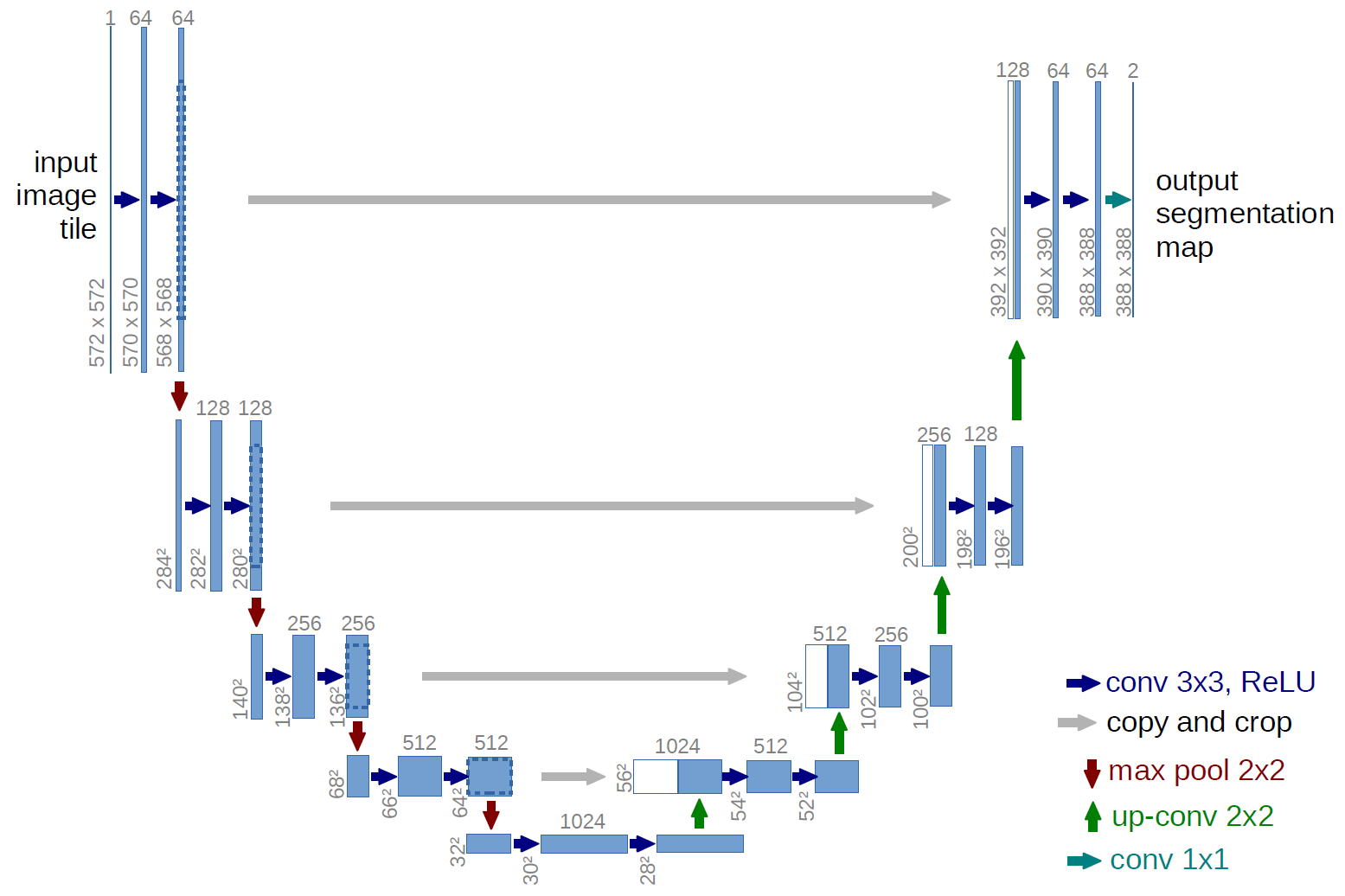
Original paper by Olaf Ronneberger, Philipp Fischer, Thomas Brox:
U-Net: Convolutional Networks for Biomedical Image Segmentation
Release history Release notifications | RSS feed


Download files
Download the file for your platform. If you're not sure which to choose, learn more about installing packages.
Source Distribution
Built Distribution
Filter files by name, interpreter, ABI, and platform.
If you're not sure about the file name format, learn more about wheel file names.
Copy a direct link to the current filters
File details
Details for the file Surface_training_model-0.1.2.tar.gz.
File metadata
- Download URL: Surface_training_model-0.1.2.tar.gz
- Upload date:
- Size: 36.8 kB
- Tags: Source
- Uploaded using Trusted Publishing? No
- Uploaded via: twine/4.0.2 CPython/3.7.16
File hashes
| Algorithm | Hash digest | |
|---|---|---|
| SHA256 |
f4d6211a592aad198dade1916109a841b258ae1863142d1b91f65fb0ce48ca5e
|
|
| MD5 |
a7d9cd0370b1c79a74e6d1b9ad531ed7
|
|
| BLAKE2b-256 |
a941bad406d7882e521a9fa505a5674a10406c1cbb996f4d777b4c0087791e94
|
File details
Details for the file Surface_training_model-0.1.2-py3-none-any.whl.
File metadata
- Download URL: Surface_training_model-0.1.2-py3-none-any.whl
- Upload date:
- Size: 39.2 kB
- Tags: Python 3
- Uploaded using Trusted Publishing? No
- Uploaded via: twine/4.0.2 CPython/3.7.16
File hashes
| Algorithm | Hash digest | |
|---|---|---|
| SHA256 |
83a2c426a2548777a44fddae3cd305ecf5bf7c319026c3901ba0e6e7a8f2f83d
|
|
| MD5 |
11ee29d811263e89774a5539f276f0ca
|
|
| BLAKE2b-256 |
0a6e68cf4b013201275a4879ef6b34670ba054a8028f67aa04d75cc0cfa8b48c
|






