
SweeplineVT -- Voronoi Tessellation using sweep-line algorithm
pip install SweeplineVT
Description
- Voronoi Tessellation on the basis of the sweep-line algorithm developed by Steven Fortune in 1986
- Make centroidal Voronoi Tessellation (CVT)
- Make Delaunay triangulation
- Take accurate positions of points with no need of pixelation / binning.
- Confine Voronoi diagram to a rectangular region
Examples
Make Voronoi Tessellation for a list of points
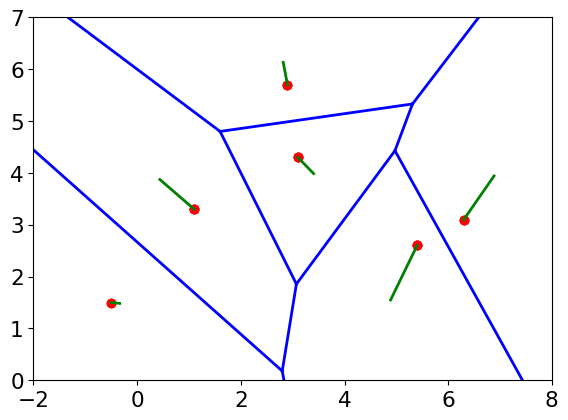
- The content of "example.dat"
-0.5 1.5
1.1 3.3
2.9 5.7
3.1 4.3
5.4 2.6
6.3 3.1
slvt.py example.dat --calCentroid
pl_VT.py example_VT.dat example_ctd.dat -s
The red points are the Voronoi sites (input points from "example.dat"). The green lines connect each sites with the corresponding cell centroid.
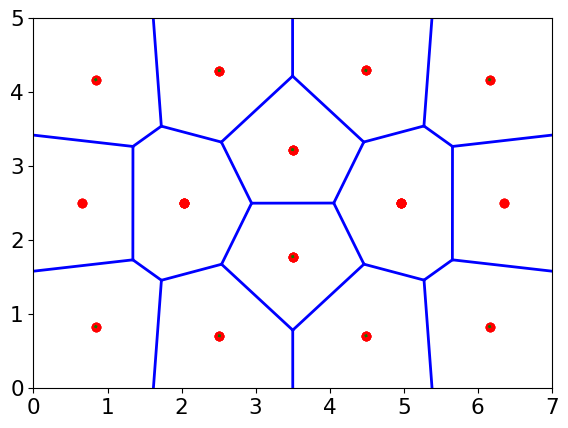
Make centroidal Voronoi Tessellation (CVT) of 14 points in 0<x<7, 0<y<5.
slvt.py --makeCVT 14 --border 0,7,0,5 -s
pl_VT.py CVT14_VT.dat -s
"-s" of slvt.py means "silent". "-s" of pl_VT.py means "step".
- One possible result you might see:
Show the distribution of cell area
from SweeplineVT import Voronoi
import pylab as pl
x=np.random.random(size=10)
y=np.random.random(size=10)
vor=Voronoi(events=np.vstack((x,y)).T,calArea=True,autoscale=False)
Area,ind,cts=vor.getarealist()
Area/=np.array(cts)
pl.hist(Area)
Output files
- {FileName}_VT.dat: each item corresponds to one cell edge. The 9 columns are:
- 1: index of edge
- 2-3 and 3-4: coordinates of the two Voronoi vertices (nodes) of the edge
- 5-6 and 7-8: coordiantes of the two nearest Voronoi sites (The Delaunay diagram)
- With "--calCentroid", {FileName}_ctd.dat: each item corresponds to one cell. The 6 columns are:
- 1: index of cell / site.
- 2-3: Voronoi site of the cell
- 4-5: centroid of the cell
- 6: area of the cell
- 7: site duplication number (>1 means duplicated)
- With "--calArea", {FileName}_area.dat: each item corresponds to one cell. The 6 columns are:
- 1: index of cell / site.
- 2-3: Voronoi site of the cell
- 4: area of the cell
- 5: site duplication number (>1 means duplicated)
1 maintainer

Release files for SweeplineVT 0.0.8
For a detailed explanation of source distributions (sdists) and built distributions (wheels), please see the package formats documentation.
Source distribution (sdist)
| File | Size | Uploaded | |
|---|---|---|---|
| SweeplineVT-0.0.8.tar.gz | 23.2 kB | Details |
Built distribution (wheel)
| File | Interpreter | ABI | Platform | Reset |
|---|---|---|---|---|
| SweeplineVT-0.0.8-py3-none-any.whl | Python 3 | none | any | Details |
Total release size: 58.2 kB
Release files / SweeplineVT-0.0.8.tar.gz
| Download URL | SweeplineVT-0.0.8.tar.gz |
|---|---|
| Size | 23.2 kB |
| Tags | Source |
|
SHA-256 checksum How to use checksums |
1633c5a9c2d666236f4eb67e3ef9c8dd5f166e3a15044ecf09ddc57acb8bb945
|
|
BLAKE2b-256 checksum How to use checksums |
6372f0ed675fc5956707b35697436ff080a3b8dcdd2424632639d8c32d3da98f
|
| Upload date | |
|
Uploaded using Trusted Publishing? What is trusted publishing? |
No |
| Uploaded via |
twine/3.1.1 pkginfo/1.5.0.1 requests/2.22.0 setuptools/46.2.0 requests-toolbelt/0.9.1 tqdm/4.41.1 CPython/3.8.1
|
Release files / SweeplineVT-0.0.8-py3-none-any.whl
| Download URL | SweeplineVT-0.0.8-py3-none-any.whl |
|---|---|
| Size | 35.0 kB |
| Tags | Python 3 |
|
SHA-256 checksum How to use checksums |
3298da96372259b7e0b426b8309e8d88babf46d28ea8370e47f7136d420f1e4d
|
|
BLAKE2b-256 checksum How to use checksums |
4e0e5681cbec0b4186937b249200f35bbba052cb070b7f2aeb2ea3b8720a52d4
|
| Upload date | |
|
Uploaded using Trusted Publishing? What is trusted publishing? |
No |
| Uploaded via |
twine/3.1.1 pkginfo/1.5.0.1 requests/2.22.0 setuptools/46.2.0 requests-toolbelt/0.9.1 tqdm/4.41.1 CPython/3.8.1
|














