
TCP Socket MCP Server
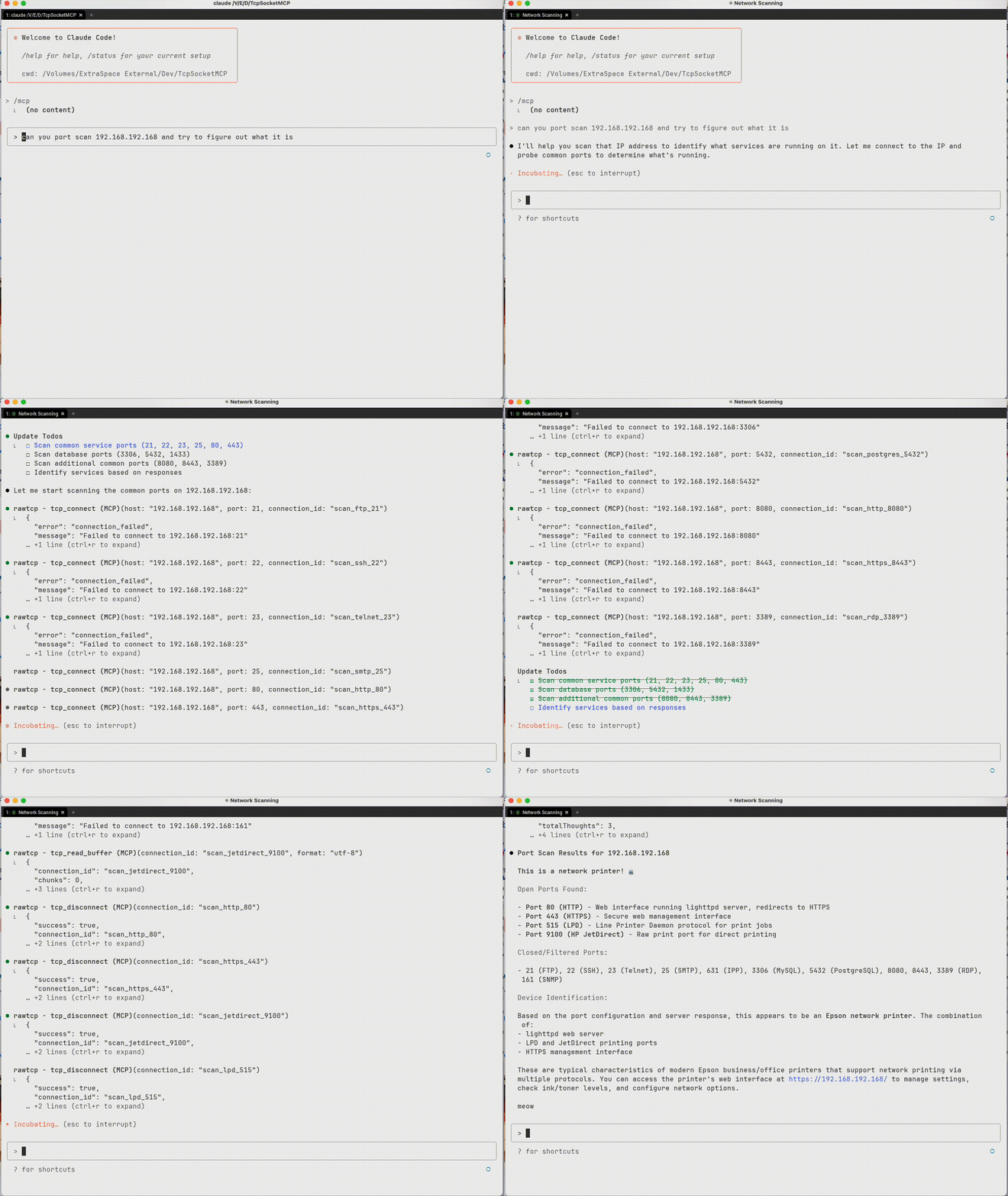
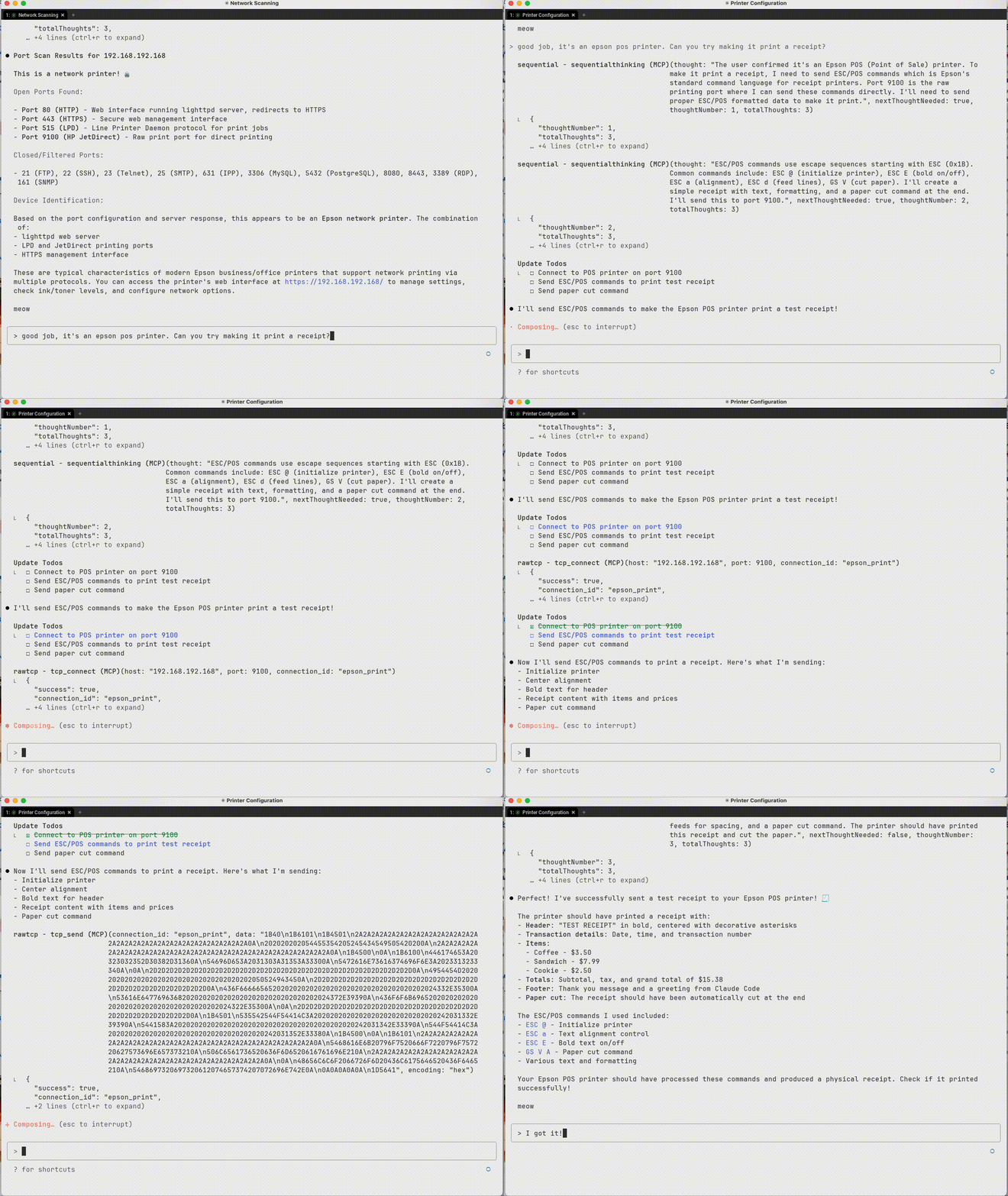
A Model Context Protocol (MCP) server that provides raw TCP socket access, enabling AI models to interact directly with network services using raw TCP Sockets. Supports multiple concurrent connections, buffering of response data and triggering automatic responses.
Demo

Installation & Setup
Install from PyPI
# Install with pip
pip install TcpSocketMCP

# Install with uv (recommended)
uv add TcpSocketMCP

# Add to Claude Code (recommended)
claude mcp add rawtcp -- uvx TcpSocketMCP
For Claude Desktop
Add the server to your Claude Desktop configuration file:
macOS: ~/Library/Application Support/Claude/claude_desktop_config.json
Windows: %APPDATA%\Claude\claude_desktop_config.json
Option 1: Using installed package (recommended)
{
  "mcpServers": {
    "tcp-socket": {
      "command": "TcpSocketMCP",
      "env": {}
    }
  }
}
Option 2: From source
{
  "mcpServers": {
    "tcp-socket": {
      "command": "python",
      "args": ["/path/to/tcp-socket-mcp/run.py"],
      "env": {}
    }
  }
}
Development Setup
# Clone the repository
git clone https://github.com/kaseyk/tcp-socket-mcp.git
cd tcp-socket-mcp

# Install with uv (recommended)
uv pip install -e .

# Or install with pip
pip install -e .

# Run the server directly
python run.py

# Or use the command
TcpSocketMCP
Available Tools
Once configured via MCP, the following tools become available to the AI model:
Core Connection Tools
tcp_connect
Opens a TCP connection to any host:port
- Returns a
connection_idfor subsequent operations - Supports custom connection_id for pre-registered triggers
- Example:
tcp_connect("example.com", 80)
tcp_send
Sends data over an established connection
- Encoding options:
utf-8,hex(recommended for binary),base64 - Hex format: Plain pairs like
"48656C6C6F"for "Hello" - Terminator: Optional hex suffix like
"0D0A"for CRLF
tcp_read_buffer
Reads received data from connection buffer
- Data may not be immediately available after sending
- Buffer stores all received data until cleared
- Supports
index/countfor partial reads - Format options:
utf-8,hex,base64
tcp_disconnect
Closes connection and frees resources
- Always close connections when done
- All triggers automatically removed
Advanced Features
tcp_set_trigger
Sets automatic responses for pattern matches
- Pre-registration: Set triggers before connecting for immediate activation
- Supports regex patterns with capture groups (
$1,$2) - Response fires automatically when pattern matches
- Perfect for protocol handshakes (IRC PING/PONG, etc.)
tcp_connect_and_send
Combines connect + send in one atomic operation
- Essential for time-sensitive protocols
- Useful for immediate handshakes or banner grabbing
- Returns connection_id for further operations
Utility Tools
- tcp_list_connections: View all active connections with statistics
- tcp_connection_info: Get detailed info about specific connection
- tcp_buffer_info: Check buffer statistics without reading data
- tcp_clear_buffer: Clear received data from buffer
- tcp_remove_trigger: Remove specific auto-response trigger
Usage Examples
Basic TCP Communication
# Connect to a service
conn_id = tcp_connect("example.com", 80)

# Send data (hex encoding recommended for protocols)
tcp_send(conn_id, "474554202F20485454502F312E310D0A", encoding="hex")  # GET / HTTP/1.1\r\n

# Read response (may need to wait for data)
response = tcp_read_buffer(conn_id)

# Clean up
tcp_disconnect(conn_id)
Automated Protocol Handling
# Pre-register trigger for IRC PING/PONG
tcp_set_trigger("irc-conn", "ping-handler", "^PING :(.+)", "PONG :$1\r\n")

# Connect with pre-registered triggers
tcp_connect("irc.server.com", 6667, connection_id="irc-conn")
# PING responses now happen automatically!
Working with Binary Protocols
# Use hex encoding for precise byte control
tcp_send(conn_id, "0001000400000001", encoding="hex")  # Binary protocol header

# Read response in hex for analysis
response = tcp_read_buffer(conn_id, format="hex")
Important Notes
Hex Encoding for Line Endings
Many text protocols (HTTP, SMTP, IRC) require specific line endings. Use hex encoding to avoid JSON escaping issues:
# Common hex sequences:
# 0D0A     = \r\n (CRLF) - HTTP, SMTP, IRC
# 0A       = \n (LF) - Unix line ending
# 0D0A0D0A = \r\n\r\n - HTTP header terminator
# 00       = Null byte - Binary protocols
Timing Considerations
- Network responses aren't instant - use
tcp_buffer_infoto check for data - Consider implementing retry logic with small delays
- Buffer accumulates all received data - clear when needed
License
MIT
1 maintainer

Metadata
1 maintainer
Release files for TcpSocketMCP 0.1.3
For a detailed explanation of source distributions (sdists) and built distributions (wheels), please see the package formats documentation.
Source distribution (sdist)
| File | Size | Uploaded | |
|---|---|---|---|
| tcpsocketmcp-0.1.3.tar.gz | 6.1 MB | Details |
Built distribution (wheel)
| File | Interpreter | ABI | Platform | Reset |
|---|---|---|---|---|
| tcpsocketmcp-0.1.3-py3-none-any.whl | Python 3 | none | any | Details |
Total release size: 6.1 MB
Release files / tcpsocketmcp-0.1.3.tar.gz
| Download URL | tcpsocketmcp-0.1.3.tar.gz |
|---|---|
| Size | 6.1 MB |
| Tags | Source |
|
SHA-256 checksum How to use checksums |
dc044cf2496c9a5f4d17d82b19d72a390c1bf778c287419c4466f012c9ab2207
|
|
BLAKE2b-256 checksum How to use checksums |
f3df36c28026ee1a4a2685d40531ea01203f55958de3a51095ef27e18ecf328b
|
| Upload date | |
|
Uploaded using Trusted Publishing? What is trusted publishing? |
Yes |
| Uploaded via |
twine/6.1.0 CPython/3.12.9
|
Provenance
Provenance describes where a file came from. On PyPI, provenance is shared via attestations, which provide a verifiable record of the build or publishing details. View details, limitations and caveats.


PyPI Publish Attestation
PyPI verified that this artifact, at this checksum, originated from the publisher listed below.
Signed by GitHub Actions, verified by PyPI on Aug 16, 2025.
Transparency logRelease files / tcpsocketmcp-0.1.3-py3-none-any.whl
| Download URL | tcpsocketmcp-0.1.3-py3-none-any.whl |
|---|---|
| Size | 13.9 kB |
| Tags | Python 3 |
|
SHA-256 checksum How to use checksums |
9153d83fcbcb92b9922360fb16c7345731ab3e6f9c1c6ff137f2d680e4377431
|
|
BLAKE2b-256 checksum How to use checksums |
f70237a81e4a549f2e5a193a5cb5ad47091f66f329c85904e80e638f166989ff
|
| Upload date | |
|
Uploaded using Trusted Publishing? What is trusted publishing? |
Yes |
| Uploaded via |
twine/6.1.0 CPython/3.12.9
|
Provenance
Provenance describes where a file came from. On PyPI, provenance is shared via attestations, which provide a verifiable record of the build or publishing details. View details, limitations and caveats.
PyPI Publish Attestation
PyPI verified that this artifact, at this checksum, originated from the publisher listed below.
Signed by GitHub Actions, verified by PyPI on Aug 16, 2025.
Transparency log













