
Full package for TigerResort

Project description
Jupyter Cell Tags support in VS Code
This extension provides support for notebook cell tags in Visual Studio Code for workng with tools like papermill, nbconvert, nbgrader and many more. Support for adding slide types to notebook cells are provided by the Jupyter Slide Show extension.
Features:
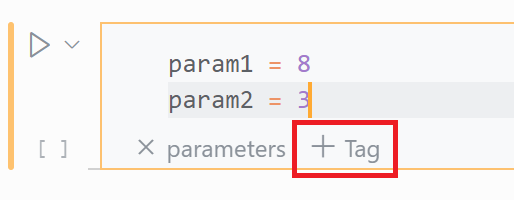
- Add a tag to the cell you're on by opening the Command Palette (
Cmd+Shift+P) and selecting Add Cell Tag or by clicking + Tag on the cell - Add multiple tags to the cell you're on by opening the Command Palette (
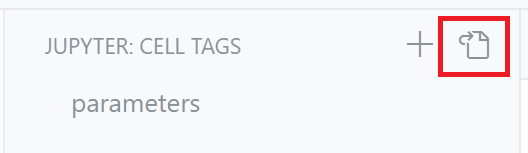
Cmd+Shift+P) and selecting Jupyter: Focus on Cell Tags View and clicking on + - Modify tags in the notebook's metadata (JSON format) by opening the Command Palette (
Cmd+Shift+P) and selecting Edit Cell Tags (JSON) or by clicking out to it from the Cell Tags View

This extension comes with the Jupyter extension for Visual Studio Code and can be disabled or uninstalled.
Contributing
This project welcomes contributions and suggestions. Most contributions require you to agree to a Contributor License Agreement (CLA) declaring that you have the right to, and actually do, grant us the rights to use your contribution. For details, visit https://cla.opensource.microsoft.com.
When you submit a pull request, a CLA bot will automatically determine whether you need to provide a CLA and decorate the PR appropriately (e.g., status check, comment). Simply follow the instructions provided by the bot. You will only need to do this once across all repos using our CLA.
This project has adopted the Microsoft Open Source Code of Conduct. For more information see the Code of Conduct FAQ or contact opencode@microsoft.com with any additional questions or comments.
Trademarks
This project may contain trademarks or logos for projects, products, or services. Authorized use of Microsoft trademarks or logos is subject to and must follow Microsoft's Trademark & Brand Guidelines. Use of Microsoft trademarks or logos in modified versions of this project must not cause confusion or imply Microsoft sponsorship. Any use of third-party trademarks or logos are subject to those third-party's policies.
Release history Release notifications | RSS feed


Download files
Download the file for your platform. If you're not sure which to choose, learn more about installing packages.
Source Distribution
Built Distribution
Filter files by name, interpreter, ABI, and platform.
If you're not sure about the file name format, learn more about wheel file names.
Copy a direct link to the current filters
File details
Details for the file TigerPackage-1.0.0.tar.gz.
File metadata
- Download URL: TigerPackage-1.0.0.tar.gz
- Upload date:
- Size: 3.7 kB
- Tags: Source
- Uploaded using Trusted Publishing? No
- Uploaded via: twine/4.0.2 CPython/3.8.13
File hashes
| Algorithm | Hash digest | |
|---|---|---|
| SHA256 |
822bacf65835b7d879079ee33c2b850129f596f6e25a88baa50af016b4060e56
|
|
| MD5 |
925762975098aaa1d8093c2b980ea0ef
|
|
| BLAKE2b-256 |
9177200055eeed1448571d4452daa1606cee6759da7b29dbd38a2ea62aef6b18
|
File details
Details for the file TigerPackage-1.0.0-py3-none-any.whl.
File metadata
- Download URL: TigerPackage-1.0.0-py3-none-any.whl
- Upload date:
- Size: 4.0 kB
- Tags: Python 3
- Uploaded using Trusted Publishing? No
- Uploaded via: twine/4.0.2 CPython/3.8.13
File hashes
| Algorithm | Hash digest | |
|---|---|---|
| SHA256 |
b92d342bd2f987b7bb7a86ecc63f0849995eeea423bb17f8942c348919c45e80
|
|
| MD5 |
6b01153b4827de306d1ec0e27cbba142
|
|
| BLAKE2b-256 |
914de926dc3c3231a38f61757b3741bd2648b68cebd9dd852b704798cfa47b75
|






