
TokenExchangeAuthenticator for JupyterHub.
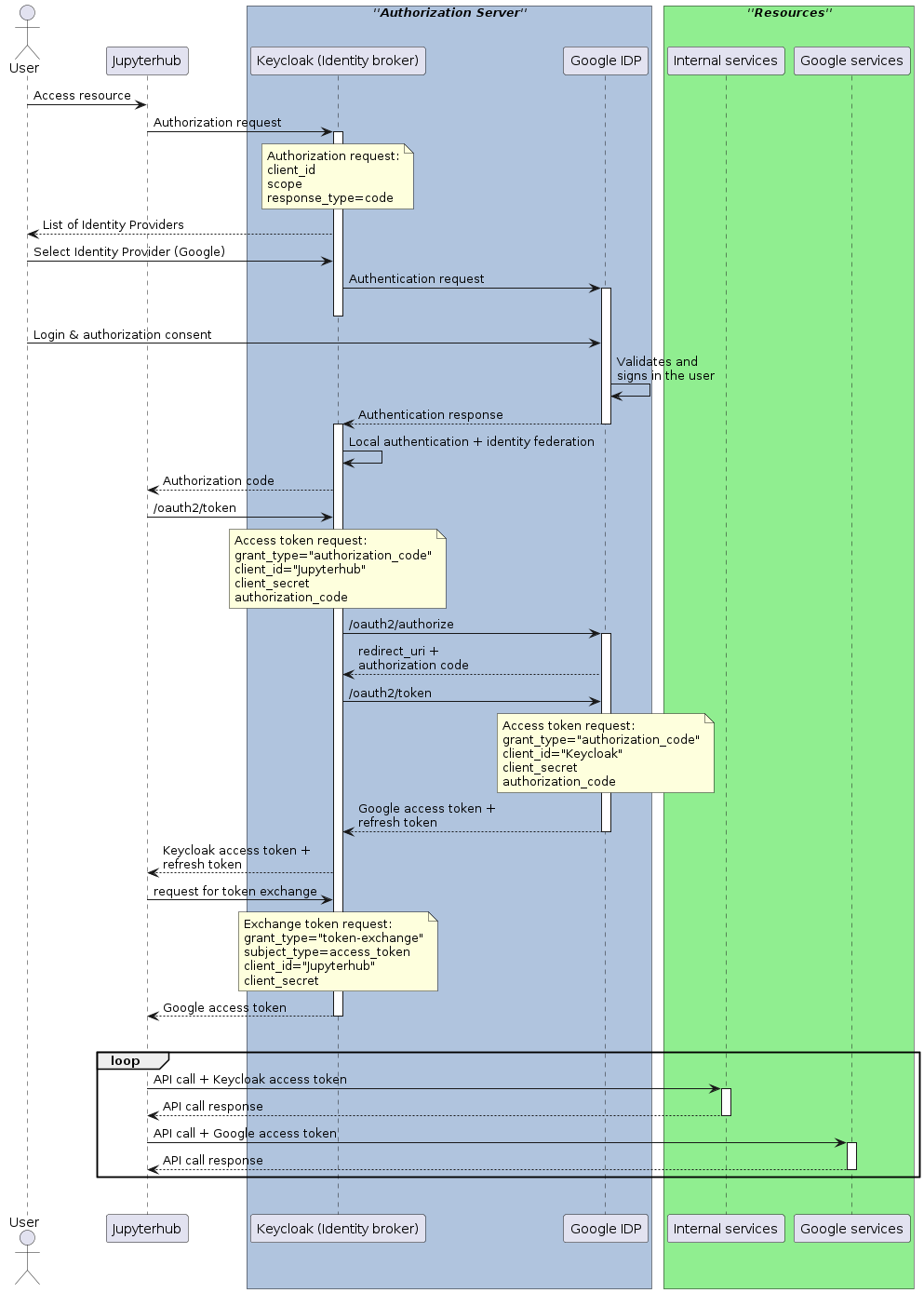
This Authenticator can be plugged in and used with JupyterHub. It is built on top of OAuthenticator, and authenticates users using OIDC and retrieves external Identity Provider (IDP) tokens using token exchange. This implementation is compatible with Keycloak as an Identity Broker and Google as an external IDP (see Internal Token to External Token Exchange).
It also implements a refresh mechanism, ensuring that both the internal access token as well as any external IDP tokens are updated individually. If the update is not possible, it forces a re-authentication of the user.
Sequence diagram
The OIDC + token exchange flow may be illustrated like in the following sequence diagram:
Installation
pip install tokenexchangeauthenticator
Usage
In your JupyterHub config file, set the authenticator and configure it:
# Enable the authenticator
c.JupyterHub.authenticator_class = 'tokenexchangeauthenticator.TokenExchangeAuthenticator'
c.TokenExchangeAuthenticator.username_key = 'preferred_username'
c.TokenExchangeAuthenticator.userdata_params = {'state': 'state', 'kc_idp_hint': 'google'}
c.TokenExchangeAuthenticator.logout_redirect_uri = 'https://my.domain.com/logout'
c.TokenExchangeAuthenticator.oauth_callback_url = 'https://my.domain.com/oauth_callback'

# Specify the issuer url, to get all the endpoints automatically from .well-known/openid-configuration
c.TokenExchangeAuthenticator.oidc_issuer = 'https://my.keycloak.com/auth/realms/myrealm'

# If you need to set a different scope, like adding the offline option for longer lived refresh token
c.TokenExchangeAuthenticator.scope = ['openid', 'email', 'offline_access']
# Request access tokens for other services by passing their id's (this uses the token exchange mechanism)
c.TokenExchangeAuthenticator.exchange_tokens = ['google']
Note on Google's authorization server
Google's authorization server only provideds the refresh_token in the response to the initial login request.
Hence, the Identity Broker (e.g. Keycloak) will only get the refresh token on the first login so that subsequent token
refresh may stop working (see issue on stack overflow).
This can be remedied by prompting for re-consent at every login like this:
# This will force the retrieval of a refresh_token on every login
c.TokenExchangeAuthenticator.extra_authorize_params = {'prompt': 'consent'}
It's also necessary to configure the client ID and secret. This may be set directly like this:
# This will force the retrieval of a refresh_token on every login
c.TokenExchangeAuthenticator.client_id = 'client-id'
c.TokenExchangeAuthenticator.client_secret = 'secret'
Or by setting the following environment variables:
OAUTH_CLIENT_ID=client_id
OAUTH_CLIENT_SECRET=client_secret
Expose the user's tokens
The user's tokens are stored using Jupyterhub's authentication state. These can optionally be exposed at a custom path which will only be accessible inside the user's single-user notebook. The path can be customised by setting:
# If set, exposes the user's access token(s) at this relative path
c.TokenExchangeAuthenticator.local_user_exposed_path = '/my-custom-path/userinfo'
Running tests
To run the tests locally:
$ pip install --upgrade --pre -r test-requirements.txt
$ pytest -v ./tokenexchangeauthenticator/tests/
Or you run a specific test file with:
$ pytest -v ./tokenexchangeauthenticator/tests/<test-file-name>
1 maintainer

Metadata
1 maintainer
Release files for TokenExchangeAuthenticator 0.3.6
For a detailed explanation of source distributions (sdists) and built distributions (wheels), please see the package formats documentation.
Source distribution (sdist)
| File | Size | Uploaded | Provenance | Actions |
|---|---|---|---|---|
| TokenExchangeAuthenticator-0.3.6.tar.gz | 11.4 kB | Without provenance | Details for TokenExchangeAuthenticator-0.3.6.tar.gz |
Built distribution (wheel)
| File | Interpreter | ABI | Platform | Actions Reset |
|---|---|---|---|---|
| TokenExchangeAuthenticator-0.3.6-py3-none-any.whl | Python 3 | none | any | Details for TokenExchangeAuthenticator-0.3.6-py3-none-any.whl |
Total release size: 25.0 kB
Release files / TokenExchangeAuthenticator-0.3.6.tar.gz
| Download URL | TokenExchangeAuthenticator-0.3.6.tar.gz |
|---|---|
| Size | 11.4 kB |
| Tags | Source |
|
SHA-256 checksum How to use checksums |
024806b2cce43683d4496464ef454c130b050522ed8d3ccc31e6e2d780c3b59e
|
|
BLAKE2b-256 checksum How to use checksums |
a504d7defc37974feb36fc327e33187b6df277f57419e0653838a02a3ab8c8eb
|
| Upload date | |
|
Uploaded using Trusted Publishing? What is trusted publishing? |
No |
| Uploaded via |
twine/5.0.0 CPython/3.9.18
|
Release files / TokenExchangeAuthenticator-0.3.6-py3-none-any.whl
| Download URL | TokenExchangeAuthenticator-0.3.6-py3-none-any.whl |
|---|---|
| Size | 13.6 kB |
| Tags | Python 3 |
|
SHA-256 checksum How to use checksums |
d6771a97ae85eaab65ecf82aa85f4dbd632ba5389cafd795f841fc33d8d1fe90
|
|
BLAKE2b-256 checksum How to use checksums |
59560c4b0075d79be133b2fb27785f6b57d7be01ac62c95b116898bbb566c2b0
|
| Upload date | |
|
Uploaded using Trusted Publishing? What is trusted publishing? |
No |
| Uploaded via |
twine/5.0.0 CPython/3.9.18
|
Security for TokenExchangeAuthenticator 0.3.6
Provenance
Provenance describes where a file came from. On PyPI, provenance is shared via attestations, which provide a verifiable record of the build or publishing details. View details, limitations and caveats.
No provenance found
None of the files in this release were uploaded with provenance metadata.
A note on package security
PyPI is a repository for distributing packages, not a service for auditing them. While third-party security researchers and our staff do their best to detect and remove malicious packages, PyPI cannot guarantee the quality, security or suitability of any given package.
To learn more about protecting yourself from malicious actors, visit our package security documentation.














