
TolMate ;-P

Project description




TolMate
TolMate is a Python utility for checking if a value falls within specified tolerance ranges. It provides feedback via console messages and popup windows to alert users about the status of the value, whether it's within range or outside specifications.
Features
- Tolerance Checks: Supports up to three (optional) levels of tolerance ranges:
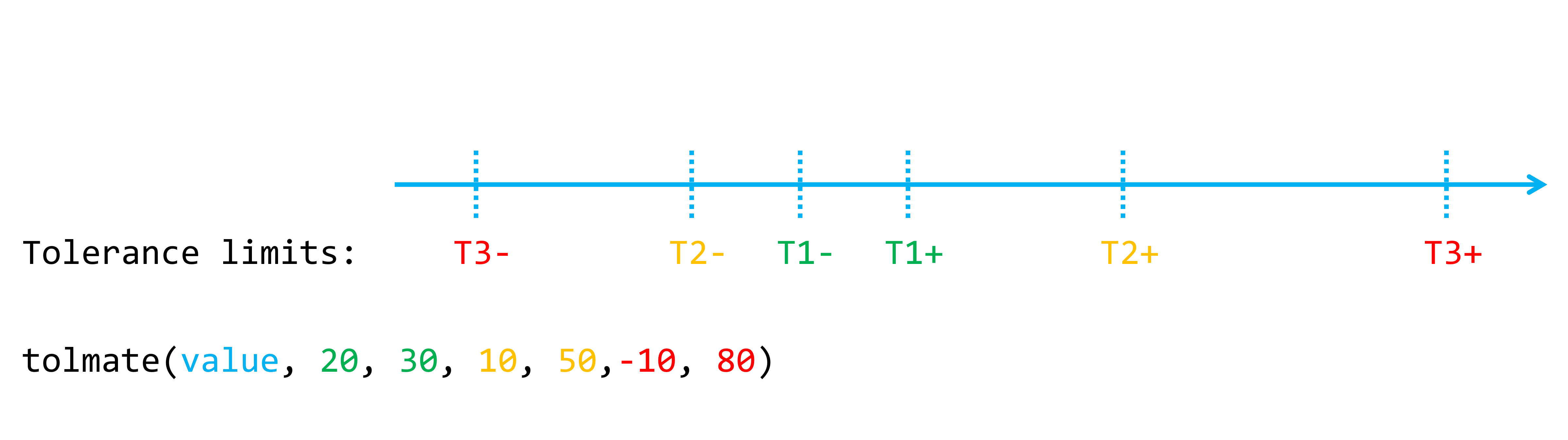
- Tol 1±: Normal range (no news, good news)
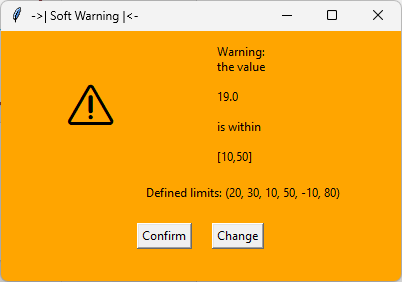
- Tol 2±: Soft warning
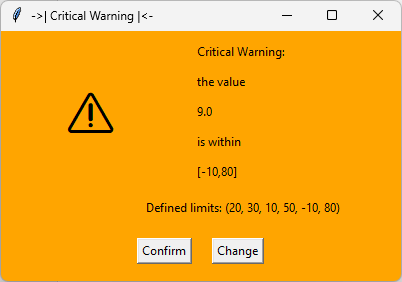
- Tol 3±: Hard warning
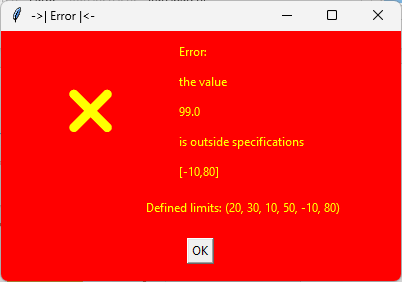
- Outside tolerances: Error
- Interactive Popups: Display user-friendly messages with color-coded warnings and action buttons.
- Dynamic Value Rechecking: Modify values directly from the popup for re-evaluation.
- Behavior Configuration: Enable or disable popups and console messages globally.
- Simple API: Easy to integrate into your existing Python projects.
- Customizable Look: Highlight alerts with built-in symbols or emojis.
- Reusable and Lightweight: Designed to integrate seamlessly into larger projects.
Installation
You can install TolMate using pip.
pip install tolmate
Requirements
- Python 3.x
tkinter(comes pre-installed with Python)
Usage
Basic Example
from tolmate import configure_behavior, tolmate

# Set global behavior for popups and messages (by default all True)
configure_behavior(show_popup=True, show_message=False)

# Main program example
def celsius_to_kelvin(celsius):
    """Convert Celsius to Kelvin."""
    return celsius + 273.15

# Main loop for initial value input
try:
    # Configure global behavior (example: enable both message and popup)
    value = float(input("\nEnter the temperature in degrees Celsius: "))

    if tolmate(value, 20, 30, 10, 50, -10, 80):  # Example ranges
        kelvin = celsius_to_kelvin(value)
        print(f"\nThe temperature in Kelvin is: {kelvin:.2f}")
    else:
        print("\nThe value is outside specifications.")

except ValueError:
    print("Please enter a valid number!")
Project details
Release history Release notifications | RSS feed


Download files
Download the file for your platform. If you're not sure which to choose, learn more about installing packages.
Source Distribution
tolmate-1.0.6.tar.gz
(5.9 kB
view details)
Built Distribution
Filter files by name, interpreter, ABI, and platform.
If you're not sure about the file name format, learn more about wheel file names.
Copy a direct link to the current filters
File details
Details for the file tolmate-1.0.6.tar.gz.
File metadata
- Download URL: tolmate-1.0.6.tar.gz
- Upload date:
- Size: 5.9 kB
- Tags: Source
- Uploaded using Trusted Publishing? No
- Uploaded via: twine/5.1.1 CPython/3.12.3
File hashes
| Algorithm | Hash digest | |
|---|---|---|
| SHA256 |
09ed6748613b95de1f1e5804bc8c8d00e8afac5f31ab69b1ef7552ff0f566d66
|
|
| MD5 |
fb83ee18b32a022ae0d7a3469042974b
|
|
| BLAKE2b-256 |
a41a7f04bed288d08569de94e0fe0196badd4038c7613609234444c03ba8c700
|
File details
Details for the file TolMate-1.0.6-py3-none-any.whl.
File metadata
- Download URL: TolMate-1.0.6-py3-none-any.whl
- Upload date:
- Size: 7.1 kB
- Tags: Python 3
- Uploaded using Trusted Publishing? No
- Uploaded via: twine/5.1.1 CPython/3.12.3
File hashes
| Algorithm | Hash digest | |
|---|---|---|
| SHA256 |
2136f7b265821abc6e9a8808865f50b897af8693846de722ead2154088a0ddce
|
|
| MD5 |
7b5fb093350e6932da5c719c9c0d589a
|
|
| BLAKE2b-256 |
3a23e4248627838997f5f63c022f017fb3e13b3fdf83440367d15993c698fce3
|






