








Tonviewer — SDK & CLI Reference
A high-performance Python SDK & CLI for the TON blockchain.
Covers: wallet intelligence, transaction parsing, NFT metadata, Fragment.com resolution, and live price feeds.
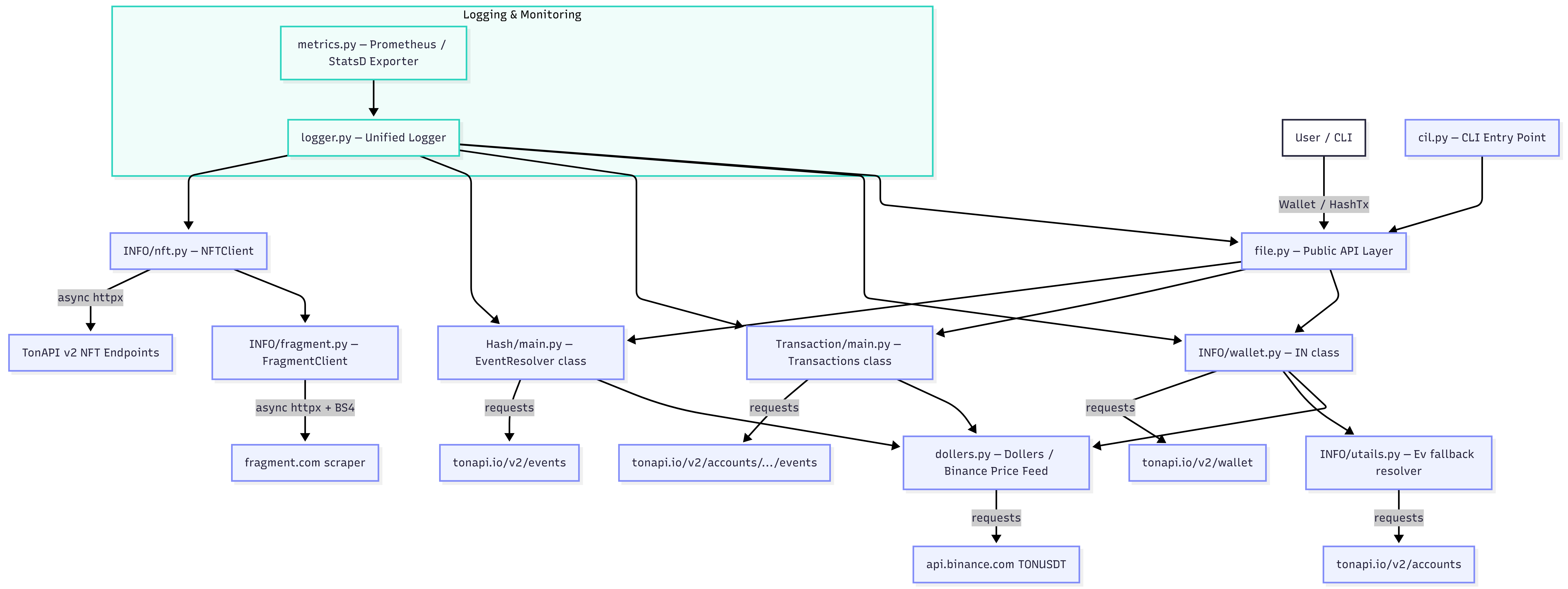
🏗️ Architecture
Python SDK
Installation
pip install --upgrade Tonviewer
# or from source:
pip install git+https://github.com/DevZ44d/Tonviewer.git
Wallet — Wallet info & transactions
from Tonviewer import Wallet

wallet = Wallet("UQ...")      # any TON wallet address
| Method | Returns | Description |
|---|---|---|
wallet.info() |
str (JSON) |
Balance in TON + USD, status, last activity, name, icon, NFT count |
wallet.transactions(limit=1) |
str (JSON) |
Last N transactions with hash, time, from/to, amount, comment |
wallet.action(action, limit=1) |
str (JSON) |
Transactions filtered to a specific action type |
Action type aliases accepted by wallet.action():
| Pass this… | Resolves to |
|---|---|
sent / send / sent ton |
Sent TON |
receive / received / received ton |
Received TON |
nft / nft transfer |
NFT Transfer |
token / jetton / transfer token |
Transfer Token |
gas / relay / gas relay |
Gas Relay |
wallet = Wallet("UQ...")

# Full wallet snapshot
print(wallet.info())

# Last 5 transactions
print(wallet.transactions(limit=5))

# Last 10 outgoing TON transfers
print(wallet.action(action="sent ton", limit=10))
HashTx — Resolve a transaction hash
from Tonviewer import HashTx

tx = HashTx(hashtx="b4566294bb20e0c22c57109f1128b903d4446d12710b3926b48c42cfc60dd097")
print(tx.get())     # → JSON string with full action breakdown
| Method | Returns | Description |
|---|---|---|
tx.get() |
str (JSON) |
All actions in the event: type, from, to, price, status, comment |
Dollers — Live TON price
from Tonviewer.dollers import Dollers

ton_price = Dollers()._TON_USDT()   # → float, e.g. 3.24
print(f"1 TON = ${ton_price}")
| Method | Returns | Description |
|---|---|---|
_TON_USDT() |
float |
Current TON/USDT price from Binance ticker API |
NFTClient — Async NFT fetcher
All methods must be called inside async with NFTClient() as client:.
import asyncio
from Tonviewer import NFTClient

async def main():
    async with NFTClient() as client:
        result = await client.get_nfts("@monk", fetch_floors=True)
        print(result.summary())

asyncio.run(main())
get_nfts
result = await client.get_nfts(user_or_wallet, *, fetch_floors=True)
Fetch all NFTs (paginated) for a @username or raw wallet address. Returns an empty NFTResult if the user has no wallet — never raises.
| Parameter | Type | Default | Description |
|---|---|---|---|
user_or_wallet |
str |
— | @username or raw TON wallet address |
fetch_floors |
bool |
True |
Fetch collection floor prices in TON |
get_nft_detail
item = await client.get_nft_detail(nft_address)
Fetch full metadata for a single NFT by contract address.
Returns NFTItem or None on failure.
item = await client.get_nft_detail("EQA...abc")
print(item.name, item.image_url)
print(item.get_attribute("Rarity"))   # → "Legendary"
get_nfts_bulk
bulk = await client.get_nfts_bulk("@alice", "@bob", fetch_floors=False)
for user, result in bulk.items():
    print(user, result.summary())
Fetch NFTs for multiple targets concurrently. Failed targets are logged and skipped.
| Parameter | Type | Default | Description |
|---|---|---|---|
*users_or_wallets |
str |
— | Any mix of @usernames and wallet addresses |
fetch_floors |
bool |
False |
Fetch floor prices (off by default to keep bulk calls fast) |
NFTResult — Portfolio container
Returned by get_nfts() and get_nfts_bulk().
Category access
result["users"]   # → List[NFTItem]  Telegram Usernames
result["gifts"]   # → List[NFTItem]  Telegram Gifts
result["etc"]     # → List[NFTItem]  Other NFTs
result.all        # → List[NFTItem]  Everything
Properties
| Property | Type | Description |
|---|---|---|
result.total / len(result) |
int |
Total NFT count |
result.names |
List[str] |
Flat list of all NFT names |
result.owner |
str | None |
Wallet address the result belongs to |
result.is_empty |
bool |
True when the wallet holds no NFTs |
Methods
| Method | Returns | Description |
|---|---|---|
result.summary() |
str |
Human-readable portfolio summary |
result.by_collection() |
Dict[str, List[NFTItem]] |
NFTs grouped by collection (largest first) |
result.search(query) |
List[NFTItem] |
Case-insensitive search across name / collection / description |
result.filter_by(fn) |
List[NFTItem] |
Filter with an arbitrary predicate |
result.has(name, exact=True) |
bool |
Check if a specific NFT name exists |
result.top_collections(n=5) |
List[tuple[str,int]] |
Top-N collections by count |
result.value_summary() |
Dict[str, float] |
Estimated floor value by category (TON) |
# Search
hits = result.search("chill flame")

# Custom filter
expensive = result.filter_by(lambda n: n.floor_price_ton and n.floor_price_ton > 10)

# Check ownership
if result.has("@monk"):
    print("Found!")

# Estimated portfolio value
vals = result.value_summary()  # {"users": 120.0, "gifts": 45.5, "etc": 0.0, "total": 165.5}
NFTItem — Single NFT
| Attribute | Type | Description |
|---|---|---|
address |
str |
Normalised NFT contract address |
name |
str |
Display name |
collection |
str |
Collection name |
collection_address |
str | None |
Collection contract address |
image_url |
str | None |
Best available image / preview URL |
description |
str | None |
Metadata description |
attributes |
List[NFTAttribute] |
Trait list |
floor_price_ton |
float | None |
Collection floor in TON (if fetched) |
category |
"users" | "gifts" | "etc" |
Auto-categorised |
item.has_attribute("Rarity")         # → bool
item.get_attribute("Rarity")         # → "Legendary" or None
FragmentClient — Advanced async Fragment scraper
import asyncio
from Tonviewer import FragmentClient

async def main():
    async with FragmentClient() as client:
        result = await client.get_username("@monk")
        print(result.status, result.price_ton, result.friendly_wallet)

asyncio.run(main())
Constructor options:
FragmentClient(
    retries=3,       # HTTP retries per request
    timeout=20.0,    # Total request timeout (seconds)
    concurrency=5,   # Max simultaneous requests (semaphore)
    cache_ttl=300,   # Cache results for N seconds (0 = off)
    proxy=None,      # Optional proxy URL: "http://user:pass@host:port"
)
get_username
result = await client.get_username(username, *, debug=False, use_cache=True)
Fetch all available info for a username from Fragment.com.
| Parameter | Type | Default | Description |
|---|---|---|---|
username |
str |
— | With or without leading @ |
debug |
bool |
False |
Save raw HTML to disk and print candidate elements |
use_cache |
bool |
True |
Return cached result if still fresh |
Raises: UserNotFoundError, WalletNotFoundError, FragmentBlockedError, FragmentFetchError, FragmentParseError.
get_usernames
results = await client.get_usernames("@monk", "@doge", "@ton")
Fetch multiple usernames concurrently (throttled by semaphore). Failed ones are logged and skipped.
resolve_wallet
wallet = await client.resolve_wallet("@monk") # → "UQA...xyz" or None
Safe non-raising variant. Returns None instead of raising when the username is not found or has no wallet.
search
hits = await client.search("cool")
for h in hits:
    print(h.username, h.status, h.price_ton)
Search Fragment for usernames matching the query.
clear_cache
client.clear_cache()           # Flush entire cache
client.clear_cache("@monk")   # Flush only this entry
FragmentResult — Username result
| Property | Type | Description |
|---|---|---|
result.username |
str |
Clean username without @ |
result.status |
str |
"Sold" / "On Auction" / "Available" / "Not Found" |
result.price_ton |
str | None |
Sale / auction price string |
result.friendly_wallet |
str | None |
UQ-prefixed owner wallet |
result.owner |
str | None |
Alias for friendly_wallet |
result.min_bid |
str | None |
Minimum auction bid |
result.auction_end |
str | None |
Auction deadline |
result.is_sold |
bool |
Username has been sold |
result.is_auction |
bool |
Currently on auction |
result.is_available |
bool |
Available for purchase |
result.is_not_found |
bool |
Not on Fragment |
result.has_wallet |
bool |
A wallet address was resolved |
result.to_dict()          # → plain dict (JSON-serialisable)
result.to_json(indent=2)  # → JSON string
Fragment — Simple async scraper
Lower-level scraper used internally. Returns a plain dict.
from Tonviewer.INFO.GetWallet import Fragment

async with Fragment(user="monk") as client:
    info = await client.get_info()
    print(info["status"], info["owner"]["ton_wallet"])
get_info() always returns a dict. On error, the dict contains {"error": "..."}.
Exceptions
FragmentError
├── FragmentFetchError       Network/HTTP failure after retries
├── FragmentBlockedError     Cloudflare 403 — never retried
├── FragmentParseError       Unexpected HTML structure
└── FragmentLookupError
    ├── UserNotFoundError    Username not on Fragment
    └── WalletNotFoundError  Username exists, no wallet linked

NFTError
├── NFTFetchError            TonAPI pagination failure
└── AddressResolutionError   @username → wallet resolution failed
CLI Reference
Tonviewer [OPTIONS]
Global flag
| Flag | Description |
|---|---|
--json |
Output the raw JSON response on any command |
Meta
| Flag | Description |
|---|---|
-h, --help |
Show help |
-v, --version |
Show version and links |
Wallet
| Flag | Arg | Description |
|---|---|---|
-w, --wallet |
ADDR |
Wallet address (combine with -i or -a) |
-i, --info |
— | Get full wallet info |
-t, --transactions |
ADDR |
Fetch latest N transactions |
-l, --limit |
N |
Number of transactions/actions (default: 1) |
-a, --action |
TYPE |
Filter transactions by action type |
-H, --hashtx |
HASH |
Resolve a transaction hash |
-p, --price |
— | Print live TON/USDT price |
NFT
| Flag | Arg | Description |
|---|---|---|
-n, --nfts |
TARGET |
Fetch all NFTs for @username or wallet |
--floors |
— | Also fetch collection floor prices |
--search |
QUERY |
Search NFTs by name / collection |
--detail |
NFT_ADDR |
Full metadata for a single NFT contract |
--bulk |
T1 T2… |
Bulk fetch for multiple targets |
--top |
N |
Show top-N collections |
--value |
— | Show estimated floor value by category |
--has |
NAME |
Check if a specific NFT name exists |
-g, --gifts |
— | Show Gifts only (mutually exclusive) |
-u, --users |
— | Show Usernames only (mutually exclusive) |
-e, --etc |
— | Show Other NFTs only (mutually exclusive) |
Fragment (simple)
| Flag | Arg | Description |
|---|---|---|
-f, --fragment |
USER |
Lookup single @username (simple scraper) |
-fm, --fragment-multi |
U1 U2… |
Concurrent lookup of multiple usernames |
FragmentClient (advanced)
| Flag | Arg | Description |
|---|---|---|
--fragment-client |
USER |
Advanced single lookup with full metadata |
--fragment-bulk |
U1 U2… |
Advanced concurrent bulk lookup |
--resolve |
USER |
Resolve @username → wallet address only |
--fragment-search |
QUERY |
Search Fragment for matching usernames |
CLI Examples
# Wallet info
Tonviewer -w "UQ..." -i
Tonviewer -w "UQ..." -i --json

# Transactions
Tonviewer -t "UQ..." -l 5
Tonviewer -t "UQ..." -l 5 --json

# Filtered transactions
Tonviewer -w "UQ..." -a "sent ton" -l 10
Tonviewer -w "UQ..." -a nft -l 20 --json

# Transaction hash
Tonviewer -H "b4566294bb20e0c2..."
Tonviewer -H "b4566294bb20e0c2..." --json

# Live TON price
Tonviewer -p
Tonviewer -p --json

# NFT full summary
Tonviewer -n "@monk"
Tonviewer -n "@monk" --floors --json

# NFT category filter
Tonviewer -n "@monk" -g           # gifts only
Tonviewer -n "@monk" -u --json    # usernames only, JSON

# NFT search
Tonviewer -n "@monk" --search "chill flame"

# NFT check
Tonviewer -n "@monk" --has "Chill Flame #117665" --json

# Top collections
Tonviewer -n "@monk" --top 10

# Estimated value
Tonviewer -n "@monk" --value --json

# Single NFT detail
Tonviewer --detail "EQA...abc"
Tonviewer --detail "EQA...abc" --json

# Bulk NFT
Tonviewer --bulk "@alice" "@bob" "@carol"
Tonviewer --bulk "@alice" "@bob" --json

# Fragment simple lookup
Tonviewer -f "@monk"
Tonviewer -f "@monk" --json

# Fragment multi lookup
Tonviewer -fm "@monk" "@doge" "@ton"
Tonviewer -fm "@monk" "@doge" --json

# Advanced FragmentClient
Tonviewer --fragment-client "@monk"
Tonviewer --fragment-client "@monk" --json

# Advanced bulk
Tonviewer --fragment-bulk "@monk" "@doge" "@ton"
Tonviewer --fragment-bulk "@monk" "@doge" --json

# Resolve wallet
Tonviewer --resolve "@monk"
Tonviewer --resolve "@monk" --json

# Search Fragment
Tonviewer --fragment-search "cool"
Tonviewer --fragment-search "cool" --json
Python quick-start examples
Full wallet snapshot
from Tonviewer import Wallet

wallet = Wallet("UQ...")
print(wallet.info())
print(wallet.transactions(limit=5))
print(wallet.action(action="sent ton", limit=10))
All NFTs with floor prices
import asyncio
from Tonviewer import NFTClient

async def main():
    async with NFTClient() as client:
        result = await client.get_nfts("@monk", fetch_floors=True)
        print(result.summary())
        for name, count in result.top_collections(5):
            print(f"  {name}: {count}")
        vals = result.value_summary()
        print(f"\nEstimated total: {vals['total']} TON")

asyncio.run(main())
Fragment ownership check
import asyncio
from Tonviewer import FragmentClient

async def main():
    async with FragmentClient() as client:
        result = await client.get_username("@monk")
        if result.is_sold:
            print("Owner:", result.owner)
            print("Price:", result.price_ton)

        wallet = await client.resolve_wallet("@monk")   # → str or None
        results = await client.get_usernames("@a", "@b", "@c")

        hits = await client.search("cool")
        for h in hits:
            print(h.username, h.status, h.price_ton)

asyncio.run(main())
Auction monitor
import asyncio
from Tonviewer import FragmentClient
from Tonviewer.INFO.fragment import monitor_auction

async def on_change(result):
    print(f"Price changed → {result.price_ton}")

async def main():
    async with FragmentClient() as client:
        await monitor_auction(client, "@cool", interval=60, on_change=on_change)

asyncio.run(main())
Bulk comparison
import asyncio
from Tonviewer import NFTClient

async def main():
    async with NFTClient() as client:
        bulk = await client.get_nfts_bulk("@alice", "@bob", fetch_floors=True)
        for user, res in bulk.items():
            vals = res.value_summary()
            print(f"{user}: {len(res)} NFTs, ~{vals['total']} TON floor value")

asyncio.run(main())
Logging
import logging
logging.basicConfig(level=logging.DEBUG)
# Loggers: "nft"  "fragment"
Notes
- Fragment.com may rate-limit or block IPs. Use
FragmentClient(proxy="http://...")to rotate. - Use
debug=Trueonget_username()to save raw HTML when prices parse asNone. - All TON addresses are normalised to UQ-prefixed user-friendly format via
tonsdk. - TonAPI floor prices are fetched concurrently and may be
Nonefor collections with no active listings. Wallet,HashTx, andDollersare synchronous.NFTClient,FragmentClient, andFragmentare async and must be used withasync with.
1 maintainer

Release files for Tonviewer 1.2.0
For a detailed explanation of source distributions (sdists) and built distributions (wheels), please see the package formats documentation.
Source distribution (sdist)
| File | Size | Uploaded | |
|---|---|---|---|
| tonviewer-1.2.0.tar.gz | 54.7 kB | Details |
Built distribution (wheel)
| File | Interpreter | ABI | Platform | Reset |
|---|---|---|---|---|
| tonviewer-1.2.0-py3-none-any.whl | Python 3 | none | any | Details |
Total release size: 108.9 kB
Release files / tonviewer-1.2.0.tar.gz
| Download URL | tonviewer-1.2.0.tar.gz |
|---|---|
| Size | 54.7 kB |
| Tags | Source |
|
SHA-256 checksum How to use checksums |
435123c95d0cf635a82c672035f940193da8ebecf97ef4c6080c65c8338f2da2
|
|
BLAKE2b-256 checksum How to use checksums |
e89952f204bf7f12c1a389ba20e3ebe730b2b3523dbafd29824731656b9c93a4
|
| Upload date | |
|
Uploaded using Trusted Publishing? What is trusted publishing? |
No |
| Uploaded via |
twine/6.2.0 CPython/3.13.0
|
Release files / tonviewer-1.2.0-py3-none-any.whl
| Download URL | tonviewer-1.2.0-py3-none-any.whl |
|---|---|
| Size | 54.3 kB |
| Tags | Python 3 |
|
SHA-256 checksum How to use checksums |
0dceffcb7a5375b56a2020a4af07792c96dab719288fcea4f153fc585d200e24
|
|
BLAKE2b-256 checksum How to use checksums |
5f1207f03ef1fdb746083b3d5956719d251f41a8c903b65a54703065c7520659
|
| Upload date | |
|
Uploaded using Trusted Publishing? What is trusted publishing? |
No |
| Uploaded via |
twine/6.2.0 CPython/3.13.0
|














