
This library provides a decorator that traces the execution of recursive functions, representing their behavior through a graph.

Project description
TraceRecursio
TraceRecursio is a Python library that provides a decorator to trace the execution of recursive functions. The library generates a visual representation of the recursion process through a directed graph, allowing you to observe how the function operates step-by-step, tracking the parameters, return values, and the order of function calls.
Features
- Trace decorator: Easily apply the
@Tracedecorator to any recursive function to start tracing its execution. - Graphical Representation: The library generates an interactive graph where each node represents a function call and edges show the call relationships.
- Detailed call information: For each recursive call, the parameters, return values, and call order are tracked and displayed.
- HTML output: The graph is exported as an interactive HTML file for easy visualization.
Installation
You can install TraceRecursio via PyPI:
pip install TraceRecursio
Quickstart
Here is a minimal example to demonstrate the library’s functionality:
from TraceRecursio import Trace

# Applying the Trace decorator to a recursive function
@Trace
def factorial(n):
    if n == 1:
        return 1
    return n * factorial(n - 1)

# Call the function
factorial(5)

# Generate and visualize the graph
Trace.get_graph('factorial')
Running this code will generate a factorial.html file that contains the interactive graph of the recursive calls.
Use Cases
Example: Fibonacci Sequence
In this example, we apply @Trace to a recursive function that calculates the nth number in the Fibonacci sequence. The decorator tracks each step of the recursion:
from TraceRecursio import Trace

@Trace
def fibonacci(n):
    if n <= 1:
        return n
    return fibonacci(n - 1) + fibonacci(n - 2)

fibonacci(5)

# Generate the graph visualization
Trace.get_graph('fibonacci')
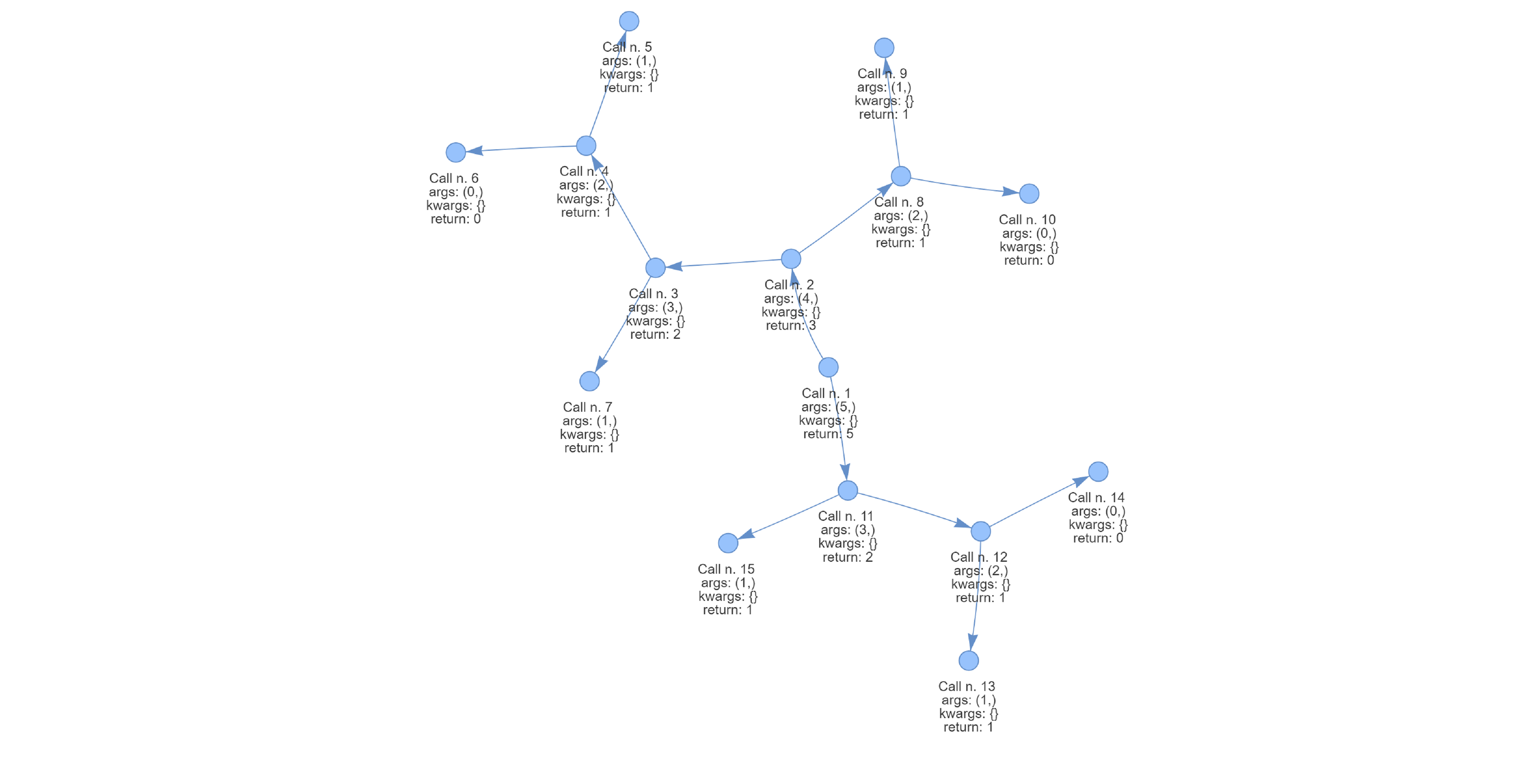
Default Graph Representation
By default, the get_graph method generates a standard directed graph that shows the recursion steps:
Hierarchical Graph Representation
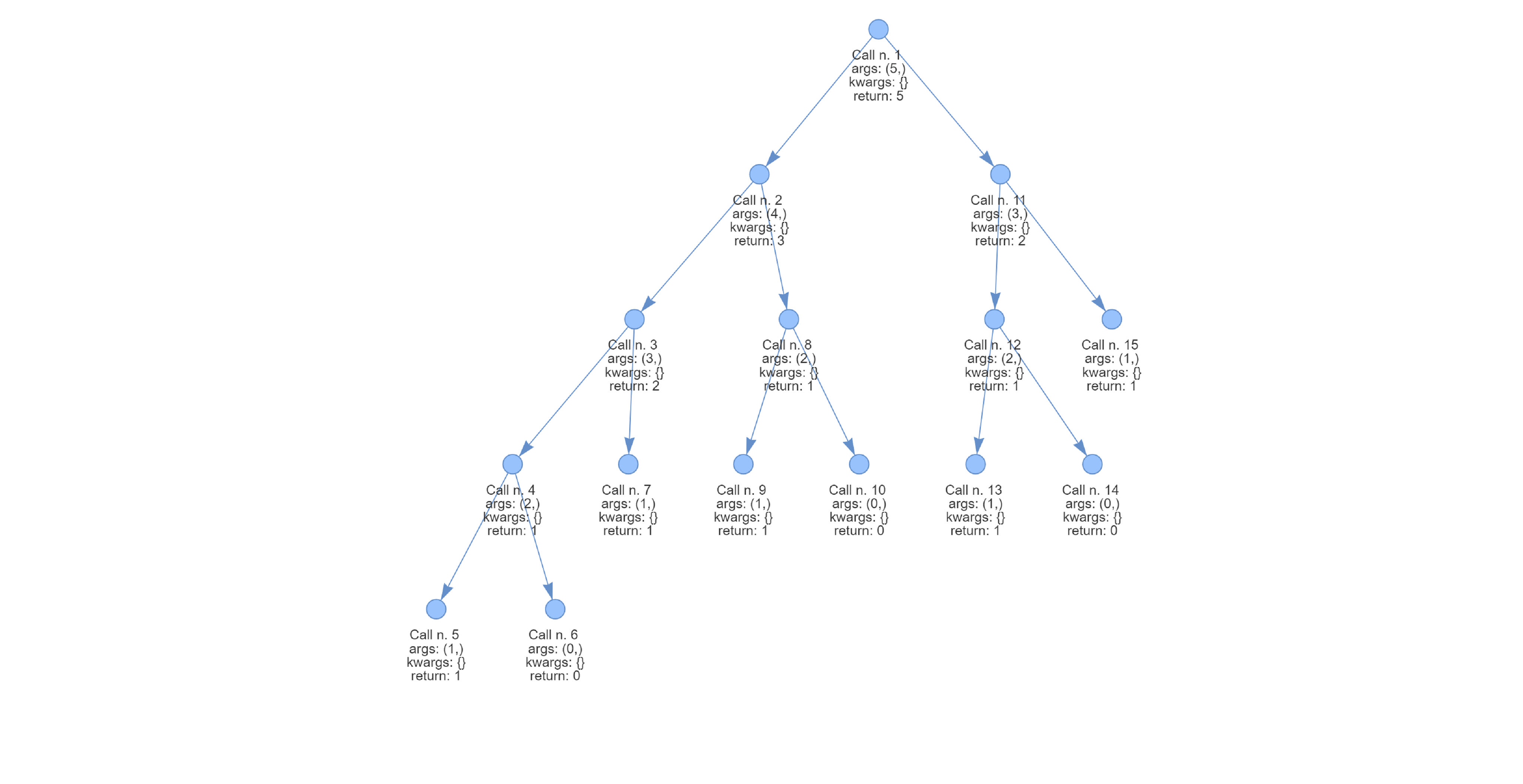
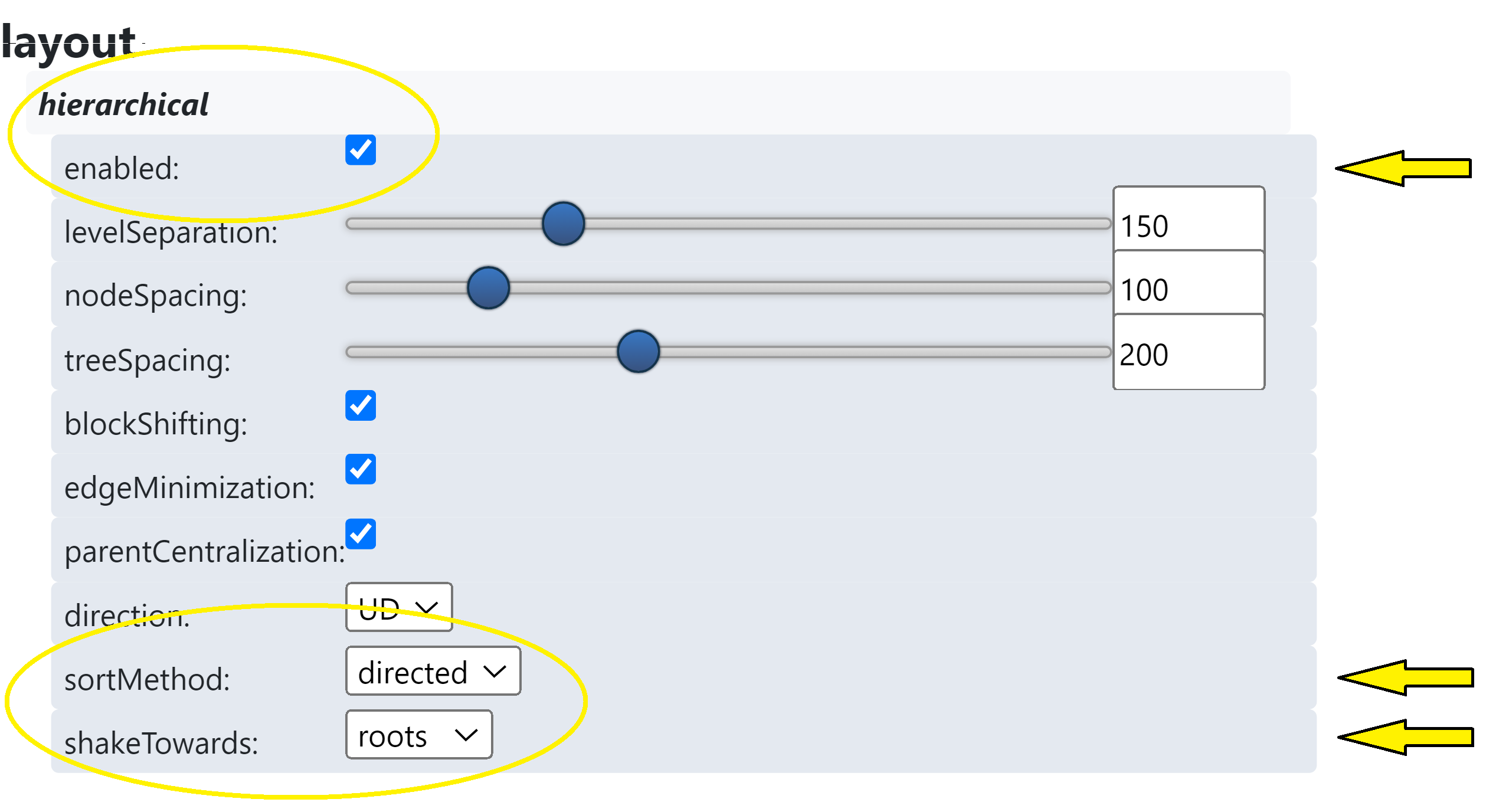
You can also visualize the recursion as a hierarchical graph, which organizes the nodes more clearly based on their relationships. To enable this, you need to modify the settings by enabling hierarchical view, setting sortMethod to directed, and adjusting the shakeTowards parameter to roots.
This will result in a more tree-like graph, where the root of the recursion (initial function call) is at the top, and subsequent calls branch downward:
The hierarchical graph and other layout configurations can be enabled via the interactive control panel that appears in the graph view. Here’s an image of the control panel where you can find the options for:
- Enabling Hierarchical Layout
- Setting Sort Method to "directed"
- Adjusting Shake Towards to "roots"
How It Works
The @Trace decorator monitors the execution of recursive functions. The key method is get_graph. This method accepts a string as an argument, which should be the name of the decorated function. This method generates and saves the HTML file of the recursion graph in the root directory where the code is executed, displaying:
- Nodes: Represent each function call.
- Edges: Show the relationship between parent and child function calls.
- Detailed information: Each node contains the arguments, return value, and call order for the corresponding function call.
Detailed Explanation of the Graph Output
Using the Fibonacci example, let’s break down the recursive calls and how they are represented in the graph. The recursion process for fibonacci(5) is as follows:
fibonacci(0) = 0
fibonacci(1) = 1
fibonacci(2) = fibonacci(1) + fibonacci(0) = 1 + 0 = 1
fibonacci(3) = fibonacci(2) + fibonacci(1) = 1 + 1 = 2
fibonacci(4) = fibonacci(3) + fibonacci(2) = 2 + 1 = 3
fibonacci(5) = fibonacci(4) + fibonacci(3) = 3 + 2
Now, comparing this with the graph generated by TraceRecursio, each node in the graph corresponds to one of these function calls:
- The nodes with
argsset to(0,)represent the call tofibonacci(0), which immediately returns0. - Similarly, the nodes with
argsset to(1,)represent the call tofibonacci(1), which immediately returns1. - The nodes with
argsset to(2,)represent the call tofibonacci(2). They have two incoming edges fromfibonacci(1)andfibonacci(0), indicating thatfibonacci(2)is computed by summing the results of these two calls. In fact, their return is set to 2, which is the sum of the return values from the two child nodes. - This pattern continues for
fibonacci(3),fibonacci(4), andfibonacci(5), with each node aggregating results from the two preceding calls, as dictated by the recursive Fibonacci algorithm.
In the graph, you can see exactly how the recursion unfolds, with the edges showing the flow of data between recursive calls. Here's an image highlighting these nodes in the graph:
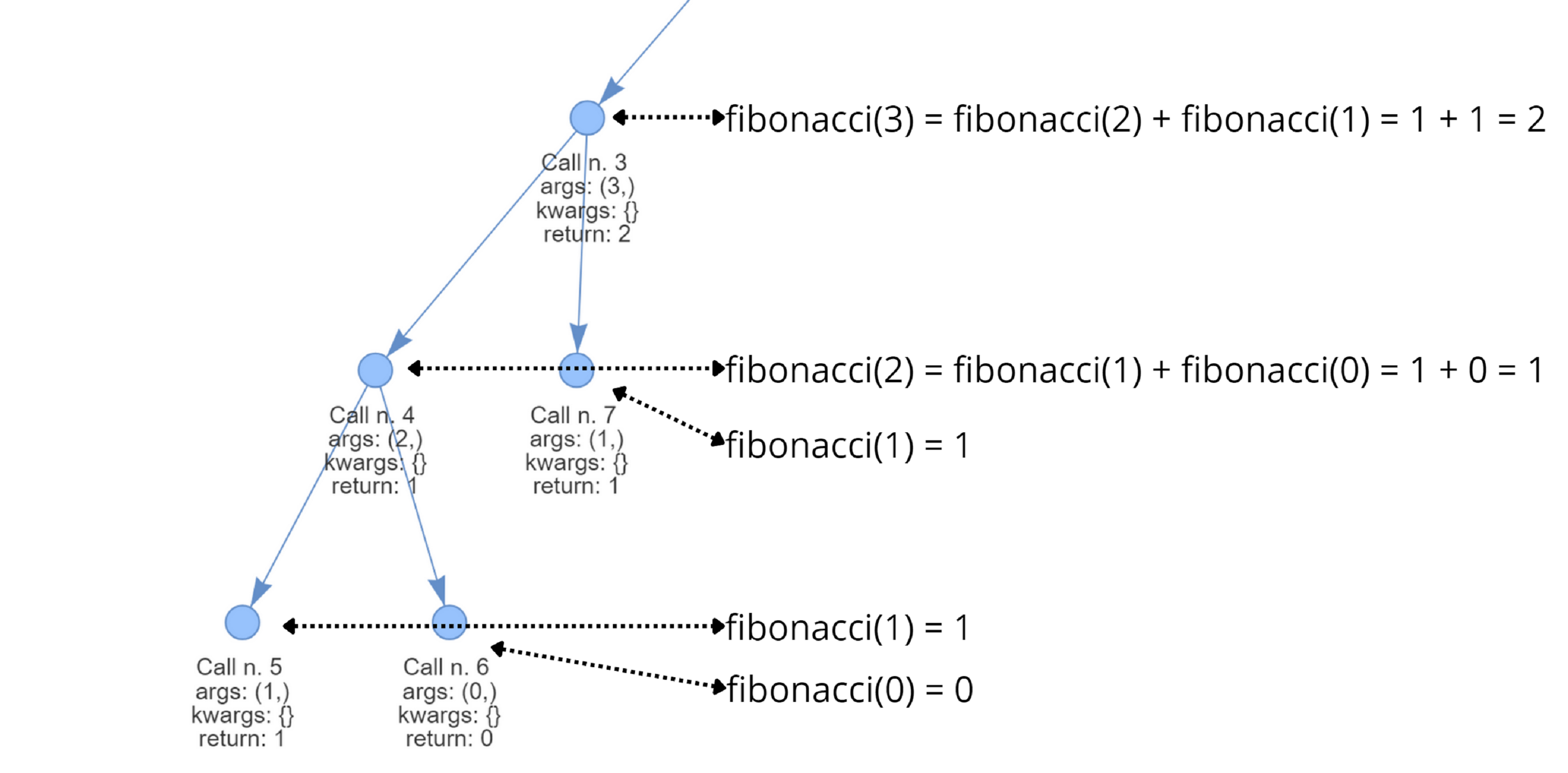
Each node not only shows the recursive call but also contains details about the arguments passed to the function, the return value, and the order in which the calls were made, making it easy to follow the execution flow step-by-step.
Additional Features
Track class
The Track class includes the instances method, which provides a dictionary with the following structure:
-
Key: The name of the decorated function.
-
Value: The decorated function itself, which contains the following useful attributes for further exploration:
edges: A dictionary where the key is the node ID, and the value is a list of connected nodes.frames_order: A dictionary with the node ID as the key and an ordinal number representing the order in which that node was generated.parameters: A dictionary where the key is the node ID and the value is the list of parameters passed to the function during that call.returns: A dictionary where the key is the node ID and the value is the result returned from that function call.G: The graph generated using NetworkX.
Contributing
We welcome contributions! Please feel free to submit a pull request or open an issue.
License
This project is licensed under the MIT License.
Release history Release notifications | RSS feed


Download files
Download the file for your platform. If you're not sure which to choose, learn more about installing packages.
Source Distribution
Built Distribution
Filter files by name, interpreter, ABI, and platform.
If you're not sure about the file name format, learn more about wheel file names.
Copy a direct link to the current filters
File details
Details for the file tracerecursio-2.1.2.tar.gz.
File metadata
- Download URL: tracerecursio-2.1.2.tar.gz
- Upload date:
- Size: 6.1 kB
- Tags: Source
- Uploaded using Trusted Publishing? No
- Uploaded via: poetry/1.6.1 CPython/3.8.10 Windows/10
File hashes
| Algorithm | Hash digest | |
|---|---|---|
| SHA256 |
b1c8d7d7c27afc33f7c1ccd8328c22a33eec7cda7e58620aef0c3634a4e7d7b1
|
|
| MD5 |
7057d6c621be4c16874f7359e6fa7a7f
|
|
| BLAKE2b-256 |
07f491a9dbfb3c9163845cb23588089e55fcc70e28278ba4214076b33bcb010e
|
File details
Details for the file tracerecursio-2.1.2-py3-none-any.whl.
File metadata
- Download URL: tracerecursio-2.1.2-py3-none-any.whl
- Upload date:
- Size: 6.8 kB
- Tags: Python 3
- Uploaded using Trusted Publishing? No
- Uploaded via: poetry/1.6.1 CPython/3.8.10 Windows/10
File hashes
| Algorithm | Hash digest | |
|---|---|---|
| SHA256 |
13b96aa2e82b1c74bc2ce72bfac8b19e2379987e88dbffd3e17dbe158a18c1d9
|
|
| MD5 |
e33862a5080fb8f6525139df1dca0bc6
|
|
| BLAKE2b-256 |
bdfacd41ce2f99c264ed95a7360d3877de9362359487fbd7c27262a7c667e98d
|






