

Badge |
Status |
|---|---|
Python versions |
|
Documentation |
|
Continuous integration |
|
Test coverage |
|
Google Colab |
|
PyPI package |
|
PyPI downloads |
|
Anaconda package |
|
Anaconda downloads |
|
Latest Anaconda release |










TradeTide
TradeTide is a Python/C++ package for researching and backtesting foreign-exchange trading strategies. It includes bundled historical samples, technical indicators, position management, and portfolio simulation.
Features
Bundled historical samples for five major FX pairs.
Technical indicators including Bollinger Bands, moving-average crossings, RMI, RSI, and MACD.
Composable all_of, any_of, and weighted signal rules.
Backtesting with configurable exit and capital-management strategies.
Installation
TradeTide is available from PyPI and Anaconda:
pip install TradeTide
conda install TradeTide --channel MartinPdeS
Verify the installation with the Python interpreter used for backtests:
python -c "import TradeTide; print(TradeTide.__version__)"Released wheels are the easiest option. Building from source requires CMake, a C++20 compiler, pybind11, and OpenMP.
Graphical workspace
Launch the local strategy lab in your browser:
TradeTideAfter updating a source checkout, reinstall with pip install -e . to register the command. You can also use python -m TradeTide.gui or the tradetide-gui alias. The GUI runs locally and needs no additional dependencies, accounts, or internet access. The home page offers editable mean-reversion, trend-following, and momentum templates, plus recent experiments. The keyboard-accessible navigation separates Market data, Strategy, Results, Orders & trades, Compare, and Research. Navigation preserves your draft and completed runs; a successful backtest opens the Results tab.
Market data
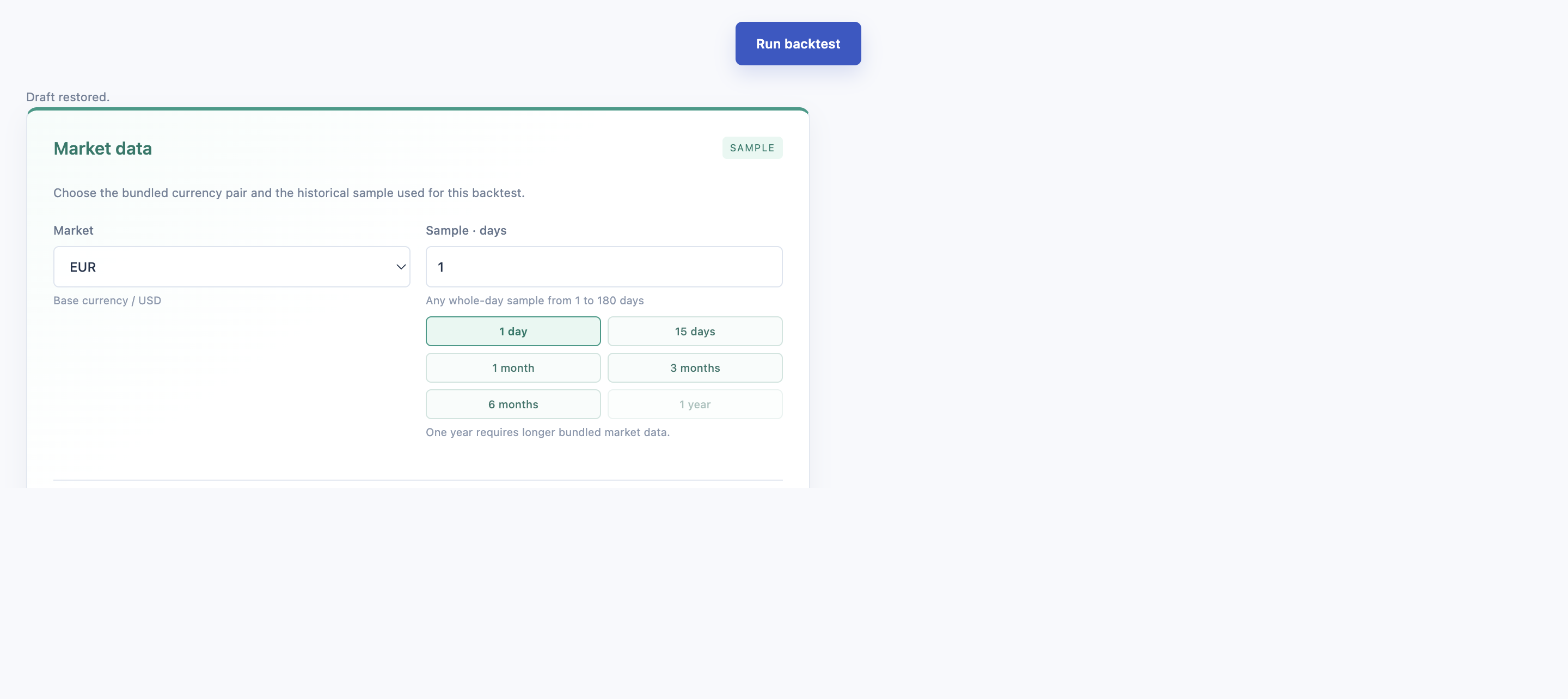
Choose the bundled currency pair and historical sample independently from the strategy configuration. Samples are available from 1 to 180 days, with one-click presets for 1 day, 15 days, 1 month, 3 months, and 6 months. The 1-year option is visible but disabled until longer bundled market data is available.
Strategy and saved configurations
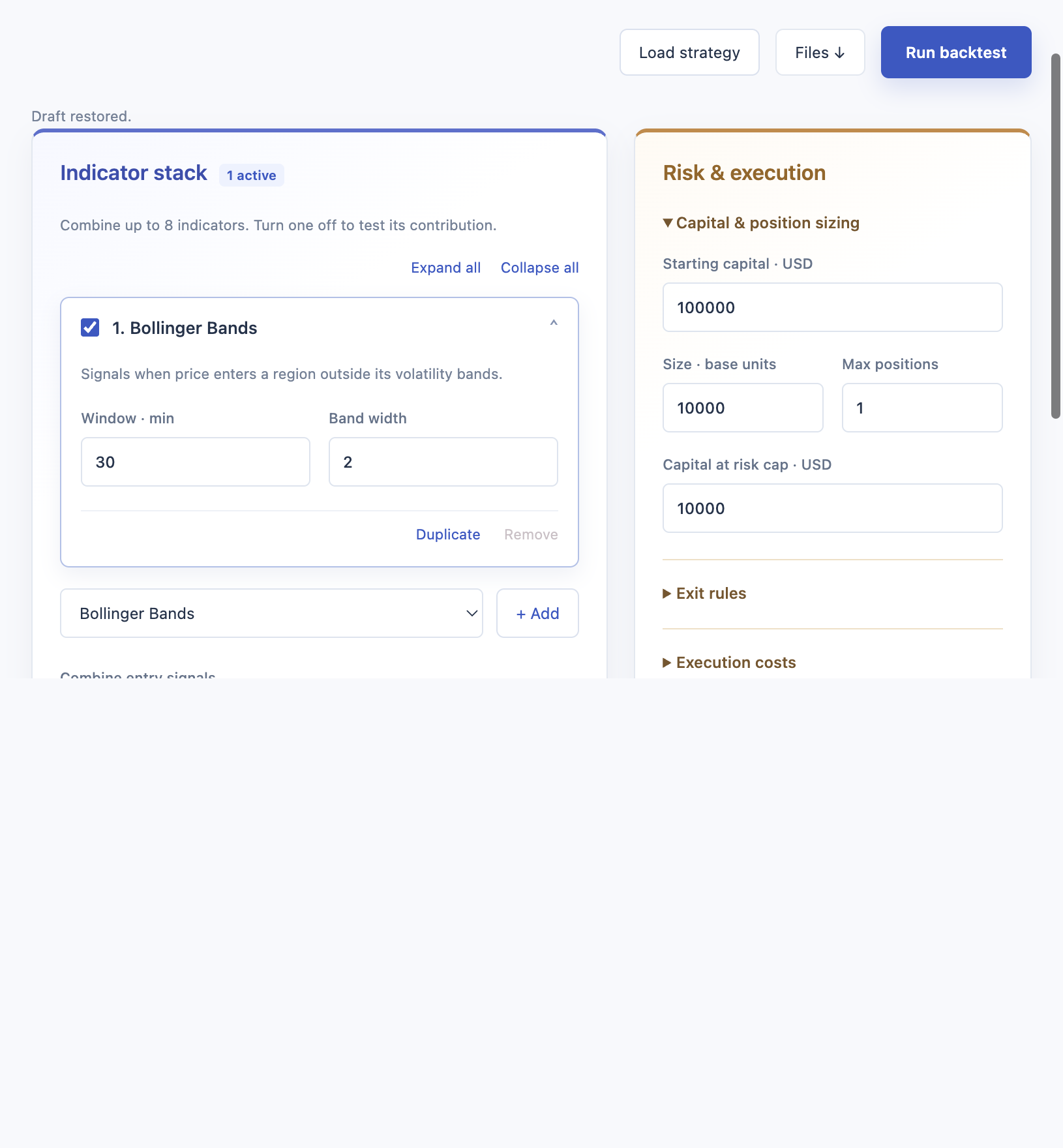
Build a stack of up to eight independently configured Bollinger Bands, moving-average crossings, RSI, RMI, and MACD indicators. Enable or disable each indicator and combine its entry events using unanimous agreement, any non-conflicting agreement, or weighted voting with a configurable threshold.
Tune fixed position size, concurrent positions, capital at risk, fixed, trailing, or break-even exits, commission, slippage, and additional spread. Use Load strategy in the Strategy tab to replace the current draft with a saved configuration. Save strategy at the bottom of the tab opens a name dialog and stores a reusable strategy in the local browser library.
Analysis and research
Inspect equity, drawdown, market entry markers, individual indicator curves, simulated entry requests (executed or skipped), and a searchable trade ledger with costs and position sizes. Open any trade to see its cost breakdown and highlight its entry and exit on the market chart. Filter trades by side or outcome, sort by P&L, and export the filtered ledger as CSV. Chart range sliders and keyboard inspection make individual periods easier to examine.
Compare any two completed runs to inspect metric changes and exact parameter differences. Normalized equity curves are overlaid only for matching markets and observation times; metric comparisons remain available for different samples. The Research tab ranks every retained experiment by return, risk, or Sharpe ratio, overlays matching normalized equity curves, and exports a standalone HTML experiment report.
Drafts and up to 20 named strategies are saved locally. The last 30 runs are stored in the browser and restored after a refresh, using the same browser profile and server address/port. Import strategy JSON or the settings from an exported run; undo restores the replaced draft. Export JSON to keep portable copies independent of browser storage. Ctrl+Enter or Cmd+Enter runs the current draft from any workspace tab.
Samples begin at each dataset’s first observation. The selected duration is calendar time and may include market closures; displayed dates show the actual simulation period. During each run, the workspace reports genuine progress through data loading, indicator calculation, signal combination, portfolio simulation, and performance reporting. Bollinger, moving-average, and RMI windows use minutes; RSI and MACD windows use bars. Signal rules combine entry events on the same bar, not persistent indicator regions. Simulated entries use the native engine’s bid/ask closing prices. Skipped requests reflect portfolio constraints or the end of the sample; they are not broker orders. Costs adjust reported equity and P&L after simulation, without changing position sizing. Editing settings leaves the previous result visible until a new run succeeds. The Results tab identifies when the current draft differs from the selected run.
Use python -m TradeTide.gui --port 8766 --no-browser to choose a port or open the displayed URL yourself. Stop the server with Ctrl+C. The server binds only to 127.0.0.1 and is intended for a local research session.
First backtest
Load the bundled EUR/USD sample, add an indicator to a strategy, and run a backtest:
from TradeTide import Backtester, BacktestResult, Currency, Market, Strategy
from TradeTide import capital_management, exit_strategy
from TradeTide.indicators import BollingerBands
from TradeTide.times import days, minutes

market = Market()
market.load_from_database(Currency.EUR, Currency.USD, time_span=3 * days)

strategy = Strategy()
strategy.add_indicator(BollingerBands(window=30 * minutes, multiplier=2.0))

backtester = Backtester(
    strategy=strategy,
    market=market,
    exit_strategy=exit_strategy.Static(stop_loss=4, take_profit=4),
    capital_management=capital_management.FixedLot(
        capital=100_000,
        fixed_lot_size=10_000,
        max_capital_at_risk=10_000,
        max_concurrent_positions=1,
    ),
)
backtester.run()
result = BacktestResult.from_portfolio(backtester.portfolio)
result.plot_equity_drawdown()
Bundled datasets are EUR/USD, GBP/USD, CHF/USD, JPY/USD, and CAD/USD. time_span accepts a timedelta or a positive duration string such as "2d 6h".
Testing
For local development, install the development extra and run the suite:
git clone https://github.com/MartinPdeS/TradeTide.git
cd TradeTide
pip install -e '.[dev]'
pytest
Contributing
See CONTRIBUTING.md for the native-build requirements, formatting checks, and pull-request guidelines.
Contact
For questions or contributions, contact martin.poinsinet.de.sivry@gmail.com.
1 maintainer

Metadata
1 maintainer
Release files for TradeTide 1.1.18
For a detailed explanation of source distributions (sdists) and built distributions (wheels), please see the package formats documentation.
Built distributions (wheels)
Total release size: 181.0 MB
Release files / tradetide-1.1.18-cp314-cp314-win_amd64.whl
| Download URL | tradetide-1.1.18-cp314-cp314-win_amd64.whl |
|---|---|
| Size | 19.3 MB |
| Tags | CPython 3.14 Windows x86-64 |
|
SHA-256 checksum How to use checksums |
faca40c856f2812feee8befc0e0ce27b75849e9f7897441d77a06df0468462d6
|
|
BLAKE2b-256 checksum How to use checksums |
fc831bf043e84d311db1c2c2544ca063560f6a0bc814d9656f4a383c063a3cc8
|
| Upload date | |
|
Uploaded using Trusted Publishing? What is trusted publishing? |
No |
| Uploaded via |
twine/7.0.0 CPython/3.13.16
|
Release files / tradetide-1.1.18-cp314-cp314-manylinux_2_27_x86_64.manylinux_2_28_x86_64.whl
| Download URL | tradetide-1.1.18-cp314-cp314-manylinux_2_27_x86_64.manylinux_2_28_x86_64.whl |
|---|---|
| Size | 12.7 MB |
| Tags | CPython 3.14 Linux glibc 2.27+ x86-64 Linux glibc 2.28+ x86-64 |
|
SHA-256 checksum How to use checksums |
bd4a1b9ba50dc4c8aa7040303c90a423cbcbf6fc52f5a3755e29fa9ccf2a5b7e
|
|
BLAKE2b-256 checksum How to use checksums |
95df6df4588509e36813deeb0e678f32827a491fb3fc5bbba024e16cfc425521
|
| Upload date | |
|
Uploaded using Trusted Publishing? What is trusted publishing? |
No |
| Uploaded via |
twine/7.0.0 CPython/3.13.16
|
Release files / tradetide-1.1.18-cp314-cp314-macosx_26_0_arm64.whl
| Download URL | tradetide-1.1.18-cp314-cp314-macosx_26_0_arm64.whl |
|---|---|
| Size | 13.7 MB |
| Tags | CPython 3.14 macOS 26.0+ ARM64 |
|
SHA-256 checksum How to use checksums |
eff370f3402b93087888921b2ac02bd8432b422a5f148553f014bcefec3703cf
|
|
BLAKE2b-256 checksum How to use checksums |
b148f7abfd345d1429396be496a6183d32e35712251466e7ec1014539e94e40c
|
| Upload date | |
|
Uploaded using Trusted Publishing? What is trusted publishing? |
No |
| Uploaded via |
twine/7.0.0 CPython/3.13.16
|
Release files / tradetide-1.1.18-cp313-cp313-win_amd64.whl
| Download URL | tradetide-1.1.18-cp313-cp313-win_amd64.whl |
|---|---|
| Size | 18.7 MB |
| Tags | CPython 3.13 Windows x86-64 |
|
SHA-256 checksum How to use checksums |
5d0c5f24e9633d7ec4d1dab8022a80ab346d6a369645696491d00682f37f5b8f
|
|
BLAKE2b-256 checksum How to use checksums |
67651f55e7e39dcd4aa1d95da6af443082e26a5853e20cf6c9bcff59d6688d19
|
| Upload date | |
|
Uploaded using Trusted Publishing? What is trusted publishing? |
No |
| Uploaded via |
twine/7.0.0 CPython/3.13.16
|
Release files / tradetide-1.1.18-cp313-cp313-manylinux_2_27_x86_64.manylinux_2_28_x86_64.whl
| Download URL | tradetide-1.1.18-cp313-cp313-manylinux_2_27_x86_64.manylinux_2_28_x86_64.whl |
|---|---|
| Size | 12.7 MB |
| Tags | CPython 3.13 Linux glibc 2.27+ x86-64 Linux glibc 2.28+ x86-64 |
|
SHA-256 checksum How to use checksums |
a680bf668d77b7d3ebc641ad8e52c64cefd169158245be12a64cb6083c08b38f
|
|
BLAKE2b-256 checksum How to use checksums |
ec9adfbc1cd59bbcfbfb0152f0685335c63f780d182938bad0b8dc98b97a19e9
|
| Upload date | |
|
Uploaded using Trusted Publishing? What is trusted publishing? |
No |
| Uploaded via |
twine/7.0.0 CPython/3.13.16
|
Release files / tradetide-1.1.18-cp313-cp313-macosx_26_0_arm64.whl
| Download URL | tradetide-1.1.18-cp313-cp313-macosx_26_0_arm64.whl |
|---|---|
| Size | 13.7 MB |
| Tags | CPython 3.13 macOS 26.0+ ARM64 |
|
SHA-256 checksum How to use checksums |
0b3a507ad3e6bcd046fac265eedd7f2f61084ecfa049d8d2850fd67ab64ed780
|
|
BLAKE2b-256 checksum How to use checksums |
8c137fa3b480fc0f073aed110bbeff252c71af3a095e3db937fed6b6863776bf
|
| Upload date | |
|
Uploaded using Trusted Publishing? What is trusted publishing? |
No |
| Uploaded via |
twine/7.0.0 CPython/3.13.16
|
Release files / tradetide-1.1.18-cp312-cp312-win_amd64.whl
| Download URL | tradetide-1.1.18-cp312-cp312-win_amd64.whl |
|---|---|
| Size | 18.7 MB |
| Tags | CPython 3.12 Windows x86-64 |
|
SHA-256 checksum How to use checksums |
f584d583fdbe28f2da4a6e018cf73341443d95a03c07ebc4eed73f5ad21df07c
|
|
BLAKE2b-256 checksum How to use checksums |
3f5d112da14ede5d72bd3ded5735fa0798a22916ca6e926fe86b77a59fa83766
|
| Upload date | |
|
Uploaded using Trusted Publishing? What is trusted publishing? |
No |
| Uploaded via |
twine/7.0.0 CPython/3.13.16
|
Release files / tradetide-1.1.18-cp312-cp312-manylinux_2_27_x86_64.manylinux_2_28_x86_64.whl
| Download URL | tradetide-1.1.18-cp312-cp312-manylinux_2_27_x86_64.manylinux_2_28_x86_64.whl |
|---|---|
| Size | 12.7 MB |
| Tags | CPython 3.12 Linux glibc 2.27+ x86-64 Linux glibc 2.28+ x86-64 |
|
SHA-256 checksum How to use checksums |
cc5fd6dfc94e8d8a6e8c625f6c7ff5fd446df6e6f06bf354deb6874c00fe5623
|
|
BLAKE2b-256 checksum How to use checksums |
0cc587c926a64bc7e2547a16f57387d8664362182a9e3573233777d3bd6a1fab
|
| Upload date | |
|
Uploaded using Trusted Publishing? What is trusted publishing? |
No |
| Uploaded via |
twine/7.0.0 CPython/3.13.16
|
Release files / tradetide-1.1.18-cp312-cp312-macosx_26_0_arm64.whl
| Download URL | tradetide-1.1.18-cp312-cp312-macosx_26_0_arm64.whl |
|---|---|
| Size | 13.7 MB |
| Tags | CPython 3.12 macOS 26.0+ ARM64 |
|
SHA-256 checksum How to use checksums |
a9d2ce8ae070471efba96237d9faaaddaa9a9abf222975d4e6e5b6374f28bfcf
|
|
BLAKE2b-256 checksum How to use checksums |
baf42616bad7d65f36f235f79327597417f0eb1ad141a79c6dcfab2052d1da8b
|
| Upload date | |
|
Uploaded using Trusted Publishing? What is trusted publishing? |
No |
| Uploaded via |
twine/7.0.0 CPython/3.13.16
|
Release files / tradetide-1.1.18-cp311-cp311-win_amd64.whl
| Download URL | tradetide-1.1.18-cp311-cp311-win_amd64.whl |
|---|---|
| Size | 18.7 MB |
| Tags | CPython 3.11 Windows x86-64 |
|
SHA-256 checksum How to use checksums |
8b53a325bda717439724dd8096da4850d2acf9956a11c19e1f6f6973fcbcfa69
|
|
BLAKE2b-256 checksum How to use checksums |
ba2e4254131505acecf42e671185c4d345f00b57823927e090c66d85f262571e
|
| Upload date | |
|
Uploaded using Trusted Publishing? What is trusted publishing? |
No |
| Uploaded via |
twine/7.0.0 CPython/3.13.16
|
Release files / tradetide-1.1.18-cp311-cp311-manylinux_2_27_x86_64.manylinux_2_28_x86_64.whl
| Download URL | tradetide-1.1.18-cp311-cp311-manylinux_2_27_x86_64.manylinux_2_28_x86_64.whl |
|---|---|
| Size | 12.7 MB |
| Tags | CPython 3.11 Linux glibc 2.27+ x86-64 Linux glibc 2.28+ x86-64 |
|
SHA-256 checksum How to use checksums |
b6f7d34e79ff5a853152490419c4a5c6c5df2c98c370ef8d8722b9321598b8d1
|
|
BLAKE2b-256 checksum How to use checksums |
5ea95d7987d4d83bbb46082ddc61a59135e1fd85e54823720de9dbc0c4b23cd2
|
| Upload date | |
|
Uploaded using Trusted Publishing? What is trusted publishing? |
No |
| Uploaded via |
twine/7.0.0 CPython/3.13.16
|
Release files / tradetide-1.1.18-cp311-cp311-macosx_26_0_arm64.whl
| Download URL | tradetide-1.1.18-cp311-cp311-macosx_26_0_arm64.whl |
|---|---|
| Size | 13.7 MB |
| Tags | CPython 3.11 macOS 26.0+ ARM64 |
|
SHA-256 checksum How to use checksums |
6f4b110bbca8c1d7afc9abcfe8ba3329047e3bcd14da64be83577392be3712a6
|
|
BLAKE2b-256 checksum How to use checksums |
b3a28fbf1991aa5aa33297728c4ede13fb826911ff4cc58a6566e4ba8e103ed1
|
| Upload date | |
|
Uploaded using Trusted Publishing? What is trusted publishing? |
No |
| Uploaded via |
twine/7.0.0 CPython/3.13.16
|
Security for TradeTide 1.1.18
Provenance
Provenance describes where a file came from. On PyPI, provenance is shared via attestations, which provide a verifiable record of the build or publishing details. View details, limitations and caveats.
No provenance found
None of the files in this release were uploaded with provenance metadata.
A note on package security
PyPI is a repository for distributing packages, not a service for auditing them. While third-party security researchers and our staff do their best to detect and remove malicious packages, PyPI cannot guarantee the quality, security or suitability of any given package.
To learn more about protecting yourself from malicious actors, visit our package security documentation.














