
Extention of the built in Turtle package

Project description
Turtle Extentions

Docs:
Install:
- Open CMD Prompt by pressing the windows button and typing cmd, then hit enter
- Type
py -m pip install TurtleExtentions(Windows) orpython pip install TurtleExtentions(Linux/MacOS) - Import the module inside the code like this:
import TurtleExtentions as TE
# Code here
Basic shapes and arguments:
Basic Shapes:
- The
Shapeclass contains all basic shapes - To use it, just type
import TurtleExtentions as TE
TE.Shape.ShapeHere(params)
- Lets make a hexagon appear
TE.Shape.Hexagon(Size=50) # The size by default is 20
- To change its position just use the pos1 and pos2 arguments
TE.Shape.Hexagon(Size=50, pos1=150, pos2=150) # Default positons are 100, 100
- Now by default this would not be filled in. To do so set the DoFill paramater to True
- You can also edit the fillcolor with the FillColor paramater like this
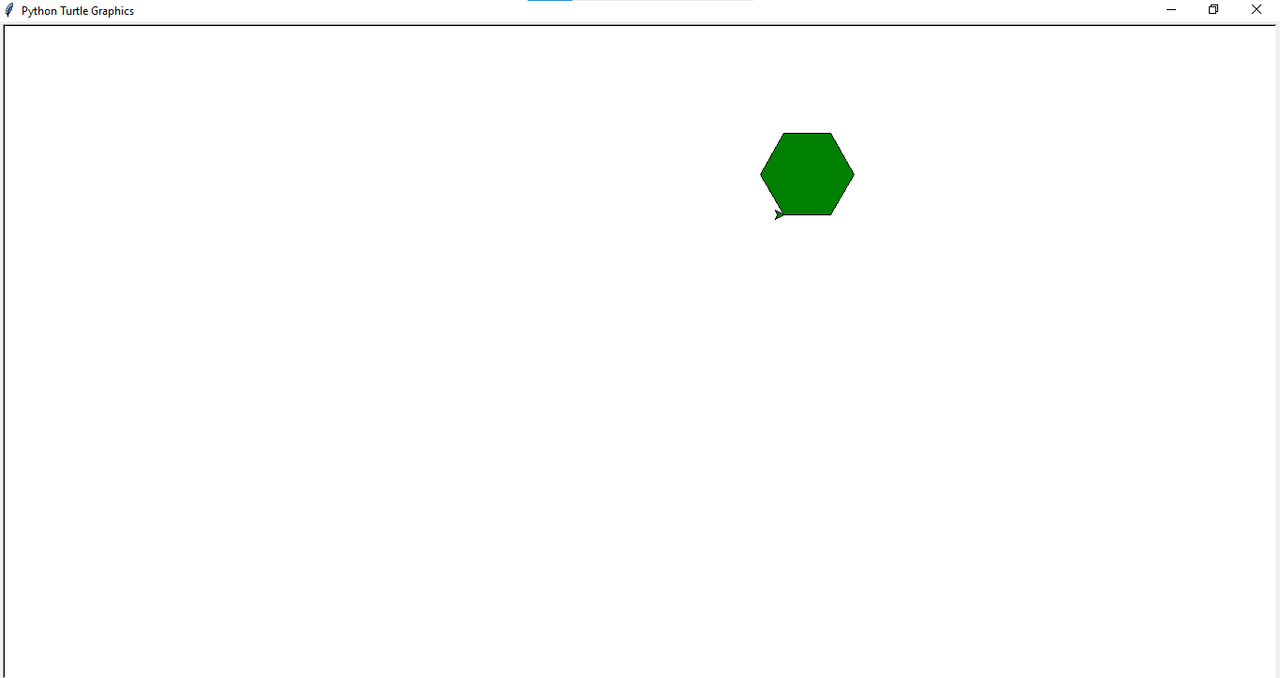
TE.Shape.Hexagon(Size=50, pos1=150, pos2=150, DoFill=True, FillColor="Green")
- That would result in this
Release 0.0.4.5
- New Edit class
- New delete shape function! (Inside of the Edit class)
- Bug fix
Release history Release notifications | RSS feed


Download files
Download the file for your platform. If you're not sure which to choose, learn more about installing packages.
Source Distribution
File details
Details for the file TurtleEssentials-0.0.4.5.tar.gz.
File metadata
- Download URL: TurtleEssentials-0.0.4.5.tar.gz
- Upload date:
- Size: 2.5 kB
- Tags: Source
- Uploaded using Trusted Publishing? No
- Uploaded via: twine/4.0.2 CPython/3.12.0
File hashes
| Algorithm | Hash digest | |
|---|---|---|
| SHA256 |
8a4504f325cab66996edf57c3728d7ca0ce18828f966c2c89e686223be020cf0
|
|
| MD5 |
c80f5f4c5c0db385aeeb579755cc7b09
|
|
| BLAKE2b-256 |
d9697fa9600cfca06bf1b1d916063dc9b5693ddf52709a3d68bf3dc71adf7032
|






