




Purpose
Every individual user on Twitter has a customized, personal experience and only views a tiny portion of the actual conversations, content and opinions that are put out on the platform. The purpose of this project is to provide tools to allow people to use Twitter data to obtain a more holistic perspective of the social network landscape. The TwitAnalysis modules allow for the live processing of Tweet streams as well as processing mass amounts of posted content related to certain topics, trends or users. This allows for analysis of a much larger sample size of Twitter data, allowing us to estimate the impact/reach of Twitter content. Basically, this means that we can go beyond just seeing what our friends are thinking/saying on the platform, and see the opinions of Twitter at large.
Scope
The scope of the project is limited by a number of different factors which we will attempt to document to allow for transparency. While not necessarily all inclusive, hopefully this can serve as a foundation for Twitter analysis, and a starting point for more targeted projects in the future.
Functionality
Currently the project is split into two main modules. The TwitLive module is used for streaming/processing live Twitter data. The TwitProcess module is used for processing bulk Twitter data.
TwitLive Example
from TwitAnalysis import *
from time import sleep

live = TwitLive()

# Process and display trend analysis
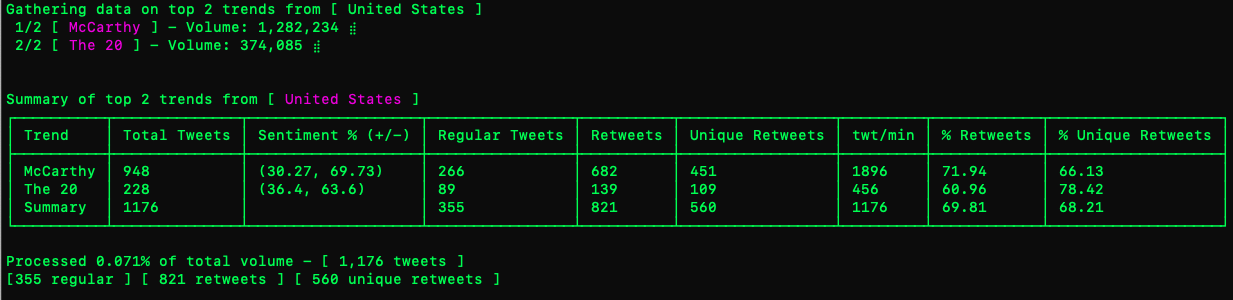
live.TopTrendAnalysis("United States",2,False, 30)
live.trends_summary()

# Stream tweets based on search
stream = live.SearchAnalysis("healthcare",False)
sleep(10)
stream.disconnect()

live.search_summary(stream)
TwitProcess Example
from TwitAnalysis import *

# Initialize new process object with a specific query
p = TwitProcess("Python Programming")
# Search/Process Tweets
p.analyze()

# Display stats for search results
print("Stats for query: 'Python Programming'")
print(f"Sentiment: {p.overall_sentiment()}")
print(f"Retweets: {p.retweets}")
print(f"Tweets: {p.reg_tweets}")
print(f"Impact: {p.impact}")
#==== OUTPUT ====#
Stats for query: 'Python Programming'
Sentiment: -0.366
Retweets: 485
Tweets: 282
Impact: 6,228,425
Twitter Documentation
https://developer.twitter.com/en/docs/tutorials/building-high-quality-filters
Research
https://www.sciencedirect.com/science/article/pii/S0268401218306005
https://epjdatascience.springeropen.com/articles/10.1140/epjds/s13688-018-0178-0
1 maintainer

Metadata
1 maintainer
Release files for TwitAnalysis 1.1
For a detailed explanation of source distributions (sdists) and built distributions (wheels), please see the package formats documentation.
Source distribution (sdist)
| File | Size | Uploaded | |
|---|---|---|---|
| TwitAnalysis-1.1.tar.gz | 10.6 kB | Details |
Built distribution (wheel)
| File | Interpreter | ABI | Platform | Reset |
|---|---|---|---|---|
| TwitAnalysis-1.1-py3-none-any.whl | Python 3 | none | any | Details |
Total release size: 21.8 kB
Release files / TwitAnalysis-1.1.tar.gz
| Download URL | TwitAnalysis-1.1.tar.gz |
|---|---|
| Size | 10.6 kB |
| Tags | Source |
|
SHA-256 checksum How to use checksums |
1dbe37234f5361ae8b26da65b3f57b6b5cf5842609313e7b9b26267519aec15b
|
|
BLAKE2b-256 checksum How to use checksums |
61309c06ef0b6e406e5d079684648fe5415d4c84a68a998b5ca0c40865a681a2
|
| Upload date | |
|
Uploaded using Trusted Publishing? What is trusted publishing? |
No |
| Uploaded via |
twine/4.0.2 CPython/3.9.18
|
Release files / TwitAnalysis-1.1-py3-none-any.whl
| Download URL | TwitAnalysis-1.1-py3-none-any.whl |
|---|---|
| Size | 11.1 kB |
| Tags | Python 3 |
|
SHA-256 checksum How to use checksums |
071f3c163e195229bfaff4d43ac46bc4d4c9d450c81767198870fa40179f08d1
|
|
BLAKE2b-256 checksum How to use checksums |
cff508757be4419db7cac0d9d27a17d772aa46b8195ac3e86927d372865b8038
|
| Upload date | |
|
Uploaded using Trusted Publishing? What is trusted publishing? |
No |
| Uploaded via |
twine/4.0.2 CPython/3.9.18
|














