
说明
python版本uiadmin实现, API接口自动生成管理后台,无需前端参与。
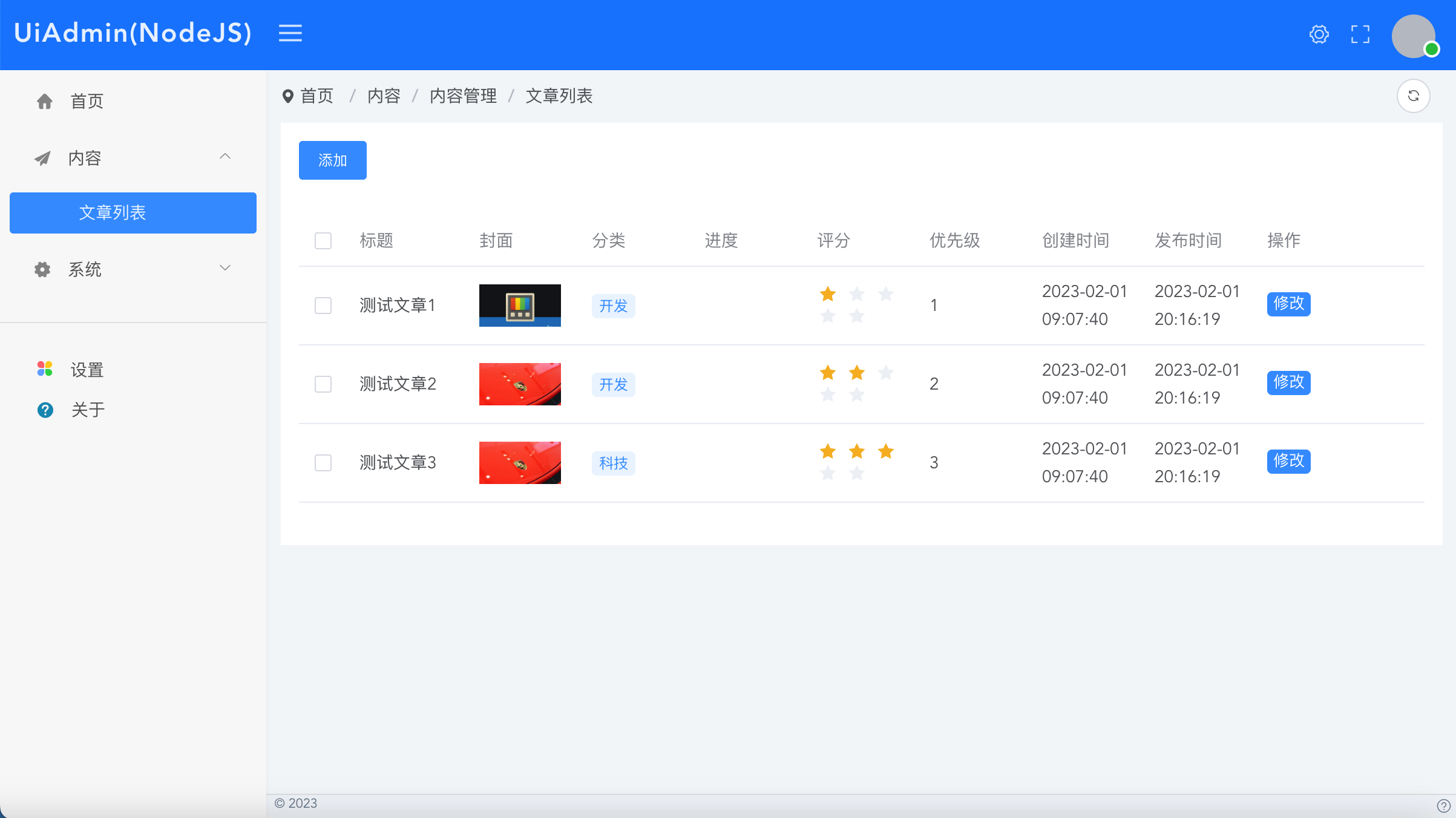
https://pypi.org/project/Uiadmin-FastApi/
Builder文档
https://uiadmin.net/docs/builder
教程
官方脚手架
下载脚手架工程
如果您不想自己搭建项目工程,可以直接使用官方的脚手架。
https://gitee.com/uiadmin/uiadmin/tree/master/back-end-python/
下载后执行
pip install "fastapi[all]"
pip install uiadmin-fastapi
pip freeze >requirements.txt
pip install -r requirements.txt
uvicorn main:app --reload
访问:localhost:8000/xyadmin/ 输入账号admin密码uiadmin登录即可进入管理后台页面
手动创建工程
安装依赖
pip install "fastapi[all]"
pip install uiadmin-fastapi
pip freeze >requirements.txt
pip install -r requirements.txt
增加配置文件
在config/default.yml添加如下内容
uiadmin:
  site:
    # 网站名称
    title: "UiAdmin"
    #正方形logo
    logo: ""
    #带有标题的横logo
    logoTitle: ""
    logoBadge: ""
  system:
    api-version: "1.0.0"
    menu-from: "annotation"
  user:
    user-role:
      - id: 1
        name: super_admin
        title: 超级管理员
        menus: ""
        status: 1
      - id: 2
        name: admin
        title: 管理员
        menus: [
          "/v1/admin/demo/lists"
        ]
        status: 1
    user-list:
      - id: 1
        nickname: "admin"
        username: "admin"
        password: "uiadmin"
        avatar: ""
        roles: "super_admin"
        status: 1
main.py使用
from fastapi import FastAPI
from fastapi.middleware.cors import CORSMiddleware
from starlette.responses import HTMLResponse
# 配置使用https://pypi.org/project/config2/
from config2.config import config
from uiadmin_fastapi.Uiadmin import Uiadmin
from uiadmin_fastapi.utils import jsonres
from uiadmin_fastapi.util.xybuilder.XyBuilderList import XyBuilderList
from uiadmin_fastapi.util.xybuilder.XyBuilderForm import XyBuilderForm

app = FastAPI()

# 跨域
app.add_middleware(
    CORSMiddleware,
    allow_origins=['*'],
    allow_credentials=True,
    allow_methods=["*"],
    allow_headers=["*"],
)

# 调用Uiadmin
uiadmin = Uiadmin(app)

@app.get("/", response_class=HTMLResponse)
def index():
    return "<a href='/xyadmin/'>点击打开后台</a><br><a href='/redoc'>查看接口文档</a>"

# 示例
@Uiadmin.menu_item({"title": "文章列表", "path": "/demo/lists", "pmenu": "/content", "menuType": 1,
  "routeType": "list", "apiSuffix": "", "apiParams": "", "apiMethod": "GET", "sortnum": 0})
@app.get("/api/v1/admin/demo/lists")
async def demo_lists():
    dataList = [
      {
        "id": 1,
        "title": "测试文章1",
        "cate": "开发",
        "cover": "https://ts2.cn.mm.bing.net/th?id=ORMS.11d30098d0f4a79a42c6352014e0f066&pid=Wdp&w=300&h=156&qlt=90&c=1&rs=1&dpr=2&p=0",
        "level": 1,
        "progress": 50,
        "updateTime": "2023-02-01 20:16:19",
        "createTime": "2023-02-01 09:07:40",
        "status": 1
      },
      {
        "id": 2,
        "title": "测试文章2",
        "cate": "开发",
        "cover": "https://ts2.cn.mm.bing.net/th?id=ORMS.ed34ae135a326a834ca9d3379be134d3&pid=Wdp&w=300&h=156&qlt=90&c=1&rs=1&dpr=2&p=0",
        "level": 2,
        "progress": 80,
        "updateTime": "2023-02-01 20:16:19",
        "createTime": "2023-02-01 09:07:40",
        "status": 1
      },
      {
        "id": 3,
        "title": "测试文章3",
        "cate": "科技",
        "cover": "https://ts2.cn.mm.bing.net/th?id=ORMS.ed34ae135a326a834ca9d3379be134d3&pid=Wdp&w=300&h=156&qlt=90&c=1&rs=1&dpr=2&p=0",
        "level": 3,
        "progress": 90,
        "updateTime": "2023-02-01 20:16:19",
        "createTime": "2023-02-01 09:07:40",
        "status": 1
      },
    ]
    xyBuilderlist = XyBuilderList();
    (xyBuilderlist
      .init()
      .addColumn("title", "标题", {
        "type": "text"
      })
      .addColumn("cover", "封面", {
        "type": "image",
      })
      .addColumn("cate", "分类", {
        "type": "tag",
        "prefixType": "dot",
        "options": []
      })
      .addColumn("progress", "进度", {
        "type": "progress"
      })
      .addColumn("level", "评分", {
        "type": "rate"
      })
      .addColumn("level", "优先级", {
        "prefixType": "dot",
        "useOptions": True,
        "options": [
          {"title": "低", "value": 1, "color": "#c6cdd4"},
          {"title": "中", "value": 2, "color": "#0488de"},
          {"title": "高", "value": 3, "color": "#ff9d28"}
        ]
      })
      .addColumn("createTime", "创建时间", {
        "type": "time",
      })
      .addColumn("updateTime", "发布时间", {
        "type": "time",
      })
      .addTopButton("add", "添加", {
        "title": "新增",
        "pageType": "modal",
        "modalType": "form",
        "api": "/v1/admin/demo/add",
        "width": "1000px"
      })
      .addColumn("rightButtonList",  "操作", {
        "type": "rightButtonList",
        "minWidth": "120px"
      })
      .addRightButton("edit", "修改", {
        "title": "修改",
        "pageType": "modal",
        "modalType": "form",
        "api": "/v1/admin/demo/edit",
        "width": "1000px"
      })
      .setDataList(dataList)
      )

    return jsonres({
        "code": 200,
        "msg": "登录成功",
        "data": {
            "listData": xyBuilderlist.getData()
        }
      }
    )

@Uiadmin.menu_item({"title": "文章增加", "path": "/demo/add", "pmenu": "/demo/lists", "menuType": 1,
  "routeType": "form", "apiSuffix": "", "apiParams": "", "apiMethod": "POST", "sortnum": 0})
@app.get("/api/v1/admin/demo/add")
def demo_add():
    xyBuilderForm = XyBuilderForm()
    (xyBuilderForm
      .init()
      .addFormItem("name", "文章标题", "text", "", {})
      .addFormItem("content", "文章内容", "html", "", {})
      .addFormItem("level", "登记", "select", "", {
        "options":[
          {"title": "低", "value": 1},
          {"title": "中", "value": 2},
          {"title": "高", "value": 3},
        ]
      })
      )

    return jsonres({
        "code": 200,
        "msg": "成功",
        "data": {
            "formData": xyBuilderForm.getData()
        }
      }
    )

@Uiadmin.menu_item({"title": "文章修改", "path": "/demo/edit", "pmenu": "/demo/lists", "menuType": 1,
  "routeType": "form", "apiSuffix": "", "apiParams": "", "apiMethod": "POST", "sortnum": 0})
@app.get("/api/v1/admin/demo/edit/{id}")
def demo_edit(id: int):
    xyBuilderForm = XyBuilderForm()
    (xyBuilderForm
      .init()
      .addFormItem("id", "ID", "text", "", {
        "disabled": True
      })
      .addFormItem("name", "文章标题", "text", "", {})
      .addFormItem("content", "文章内容", "html", "", {})
      .addFormItem("level", "登记", "select", "", {
        "options":[
          {"title": "低", "value": 1},
          {"title": "中", "value": 2},
          {"title": "高", "value": 3},
        ]
      })
      .setFormValues({
        "id": id,
        "name": "text",
        "content": "测试",
        "level": 2
      })
      )

    return jsonres({
        "code": 200,
        "msg": "成功",
        "data": {
            "formData": xyBuilderForm.getData()
        }
      }
    )
运行
uvicorn main:app --reload
1 maintainer

Metadata
1 maintainer
Release files for Uiadmin-FastApi 1.0.3
For a detailed explanation of source distributions (sdists) and built distributions (wheels), please see the package formats documentation.
Source distribution (sdist)
| File | Size | Uploaded | Provenance | Actions |
|---|---|---|---|---|
| Uiadmin-FastApi-1.0.3.tar.gz | 10.0 kB | Without provenance | Details for Uiadmin-FastApi-1.0.3.tar.gz |
Built distribution (wheel)
| File | Interpreter | ABI | Platform | Actions Reset |
|---|---|---|---|---|
| Uiadmin_FastApi-1.0.3-py3-none-any.whl | Python 3 | none | any | Details for Uiadmin_FastApi-1.0.3-py3-none-any.whl |
Total release size: 22.1 kB
Release files / Uiadmin-FastApi-1.0.3.tar.gz
| Download URL | Uiadmin-FastApi-1.0.3.tar.gz |
|---|---|
| Size | 10.0 kB |
| Tags | Source |
|
SHA-256 checksum How to use checksums |
04d314fd159991a1d710daf2b2b618b6c475892d7778fc403338ce4518414e85
|
|
BLAKE2b-256 checksum How to use checksums |
8e4ecee9f81690fef5804f23a5ed2696878511f741f0cc7950105d6eec7157f7
|
| Upload date | |
|
Uploaded using Trusted Publishing? What is trusted publishing? |
No |
| Uploaded via |
twine/4.0.2 CPython/3.9.16
|
Release files / Uiadmin_FastApi-1.0.3-py3-none-any.whl
| Download URL | Uiadmin_FastApi-1.0.3-py3-none-any.whl |
|---|---|
| Size | 12.0 kB |
| Tags | Python 3 |
|
SHA-256 checksum How to use checksums |
1a7d7a82c9fdb09a85606c9744f41eccc8be0c64e91fe736aa0b2ad1401fb0ed
|
|
BLAKE2b-256 checksum How to use checksums |
743136d9c4fa8ff98da6b6493c7f782963cc5ae298697882ae35919c609033db
|
| Upload date | |
|
Uploaded using Trusted Publishing? What is trusted publishing? |
No |
| Uploaded via |
twine/4.0.2 CPython/3.9.16
|
Security for Uiadmin-FastApi 1.0.3
Provenance
Provenance describes where a file came from. On PyPI, provenance is shared via attestations, which provide a verifiable record of the build or publishing details. View details, limitations and caveats.
No provenance found
None of the files in this release were uploaded with provenance metadata.
A note on package security
PyPI is a repository for distributing packages, not a service for auditing them. While third-party security researchers and our staff do their best to detect and remove malicious packages, PyPI cannot guarantee the quality, security or suitability of any given package.
To learn more about protecting yourself from malicious actors, visit our package security documentation.













