










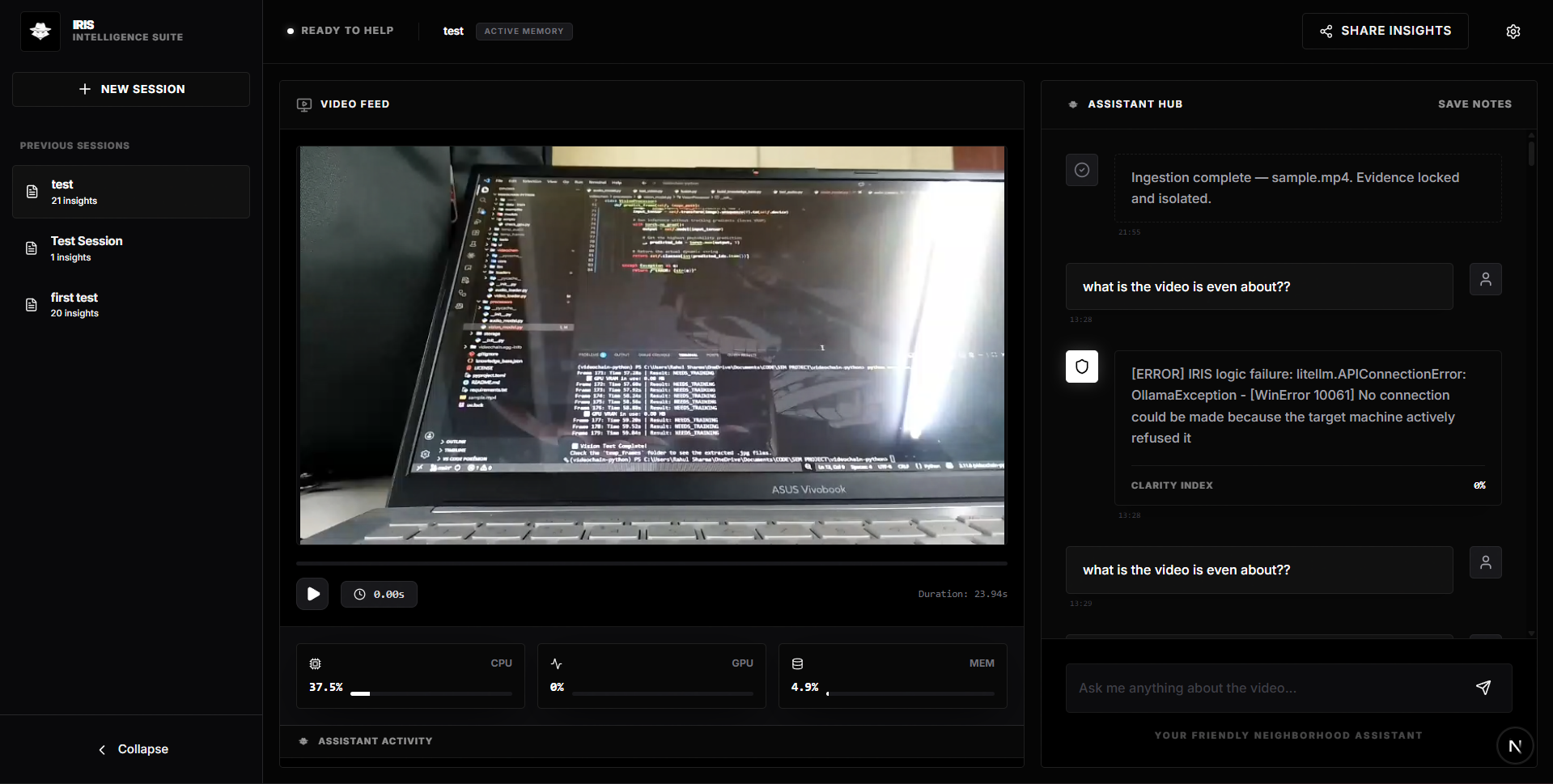
VidChain is a local-first multimodal RAG framework powered by the IRIS Engine (Intelligent Retrieval & Insight System). It decomposes video into visual, auditory, OCR, and temporal signal streams and fuses them into a queryable intelligence layer, intended for forensic analysis, security auditing, and automated video summarization with on-device privacy by default.
Table of Contents
- Overview
- Features
- Installation
- Configuration
- Quick Start
- CLI Reference
- SDK: Modular Sensor Matrix
- REST API
- Architecture
- Troubleshooting
- Contributing
- License
Overview
VidChain turns raw video into a queryable intelligence layer. Each ingested video is processed through a modular sensor pipeline (visual, audio, OCR, motion, behavioral), decomposed into an isolated Temporal Knowledge Graph, and fused with vector retrieval to produce grounded, timestamp-cited answers. Inference runs entirely on-device by default; cloud models are supported as an explicit opt-in, not a requirement.
Features
| Capability | Description |
|---|---|
| 4-Route Agentic Router | Classifies queries into Narrative Summarization, Local Forensic Search, Global Master Intelligence, and Conversational Dialogue |
| Global Master Intelligence | Cross-video entity tracking via a macro-graph, enabling pattern recognition across isolated sessions |
| Temporal Persistence | Chronological reasoning that bridges frame gaps and maintains state continuity between sensor logs |
| Recursive Map-Reduce Summarizer | Collapses hours of video into coherent reports without hitting LLM context limits |
| Neural Concurrency Locking | Prevents state corruption during simultaneous ingestion and query operations |
| Local-First Execution | Vision (Moondream) and reasoning (Llama 3 via Ollama) run on-device by default; no data leaves the machine unless a cloud model is explicitly configured |
Installation
Prerequisites
| Requirement | Version |
|---|---|
| Python | 3.11+ |
| CUDA | 12.1+ |
| Ollama | Latest (running) |
| Node.js | v18+ (for web portal) |
Option A — Install from PyPI (recommended)
pip install torch torchvision torchaudio --index-url https://download.pytorch.org/whl/cu121
pip install vidchain
Option B — Install from source (for development)
pip install torch torchvision torchaudio --index-url https://download.pytorch.org/whl/cu121
git clone https://github.com/rahulsiiitm/videochain-python
cd videochain-python
pip install -e .
Model weights (required either way)
ollama pull moondream   # Vision Language Model
ollama pull llama3      # Language Model for reasoning & routing
CPU Fallback: If no CUDA device is detected, VidChain automatically degrades to CPU mode — no code changes required.
Configuration
| Variable | Required | Description |
|---|---|---|
GEMINI_API_KEY |
Only if using a Gemini model via --llm gemini/... |
API key for Google's Gemini models, used through LiteLLM |
db_path (constructor arg, not env var) |
Yes | Local directory where ChromaDB vectors and Temporal Knowledge Graphs are stored |
No other environment variables are required for the default local-only configuration. Any LiteLLM-compatible provider can be substituted for --llm or --vlm; check the LiteLLM provider docs for the corresponding key name if using a provider other than Gemini or Ollama.
Quick Start
from vidchain import VidChain

vc = VidChain(db_path="./forensic_vault")

# Ingest video (runs full default pipeline)
video_id = vc.ingest(video_source="interview_01.mp4")

# Query
response = vc.ask("What is the main topic of discussion?", video_id=video_id)
print(response)

# Summarize
summary = vc.summarize_video(video_id=video_id, mode="concise")
print(summary)
CLI Reference
vidchain-serve
Launches the FastAPI backend and Next.js dashboard.
vidchain-serve
- API available at
http://localhost:8000 - Dashboard opens at
http://localhost:8000
vidchain-analyze
Headless video ingestion from the terminal.
vidchain-analyze path/to/video.mp4 --vlm moondream
| Flag | Description |
|---|---|
--vlm <model> |
Vision model to use (default: moondream, local) |
--llm <model> |
Reasoning model to use (default: ollama/llama3, local) |
--fast |
Replaces VLM with YOLO for high-speed detection (ideal for long CCTV footage) |
--emotion |
Injects DeepFace emotion analysis node |
--action |
Injects MobileNetV3 action classification node |
Model substitution: VidChain uses LiteLLM, so any compatible model can be swapped in, including cloud models if higher reasoning quality is preferred over on-device execution:
# Local (default)
vidchain-analyze video.mp4 --llm "ollama/llama3"

# Cloud (opt-in, requires API key export)
export GEMINI_API_KEY="your_api_key"
vidchain-analyze video.mp4 --llm "gemini/gemini-2.5-flash"

# Custom VLM
vidchain-analyze video.mp4 --vlm "llava:7b"
SDK: Modular Sensor Matrix
VidChain uses a LangChain-inspired composable pipeline. Each Node handles one sensing modality; chains are assembled per use case.
Available Nodes
| Node | Modality | Description |
|---|---|---|
AdaptiveKeyframeNode |
Logic | Gaussian-differential sampling — drops redundant frames to reduce compute load |
LlavaNode |
Visual | Scene semantics, descriptive captions, and situational context |
YoloNode |
Visual | High-speed discrete object detection (lightweight fallback for LlavaNode) |
WhisperNode |
Audio | Speech transcription and acoustic anomaly detection (e.g., shouts) |
OcrNode |
Text | Digital trace extraction — license plates, screens, documents |
TrackerNode |
Motion | Persistent object tracking (IoU) and camera motion estimation (Optical Flow) |
EmotionNode |
Behavioral | Facial sentiment analysis |
ActionNode |
Behavioral | Human activity classification via MobileNetV3 |
Custom Pipeline Example
from vidchain import VidChain
from vidchain.pipeline import VideoChain
from vidchain.nodes import AdaptiveKeyframeNode, LlavaNode, OcrNode, TrackerNode, YoloNode

vc = VidChain(db_path="./forensic_vault")

surveillance_chain = VideoChain(nodes=[
    AdaptiveKeyframeNode(change_threshold=1.5),  # High sensitivity
    YoloNode(),                                  # Structured detections
    TrackerNode(),
    LlavaNode(model_name="moondream"),           # Semantic scene description
    OcrNode(),
])

video_id = vc.ingest(
    video_source="gate_camera_04.mp4",
    chain=surveillance_chain
)

response = vc.ask(
    "Were there any vehicles with visible license plates after 14:00?",
    video_id=video_id
)
print(response)
REST API
Exposed when running vidchain-serve.
| Method | Endpoint | Description |
|---|---|---|
GET |
/api/health |
System status and list of ingested video IDs |
POST |
/api/sessions |
Create a new isolated neural session |
POST |
/api/ingest |
Submit a video file path for background processing |
POST |
/api/query |
Run a natural language query through the Agentic Router |
GET |
/api/media-stream |
Serve local video securely for frontend playback |
Architecture
Isolated GraphRAG
Each ingested video generates a dedicated Temporal Knowledge Graph (.pkl). The RAG engine retrieves semantically relevant chunks from ChromaDB and fuses them with structured graph data (co-occurrences, tracking IDs, timestamps). Memory boundaries are strictly enforced — no cross-video context bleed.
The Neural Lens
Every query response is paired with a Base64-encoded visual snapshot extracted directly from the referenced timestamp, providing visual grounding for AI-generated claims.
Troubleshooting
| Symptom | Likely Cause | Fix |
|---|---|---|
vidchain-serve fails to start |
Ollama not running | Start Ollama before launching VidChain (ollama serve) |
| Ingestion runs but very slowly | No CUDA device detected, running on CPU fallback | Confirm nvidia-smi shows a GPU; reinstall the CUDA-enabled Torch build from Installation |
--llm gemini/... fails with an auth error |
GEMINI_API_KEY not exported |
export GEMINI_API_KEY="your_api_key" before running the command |
| Dashboard loads but shows no videos | Wrong db_path between ingest and query calls |
Ensure VidChain(db_path=...) points to the same directory across sessions |
Contributing
Issues and pull requests are welcome via GitHub Issues. For substantial changes, open an issue first to discuss scope before submitting a PR.
License
MIT — See LICENSE for details.
Author: Rahul Sharma — IIIT Manipur Portfolio · GitHub
Star this repo if you find it useful — it helps the IRIS Engine grow.
1 maintainer

Metadata
1 maintainer
Release files for vidchain 1.0.2
For a detailed explanation of source distributions (sdists) and built distributions (wheels), please see the package formats documentation.
Source distribution (sdist)
| File | Size | Uploaded | Provenance | |
|---|---|---|---|---|
| vidchain-1.0.2.tar.gz | 3.6 MB | Without provenance | Details |
Built distribution (wheel)
| File | Interpreter | ABI | Platform | Reset |
|---|---|---|---|---|
| vidchain-1.0.2-py3-none-any.whl | Python 3 | none | any | Details |
Total release size: 7.2 MB
Release files / vidchain-1.0.2.tar.gz
| Download URL | vidchain-1.0.2.tar.gz |
|---|---|
| Size | 3.6 MB |
| Tags | Source |
|
SHA-256 checksum How to use checksums |
6eb18403ea5cf124d894df32fd669e215526b6463e484ec7c1d0ddefa46277e8
|
|
BLAKE2b-256 checksum How to use checksums |
9134cd3e918d4f2d68caac5f324fffc7d589ea17ae03f6dba7f4526f31219517
|
| Upload date | |
|
Uploaded using Trusted Publishing? What is trusted publishing? |
No |
| Uploaded via |
twine/7.0.0 CPython/3.12.10
|
Release files / vidchain-1.0.2-py3-none-any.whl
| Download URL | vidchain-1.0.2-py3-none-any.whl |
|---|---|
| Size | 3.6 MB |
| Tags | Python 3 |
|
SHA-256 checksum How to use checksums |
2ffa5aa432ab8386ee27f97458637cacadcc172f805ab24b3a1bd212347a79d3
|
|
BLAKE2b-256 checksum How to use checksums |
e29b3b707f1c7d20b6b670870931801039547f7c2db6448ddaba24477a9b1272
|
| Upload date | |
|
Uploaded using Trusted Publishing? What is trusted publishing? |
No |
| Uploaded via |
twine/7.0.0 CPython/3.12.10
|
Security for vidchain 1.0.2
Provenance
Provenance describes where a file came from. On PyPI, provenance is shared via attestations, which provide a verifiable record of the build or publishing details. View details, limitations and caveats.
No provenance found
None of the files in this release were uploaded with provenance metadata.
A note on package security
PyPI is a repository for distributing packages, not a service for auditing them. While third-party security researchers and our staff do their best to detect and remove malicious packages, PyPI cannot guarantee the quality, security or suitability of any given package.
To learn more about protecting yourself from malicious actors, visit our package security documentation.














