

WPWatcher - Automating WPScan to scan and report vulnerable Wordpress sites






Wordpress Watcher is a wrapper for WPScan that manages scans on multiple sites and reports by email and/or syslog. Schedule scans and get notified when vulnerabilities, outdated plugins and other risks are found.
Features
- Scan multiple sites with WPScan
- Parse WPScan output and divide the results in "Alerts", "Warnings" and "Informations"
- Handled VulnDB API limit
- Define reporting emails addresses for every configured site individually and globally
- Define false positives strings for every configured site individually and globally
- Define WPScan arguments for every configured site individually and globally
- Send WPScan findings to Syslog server
- Save raw WPScan output into files
- Log file lists all the findings
- Speed up scans using several asynchronous workers
- Follow URL redirection if WPScan fails and propose to ignore main redirect
- Scan sites continuously at defined interval and configure script as a linux service
- Additionnal alerts depending of finding type (SQL dump, etc.)
- Keep track of fixed and unfixed issues
Documentation
Usage exemple
Scan two sites, add WPScan arguments, follow URL redirection and email report to recepients. If you reach your API limit, it will wait and continue 24h later.
wpwatcher --url exemple.com exemple1.com \
  --wpscan_args "--force --stealthy --api-token <TOKEN>" \
  --follow_redirect --api_limit_wait \
  --send --infos --email_to you@office.ca me@office.ca
WPWatcher must read a configuration file to send mail reports. This exemple assume you have filled your config file with mail server setings.
Emails
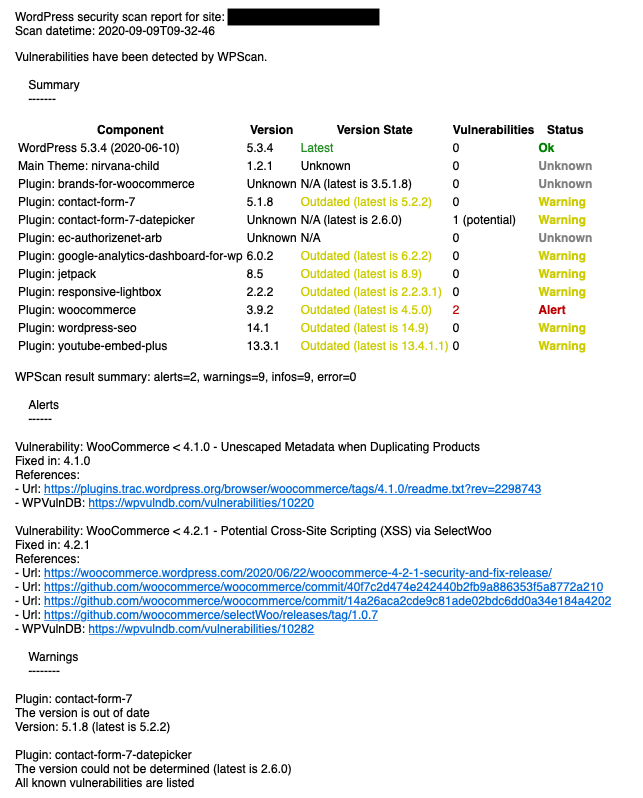
Sample email report.
Authors
- Florian Roth (Original author of WPWatcher v0.2)
- Tristan Landes
Disclamer
Use at your own risks.
1 maintainer

Metadata
1 maintainer
Release files for wpwatcher 3.0.7
For a detailed explanation of source distributions (sdists) and built distributions (wheels), please see the package formats documentation.
Source distribution (sdist)
| File | Size | Uploaded | Provenance | |
|---|---|---|---|---|
| wpwatcher-3.0.7.tar.gz | 42.1 kB | Without provenance | Details |
Built distribution (wheel)
| File | Interpreter | ABI | Platform | Reset |
|---|---|---|---|---|
| wpwatcher-3.0.7-py3-none-any.whl | Python 3 | none | any | Details |
Total release size: 93.1 kB
Release files / wpwatcher-3.0.7.tar.gz
| Download URL | wpwatcher-3.0.7.tar.gz |
|---|---|
| Size | 42.1 kB |
| Tags | Source |
|
SHA-256 checksum How to use checksums |
aca40c5fb9eeb3356111d7c22c824c3fdc9e1bd4dfcca3c5096098ade31adb91
|
|
BLAKE2b-256 checksum How to use checksums |
4cc71654616a497acca3ad951d6f26ac3fb44fc5adab162162619d25696b8f8b
|
| Upload date | |
|
Uploaded using Trusted Publishing? What is trusted publishing? |
No |
| Uploaded via |
twine/4.0.2 CPython/3.9.16
|
Release files / wpwatcher-3.0.7-py3-none-any.whl
| Download URL | wpwatcher-3.0.7-py3-none-any.whl |
|---|---|
| Size | 51.0 kB |
| Tags | Python 3 |
|
SHA-256 checksum How to use checksums |
61ce7382f01aa24fb03637e77bcbd0990e533782f228c1e28c3139d2c28631a4
|
|
BLAKE2b-256 checksum How to use checksums |
365e367df274113d811fc8c231163ce370eae4ca79389fda353a13ef4c3937d8
|
| Upload date | |
|
Uploaded using Trusted Publishing? What is trusted publishing? |
No |
| Uploaded via |
twine/4.0.2 CPython/3.9.16
|
Security for wpwatcher 3.0.7
Provenance
Provenance describes where a file came from. On PyPI, provenance is shared via attestations, which provide a verifiable record of the build or publishing details. View details, limitations and caveats.
No provenance found
None of the files in this release were uploaded with provenance metadata.
A note on package security
PyPI is a repository for distributing packages, not a service for auditing them. While third-party security researchers and our staff do their best to detect and remove malicious packages, PyPI cannot guarantee the quality, security or suitability of any given package.
To learn more about protecting yourself from malicious actors, visit our package security documentation.














