
A database with multiple data sets that support drawing, These data sets are: World population data set, World Carbon dioxide Concentration data set, World Number of Cities data set, China number of population data set, China number of space vehicles data set......

Project description
A database with multiple data sets that support drawing, These data sets are: World population data set, World Carbon dioxide Concentration data set, World Number of Cities data set, China number of population data set, China number of space vehicles data set......







- Function introduction
- download
- use
- Additional Features
- What data do we have
- Donation
- About Pypi
- license
Features
This project is a dataset with multiple functions, there are many datasets in it, and it has been uploaded to Pypi.
Download
This project uses Pypi, so it is recommended to use Pypi to download
Code: pip3 install Wdatabase
Use
The package name when we upload is not the same as the package name used in actual use When importing, use the following code
from Wdata import WdataMain as main
The main class has the following functions:
| Functions | Introduction | Syntax | Return Type |
|---|---|---|---|
| draw | Draw | Func() | None |
| Save_file | Save file | Func(filename:str) | bool |
Import Data
Wdata has a lot of data sets, here we use 200 years of population growth data as an example
The syntax of Wdata_class is as follows:
WdataMain(json_fname: str)
json_fname is the name of the dataset
from Wdata import WdataMain as main

test = main('Population_growth')  # import population growth over 200 years
Get data
We can use the dict() function to fetch the data
such as these codes
from Wdata import WdataMain as main

test = main('Population_growth')  # import population growth over 200 years
print(dict(test))
after running
~/python test.py
{
    '1800': 900000000,
    '1820': 1100000000,
    '1840': 1200000000,
    '1860': 1300000000,
    '1880': 1400000000,
    '1900': 1650000000,
    '1920': 1800000000,
    '1940': 2200000000,
    '1960': 3000000000,
    '1980': 4400000000,
    '2000': 5900000000,
    '2022': 7400000000
    }
Drawing
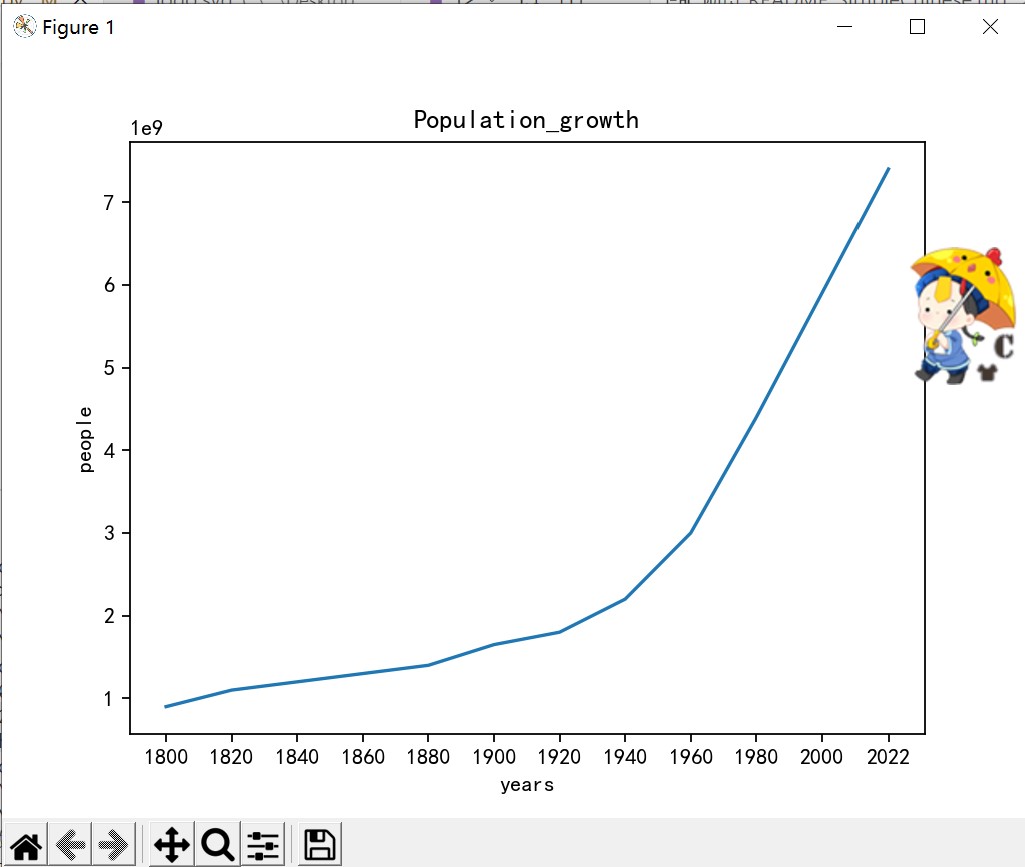
Drawing functions use the draw() function
as the following code
from Wdata import WdataMain as main

test = main('Population_growth')  # import population growth over 200 years
test.draw()
The result is this
Data save
You can use the Save_file() function to save data
The syntax of Save_file is Save_file(filename:str, type=JSON) -> None
Parameter description:
The filename 'parameter is used to describe saving a file
The type 'parameter is used to describe the file type
The file types are as follows:
| File Type | Usage | Description |
|---|---|---|
| Csv | Wdata. CSV | Save File file.csv |
| Json | Wdata. JSON | Save the file 'file. json' as the default option |
| Such as the following code |
from Wdata import WdataMain as main
from Wdata import CSV
test=main ('Population_growth ') # Import the Population growth in the past 200 years
test. Save_File ('Package_test ', CSV) # This function will automatically add the. csv suffix
Additional Features
Cosine similarity function
The cosine similarity function can calculate the cosine similarity of two coordinates in two-dimensional space according to the cosine similarity formula usage method:
from Wdata import mathfunc
Xy1=(2, 3) # First coordinate
Xy2=(3, 5) # Second coordinate
Result=mathfunc.similarity (xy1, xy2) # Cosine similarity
print(result)
Distance formula
Distance formula Use Euclid distance formula to calculate the distance between two coordinates in two-dimensional space usage method:
from Wdata import mathfunc
xy1 = (2, 3)
xy2 = (3, 5)
Result=mathfunc.distance (xy1, xy2) # Distance formula
print(result)
What data do we have
Currently we have the following data
| name | description | unit of measure |
|---|---|---|
| Population_growth | Population Growth 1800-2022 | People |
| Chinese_spacecraft | 2017-2020.06 Chinese spacecraft launches | Spacecraft |
| World_spacecraft | 2017-2020.06 World Spacecraft Launches | Spacecraft |
The above data comes from Bing and Baidu. The author cannot guarantee the accuracy of the data and should not be used for professional purposes
Donate
Due to special reasons, the author was unable to register a Paypal account and was forced to use Alipay
For details, please see Donation Instructions
About Pypi
The Wdataorg team has used twine to upload this library to Pypi
Wdatabase Pypi warehouse address
License
This open source project uses Apache License 2.0
In the process of using this open source project, please use it strictly in accordance with the license
The final interpretation right belongs to the development team Wdataorg
Release history Release notifications | RSS feed


Download files
Download the file for your platform. If you're not sure which to choose, learn more about installing packages.
Source Distribution
Built Distributions
Filter files by name, interpreter, ABI, and platform.
If you're not sure about the file name format, learn more about wheel file names.
Copy a direct link to the current filters
File details
Details for the file Wdatabase-2.2.0a0.tar.gz.
File metadata
- Download URL: Wdatabase-2.2.0a0.tar.gz
- Upload date:
- Size: 18.4 kB
- Tags: Source
- Uploaded using Trusted Publishing? No
- Uploaded via: twine/4.0.1 CPython/3.10.4
File hashes
| Algorithm | Hash digest | |
|---|---|---|
| SHA256 |
89dbea0182e662b2554a026fd1922a90a9a3bf59680e4b78cb2d12ed69f60d68
|
|
| MD5 |
48997f33fd1df10903e6bf14e10ffa0a
|
|
| BLAKE2b-256 |
37d67b2a430550cdde0e67114ce79e7988d3e07702a3b4c8476db76eb3316e60
|
File details
Details for the file Wdatabase-2.2.0a0-py3.10.egg.
File metadata
- Download URL: Wdatabase-2.2.0a0-py3.10.egg
- Upload date:
- Size: 19.0 kB
- Tags: Egg
- Uploaded using Trusted Publishing? No
- Uploaded via: twine/4.0.1 CPython/3.10.4
File hashes
| Algorithm | Hash digest | |
|---|---|---|
| SHA256 |
53f09897f1b0e7cb8d2f1f93ae1e5537b7650771ae7359067e3f1ded406a509f
|
|
| MD5 |
6b409594e72673476f01a4cae7a96dd7
|
|
| BLAKE2b-256 |
adc87ab89e49832b2562d3a566876221590f8b99180098eed6ab5065d5a37f49
|
File details
Details for the file Wdatabase-2.2.0a0-py3.9.egg.
File metadata
- Download URL: Wdatabase-2.2.0a0-py3.9.egg
- Upload date:
- Size: 18.9 kB
- Tags: Egg
- Uploaded using Trusted Publishing? No
- Uploaded via: twine/4.0.1 CPython/3.10.4
File hashes
| Algorithm | Hash digest | |
|---|---|---|
| SHA256 |
114e6b2c00f33801da77678c7a97f225b74ef1ea03f327239fb9644bf305914a
|
|
| MD5 |
bd98aa02ea3bb0572bde147b2a48db5c
|
|
| BLAKE2b-256 |
f3970ba5906fd9aed1d82e7ffb4dd05ccbfc19be35eff0ed1867d335e0661a50
|
File details
Details for the file Wdatabase-2.2.0a0-py3.8.egg.
File metadata
- Download URL: Wdatabase-2.2.0a0-py3.8.egg
- Upload date:
- Size: 18.8 kB
- Tags: Egg
- Uploaded using Trusted Publishing? No
- Uploaded via: twine/4.0.1 CPython/3.10.4
File hashes
| Algorithm | Hash digest | |
|---|---|---|
| SHA256 |
41eaa31dec70178d490e2dbf906e7174e6acc29bc5d2fe59bb2c73389fb83241
|
|
| MD5 |
409e8d4b636cbecdbef6b95d1373c751
|
|
| BLAKE2b-256 |
46f6056ee65bfe505741efa535395035f004f1c0b7bfc463318b742e61e3d9bb
|






