
WoW Commodities


WoW Commodities is a tool to download World of Warcraft commodities auction data using Blizzard API.
Installation
pip install WoW_Commodities
Usage
WoW Commodities needs tree positional arguments (in that order):
- id: a client ID from the Blizzard API.
- secret: a secret from the Blizzard API.
- path: a writable path including the filename.
Details on how to create those credentials can be found here.
WoW Commodities may also take optional arguments defining the region of the downloaded data. The supported regions are:
- us = North America
- eu = Europe
- kr = Korea
- tw = Taiwan
- cn = China
Defaults to us.
And a localization paramenter for language translations. The supported localization are:
- US Region: en_US, es_MX, pt_BR
- EU Region: en_GB, es_ES, fr_FR, ru_RU, de_DE, pt_PT, it_IT
- KR Region: ko_KR
- TW Region: zh_TW.
- CN Region: zh_CN
Bear in mind that not all combinations of Regions and Localizations are valid. For more details on those combinations read this article.
Defaults to en_US.
With optional arguments:
wow-commodities -r us -l en_US id secret C:\User\username\Downloads\data.csv.xz
Without optional arguments:
wow-commodities id secret C:\User\username\Downloads\data.csv.xz
Where id and secret are your ID and SECRET from Blizzard API (alphanumerical sequences), and
username is your computer user. You may change this path completely if you wish, just be sure the path exists and is writable.
The downloaded data will be in a LZMA (xz extention) compressed CSV file. Once this data file can get pretty big some times.
If needed you may uncompress it with 7-Zip and use the tools of preference to analyse it, but keep in mind that several tools can read it compressed (like R), without the need to unpack the file. Spreadsheet software might need the uncompressed file.
P.S.: Since chinese API uses a completely diferent set of links and the server seems to have access limitations, I was unable to test it. So I can't confirm if it works for the Chinese region.
The Data
The downloaded data consists of five columns:
- ID: a numeric identification of the auction.
- Item: a numeric identification of the item.
- Quantity: the amount of an item in the auction.
- Unit Price: the value in copper per item unit (divide by 10000 to see the value in gold). The total value of the auction can be calculated multiplying this by quantity.
- Time Left: time remaing for the auction to expire. This consists of categorical values (SHORT, MEDIUM, LONG and VERY LONG).
You can use a website like Wowhead to discover the item id you want to focus on. This is prefered since items can have repeated names and lots of translations, but only an unique ID. e.g: in https://www.wowhead.com/item=197794/grand-banquet-of-the-kaluak, item=197794 is the item id you want for Grand Banquet of Kalu'ak.
IMPORTANT:
Auction house data updates at a set interval. The value was initially set at 1 hour; however, it might change over time without notice.
So, it's pointless to download data in intervals lower than the API updates.
R import Example
Below an example of a R Script to import the data. Now you can have fun with it.
library(readr)

item_id = 197794 # Grand Banquet of the Kalu'ak

commodities <- read_csv(
  'C:\my\path\to\data.csv.xz',
  col_types = cols_only(
    `ID` = col_character(),
    `Item` = col_factor(),
    `Quantity` = col_integer(),
    `Unit Price` = col_double(),
    `Time Left` = col_factor(
      levels = c('SHORT', 'MEDIUM', 'LONG', 'VERY_LONG'),
      ordered = T,
    ),
  )
)

commodities$`Unit Price` <- commodities$`Unit Price` / 10000 # gold
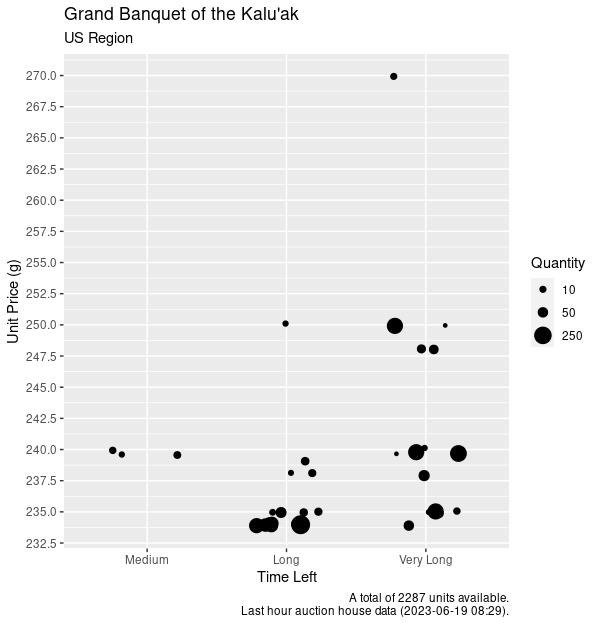
You can even produce pretty cool graphics with such data.
License
Wow Commodities is distributed under the terms of the LGPL 3.0 license.
This application comes with no warrant of any kind. Use at your own risk.
1 maintainer

Metadata
1 maintainer
Release files for WoW_Commodities 1.1.1
For a detailed explanation of source distributions (sdists) and built distributions (wheels), please see the package formats documentation.
Built distribution (wheel)
| File | Interpreter | ABI | Platform | Reset |
|---|---|---|---|---|
| wow_commodities-1.1.1-py3-none-any.whl | Python 3 | none | any | Details |
Release files / wow_commodities-1.1.1-py3-none-any.whl
| Download URL | wow_commodities-1.1.1-py3-none-any.whl |
|---|---|
| Size | 9.6 kB |
| Tags | Python 3 |
|
SHA-256 checksum How to use checksums |
0dc6a6ad0676738aba55c4438f5426f4c0bfb50cf4cef0944810765e7173f832
|
|
BLAKE2b-256 checksum How to use checksums |
53b6116c90bd0dd93c9c1c9349783f1e7ca91b0cd1931b66b03049469a26eec5
|
| Upload date | |
|
Uploaded using Trusted Publishing? What is trusted publishing? |
No |
| Uploaded via |
python-httpx/0.28.1
|













