
YMLEditor is a package for quickly creating editors for simple YAML configuration files.

Project description
Readme
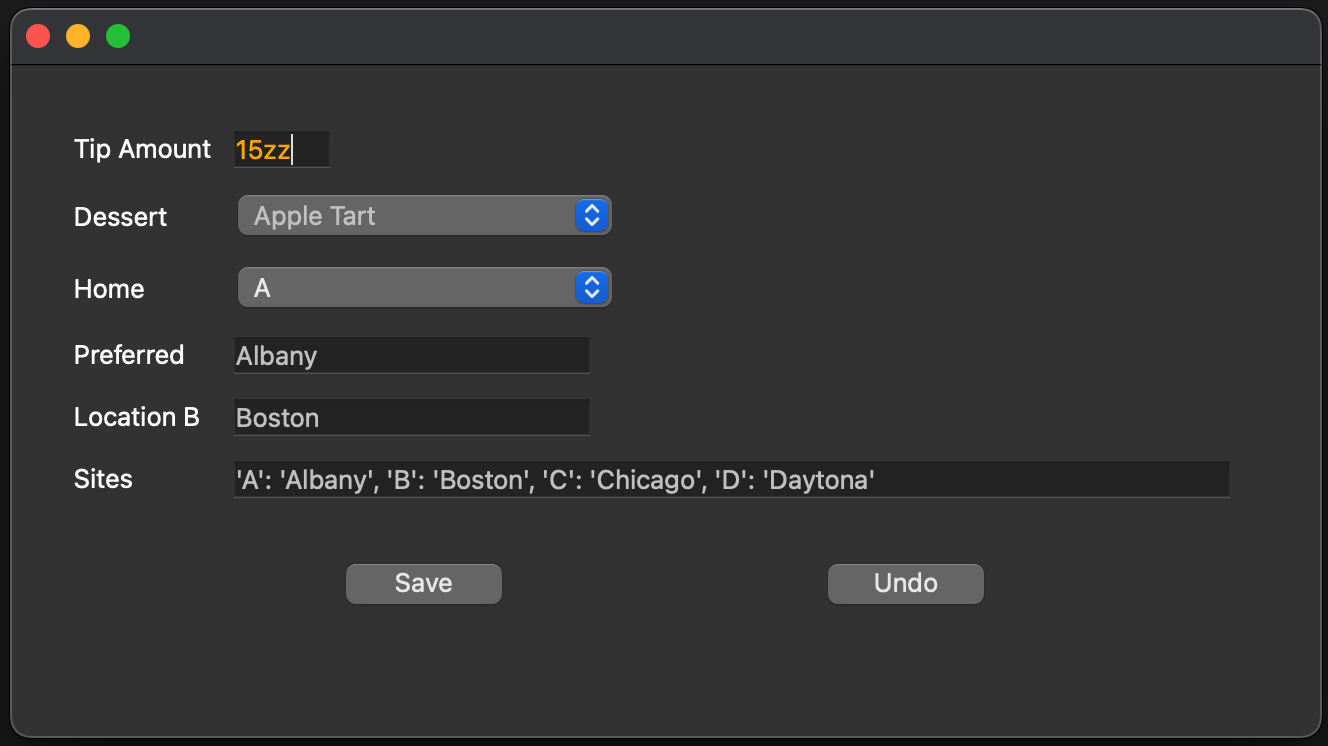
Overview
YMLEditor is a package for easily creating editors for simple configuration files.
Features
SettingsWidget provides a Widget for displaying and editing config file fields. You simply list the fields with their config key and the widget you want for each (line_edit, text_edit, label, combo-box). You can also add a regex for data entry validation. The SettingsWiget and YamlConfig will read the config file, display the fields for editing, and then save the data.
- Easy Front-End Creation: Create a configuration editor with a few lines of code.
- Configurable Layout: Displays settings using the format you provide.
- Widget Support: Supports these QT widgets: text edit, line edit, combo box, and label.
- Input Validation: Validates input based on supplied regular expressions and highlights invalid entries. In the sample above, Tip Amount is highlighted because it contains letters.
- Data Syncing: Synchronizes data values between the UI and the config file, seamlessly using the ConfigFile manager described below.
- Utilizes PyQt6
YamlConfig provides functionality for creating, loading, updating, and saving YAML files using PyYAML.
- Load / Save / Create Provides interfaces to load and save YAML files and to create new YAML files.
- Get / Set Operations: Provides simple key/value access to data fields in the YAML configuration, including scalars (int, float, str, bool, date), lists, and dictionaries. Complex hierarchies are not supported.
- Undo Support: Keeps a snapshot for each save in session and restores from stack.
- Granular Dependency Management: For build system integration, this can be configured to touch a proxy file when a specified field changes, offering more granular dependency tracking for build systems.
Installation
To install YMLEditor:
pip install YMLEditor
Format Layout
Each line in the format corresponds to a field in the config file:
ConfigKey: (DisplayName, WidgetType, Options, Width)
- Config Key: The name of the item in the YAML config file
- Display Name: The name to show in the UI.
- Widget Type: The type of input control "text_edit", "line_edit", "label", "read_only", or "combo_box".
- Options: Either a regex pattern for field validation (e.g., line_edit), or a list of items for selection (e.g., combo box).
- Field Width: Width of the widget in the UI.
Sample layout format
formats = {
       "layout1": {
              "TIP": ("Tip Amount", "line_edit", r'^\d{1,2}$', 50),
              "DESSERT": ("Dessert", "combo", ["Tiramisu", "Apple Tart", "Cheesecake"], 200),
              "HOME": ("Home", "combo", ["A", "B", "C"], 200),
              "SITES.@HOME": ("Preferred", "read_only", None, 180),
              "SITES.B": ("Location B", "line_edit", None, 180),
              "SITES": ("Sites", "line_edit", None, 300),
       },
}
- SITES.@HOME - If '@' is present, that key will be looked up and replace by its contents (SITES.C in this example)
- SITES.B - You can access sub hierarchies by using "." to separate keys (Boston in this example)
- TIP - The regex for Tips highlights entries that aren't simply 1 or 2 digits.
Sample YAML file
TIP: 18
DESSERT: Cheesecake
HOME: C
SITES:
  A: New Orleans
  B: Boston
  C: Vancouver
Sample App
Sample.py is provided to demonstrate the capabilities of YMLEditor with a sample YAML file.
License
YMLEditor is licensed under the MIT License. See LICENSE for details.
This uses QT for some components which has the primary open-source license is the GNU Lesser General Public License v. 3 (“LGPL”). With the LGPL license option, you can use the essential libraries and some add-on libraries of Qt. See https://www.qt.io/licensing/open-source-lgpl-obligations for QT details.
NOTES
- Only basic YAML syntax is supported:
- Data type specification tags such as !!int, !!float, etc. are ignored
- Anchors and aliases are not supported
- Comments are stripped
Support
To report an issue, please visit the issue tracker.
Release history Release notifications | RSS feed


Download files
Download the file for your platform. If you're not sure which to choose, learn more about installing packages.
Source Distributions
Built Distribution
Filter files by name, interpreter, ABI, and platform.
If you're not sure about the file name format, learn more about wheel file names.
Copy a direct link to the current filters
File details
Details for the file YMLEditor-0.1.18-py3-none-any.whl.
File metadata
- Download URL: YMLEditor-0.1.18-py3-none-any.whl
- Upload date:
- Size: 23.8 kB
- Tags: Python 3
- Uploaded using Trusted Publishing? No
- Uploaded via: twine/6.0.1 CPython/3.13.0
File hashes
| Algorithm | Hash digest | |
|---|---|---|
| SHA256 |
b45b6f6a38b28e8a26f73a26710c374b1deaf4956a357b0a22b7fe83b560ecaa
|
|
| MD5 |
223e8cd9af7426b0012dc999c9d4021d
|
|
| BLAKE2b-256 |
825bc826950791c885359d57b650a9839d38e49075fe4dbaf0fa14674d4b1751
|






