
a2a-spec
Contract tests for multi-agent systems




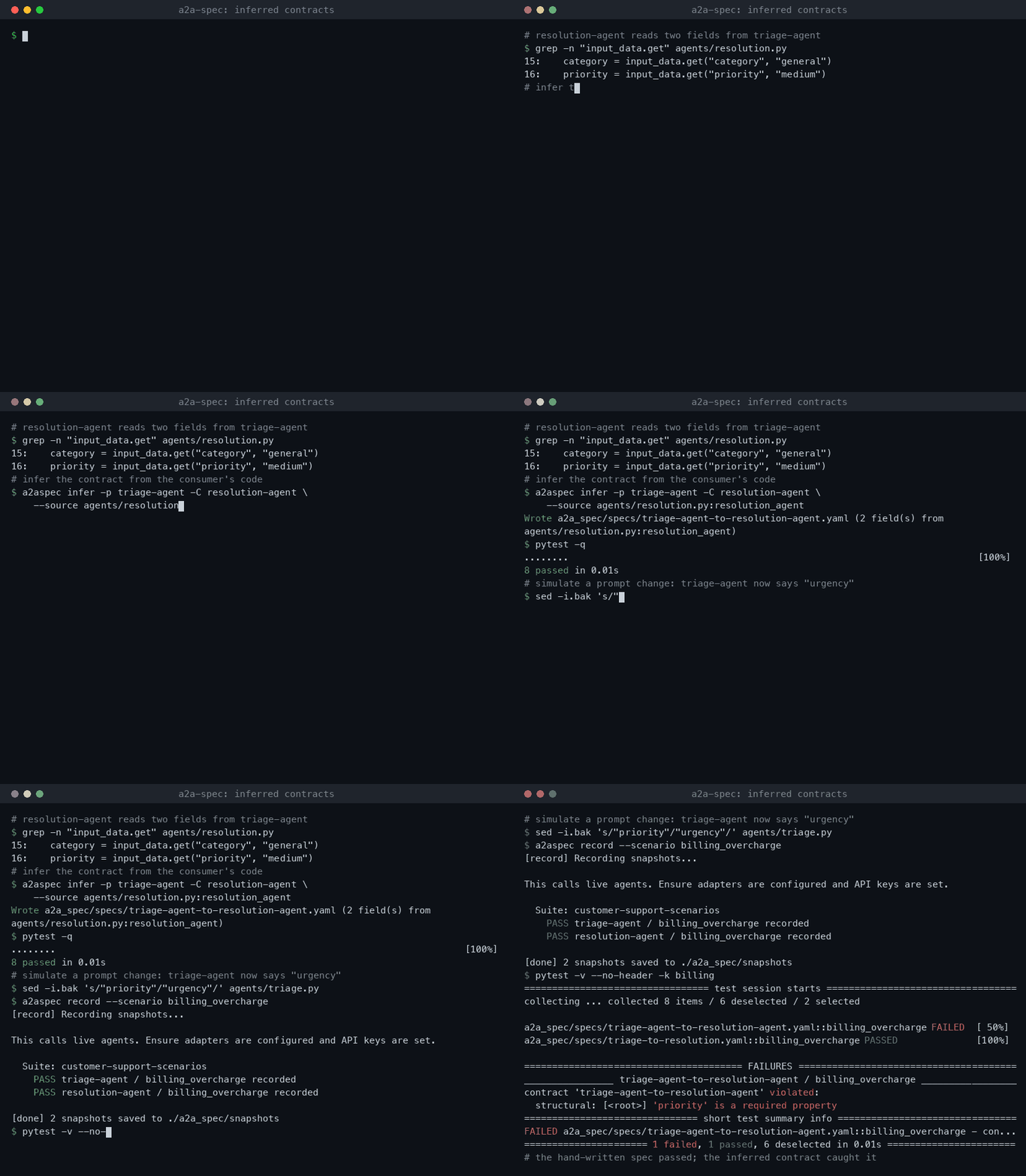
a2a-spec finds the fields that one agent reads from another agent. It tests these fields in CI. The tests use recorded outputs, so they make no LLM calls and need no API keys.
The problem
Agent A sends data to agent B. You change the prompt of agent A, and its output changes. For example, agent A now sends urgency instead of priority.
Agent B reads priority with a default value. It does not stop with an error. It gives a wrong result, and no test fails.
What a2a-spec does
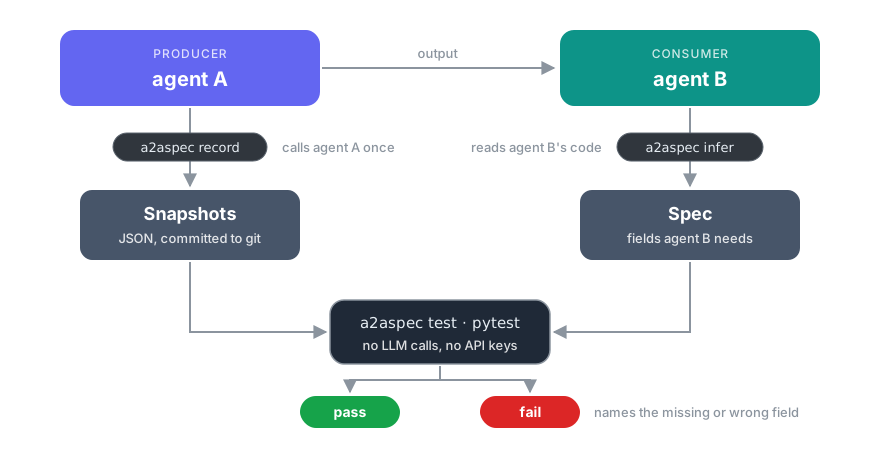
- It reads the code of agent B and finds the fields that agent B uses.
- It records the output of agent A one time and saves it as JSON files in git.
- It tests the recorded output against the fields that agent B needs. You run these tests in pytest or in CI.
Terms
| Term | Meaning |
|---|---|
| Producer | The agent that sends the data. |
| Consumer | The agent that receives the data. |
| Spec | A YAML file. It gives the fields that the consumer needs from the producer. |
| Snapshot | A JSON file. It contains one recorded input and output of the producer. |
| Scenario | A named input for the producer. |
| Adapter | A small Python object. a2a-spec uses it to call your agent. |
Get started
You need Python 3.11 or later and a git repository.
This example uses two agents. The producer triage_agent classifies a message. The consumer resolution_agent uses that result.
# agents/triage.py
async def triage_agent(data: dict) -> dict:
    text = data["message"].lower()
    category = "billing" if "charge" in text else "general"
    return {"category": category, "priority": "high" if "urgent" in text else "low"}
# agents/resolution.py
async def resolution_agent(ticket: dict) -> dict:
    escalate = ticket.get("priority", "low") == "high"
    return {"reply": f"We are checking your {ticket['category']} issue.", "escalate": escalate}
1. Install a2a-spec.
pip install a2a-spec
2. Create the project files.
a2aspec init
This command creates a2a-spec.yaml and the a2a_spec/ directory.
3. Remove the example spec and the example scenario.
rm a2a_spec/specs/example-spec.yaml a2a_spec/scenarios/example-scenarios.yaml
4. Add the producer to a2a_spec/adapters/__init__.py.
from a2a_spec import FunctionAdapter
from agents.triage import triage_agent

ADAPTERS = {
    "triage-agent": FunctionAdapter(fn=triage_agent, agent_id="triage-agent", version="1.0"),
}
5. Add inputs for the producer to a2a_spec/scenarios/support.yaml.
scenarios:
  - name: double_charge
    input:
      message: "I was charged twice. This is urgent."
  - name: question
    input:
      message: "How do I change my address?"
6. Record the output of the producer.
a2aspec record
The command calls the producer one time for each scenario:
    PASS triage-agent / double_charge recorded
    PASS triage-agent / question recorded
[done] 2 snapshots saved to ./a2a_spec/snapshots
7. Make the spec from the code of the consumer.
a2aspec infer --producer triage-agent --consumer resolution-agent \
  --source agents/resolution.py:resolution_agent
The command writes a2a_spec/specs/triage-agent-to-resolution-agent.yaml:
# Generated by 'a2aspec infer' from agents/resolution.py:resolution_agent and 2 triage-agent snapshot(s). Review before committing.
#   priority: required, read at line 2
#   category: required, read at line 3
spec:
  name: triage-agent-to-resolution-agent
  producer: triage-agent
  consumer: resolution-agent
  structural:
    type: object
    required: [priority, category]
    properties:
      priority: {type: string}
      category: {type: string}
Read the spec before you commit it. If the command shows a WARN line, read Limits.
8. Run the tests.
a2aspec test
PASS triage-agent-to-resolution-agent / double_charge
PASS triage-agent-to-resolution-agent / question
  2 passed  (total: 2)
9. Commit the files.
git add a2a-spec.yaml a2a_spec agents
git commit -m "test: add agent contracts"
The committed snapshots are the baseline for the next steps.
When you change an agent
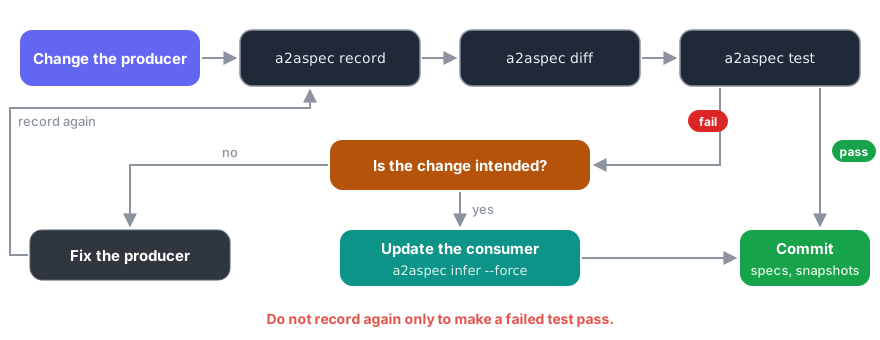
1. Change the producer. For example, change its prompt, its model or its code. In this example, the producer now sends urgency instead of priority.
2. Record the output again.
a2aspec record
3. Compare the new output with the committed snapshots.
a2aspec diff
  triage-agent / double_charge:
    FAIL priority: Field 'priority' was removed
    LOW  urgency: Field 'urgency' was added
4. Run the tests.
a2aspec test
FAIL triage-agent-to-resolution-agent / double_charge
    [<root>] 'priority' is a required property
5. Correct the problem.
- If the change in the producer is an error, correct the producer. Then do steps 2 to 4 again.
- If the change is necessary, change the consumer. Then run
a2aspec inferwith--forceand commit the new spec and snapshots.
Do not record the snapshots again only to make a test pass. Do not delete snapshots or remove fields from a spec for this purpose.
Keep the specs up to date
A consumer can start to read a new field when you change its code. Then its spec is not complete. To find this problem, run:
a2aspec infer --check
FAIL triage-agent-to-resolution-agent (agents/resolution.py:resolution_agent)
    resolution_agent reads 'language' (line 3), which the spec does not cover
The command compares each spec that a2aspec infer made with the current code of its consumer. It reads only code, so it needs no snapshots and makes no LLM calls. The output also shows the command that makes the spec again.
Add a2aspec infer --check to CI. The pytest plugin also runs this check as the consumer_code test of each inferred spec.
Run the tests with pytest
a2a-spec has a pytest plugin. Add these lines to pyproject.toml:
[tool.pytest.ini_options]
a2a_config = "a2a-spec.yaml"
testpaths = ["tests", "a2a_spec/specs"]
pytest then runs one test for each snapshot:
$ pytest -v
a2a_spec/specs/triage-agent-to-resolution-agent.yaml::double_charge PASSED   [ 50%]
a2a_spec/specs/triage-agent-to-resolution-agent.yaml::question PASSED        [100%]
The usual pytest options work, for example -k, -x and --junitxml. To run the tests one time without the configuration, use pytest --a2a.
To test a live output in your own test, use the a2a_check fixture. This example is an async test, so it needs an async plugin such as pytest-asyncio.
async def test_triage_live(a2a_check):
    output = await triage_agent({"message": "I was charged twice"})
    a2a_check("triage-agent-to-resolution-agent", output)
Run the tests in CI
The tests use the committed snapshots. CI needs no API keys.
On GitHub, use the a2a-spec action. It runs a2aspec infer --check and a2aspec test, and it shows each failure as an annotation in the pull request:
# .github/workflows/contracts.yml
name: Agent contracts
on: [push, pull_request]

jobs:
  contracts:
    runs-on: ubuntu-latest
    steps:
      - uses: actions/checkout@v6
      - uses: padobrik/a2a-spec@v0.5.0
The action has these inputs: package (for example a2a-spec[semantic]), working-directory, config, check-inferred and args.
You can also run the commands yourself:
# .github/workflows/contracts.yml
name: Agent contracts
on: [push, pull_request]

jobs:
  contracts:
    runs-on: ubuntu-latest
    steps:
      - uses: actions/checkout@v6
      - uses: actions/setup-python@v6
        with:
          python-version: "3.12"
      - run: pip install a2a-spec
      - run: a2aspec infer --check
      - run: a2aspec test --format github
--format github shows each failure as an annotation in the pull request. For JUnit XML, use --format junit > results.xml. If your specs have semantic rules, install a2a-spec[semantic] instead.
Write a spec by hand
A spec can have three types of rules:
| Rule type | What it finds | How |
|---|---|---|
structural |
A missing field, a wrong type, a value out of range | JSON Schema |
semantic |
A text field that no longer means the same thing | Similarity of local embeddings |
policy |
Text that must not occur, for example a card number | Regular expressions or your own function |
spec:
  name: triage-to-resolution
  version: "1.0"
  producer: triage-agent
  consumer: resolution-agent
  structural:
    type: object
    required: [category]
    properties:
      category: {type: string, enum: [billing, general]}
  semantic:
    - rule: summary_matches_message
      method: embedding_similarity
      source_field: message     # field in the producer input
      target_field: summary     # field in the producer output
      threshold: 0.5
  policy:
    - rule: no_card_numbers
      method: regex
      patterns: ['\b\d{4}[- ]?\d{4}[- ]?\d{4}[- ]?\d{4}\b']
Semantic rules need pip install "a2a-spec[semantic]". See Writing specs for all options.
Check exact values
A scenario can also give exact values for the output of an agent. a2aspec test and pytest compare these values with the snapshot or with the live output.
scenarios:
  - name: double_charge
    input:
      message: "I was charged twice. This is urgent."
    expectations:
      triage-agent:
        category: billing
FAIL triage-agent-to-resolution-agent / double_charge
  expectations FAIL
    expected 'category' = 'billing', got 'general'
Connect your agents
| Agent type | Adapter |
|---|---|
Python async function |
FunctionAdapter(fn=..., agent_id=..., version=...) |
| HTTP endpoint (POST JSON, receive JSON) | HTTPAdapter(url=..., agent_id=..., version=...) |
| LangChain runnable | LangChainAdapter(runnable=..., agent_id=..., version=...) (install a2a-spec[langchain]) |
| Agent with the A2A protocol 1.0 | A2AAdapter(url=..., agent_id=...) |
For an A2A agent, give the base URL of the agent. The adapter reads the Agent Card, finds the JSON-RPC interface and sends the scenario input. It records the agent version from the Agent Card in each snapshot.
from a2a_spec import A2AAdapter

ADAPTERS = {
    "triage-agent": A2AAdapter(url="https://triage.example.com", agent_id="triage-agent"),
}
See Writing adapters for all options.
Use with coding agents
a2a-spec contains an Agent Skill. The skill tells a coding agent how to use a2a-spec. It also tells the agent not to make a failed test pass by recording the snapshots again.
a2aspec skill --dir path/to/skills
This command writes path/to/skills/a2a-spec/SKILL.md. Export the skill again after you update a2a-spec.
Limits
a2aspec inferreads Python consumers only. It findsdata["key"],data.get("key")and"key" in datafor top-level keys.- If the consumer gives its input to another function,
a2aspec infercannot follow it. The command then shows aWARNline. Add the missing fields to the spec by hand. a2aspec infer --checkchecks only specs that containinferred_from. Specs from a2a-spec 0.3 and earlier do not have it. Runa2aspec inferwith--forceagain to add it.a2aspec diffcompares with the snapshots in git. Commit the snapshots before you use it.A2AAdaptersupports A2A 1.0 with JSON-RPC. It does not support streaming or file parts.- Semantic rules use a local embedding model. The
semanticextra installs PyTorch.
Commands
| Command | What it does |
|---|---|
a2aspec init |
Creates the project files. |
a2aspec record |
Calls the producers and saves their output as snapshots. |
a2aspec infer |
Makes a spec from the fields that a consumer reads. |
a2aspec infer --check |
Finds specs that do not cover what their consumer reads now. |
a2aspec test |
Tests the snapshots against the specs. |
a2aspec test --live |
Calls the producers with each scenario and tests their output. It saves nothing. |
a2aspec diff |
Compares the snapshots with the committed snapshots. |
a2aspec skill |
Exports the skill for coding agents. |
See CLI reference for all options.
Documentation
Contributing
See CONTRIBUTING.md.
License
Apache 2.0. See LICENSE.
1 maintainer

Metadata
1 maintainer
Release files for a2a-spec 0.5.0
For a detailed explanation of source distributions (sdists) and built distributions (wheels), please see the package formats documentation.
Source distribution (sdist)
| File | Size | Uploaded | |
|---|---|---|---|
| a2a_spec-0.5.0.tar.gz | 1.6 MB | Details |
Built distribution (wheel)
| File | Interpreter | ABI | Platform | Reset |
|---|---|---|---|---|
| a2a_spec-0.5.0-py3-none-any.whl | Python 3 | none | any | Details |
Total release size: 1.7 MB
Release files / a2a_spec-0.5.0.tar.gz
| Download URL | a2a_spec-0.5.0.tar.gz |
|---|---|
| Size | 1.6 MB |
| Tags | Source |
|
SHA-256 checksum How to use checksums |
9b7dca6af1040147c810a4639da18976f24434a34f6b4348b06cb45bf2a9b1d5
|
|
BLAKE2b-256 checksum How to use checksums |
df009ff0af467b4652850d794a5a29b4b25760261f65b54abfc9c289cd64997f
|
| Upload date | |
|
Uploaded using Trusted Publishing? What is trusted publishing? |
Yes |
| Uploaded via |
twine/7.0.0 CPython/3.13.14
|
Provenance
Provenance describes where a file came from. On PyPI, provenance is shared via attestations, which provide a verifiable record of the build or publishing details. View details, limitations and caveats.


PyPI Publish Attestation
PyPI verified that this artifact, at this checksum, originated from the publisher listed below.
Signed by GitHub Actions, verified by PyPI on Oct 15, 2026.
Transparency logRelease files / a2a_spec-0.5.0-py3-none-any.whl
| Download URL | a2a_spec-0.5.0-py3-none-any.whl |
|---|---|
| Size | 82.1 kB |
| Tags | Python 3 |
|
SHA-256 checksum How to use checksums |
a884442d91aae8a642180429e2fa094849334f354ba9c0f079376ea9a8e7f256
|
|
BLAKE2b-256 checksum How to use checksums |
92df81137f89a5ae58e5ea91c91a9570971c55381ddb8ac14aa47ddc55d0a9d8
|
| Upload date | |
|
Uploaded using Trusted Publishing? What is trusted publishing? |
Yes |
| Uploaded via |
twine/7.0.0 CPython/3.13.14
|
Provenance
Provenance describes where a file came from. On PyPI, provenance is shared via attestations, which provide a verifiable record of the build or publishing details. View details, limitations and caveats.
PyPI Publish Attestation
PyPI verified that this artifact, at this checksum, originated from the publisher listed below.
Signed by GitHub Actions, verified by PyPI on Oct 15, 2026.
Transparency log













