
A2B (Arxiv to Bibliography)


Replace arXiv links (or doi links) by their corresponding bibliography in markdowns / Notion databases. Inspired by Mu Li.
This repo provides a tool to replace arXiv/DOI links saved in
with their corresponding bibliographic information, which intends to create a more convenient experience for users in needs of searching, collecting, and taking notes of literatures. The script uses the Semantic Scholar API to retrieve information such as authors, title, journal, year, and citation count for a given arXiv paper.
| Markdown | Notion Database |
|---|---|
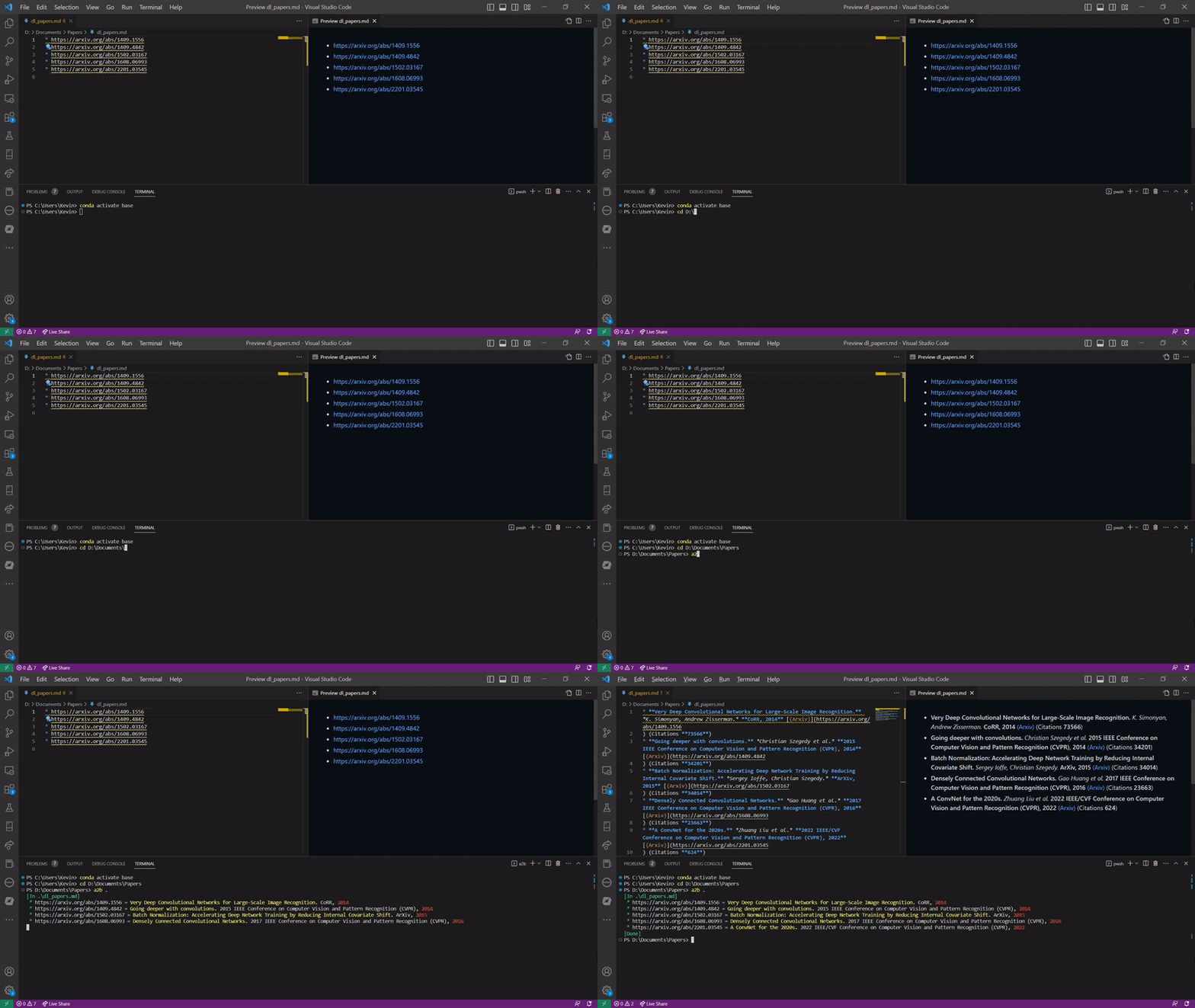 |
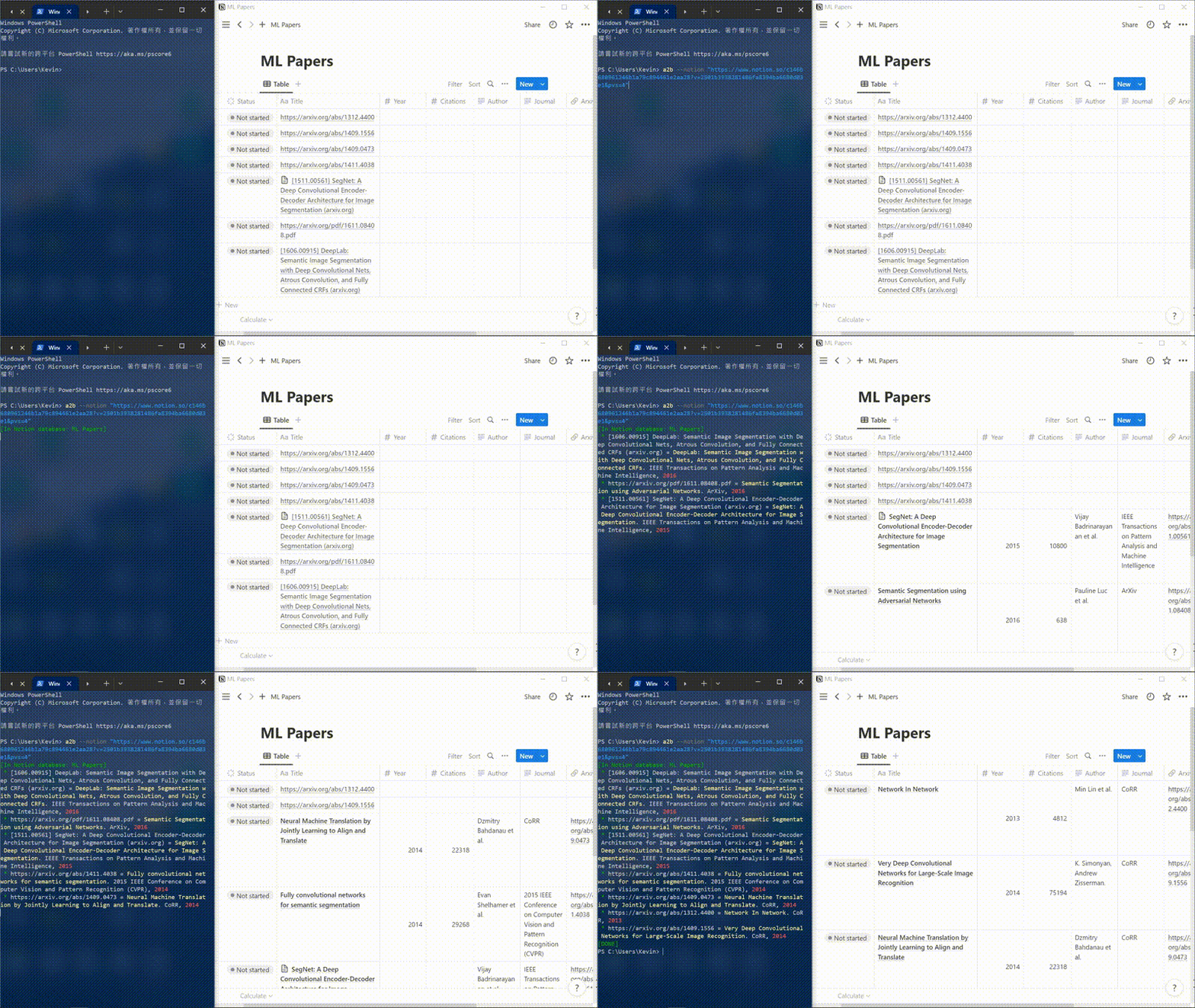 |
Installation
To install a2b, make sure you have pip installed and run:
>> pip install a2b
Usage
The tool can be run from the command line, e.g. to check the installed version of a2b,
>> a2b --version

Markdown
1. Generate markdown from a single arXiv link or DOI
For example:
>> a2b --arxiv https://arXiv.org/abs/1912.08957

## __Optimization for deep learning: theory and algorithms.__ *Ruoyu Sun.* __ArXiv, 2019__ [(Arxiv)](ht
## tps://arXiv.org/abs/1912.08957) [(S2)](https://www.semanticscholar.org/paper/c23173e93f1db79a422e2af
## 881a40afb96b8cb92) (Citations __114__)
Here you can use the link of pdf https://arXiv.org/pdf/1912.08957.pdf, instead of the link of arXiv page.
>> a2b --doi https://doi.org/10.1007/BF00133570

## __Snakes: Active contour models.__ *M. Kass et al.* __International Journal of Computer Vision, 2004__
## [(Link)](https://doi.org/10.1007/BF00133570) [(S2)](https://www.semanticscholar.org/paper/9394a5d5adcb6
## 26128b6a42c8810b9505a3c6487) (Citations __15860__)
One can simply provide the DOI 10.1007/BF00133570 without adding the hyperlink prefix to generate bibilography from DOI.
2. Replace arXiv links in a single markdown file
>> a2b path/to/markdown.md
3. Replace arXiv links in all markdown files within a directory
Run the following command to replace all arXiv links found in the given directory and its subdirectories.
>> a2b path/to/directory
To replace arXiv links in the markdown files ONLY within the directory (subdirectories excluded), use arguments --no-recursive or -nr:
>> a2b -nr path/to/directory

Notion Database
To generate bibliography from links saved in a Notion database, follow the instructions below
- Create a new Notion integration and keep the Notion API key obtained from the integration
- Go to the Notion database and
- Connect the Notion database to the integration you just created
- Create these columns (with data type matched) in the Notion database
- Title (title)
- Author (rich_text)
- Year (number)
- Journal (rich_text)
- Arxiv (url)
- Link (url)
- S2 (url)
- Citations (number)
- Paste Arxiv links or doi links in the column
Titleand run the following command to activate the conversion
>> a2b --notion notion_database_id --key notion_api_key
# or
>> a2b --notion notion_database_url --key notion api_key
You can choose to save your Notion API key as a environment variable NOTION_API_KEY, and then you can simply run without manually providing the key in command:
>> a2b --notion notion_database_id
# or
>> a2b --notion notion_database_url
Changelog
- Version 1.0.7
- Fix the problem of arxiv and doi format confliction in Notion
- Version 1.0.6
- Fix version command
- Version 1.0.5
- Support Notion database
- Version 1.0.4
- Support creating bibliography from DOI links
- Support querying a single arXiv link from terminal
1 maintainer

Metadata
1 maintainer
Release files for a2b 1.0.7
For a detailed explanation of source distributions (sdists) and built distributions (wheels), please see the package formats documentation.
Source distribution (sdist)
| File | Size | Uploaded | |
|---|---|---|---|
| a2b-1.0.7.tar.gz | 9.3 kB | Details |
Built distribution (wheel)
| File | Interpreter | ABI | Platform | Reset |
|---|---|---|---|---|
| a2b-1.0.7-py3-none-any.whl | Python 3 | none | any | Details |
Total release size: 18.5 kB
Release files / a2b-1.0.7.tar.gz
| Download URL | a2b-1.0.7.tar.gz |
|---|---|
| Size | 9.3 kB |
| Tags | Source |
|
SHA-256 checksum How to use checksums |
4d6bf97239b353148eb8634e68c56a0fd9b024f0009705d9ff8da68f373c9e4d
|
|
BLAKE2b-256 checksum How to use checksums |
b2d32f37c2d13e9896f92cc0a0c851cb98f2b0fb73d726219a2d8a961fef7b57
|
| Upload date | |
|
Uploaded using Trusted Publishing? What is trusted publishing? |
No |
| Uploaded via |
twine/4.0.2 CPython/3.9.4
|
Release files / a2b-1.0.7-py3-none-any.whl
| Download URL | a2b-1.0.7-py3-none-any.whl |
|---|---|
| Size | 9.2 kB |
| Tags | Python 3 |
|
SHA-256 checksum How to use checksums |
9a5e46a26d0c48f66b930fce045a465b260ba5d87a2a2431a51c1742d83841b6
|
|
BLAKE2b-256 checksum How to use checksums |
a0035d21a6b197966300ff8efbf933a9aba0e7ac228b3ce4d89013e2eb7b4131
|
| Upload date | |
|
Uploaded using Trusted Publishing? What is trusted publishing? |
No |
| Uploaded via |
twine/4.0.2 CPython/3.9.4
|














