
aWaifu - Mass Waifu Profile generator
Python module to randomly generate waifus' profiles in mass scale.
Wanna try it out?
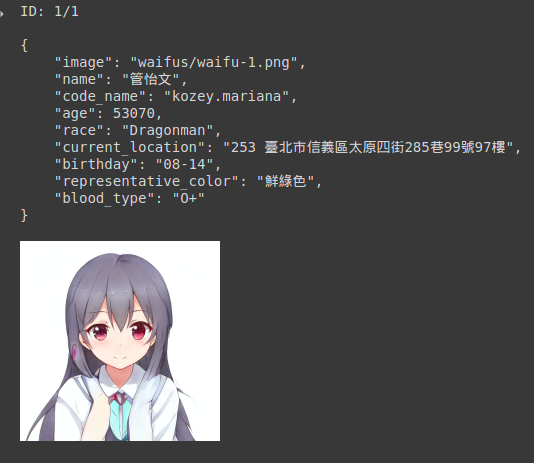
If you'd like to try out the module with out any installation, I suggest try the Google Colab notebook version first.
Installation
You can install directly from PyPi:
pip install aWaifu
Or get the `.whl` from https://github.com/git-akihakune/aWaifu/releases/tag/v0.1.1.
Usage
To run with default options:
python -m aWaifu
Scripting
First, create a Waifus object:
from aWaifu.utils import Waifus

waifuGen = Waifus()
You can customize the script's behaviour from your object. Here is a quite self-explained list of options:
numberOfProfiles: int = 10, # number of profiles going to generate
verbose: bool = False, # verbose mode
multiCultures: bool = True, # False: limit to Japanese profiles only
bigWaifu: bool = False, # larger images, with watermark
noProfile: bool = False, # do not generate profiles
noImage: bool = False, # generate profiles without picture
autoCloseImage:bool = True, # automatically close opened images from verbose
faster: bool = False, # do not assert delays between requests
Therefore, the default script actually is:
waifuGen = Waifus(numberOfProfiles=5, verbose=True, bigWaifu=True)
Next, generate the profiles:
waifuGen.generateProfiles()
The results will be saved to waifus/ directory. Previous results will be overwritten. If you want to save the results to a zip file:
Waifus.getAllInfo()
Development
This module is initially a Google Colab Python Notebook, with some added details. Therefore, it's not been carefully developed. Every issue, pull request or suggestion is deeply appreciated.
1 maintainer

Metadata
1 maintainer
Release files for aWaifu 0.1.2
For a detailed explanation of source distributions (sdists) and built distributions (wheels), please see the package formats documentation.
Source distribution (sdist)
| File | Size | Uploaded | Provenance | |
|---|---|---|---|---|
| aWaifu-0.1.2.tar.gz | 4.9 kB | Without provenance | Details |
Built distribution (wheel)
| File | Interpreter | ABI | Platform | Reset |
|---|---|---|---|---|
| aWaifu-0.1.2-py3-none-any.whl | Python 3 | none | any | Details |
Total release size: 11.2 kB
Release files / aWaifu-0.1.2.tar.gz
| Download URL | aWaifu-0.1.2.tar.gz |
|---|---|
| Size | 4.9 kB |
| Tags | Source |
|
SHA-256 checksum How to use checksums |
7b345f0b883959ddbb3c6804169831f136a780d473481a6532f05777a58b8921
|
|
BLAKE2b-256 checksum How to use checksums |
581cade9693597aaff765041aba529756fc5c5f7a632a32eed5aacf27c95667d
|
| Upload date | |
|
Uploaded using Trusted Publishing? What is trusted publishing? |
No |
| Uploaded via |
twine/3.6.0 importlib_metadata/4.8.2 pkginfo/1.8.1 requests/2.26.0 requests-toolbelt/0.9.1 tqdm/4.62.3 CPython/3.9.8
|
Release files / aWaifu-0.1.2-py3-none-any.whl
| Download URL | aWaifu-0.1.2-py3-none-any.whl |
|---|---|
| Size | 6.3 kB |
| Tags | Python 3 |
|
SHA-256 checksum How to use checksums |
f1aec463ae41a06a4fa8604598e00a3bd2f3e79a1d03785346e6290656c9417b
|
|
BLAKE2b-256 checksum How to use checksums |
2e955af7576d7e97af66af9e9c5b054b9642d44a98f38de15781f8bbb50d6871
|
| Upload date | |
|
Uploaded using Trusted Publishing? What is trusted publishing? |
No |
| Uploaded via |
twine/3.6.0 importlib_metadata/4.8.2 pkginfo/1.8.1 requests/2.26.0 requests-toolbelt/0.9.1 tqdm/4.62.3 CPython/3.9.8
|
Security for aWaifu 0.1.2
Provenance
Provenance describes where a file came from. On PyPI, provenance is shared via attestations, which provide a verifiable record of the build or publishing details. View details, limitations and caveats.
No provenance found
None of the files in this release were uploaded with provenance metadata.
A note on package security
PyPI is a repository for distributing packages, not a service for auditing them. While third-party security researchers and our staff do their best to detect and remove malicious packages, PyPI cannot guarantee the quality, security or suitability of any given package.
To learn more about protecting yourself from malicious actors, visit our package security documentation.














