
Here is your description
Verified details
These details have been verified by PyPIProject links
GitHub Statistics
Maintainers

Project description
AA Belt Radar module for AllianceAuth.
[!WARNING] Before you create Models, etc remove the 0001_initial.py from migrations folder if you dont have created own one.
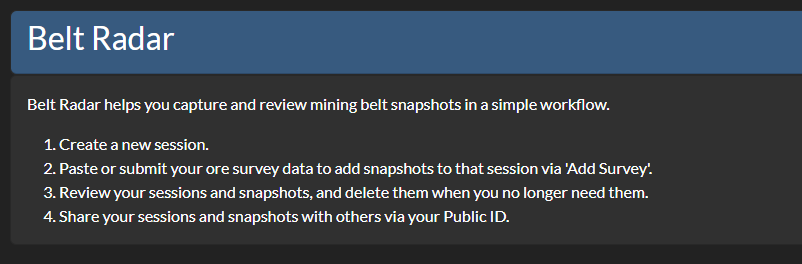
A Belt Survey Analyser to track how fast you mine your belt.
Features
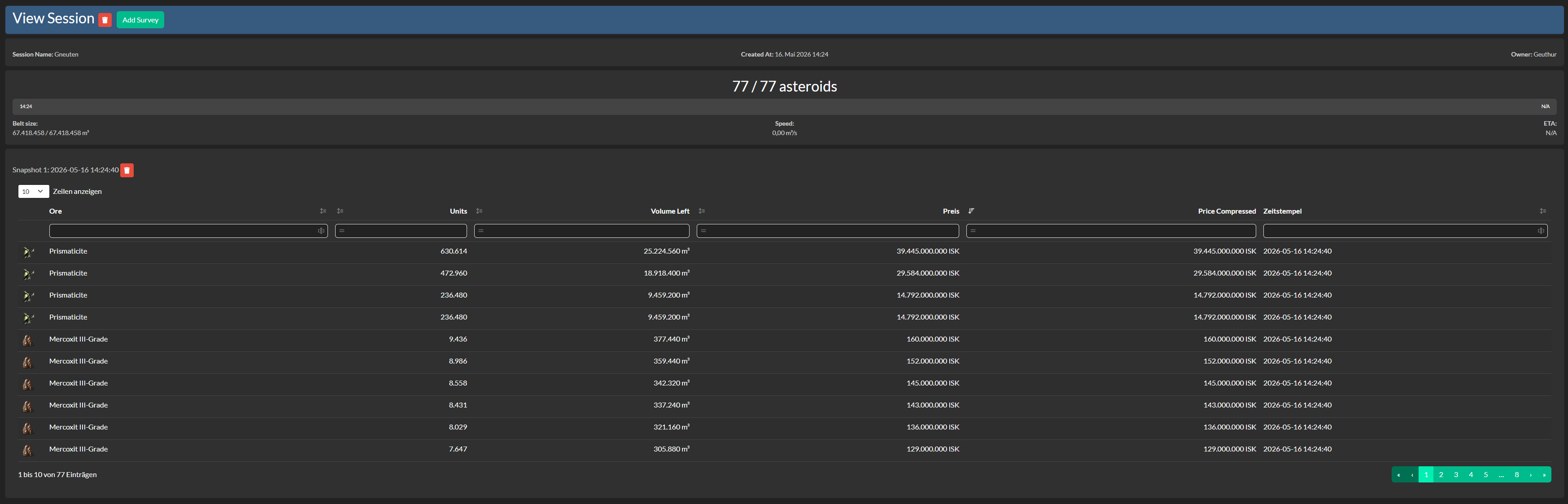
- Display estimated completion time for belt mining
- Show mining speed in m³/s
- Display remaining volume and belt size information
- Optional Share your Mining Session with others
Upcoming
- Respawn Timer for Belts
- Graphical Upgrades
- Compressed Price
Highlights

Installation
[!NOTE] AA Belt Radar needs at least Alliance Auth v5 Please make sure to update your Alliance Auth before you install this APP
Step 1 - Install the Package
Make sure you're in your virtual environment (venv) of your Alliance Auth then install the pakage.
pip install aa-beltradar
Step 2 - Configure Alliance Auth
Configure your Alliance Auth settings (local.py) as follows:
INSTALLED_APPS = [
    # other apps
    "eve_sde",  # only if it not already existing
    "beltradar",
    # other apps?
]

# This line is right below the `INSTALLED_APPS` list, if not already exist!
INSTALLED_APPS = ["modeltranslation"] + INSTALLED_APPS
Step 3 - Add the Scheduled Tasks
To set up the Scheduled Tasks add following code to your local.py
CELERYBEAT_SCHEDULE["AA Belt Radar :: Update Belt Radar"] = {
    "task": "beltradar.tasks.update_all_belt_radar",
    "schedule": crontab(minute=0, hour="*/1"),
}
Step 3.1 - (Optional) Add own Logger File
To set up the Logger add following code to your local.py
Ensure that you have writing permission in logs folder.
LOGGING["handlers"]["beltradar_file"] = {
    "level": "INFO",
    "class": "logging.handlers.RotatingFileHandler",
    "filename": os.path.join(BASE_DIR, "log/beltradar.log"),
    "formatter": "verbose",
    "maxBytes": 1024 * 1024 * 5,
    "backupCount": 5,
}
LOGGING["loggers"]["extensions.beltradar"] = {
    "handlers": ["beltradar_file"],
    "level": "DEBUG",
}
Step 4 - Migrate & Preload EVE SDE Data
AA Skillfarm uses EVE SDE data to map IDs to names for EveTypes. You will need to preload some data from SDE once.
python manage.py migrate eve_sde
python manage.py esde_load_sde
Step 4.1 - Migrate App and collect static
Migrate the app and collect static.
python manage.py migrate beltradar
python manage.py collectstatic --noinput
Step 5 - Setting up Permissions
With the Following IDs you can set up the permissions for the Belt Radar
| ID | Description | |
|---|---|---|
basic_access |
Can access the Belt Radar module | All Members with the Permission can access the Belt Radar. |
manage_access |
Can Manage Belt Radar module | Can manage Application |
admin_access |
Has access to all Survey Sessions | Can see all Survey Sessions |
Step 6 - (Optional) Setting up Compatibilies
The Following Settings can be setting up in the local.py
| Setting Name | Descriptioon | Default |
|---|---|---|
BELT_RADAR_APP_NAME |
Set the name of the APP | "Belt Radar" |
BELT_RADAR_TASK_TIME_LIMIT |
Defines the time (in seconds) a task will timeout | 1200 |
Translations

Help us translate this app into your language or improve existing translations. Join our team!"
Contributing
You want to improve the project? Please ensure you read the Contribution Guidelines
Project details
Verified details
These details have been verified by PyPIProject links
GitHub Statistics
Maintainers


Download files
Download the file for your platform. If you're not sure which to choose, learn more about installing packages.
Source Distribution
Built Distribution
Filter files by name, interpreter, ABI, and platform.
If you're not sure about the file name format, learn more about wheel file names.
Copy a direct link to the current filters
File details
Details for the file aa_beltradar-0.0.3.tar.gz.
File metadata
- Download URL: aa_beltradar-0.0.3.tar.gz
- Upload date:
- Size: 57.1 kB
- Tags: Source
- Uploaded using Trusted Publishing? Yes
- Uploaded via: twine/6.1.0 CPython/3.13.12
File hashes
| Algorithm | Hash digest | |
|---|---|---|
| SHA256 |
1aed11163446ac6772076ad3fea2ea4975eb817f99c3d343a42a05d529084ccd
|
|
| MD5 |
56378183dd878b4a5ed3a0ba05b769c5
|
|
| BLAKE2b-256 |
1d82781a8dbffe2f71ddbbbf2af4384b97676b97ee00f0d7bd4827e2006612eb
|
Provenance
The following attestation bundles were made for aa_beltradar-0.0.3.tar.gz:
Publisher:
release.yml on Geuthur/aa-beltradar
-
Statement:
-
Statement type:
https://in-toto.io/Statement/v1 -
Predicate type:
https://docs.pypi.org/attestations/publish/v1 -
Subject name:
aa_beltradar-0.0.3.tar.gz -
Subject digest:
1aed11163446ac6772076ad3fea2ea4975eb817f99c3d343a42a05d529084ccd - Sigstore transparency entry: 1553807114
- Sigstore integration time:
-
Permalink:
Geuthur/aa-beltradar@468b93223329c392b27595d39628fd100d66102a -
Branch / Tag:
refs/tags/v0.0.2 - Owner: https://github.com/Geuthur
-
Access:
public
-
Token Issuer:
https://token.actions.githubusercontent.com -
Runner Environment:
github-hosted -
Publication workflow:
release.yml@468b93223329c392b27595d39628fd100d66102a -
Trigger Event:
release
-
Statement type:
File details
Details for the file aa_beltradar-0.0.3-py3-none-any.whl.
File metadata
- Download URL: aa_beltradar-0.0.3-py3-none-any.whl
- Upload date:
- Size: 76.1 kB
- Tags: Python 3
- Uploaded using Trusted Publishing? Yes
- Uploaded via: twine/6.1.0 CPython/3.13.12
File hashes
| Algorithm | Hash digest | |
|---|---|---|
| SHA256 |
5ba10ff4322f4cf9450401d9cd26f7d0f4256fa53cfad9c722ac3e407769e766
|
|
| MD5 |
94142c89580a37d54fd768d39370b28a
|
|
| BLAKE2b-256 |
5a3652021ccb0a41bbe4185e399e3f55b4401c94ad2adc5805dfb5d6ea3faa9e
|
Provenance
The following attestation bundles were made for aa_beltradar-0.0.3-py3-none-any.whl:
Publisher:
release.yml on Geuthur/aa-beltradar
-
Statement:
-
Statement type:
https://in-toto.io/Statement/v1 -
Predicate type:
https://docs.pypi.org/attestations/publish/v1 -
Subject name:
aa_beltradar-0.0.3-py3-none-any.whl -
Subject digest:
5ba10ff4322f4cf9450401d9cd26f7d0f4256fa53cfad9c722ac3e407769e766 - Sigstore transparency entry: 1553807180
- Sigstore integration time:
-
Permalink:
Geuthur/aa-beltradar@468b93223329c392b27595d39628fd100d66102a -
Branch / Tag:
refs/tags/v0.0.2 - Owner: https://github.com/Geuthur
-
Access:
public
-
Token Issuer:
https://token.actions.githubusercontent.com -
Runner Environment:
github-hosted -
Publication workflow:
release.yml@468b93223329c392b27595d39628fd100d66102a -
Trigger Event:
release
-
Statement type:






