
Z-Kill Campaigns for Alliance Auth

Project description






[!IMPORTANT] AA Campaign requires a working installation of Alliance Auth plus django-eveonline-sde.
AA Campaign
AA Campaign is a plugin for Alliance Auth that allows you to create and track ZKill campaigns. Whether you're monitoring a specific system, a whole region, or targeting a rival alliance, AA Campaign pulls data directly from ZKillboard to provide real-time intelligence and performance tracking.
Screenshots
Index
Core Requirements
The following AllianceAuth plugins are required:
allianceauth >= 4.12
django-eveonline-sde
Install Instructions
After making sure to add the above prerequisite applications.
source /home/allianceserver/venv/auth/bin/activate && cd /home/allianceserver/myauth/
pip install django-eveonline-sde
pip install aa-campaign
vi myauth/settings/local.py
Add aacampaign to your INSTALLED_APPS.
python manage.py migrate && python manage.py collectstatic --noinput
python manage.py esde_load_sde
python manage.py aa_campaign_setup
Upgrade Notes
For an existing installation that is still using django-eveuniverse:
pip install -U django-eveonline-sde aa-campaign
python manage.py migrate eve_sde
python manage.py esde_load_sde
python manage.py migrate
If you already have campaign location or killmail data, load the SDE before running the AA Campaign migration so the new foreign keys can be created successfully. After the upgrade is complete, django-eveuniverse can be removed from your environment and INSTALLED_APPS.
restart the things
exit your venv
sudo supervisorctl restart myauth:
[!TIP] You can manually trigger a data pull using:
python manage.py aa_campaign_pull --days 30adding
--verboseto the end will display the raw data pulled from ZKillboard.You can repair killmails using:
python manage.py aa_campaign_pull --repair
[!WARNING] Running a long pull, or setting a campaign set far into the past can take an extremely long time. This app is designed with politeness towards API first and foremost. The more data you pull, the longer it will take.
Features
Campaign Dashboard
The AA Campaign dashboard provides a unified view of all active operations.
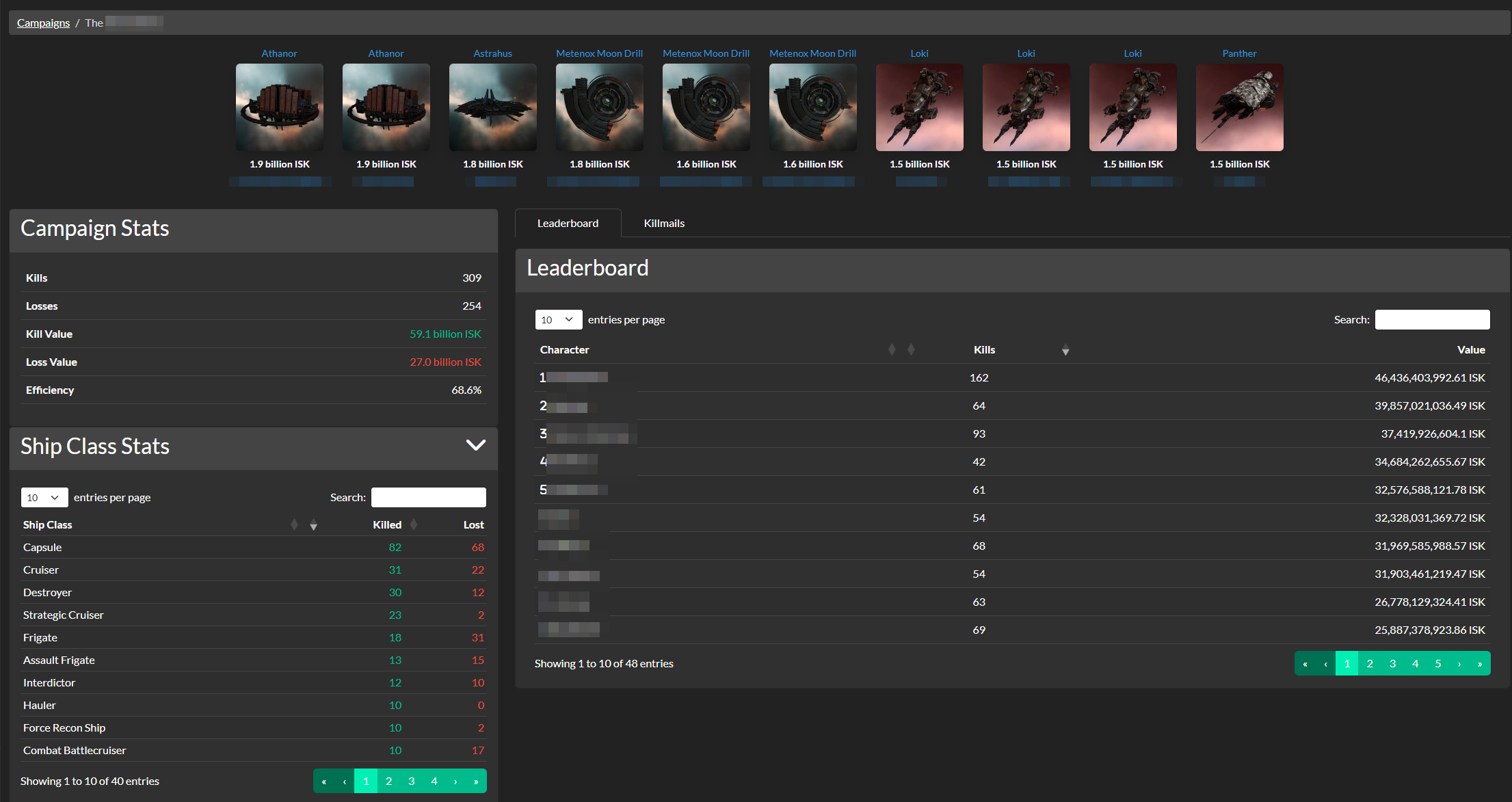
Track your progress with a suite of analytical tools and live data feeds. Selecting a campaign displays a detailed breakdown of performance.
- Campaign Stats
- Instant overview of total kills, losses, ISK value, and overall efficiency.
- Location Tracking
- Campaigns can be locked to specific Solar Systems, Constellations, or Regions, or set to Global for entity-wide tracking.
- Member vs Target Tracking
- Define exactly which friendly characters, corporations, or alliances are participating and which hostile entities are the targets.
Leaderboards
Compete for the top spot with integrated character leaderboards.
- Tracks individual performance within each campaign.
- Ranks pilots by kill count and total ISK value.
- Highlights top performers with rank icons for the top 5.
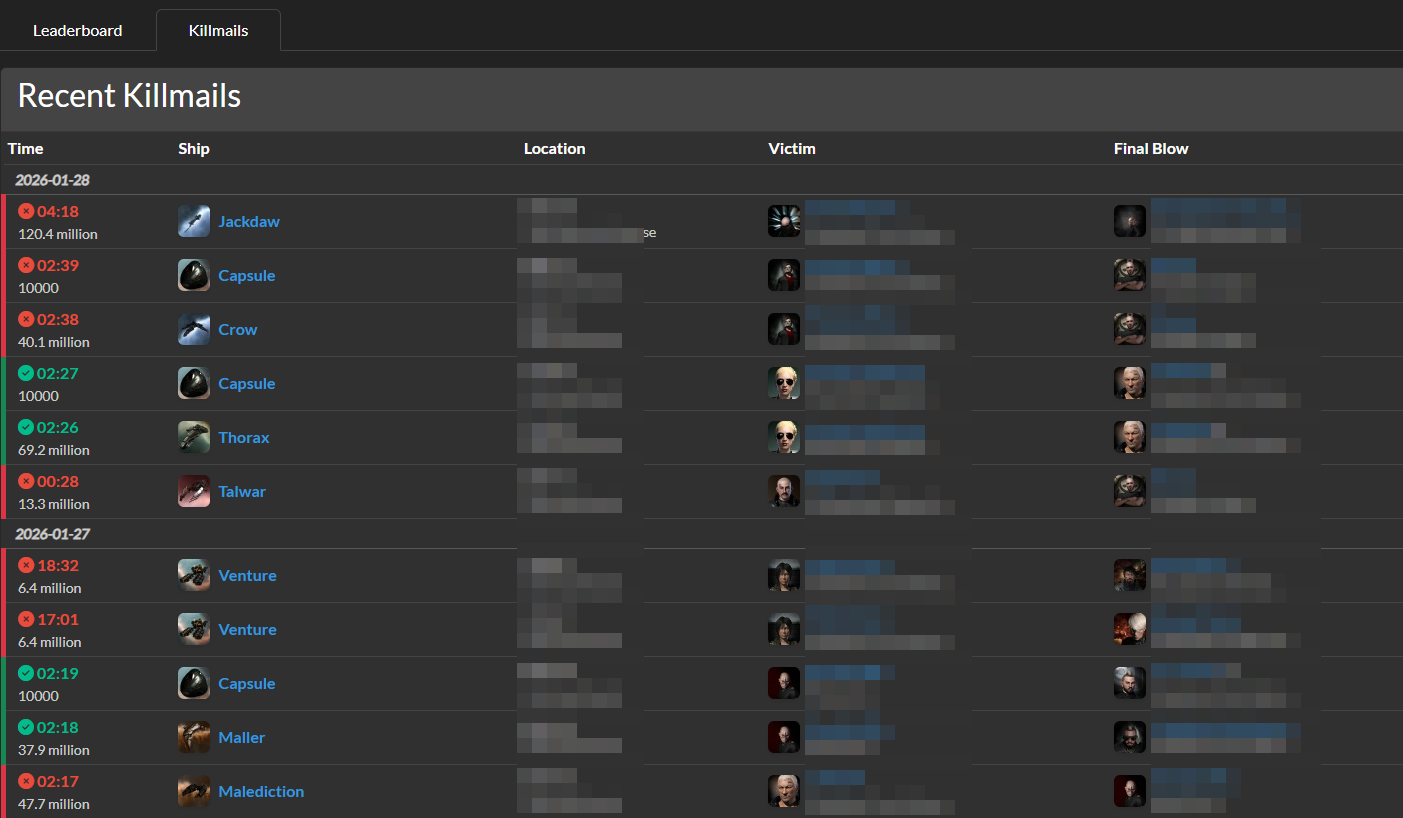
Recent Killmails
A detailed feed of all activity associated with your campaign.
- Color-coded indicators for kills (green) and losses (red).
- Direct links to ZKillboard for detailed analysis.
- Summarized victim and final blow information for quick review.
Ship Class Statistics
Analyze the meta of your campaign.
- Breakdown of kills and losses by ship class.
- Helps identify what ships are being used effectively and where losses are occurring.
- Interactive data tables for easy filtering and sorting.
Permissions
| Permission | Description |
|---|---|
| basic_access | Can access this app |
| manage_campaign | Can manage campaigns |
Release history Release notifications | RSS feed


Download files
Download the file for your platform. If you're not sure which to choose, learn more about installing packages.
Source Distribution
Built Distribution
Filter files by name, interpreter, ABI, and platform.
If you're not sure about the file name format, learn more about wheel file names.
Copy a direct link to the current filters
File details
Details for the file aa_campaign-1.1.1b3.tar.gz.
File metadata
- Download URL: aa_campaign-1.1.1b3.tar.gz
- Upload date:
- Size: 63.7 kB
- Tags: Source
- Uploaded using Trusted Publishing? No
- Uploaded via: twine/6.2.0 CPython/3.11.9
File hashes
| Algorithm | Hash digest | |
|---|---|---|
| SHA256 |
54618afaa8aaebe0d8a15b992655a10f029fca4a9a930ae7e85ceaea34801897
|
|
| MD5 |
a84abb3e9b17dbac0d6d1bed87f29467
|
|
| BLAKE2b-256 |
27b8c1f89b145488029ea9531470c5b76f76cbe01f1940d6af03ff53894b3a59
|
File details
Details for the file aa_campaign-1.1.1b3-py3-none-any.whl.
File metadata
- Download URL: aa_campaign-1.1.1b3-py3-none-any.whl
- Upload date:
- Size: 72.1 kB
- Tags: Python 3
- Uploaded using Trusted Publishing? No
- Uploaded via: twine/6.2.0 CPython/3.11.9
File hashes
| Algorithm | Hash digest | |
|---|---|---|
| SHA256 |
49759e11bb11ad35cbabb18f8843d7992d7dbaed07d34038c00e3ff88bba0eeb
|
|
| MD5 |
8bd498beb7907757c67c5bf0b4ef30ee
|
|
| BLAKE2b-256 |
1a2d3c6900f4e75d32ca84c21c70632f8cc3094a1ebf226a9a8eea8f38547f07
|






