
Discord Obfuscate Plugin for Alliance Auth

Project description
AA Discord Obfuscate
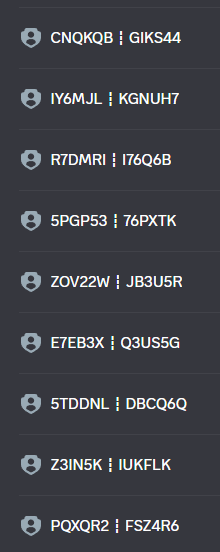
Obfuscate Alliance Auth group names when syncing to Discord by replacing group names with deterministic, configurable hashes. Includes per-group settings, previews, and one-click sync actions.



- AA Discord Obfuscate
Features
- Obfuscates Discord role names for Alliance Auth groups using HMAC hashes.
- Per-group controls in Django admin: opt out, custom name override, method, format, dividers, and role color.
- Optional per-group role color applied during sync.
- Optional per-group random key mode with periodic rotation.
- Role ordering visibility in admin (ordering changes are made in Discord).
- Pattern-based role color rules for new roles.
- Preview and bulk sync actions in Django admin.
[!CAUTION] This will not work on roles that are above the bot. Attempting to modify roles that are above the bot will result in an error and potentially terrible terrible things..
Requirements
- Alliance Auth 4.3.1+
- Python 3.11+
- Discord service configured in Alliance Auth (bot and guild)
Installation
Install the app in your AA virtual environment:
pip install git+https://github.com/ppfeufer/aa-discord-obfuscate
Add the app to your AA INSTALLED_APPS in settings/local.py:
INSTALLED_APPS += [
    "discord_obfuscate",
]
Run migrations and restart AA:
python manage.py migrate
Configuration
App Settings (settings/local.py)
Only one optional setting is supported in settings/local.py:
[!CAUTION] Because this repository is public, anyone can see what this defaults to, not changing this to a unique value poses a significant security risk.
# Discord Obfuscate
DISCORD_OBFUSCATE_SECRET = "change-me"  # Defaults to SECRET_KEY
All other behavior is configured in Django admin.
Initial Configuration (First Run)
Complete these steps before syncing roles for the first time:
-
In Django admin, open
Discord Obfuscate Configand set your defaults.- Highly recommended: enable
Default opt-outso new entries keep the original group name until you explicitly opt in to obfuscation. - Set the default obfuscation type, divider characters, and min chars if you want a consistent output format from day one.
- Highly recommended: enable
-
Open
Discord Role Order Config, select the bot role in the dropdown, and save.- This dropdown is populated from live Discord role data.
- Saving after the bot role is set ensures the role ordering page can correctly lock roles above the bot.
-
Open
Discord Role Obfuscations.- Use the admin action dropdown
Discover groups from Discord rolesto pull current Discord roles into per-group entries. - Use the bulk action
Toggle opt-out for selected rolesto opt in/out the groups you want to obfuscate.
- Use the admin action dropdown
-
Run a sync:
- Use
Sync selected roles noworSync all roles now, or rely on sync-on-save if enabled. Additionally, you can wait for the periodic task.
- Use
[!NOTE] This does not modify any groups inside AllianceAuth, they will appear as they always have.
Enable and Schedule Tasks
The app ships periodic tasks, but they only run when enabled
- Create the periodic tasks:
python manage.py obfuscate_setup
- In Django admin, open
Discord Obfuscate Configand enable the task toggles you need:Periodic sync,Role color rule sync, and/orRandom key rotation.
This creates three periodic tasks in Periodic Tasks disabled by default:
Obfuscate Discord: Sync all roles(hourly)Obfuscate Discord: Sync role colors(hourly)Obfuscate Discord: Rotate random keys(every 3 days)
[!WARNING] You need to enable the periodic tasks in Periodic Tasks and the App's Configuration Admin to run them. The tasks exit early when their config toggles are disabled.
You can adjust
schedules in Django admin under Periodic Tasks.
Default Settings
Use the Discord Obfuscate Config in Django admin to control defaults
for newly created per-group entries:
Sync on savequeues a rename task when you save a per-group config. (recommended)Default opt-outsets new entries to keep the original group name.Default use random keyturns on random-key mode by default.Default rotate namecontrols the random key rotation behavior.Default obfuscation typechooses the hashing method for new entries.Default divider charactersandDefault min chars before dividerset output formatting defaults.Random key rotation enabledperiodically changes the random key used for random key input, and therefore changes the name of the obfuscated roles.- Role ordering is configured in
Discord Role Order Config(separate admin menu). Require existing rolecontrols whether the Discord service is allowed to create a missing role when neither the original nor obfuscated role exists.Role color rule sync enabledandPeriodic sync enabledgate their respective tasks.
Defaults are applied when entries are created.
Usage
Per-Group Obfuscation
- Go to
Discord Role Obfuscationsin Django admin. - Use the
Discover groups from Discord rolesaction to create entries for roles that already exist in Discord, or add entries manually (recommended). - Configure per-group options:
- Opt out to keep the original group name.
- Custom name override (takes precedence over hashing).
- Random key mode plus rotate-name flag.
- Obfuscation method, format, divider characters, and min chars per divider.
- Optional fixed role color (
#RRGGBB).
- Use the preview field to verify the output name.
- Use the admin actions
Sync selected roles noworSync all roles now, or rely on sync-on-save (recommended) / periodic sync.
Obfuscation Process
When the Discord service requests group names, the app intercepts and computes the desired role name for each group:
- If
Opt outis enabled, the original group name is used. - If
Custom nameis set, that value is sanitized and used. - Otherwise, the input is the group name or the random key (if enabled).
- The input is hashed with HMAC using
DISCORD_OBFUSCATE_SECRETand the selected method (SHA256/BLAKE2s with hex/base32 encoding). - The output is formatted with the per-group format (or
{hash12}), sanitized to allowed characters, dividers inserted (if configured), and truncated to 100 characters.
When a sync runs, the app:
- Finds an existing Discord role by desired name, cached role ID, last obfuscated name, or original group name.
- Renames the role to the desired obfuscated name.
- Applies the per-group role color if set.
[!NOTE] If no matching role exists, the Discord service can create it using the desired obfuscated name. If the original (non-obfuscated) role already exists, the app keeps that role until a sync renames it, to avoid duplicates.
Random Key Rotation
Enable Use random key on a per-group basis to generate a 16-character
alphanumeric key that replaces the group name for obfuscation input. When the
random-key rotation task is enabled in Discord Obfuscate config, it will:
- Rotate keys for entries with
Use random keyenabled. - Rename those roles to the newly obfuscated names.
- Apply the manual role order configuration if it is enabled.
Each random-key entry can opt out of renaming via the rotate-name checkbox shown
when Use random key is enabled. Manual ordering is configured in Discord Role Order Config; locked roles remain fixed while unlocked roles may be shuffled
when the rotation task runs.
Role Ordering
Role ordering is configured in Discord Role Order Config.
- Set the bot role in the dropdown and save. Roles above the bot are locked.
- The table shows live Discord role order; to change order, edit roles in Discord and refresh this page.
- Lock checkboxes only affect automation when role ordering is enabled.
- Opt-out and color are read-only here. Update opt-out in
Discord Role Obfuscationsand color in Discord or via Role Color Rules.
Role Coloring
There are two ways to color roles. Per-group colors always take precedence.
Per-group fixed color:
- Set
Role coloron aDiscord Role Obfuscationentry (#RRGGBB). - The next sync applies that color when renaming, even if the name already matches.
- Roles with a fixed color are treated as pinned and are skipped by rule-based colors. Run a sync after setting a fixed color so the role ID is cached.
Rule-based random colors:
- Create one or more
Discord Role Color Ruleswith a name pattern (use*as the wildcard), optional case sensitivity, and a priority (lower numbers run first). - Enable
Role color rule syncinDiscord Obfuscate Config. - Enable the task in
Periodic Tasks.
When the rule sync task runs, it:
- Scans all Discord roles and existing color assignments.
- Skips roles that already have a color, are pinned by per-group settings, or already have an assignment.
- Builds a 250-color palette and chooses a random unused color for each match.
- Updates the role in Discord and stores a
Discord Role Color Assignment. - Keeps assignments stable and cleans up stale ones if roles disappear.
Limitations
- State-based role mapping is not supported. The Alliance Auth Discord service
passes a
state_nameargument, but this app ignores it and only uses group memberships.
Uninstall / Reset
If you want to fully remove this app and all of its data, do the following:
- Reset role names (recommended)
- Set the obfuscation entry to opt-out for each group so the original group name is used, then run a sync to rename roles back to their defaults. (or save if you use update on save)
- Stop services
- Stop the Celery worker/beat so no tasks run during cleanup.
- Disable scheduled tasks (optional but recommended)
- In Django admin (
django_celery_beat), delete periodic tasks named:Obfuscate Discord: Sync all rolesObfuscate Discord: Sync role colorsObfuscate Discord: Rotate random keys
- Remove database tables
- Run:
python manage.py migrate discord_obfuscate zero
This drops all discord_obfuscate tables and data.
- Remove the app from settings
- Remove
discord_obfuscatefromINSTALLED_APPS.
- Delete code
- Uninstall the package or remove the app directory, then restart Alliance Auth.
If you want to reset without uninstalling:
- Run step 3 only, then re‑run:
python manage.py migrate
This recreates empty tables with a clean state.
Release history Release notifications | RSS feed


Download files
Download the file for your platform. If you're not sure which to choose, learn more about installing packages.
Source Distribution
Built Distribution
Filter files by name, interpreter, ABI, and platform.
If you're not sure about the file name format, learn more about wheel file names.
Copy a direct link to the current filters
File details
Details for the file aa_discord_obfuscate-0.0.1.tar.gz.
File metadata
- Download URL: aa_discord_obfuscate-0.0.1.tar.gz
- Upload date:
- Size: 58.8 kB
- Tags: Source
- Uploaded using Trusted Publishing? No
- Uploaded via: twine/6.2.0 CPython/3.11.9
File hashes
| Algorithm | Hash digest | |
|---|---|---|
| SHA256 |
547143a4991a614c6f1f81151fd66311e15844b7f70f539ba90f5e7af9fdc907
|
|
| MD5 |
e3534bf6e630d43b938705399ef82818
|
|
| BLAKE2b-256 |
a431c6e62839cc158ab79603b85d5ad41bcab2e7a5ced6e2ae137e5f13914163
|
File details
Details for the file aa_discord_obfuscate-0.0.1-py3-none-any.whl.
File metadata
- Download URL: aa_discord_obfuscate-0.0.1-py3-none-any.whl
- Upload date:
- Size: 67.7 kB
- Tags: Python 3
- Uploaded using Trusted Publishing? No
- Uploaded via: twine/6.2.0 CPython/3.11.9
File hashes
| Algorithm | Hash digest | |
|---|---|---|
| SHA256 |
e2632ea88a67829c21d2f336f3e707d8c2bbea53389a1f2b7a344598457dd9da
|
|
| MD5 |
9deba83306c905618d49699bf4d7b9e1
|
|
| BLAKE2b-256 |
6c10dfcd86898b6531e1ec9137b1fc6272354c41b1e8cc34e8f4619deb4a818f
|






