
Discord Notify
Forward Alliance Auth notifications to users on Discord









Contents
Overview
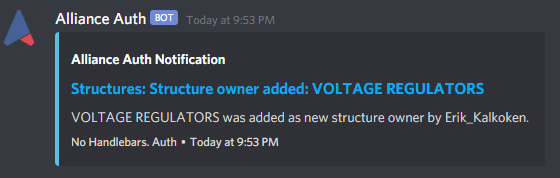
This app automatically forwards Alliance Auth notifications to users on Discord.
Features
- Auth notifications appear instantly as DM on Discord
- Notifications are colored according to their level (e.g. INFO = blue)
- Can be restricted to notifications for superusers only (e.g. to keep track of errors)
Example
Installation
Step 1 - Check preconditions
-
Discord Notify is a plugin for Alliance Auth. If you don't have Alliance Auth running already, please install it first before proceeding. (see the official AA installation guide for details)
-
Discord Notify needs Discord Proxy to function. Please make sure the server is up and running on your system, before continuing.
-
Please also make sure you have the Discord service installed and setup in Alliance Auth.
Step 2 - Install app
Make sure you are in the virtual environment (venv) of your Alliance Auth installation. Then install the newest release from PyPI:
pip install aa-discordnotify
Step 3 - Configure Auth settings
Configure your Auth settings (local.py) as follows:
- Add
"discordnotify"toINSTALLED_APPS - For Docker installations:
DISCORDPROXY_HOSTmust be set to your discord proxy container name e.gallianceauth_discordproxy. - Optional: Add additional settings if you want to change any defaults. See Settings for the full list.
Step 4 - Finalize App installation
Restart your supervisor services for Auth (no migration required).
Step 5 - Send test notification
To test that your installation was successful you can create a test notification to yourself by navigating to the relative route /discordnotify/test in your browser. The absolute URL depends on your Auth site. Example: For an Auth site with the URL https://auth.example.com the test URL would be:
https://auth.example.com/discordnotify/test
When everything was setup correctly, you will receive a test notification on Discord.
Congratulations you are now ready to use Discord Notify!
Settings
Here is a list of available settings for this app. They can be configured by adding them to your AA settings file (local.py).
Note that all settings are optional and the app will use the documented default settings if they are not used.
| Name | Description | Default |
|---|---|---|
DISCORDNOTIFY_ENABLED |
Set this to False to disable this app temporarily | True |
DISCORDPROXY_PORT |
Port used to communicate with Discord Proxy. | 50051 |
DISCORDPROXY_HOST |
Hostname used to communicate with Discord Proxy. | localhost |
DISCORDNOTIFY_MARK_AS_VIEWED |
When enabled will mark all notifications as viewed that have been successfully submitted to Discord | False |
DISCORDNOTIFY_SUPERUSER_ONLY |
When enabled only superusers will be get their notifications forwarded. | False |
1 maintainer

Metadata
1 maintainer
Release files for aa-discordnotify 4.0.1
For a detailed explanation of source distributions (sdists) and built distributions (wheels), please see the package formats documentation.
Source distribution (sdist)
| File | Size | Uploaded | |
|---|---|---|---|
| aa_discordnotify-4.0.1.tar.gz | 20.7 kB | Details |
Built distribution (wheel)
| File | Interpreter | ABI | Platform | Reset |
|---|---|---|---|---|
| aa_discordnotify-4.0.1-py3-none-any.whl | Python 3 | none | any | Details |
Total release size: 33.6 kB
Release files / aa_discordnotify-4.0.1.tar.gz
| Download URL | aa_discordnotify-4.0.1.tar.gz |
|---|---|
| Size | 20.7 kB |
| Tags | Source |
|
SHA-256 checksum How to use checksums |
ae1fb49d1cfa56e7e1f896d22f88e493709635b13bf4745a4f28a4e2baf397af
|
|
BLAKE2b-256 checksum How to use checksums |
24a7a1ae464fa3c167db1c5925f7cd7bb45d2ec99bd770c0306c81fb00e15082
|
| Upload date | |
|
Uploaded using Trusted Publishing? What is trusted publishing? |
No |
| Uploaded via |
python-requests/2.34.2
|
Release files / aa_discordnotify-4.0.1-py3-none-any.whl
| Download URL | aa_discordnotify-4.0.1-py3-none-any.whl |
|---|---|
| Size | 12.9 kB |
| Tags | Python 3 |
|
SHA-256 checksum How to use checksums |
29e47cd7068c0a7bd649ae9800bc219959f5042a4943a6edc4171f2c95b699c6
|
|
BLAKE2b-256 checksum How to use checksums |
f46ee5bac1aa8b03fffb30f80f40806b1348508e5b233d35948c2cb7086c4622
|
| Upload date | |
|
Uploaded using Trusted Publishing? What is trusted publishing? |
No |
| Uploaded via |
python-requests/2.34.2
|














