
AA EVE Online SDE Admin Status Page












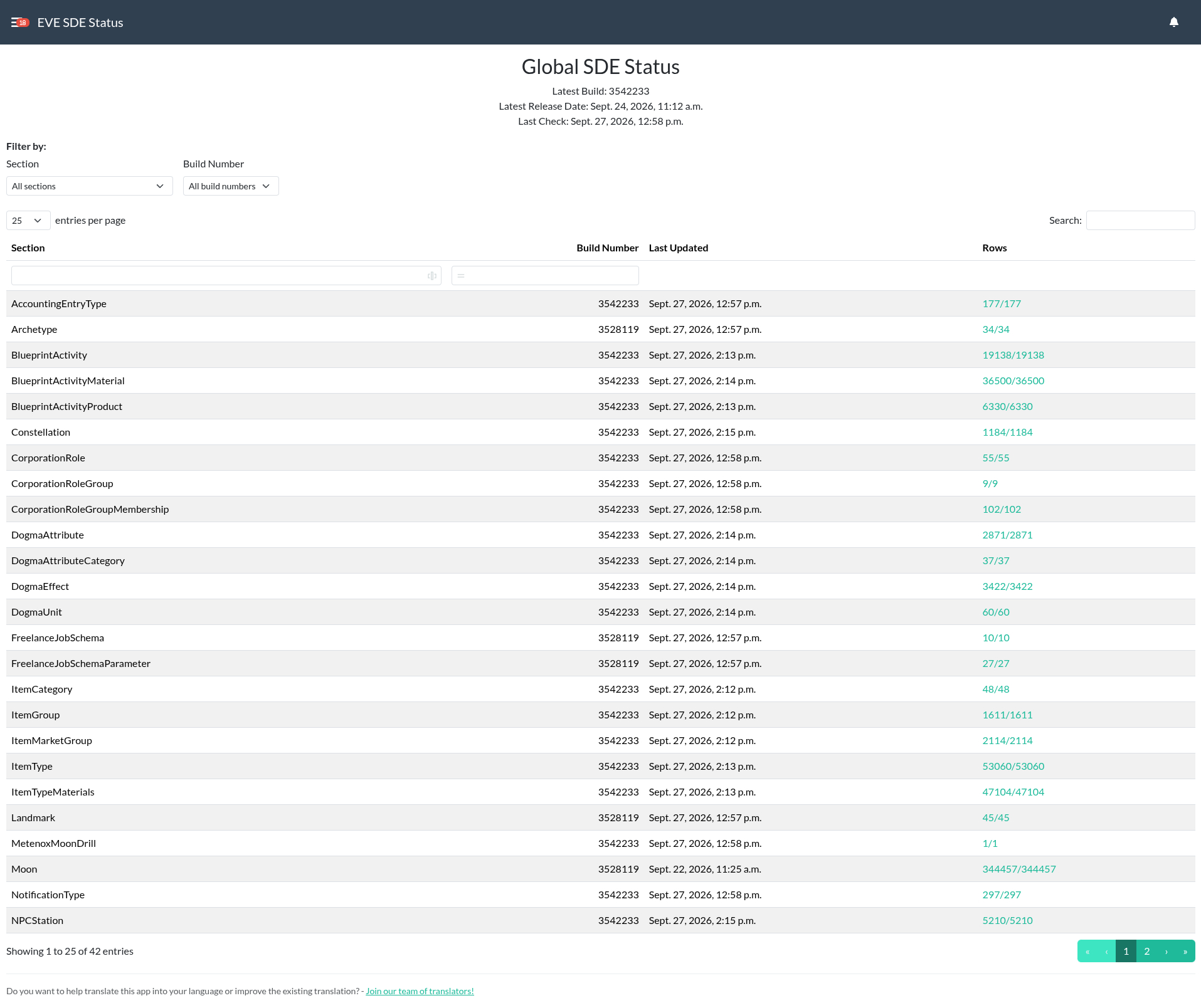
Simple status page for EVE Online SDE data, gathered from Django EVE Online SDE.
- Installation
- Docker Installation
- Updating
- Accessing the Admin Status Page
- Changelog
- Translation Status
- Contributing
Installation
Bare Metal Installation
Step 1: Install the App
Make sure you're in the virtual environment (venv) of your Alliance Auth installation. Then install the latest version:
pip install aa-eveonline-sde-admin-page==0.0.2
Step 2: Update Your AA Settings
Configure your AA settings in your local.py as follows:
INSTALLED_APPS += [
    # ...
    "eve_sde",  # This should already be here if you have Django EVE Online SDE installed
    "aa_eveonline_sde_admin_page",
    # ...
]

# This line right below the `INSTALLED_APPS` list, and only if not already added for another app
INSTALLED_APPS = ["modeltranslation"] + INSTALLED_APPS
Now, restart your Auth.
Docker Installation
Step 1: Add the App
Add the app to your conf/requirements.txt:
aa-eveonline-sde-admin-page==0.0.2
Step 2: Update Your AA Settings
Configure your AA settings (conf/local.py) as follows:
INSTALLED_APPS += [
    # ...
    "eve_sde",  # This should already be here if you have Django EVE Online SDE installed
    "aa_eveonline_sde_admin_page",
    # ...
]

# This line right below the `INSTALLED_APPS` list, and only if not already added for another app
INSTALLED_APPS = ["modeltranslation"] + INSTALLED_APPS
Step 3: Build Auth and Restart Your Containers
docker compose build --no-cache
docker compose --env-file=.env up -d
Updating
Bare Metal Installation
To update your existing installation of AFAT, first enable your virtual environment (venv) of your Alliance Auth installation. Then run the following command to update the app:
pip install aa-eveonline-sde-admin-page==0.0.2
And restart your Auth.
Docker Installation
To update your existing installation of AFAT, all you need to do is update the
respective line in your conf/requirements.txt file to the latest version.
aa-eveonline-sde-admin-page==0.0.2
Then rebuild your containers:
docker compose build --no-cache
docker compose --env-file=.env up -d
Accessing the Admin Status Page
Access to the status page is restricted to users with the eve_sde.admin_access
permission. You can assign this permission to a user or group via the Django admin
interface.
Changelog
To keep track of all changes, please read the Changelog.
Translation Status

Do you want to help translate this app into your language or improve the existing translation? - Join our team of translators!
Contributing
You want to contribute to this project? That's cool!
Please make sure to read the contribution guidelines.
(I promise, it's not much, just some basics)
1 maintainer

Metadata
1 maintainer
Release files for aa-eveonline-sde-admin-page 0.0.2
For a detailed explanation of source distributions (sdists) and built distributions (wheels), please see the package formats documentation.
Source distribution (sdist)
| File | Size | Uploaded | Provenance | Actions |
|---|---|---|---|---|
| aa_eveonline_sde_admin_page-0.0.2.tar.gz | 39.2 kB | With provenance | Details for aa_eveonline_sde_admin_page-0.0.2.tar.gz |
Built distribution (wheel)
| File | Interpreter | ABI | Platform | Actions Reset |
|---|---|---|---|---|
| aa_eveonline_sde_admin_page-0.0.2-py3-none-any.whl | Python 3 | none | any | Details for aa_eveonline_sde_admin_page-0.0.2-py3-none-any.whl |
Total release size: 102.2 kB
Release files / aa_eveonline_sde_admin_page-0.0.2.tar.gz
| Download URL | aa_eveonline_sde_admin_page-0.0.2.tar.gz |
|---|---|
| Size | 39.2 kB |
| Tags | Source |
|
SHA-256 checksum How to use checksums |
c9cb908f8204a3ae85b5b5d08e6489c925272de40152ad1c3a54ace5e93e0f26
|
|
BLAKE2b-256 checksum How to use checksums |
ee46cbfaa40352b35bbd051135736d19498a76a6032e244665aa745314c2b041
|
| Upload date | |
|
Uploaded using Trusted Publishing? What is trusted publishing? |
Yes |
| Uploaded via |
twine/7.0.0 CPython/3.13.14
|
Provenance
Provenance describes where a file came from. On PyPI, provenance is shared via attestations, which provide a verifiable record of the build or publishing details. View details, limitations and caveats.


PyPI Publish Attestation
PyPI verified that this artifact, at this checksum, originated from the publisher listed below.
Signed by GitHub Actions, verified by PyPI on Oct 6, 2026.
Transparency logRelease files / aa_eveonline_sde_admin_page-0.0.2-py3-none-any.whl
| Download URL | aa_eveonline_sde_admin_page-0.0.2-py3-none-any.whl |
|---|---|
| Size | 63.0 kB |
| Tags | Python 3 |
|
SHA-256 checksum How to use checksums |
3a33da9683421b670e2692fb50be6dfab30babfb26e8074e540b9cf10efbed7a
|
|
BLAKE2b-256 checksum How to use checksums |
1a4a8c0081d433b66e8579b026d34761353d5aa26d7305427bf864d4146c69b1
|
| Upload date | |
|
Uploaded using Trusted Publishing? What is trusted publishing? |
Yes |
| Uploaded via |
twine/7.0.0 CPython/3.13.14
|
Provenance
Provenance describes where a file came from. On PyPI, provenance is shared via attestations, which provide a verifiable record of the build or publishing details. View details, limitations and caveats.
PyPI Publish Attestation
PyPI verified that this artifact, at this checksum, originated from the publisher listed below.
Signed by GitHub Actions, verified by PyPI on Oct 6, 2026.
Transparency logSecurity for aa-eveonline-sde-admin-page 0.0.2
Provenance
Provenance describes where a file came from. On PyPI, provenance is shared via attestations, which provide a verifiable record of the build or publishing details. View details, limitations and caveats.
Full provenance
Both files in this release have been uploaded with provenance metadata.
Attestation for aa_eveonline_sde_admin_page-0.0.2.tar.gz
PyPI Publish Attestation
PyPI verified that this artifact, at this checksum, originated from the publisher listed below.
Signed by GitHub Actions, verified by PyPI on Oct 6, 2026.
Transparency logA note on package security
PyPI is a repository for distributing packages, not a service for auditing them. While third-party security researchers and our staff do their best to detect and remove malicious packages, PyPI cannot guarantee the quality, security or suitability of any given package.
To learn more about protecting yourself from malicious actors, visit our package security documentation.














